Deleted Files Recovery
File-Systems
Windows file-systems list
- FAT12/16: MSDOS, WIN95/98/NT/200
- FAT32: 95/2000/XP/2003/VISTA/⅞/10
- ExFAT: 2008/2012/2016/VISTA/⅞/10
- NTFS: XP/2003/2008/2012/VISTA/⅞/10
- ReFS: 2012/2016
FAT
The FAT (File Allocation Table) file system is designed around its core component, the file allocation table, positioned at the volume's start. This system safeguards data by maintaining two copies of the table, ensuring data integrity even if one is corrupted. The table, along with the root folder, must be in a fixed location, crucial for the system's startup process.
The file system's basic unit of storage is a cluster, usually 512B, comprising multiple sectors. FAT has evolved through versions:
- FAT12, supporting 12-bit cluster addresses and handling up to 4078 clusters (4084 with UNIX).
- FAT16, enhancing to 16-bit addresses, thereby accommodating up to 65,517 clusters.
- FAT32, further advancing with 32-bit addresses, allowing an impressive 268,435,456 clusters per volume.
A significant limitation across FAT versions is the 4GB maximum file size, imposed by the 32-bit field used for file size storage.
Key components of the root directory, particularly for FAT12 and FAT16, include:
- File/Folder Name (up to 8 characters)
- Attributes
- Creation, Modification, and Last Access Dates
- FAT Table Address (indicating the start cluster of the file)
- File Size
EXT
Ext2 is the most common file system for not journaling partitions (partitions that don't change much) like the boot partition. Ext¾ are journaling and are used usually for the rest partitions.
Metadata
Some files contain metadata. This information is about the content of the file which sometimes might be interesting to an analyst as depending on the file type, it might have information like:
- Title
- MS Office Version used
- Author
- Dates of creation and last modification
- Model of the camera
- GPS coordinates
- Image information
You can use tools like exiftool and Metadiver to get the metadata of a file.
Deleted Files Recovery
Logged Deleted Files
As was seen before there are several places where the file is still saved after it was "deleted". This is because usually the deletion of a file from a file system just marks it as deleted but the data isn't touched. Then, it's possible to inspect the registries of the files (like the MFT) and find the deleted files.
Also, the OS usually saves a lot of information about file system changes and backups, so it's possible to try to use them to recover the file or as much information as possible.
File Carving
File carving is a technique that tries to find files in the bulk of data. There are 3 main ways tools like this work: Based on file types headers and footers, based on file types structures and based on the content itself.
Note that this technique doesn't work to retrieve fragmented files. If a file isn't stored in contiguous sectors, then this technique won't be able to find it or at least part of it.
There are several tools that you can use for file Carving indicating the file types you want to search for
Data Stream **C**arving
Data Stream Carving is similar to File Carving but instead of looking for complete files, it looks for interesting fragments of information. For example, instead of looking for a complete file containing logged URLs, this technique will search for URLs.
Secure Deletion
Obviously, there are ways to "securely" delete files and part of logs about them. For example, it's possible to overwrite the content of a file with junk data several times, and then remove the logs from the \(MFT** and **\)LOGFILE about the file, and remove the Volume Shadow Copies. You may notice that even performing that action there might be other parts where the existence of the file is still logged, and that's true and part of the forensics professional job is to find them.
Carving & Recovery tools
More tools in https://github.com/Claudio-C/awesome-datarecovery
Autopsy
The most common tool used in forensics to extract files from images is Autopsy. Download it, install it and make it ingest the file to find "hidden" files. Note that Autopsy is built to support disk images and other kinds of images, but not simple files.
Binwalk
Binwalk is a tool for analyzing binary files to find embedded content. It's installable via apt and its source is on GitHub.
Useful commands:
sudo apt install binwalk #Insllation
binwalk file #Displays the embedded data in the given file
binwalk -e file #Displays and extracts some files from the given file
binwalk --dd ".*" file #Displays and extracts all files from the given file
Foremost
Another common tool to find hidden files is foremost. You can find the configuration file of foremost in /etc/foremost.conf. If you just want to search for some specific files uncomment them. If you don't uncomment anything foremost will search for its default configured file types.
sudo apt-get install foremost
foremost -v -i file.img -o output
#Discovered files will appear inside the folder "output"
Scalpel
Scalpel is another tool that can be used to find and extract files embedded in a file. In this case, you will need to uncomment from the configuration file (/etc/scalpel/scalpel.conf) the file types you want it to extract.
Bulk Extractor
This tool comes inside kali but you can find it here: https://github.com/simsong/bulk_extractor
This tool can scan an image and will extract pcaps inside it, network information (URLs, domains, IPs, MACs, mails) and more files. You only have to do:
Navigate through all the information that the tool has gathered (passwords?), analyse the packets (read Pcaps analysis), search for weird domains (domains related to malware or non-existent).
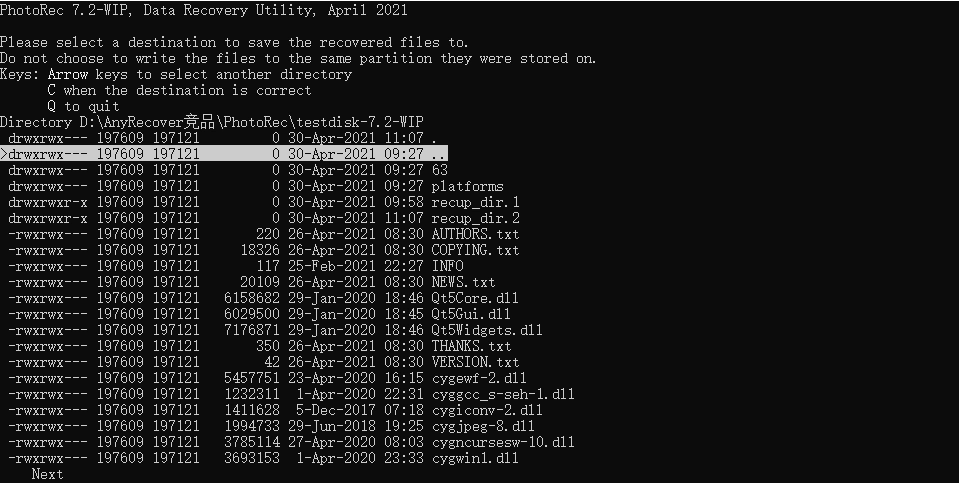
PhotoRec
You can find it in https://www.cgsecurity.org/wiki/TestDisk_Download
It comes with GUI and CLI versions. You can select the file-types you want PhotoRec to search for.
binvis
Check the code and the web page tool.
Features of BinVis
- Visual and active structure viewer
- Multiple plots for different focus points
- Focusing on portions of a sample
- Seeing stings and resources, in PE or ELF executables e. g.
- Getting patterns for cryptanalysis on files
- Spotting packer or encoder algorithms
- Identify Steganography by patterns
- Visual binary-diffing
BinVis is a great start-point to get familiar with an unknown target in a black-boxing scenario.
Specific Data Carving Tools
FindAES
Searches for AES keys by searching for their key schedules. Able to find 128. 192, and 256 bit keys, such as those used by TrueCrypt and BitLocker.
Download here.
Complementary tools
You can use viu to see images from the terminal. You can use the linux command line tool pdftotext to transform a pdf into text and read it.
References
- https://en.wikipedia.org/wiki/GUID_Partition_Table
- http://ntfs.com/ntfs-permissions.htm
- https://www.osforensics.com/faqs-and-tutorials/how-to-scan-ntfs-i30-entries-deleted-files.html
- https://docs.microsoft.com/en-us/windows-server/storage/file-server/volume-shadow-copy-service
- iHackLabs Certified Digital Forensics Windows