ACL
Access Control List (ACL)
An Access Control List (ACL) consists of an ordered set of Access Control Entries (ACEs) that dictate the protections for an object and its properties. In essence, an ACL defines which actions by which security principals (users or groups) are permitted or denied on a given object.
There are two types of ACLs:
- Discretionary Access Control List (DACL): Specifies which users and groups have or do not have access to an object.
- System Access Control List (SACL): Governs the auditing of access attempts to an object.
The process of accessing a file involves the system checking the object's security descriptor against the user's access token to determine if access should be granted and the extent of that access, based on the ACEs.
Key Components
- DACL: Contains ACEs that grant or deny access permissions to users and groups for an object. It's essentially the main ACL that dictates access rights.
- SACL: Used for auditing access to objects, where ACEs define the types of access to be logged in the Security Event Log. This can be invaluable for detecting unauthorized access attempts or troubleshooting access issues.
System Interaction with ACLs
Each user session is associated with an access token that contains security information relevant to that session, including user, group identities, and privileges. This token also includes a logon SID that uniquely identifies the session.
The Local Security Authority (LSASS) processes access requests to objects by examining the DACL for ACEs that match the security principal attempting access. Access is immediately granted if no relevant ACEs are found. Otherwise, LSASS compares the ACEs against the security principal's SID in the access token to determine access eligibility.
Summarized Process
- ACLs: Define access permissions through DACLs and audit rules through SACLs.
- Access Token: Contains user, group, and privilege information for a session.
- Access Decision: Made by comparing DACL ACEs with the access token; SACLs are used for auditing.
ACEs
There arey three main types of Access Control Entries (ACEs):
- Access Denied ACE: This ACE explicitly denies access to an object for specified users or groups (in a DACL).
- Access Allowed ACE: This ACE explicitly grants access to an object for specified users or groups (in a DACL).
- System Audit ACE: Positioned within a System Access Control List (SACL), this ACE is responsible for generating audit logs upon access attempts to an object by users or groups. It documents whether access was allowed or denied and the nature of the access.
Each ACE has four critical components:
- The Security Identifier (SID) of the user or group (or their principal name in a graphical representation).
- A flag that identifies the ACE type (access denied, allowed, or system audit).
- Inheritance flags that determine if child objects can inherit the ACE from their parent.
- An access mask, a 32-bit value specifying the object's granted rights.
Access determination is conducted by sequentially examining each ACE until:
- An Access-Denied ACE explicitly denies the requested rights to a trustee identified in the access token.
- Access-Allowed ACE(s) explicitly grant all requested rights to a trustee in the access token.
- Upon checking all ACEs, if any requested right has not been explicitly allowed, access is implicitly denied.
Order of ACEs
The way ACEs (rules that say who can or cannot access something) are put in a list called DACL is very important. This is because once the system gives or denies access based on these rules, it stops looking at the rest.
There is a best way to organize these ACEs, and it is called "canonical order." This method helps make sure everything works smoothly and fairly. Here is how it goes for systems like Windows 2000 and Windows Server 2003:
- First, put all the rules that are made specifically for this item before the ones that come from somewhere else, like a parent folder.
- In those specific rules, put the ones that say "no" (deny) before the ones that say "yes" (allow).
- For the rules that come from somewhere else, start with the ones from the closest source, like the parent, and then go back from there. Again, put "no" before "yes."
This setup helps in two big ways:
- It makes sure that if there is a specific "no," it is respected, no matter what other "yes" rules are there.
- It lets the owner of an item have the final say on who gets in, before any rules from parent folders or further back come into play.
By doing things this way, the owner of a file or folder can be very precise about who gets access, making sure the right people can get in and the wrong ones can't.
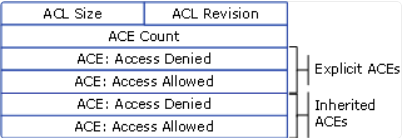
So, this "canonical order" is all about making sure the access rules are clear and work well, putting specific rules first and organizing everything in a smart way.
Note
ACL是windows中专用于文件系统安全的附加项
GUI Example
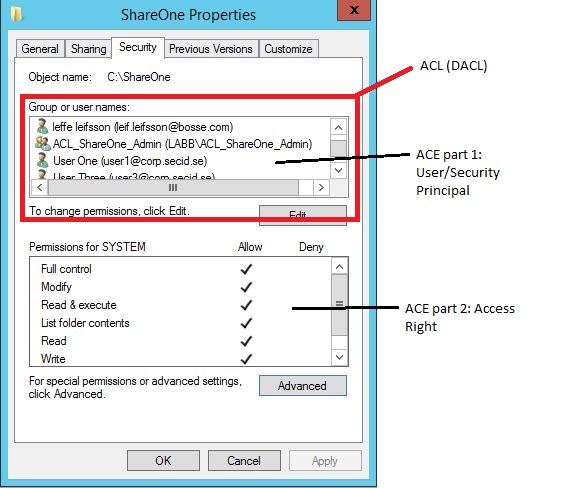
This is the classic security tab of a folder showing the ACL, DACL and ACEs:
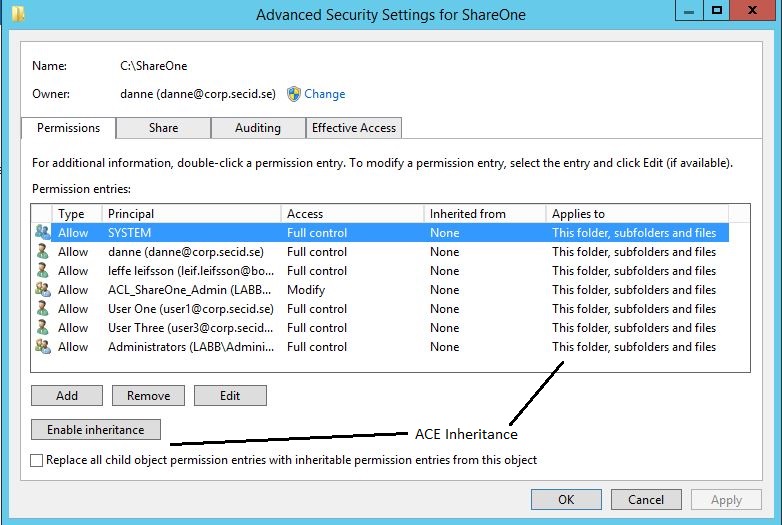
If we click the Advanced button we will get more options like inheritance:
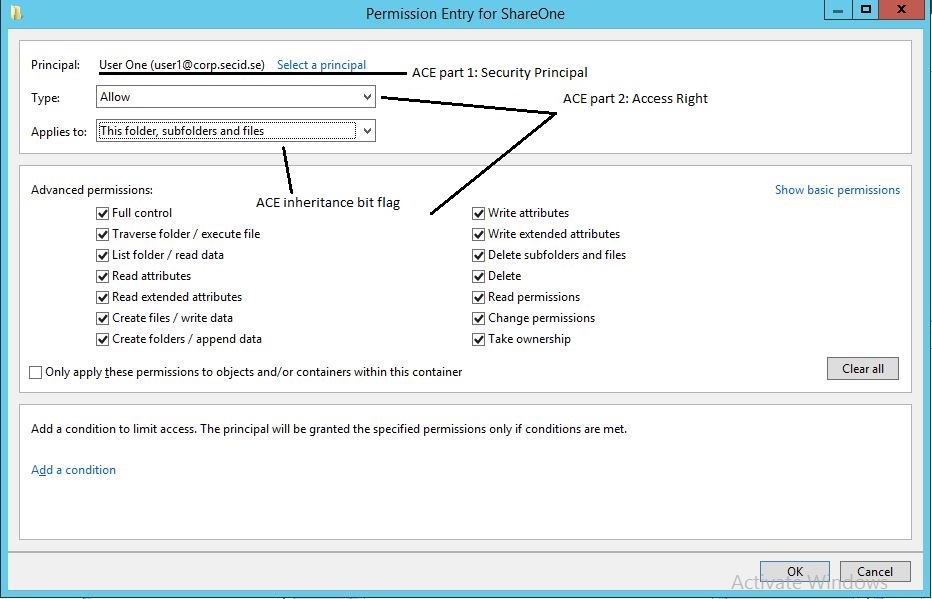
And if you add or edit a Security Principal:
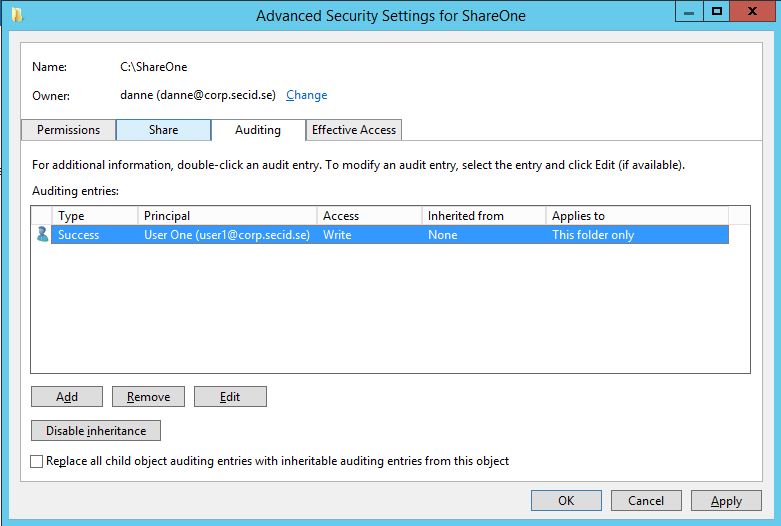
And last we have the SACL in the Auditing tab:
Explaining Access Control in a Simplified Manner
When managing access to resources, like a folder, we use lists and rules known as Access Control Lists (ACLs) and Access Control Entries (ACEs). These define who can or cannot access certain data.
Denying Access to a Specific Group
Imagine you have a folder named Cost, and you want everyone to access it except for a marketing team. By setting up the rules correctly, we can ensure that the marketing team is explicitly denied access before allowing everyone else. This is done by placing the rule to deny access to the marketing team before the rule that allows access to everyone.
Allowing Access to a Specific Member of a Denied Group
Let's say Bob, the marketing director, needs access to the Cost folder, even though the marketing team generally shouldn't have access. We can add a specific rule (ACE) for Bob that grants him access, and place it before the rule that denies access to the marketing team. This way, Bob gets access despite the general restriction on his team.
Understanding Access Control Entries
ACEs are the individual rules in an ACL. They identify users or groups, specify what access is allowed or denied, and determine how these rules apply to sub-items (inheritance). There are two main types of ACEs:
- Generic ACEs: These apply broadly, affecting either all types of objects or distinguishing only between containers (like folders) and non-containers (like files). For example, a rule that allows users to see the contents of a folder but not to access the files within it.
- Object-Specific ACEs: These provide more precise control, allowing rules to be set for specific types of objects or even individual properties within an object. For instance, in a directory of users, a rule might allow a user to update their phone number but not their login hours.
Each ACE contains important information like who the rule applies to (using a Security Identifier or SID), what the rule allows or denies (using an access mask), and how it's inherited by other objects.
Key Differences Between ACE Types
- Generic ACEs are suitable for simple access control scenarios, where the same rule applies to all aspects of an object or to all objects within a container.
- Object-Specific ACEs are used for more complex scenarios, especially in environments like Active Directory, where you might need to control access to specific properties of an object differently.
In summary, ACLs and ACEs help define precise access controls, ensuring that only the right individuals or groups have access to sensitive information or resources, with the ability to tailor access rights down to the level of individual properties or object types.
Access Control Entry Layout
访问控制项 (ACE) 描述与特定安全标识符 (SID) 关联的访问权限。 OS 评估 ACE,以基于其凭据计算授予特定程序的有效访问权限。 例如,当用户登录计算机并执行程序时,程序将使用与该特定用户帐户关联的凭据。
当程序尝试打开对象时,Windows 会将与程序关联的凭据与与对象关联的安全控件进行比较。 然后,安全引用监视器使用 ACE 信息来确定是应允许还是拒绝程序访问给定对象。 ACE 决定安全子系统的行为。
下图演示了访问控制项。
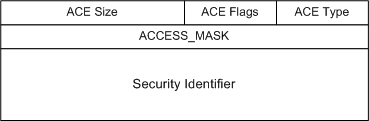
安全子系统使用多种 ACES 类型,包括以下类型。 ACE 结构的 Type 成员控制 ACE 的解释。 已定义的类型包括:
- ACCESS_ALLOWED_ACE_TYPE—此类型表示 ACE 指定了授予特定 SID 的访问权限。
- ACCESS_DENIED_ACE_TYPE 表示 ACE 指定了要拒绝特定 SID 的访问权限。
- SYSTEM_AUDIT_ACE_TYPE 表示 ACE 指定了审核行为。
- SYSTEM_ALARM_ACE_TYPE 表示 ACE 指定了警报行为。
- ACCESS_ALLOWED_COMPOUND_ACE_TYPE 表示 ACE 与特定服务器及其模拟的实体绑定。
| ACE Field | Description |
|---|---|
| Type | Flag that indicates the type of ACE. Windows 2000 and Windows Server 2003 support six types of ACE: Three generic ACE types that are attached to all securable objects. Three object-specific ACE types that can occur for Active Directory objects. |
| Flags | Set of bit flags that control inheritance and auditing. |
| Size | Number of bytes of memory that are allocated for the ACE. |
| Access mask | 32-bit value whose bits correspond to access rights for the object. Bits can be set either on or off, but the setting's meaning depends on the ACE type. For example, if the bit that corresponds to the right to read permissions is turned on, and the ACE type is Deny, the ACE denies the right to read the object's permissions. If the same bit is set on but the ACE type is Allow, the ACE grants the right to read the object's permissions. More details of the Access mask appear in the next table. |
| SID | Identifies a user or group whose access is controlled or monitored by this ACE. |
Access Mask Layout
访问掩码的功能是以简洁形式描述访问权限。 为了简化访问管理,访问掩码包含一组四位(通用权限),这些权限通过使用函数RtlMapGenericMask 转换为一组更详细的权限。
下图阐释了访问掩码。
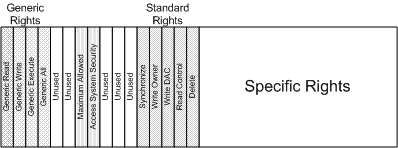
通用权限包括:
- GENERIC_READ—读取对象维护的信息的权限。
- GENERIC_WRITE—编写由对象维护的信息的权限。
- GENERIC_EXECUTE—执行或查看对象的权限。
- GENERIC_ALL—读取、写入和执行对象的权限。
这些权利可以合并。 例如,可以同时请求 GENERIC_READ 和 GENERIC_WRITE。 由此产生的映射需要将每个通用权利所需的权利联合起来。 此范例模拟用于控制对 UNIX 资源的访问的 UNIX“rwx”访问位。 访问掩码中的通用权限简化了 Windows 上的应用程序开发,因为这些权限掩盖了各种对象类型的不同安全权限。
以下一组*标准权限*适用于所有对象类型:
- DELETE—删除特定对象的权限。
- READ_CONTROL—读取对象的控件(安全)信息的权限。
- WRITE_DAC—修改对象的控件(安全)信息的权限。
- WRITE_OWNER—修改对象的所有者 SID 的权限。 请记住,所有者始终有权修改对象。
- SYNCHRONIZE—等待给定对象的权限(假设等待是对象的有效概念)。
访问掩码的低 16 位表示特定权限。 这些特定权限的含义对于有关对象是唯一的。 对于文件系统,主要利益是文件对象的特定权限。 对于文件对象,根据文件对象是代表文件还是代表目录,通常对特定的权限有不同的解释。 对于文件,通常的解释是:
- FILE_READ_DATA—从给定文件读取数据的权利。
- FILE_WRITE_DATA—将数据写入给定文件(在文件的现有范围内)的权利。
- FILE_APPEND_DATA—扩展给定文件的权利。
- FILE_READ_EA—读取文件的扩展属性的权利。
- FILE_WRITE_EA—修改文件的扩展属性的权利。
- FILE_EXECUTE—在本地执行给定文件的权利。 执行存储在远程共享上的文件需要读取权限,因为该文件是从服务器读取的,但在客户端上执行。
- FILE_READ_ATTRIBUTES—读取文件的属性信息的权利。
- FILE_WRITE_ATTRIBUTES—修改文件的属性信息的权利。
对于目录,使用了相同的位值;但在以下一些情况下,它们的解释不同:
- FILE_LIST_DIRECTORY—列出目录内容的权利。
- FILE_ADD_FILE—在目录中创建新文件的权限。
- FILE_ADD_SUBDIRECTORY—在目录中创建新目录(子目录)的权限。
- FILE_READ_EA—读取给定目录的扩展属性的权限。
- FILE_WRITE_EA—编写给定目录的扩展属性的权限。
- FILE_TRAVERSE—访问目录中的对象的权限。 FILE_TRAVERSE 访问权限不同于 FILE_LIST_DIRECTORY 访问权限。 保留 FILE_LIST_DIRECTORY 访问权限允许实体获取目录内容的列表,而 FILE_TRAVERSE 访问权限授予实体访问对象的权限。 没有 FILE_LIST_DIRECTORY 访问权限的调用者可以打开一个它知道已经存在的文件,但无法获取目录内容的列表。
- FILE_DELETE_CHILD—删除当前目录中的文件或目录的权限。
- FILE_READ_ATTRIBUTES—读取目录的属性信息的权限。
- FILE_WRITE_ATTRIBUTES—修改目录的属性信息的权限。
| Bit (Range) | Meaning | Description/Example |
|---|---|---|
| 0 - 15 | Object Specific Access Rights | Read data, Execute, Append data |
| 16 - 22 | Standard Access Rights | Delete, Write ACL, Write Owner |
| 23 | Can access security ACL | |
| 24 - 27 | Reserved | |
| 28 | Generic ALL (Read, Write, Execute) | Everything below |
| 29 | Generic Execute | All things necessary to execute a program |
| 30 | Generic Write | All things necessary to write to a file |
| 31 | Generic Read | All things necessary to read a file |