Js中的有效信息
关于JS在渗透测试中的关键作用,想必不用过多强调,在互联网上也有许多从JS中找到敏感信息从而拿下关键系统的案例。大部分师傅喜欢使用findsomething之类的浏览器插件,也有使用诸如Unexpected.information以及APIFinder之类的Burp插件,也有师傅喜欢使用packerfuzzer和JSFinder之类的工具。上述脚本和工具都是非常优秀的,笔者在日常测试中也经常将上述工具结合着使用。但是,如果只是单独使用上面的部分脚本和工具,实际上能找到的攻击面是比较狭隘的,并且也不能比较全面地去搜集JS中存在的,可能被我们利用的信息。
提取Js中的接口
前端常用的js打包器
以下是前端常用的JavaScript代码打包器:
Webpack
- 特点:以模块化为核心,支持代码分割、异步加载、预编译等功能,可将整个应用程序视为一个静态资源,并根据依赖关系将其打包成一个或多个JavaScript文件,支持多种模块化规范,如CommonJS、AMD、ES6等,还支持处理CSS、图片等其他类型的静态资源。
- 优势:极高的灵活性,强大的插件和加载器生态,模块化管理能力强,允许开发者控制各个模块的加载和优化策略,如按需加载、代码分割等。
- 使用场景:适用于多种资源类型(JavaScript、CSS、图片等)的打包,尤其适合复杂的大型项目和多页面应用。
Rollup
- 特点:专注于打包JavaScript库,采用静态分析的方式,可生成更小、更快的输出文件,支持多种模块化规范,具有丰富的插件系统和灵活的配置选项。
- 优势:生成的代码更优化,面向现代浏览器,能更好地处理ES6模块。
- 使用场景:适用于开发JavaScript库或组件,帮助生成优化的、轻量级的代码。
Parcel
- 特点:零配置的前端打包工具,能自动处理项目中的各种文件类型,包括JavaScript、CSS、HTML、图片等,具有快速的打包速度和简单易用的特点。
- 优势:无需繁琐的配置,只需简单的命令即可开始打包,适合快速开发和原型验证。
- 使用场景:对于小型项目或初学者来说是一个很好的选择。
esbuild
- 特点:一个用Go语言编写的极快的JavaScript打包工具,支持ES6模块,能够快速地将JavaScript代码打包成一个或多个文件。
- 优势:打包速度快,资源占用低。
- 使用场景:适合需要快速打包的项目,尤其是对打包速度有较高要求的场景。
Rspack
- 特点:由ByteDance推出的新一代JavaScript打包工具,采用Rust语言编写,性能优越,构建速度快,内存使用和模块处理经过优化。
- 优势:在构建速度和性能上超越了Webpack,提供了灵活的配置选项,可在构建速度和代码质量之间找到最佳平衡点。
- 使用场景:适合对构建速度和性能有较高要求的前端项目,尤其是大型项目。
Browserify
- 特点:基于CommonJS规范的JavaScript模块打包工具,允许开发者在浏览器中使用类似于Node.js的模块化开发方式,将多个模块打包成一个浏览器可用的JavaScript文件。
- 优势:简化了前端代码的组织和管理,使得在浏览器中使用模块化开发更加便捷。
- 使用场景:适合在浏览器中进行模块化开发的项目。
其中webpack是目前最常用的js打包器
识别前端使用的框架和打包工具
可以使用Wappalyzer,但是要订阅,这里使用Wappalyzer的免费替代品BuiltWith
其他免费代替品:12 Great Wappalyzer Alternatives: Top Technology Identifiers in 2024 | AlternativeTo
6 Top Wappalyzer alternatives (free and paid) - Stackcrawler
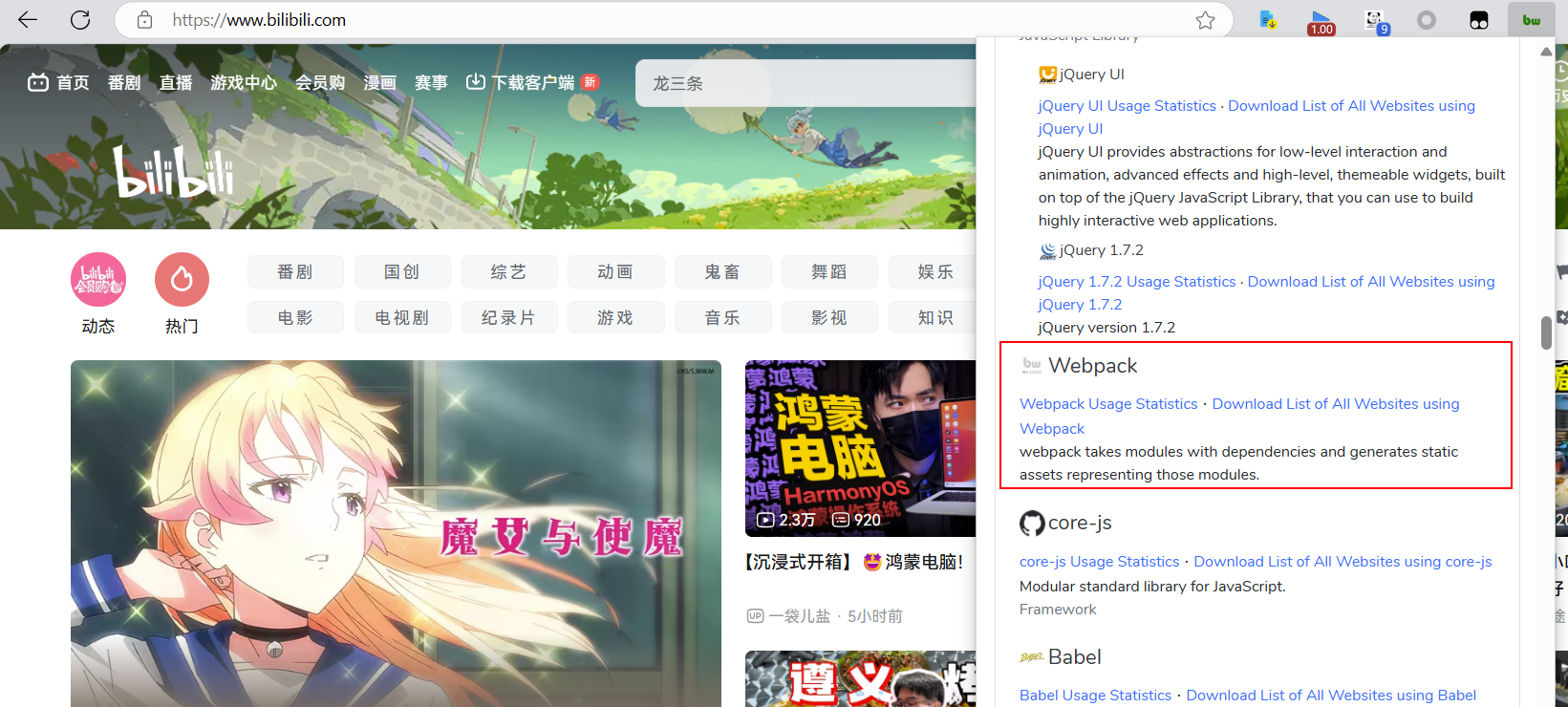
这里识别出了bilibili的打包工具为webpack
下载js文件并提取接口
找到了web应用使用的打包工具后,我们需要寻找对应的工具去下载js文件
python PackerFuzzer.py -u https://{domain}/ -c "cookie" -d "Token:xxx" -b "{base_dir}" -l zh

# -d 附加HTTP头部内容,可为空,若填写则将全局传入,默认为Cache-Control:no-cache,例如:-d "Token:3VHJ32HF0";
# -b 指定API中间部分(例如某API为:https://demo.poc-sir.com/v1_api/login 时,则其basedir为:v1_api),可为空,当您认为本工具自动提取的basedir不准确时,可使用此选项,例如:-b v1_api;
# -f(--flag)SSL连接安全选项,当为空时默认关闭状态,在此状态下将会阻止一切不安全的连接。若您希望忽略SSL安全状态,您可使用1命令开启,将会忽略一切证书错误,例如:-f 1;
# --ah(--apihost)Api域名选项,可通过此选项自定义扫描时所有的API请求域名,例如:api部分(从JS中提取到的API路径)为/v1/info,扫描的url(-u --url参数传入内容,扫描的网页)为http://exp.com/,当apihost参数传入https://pocsir.com:777/则此时的API为https://pocsir.com:777/v1/info而不是http://exp.com/v1/info,用于api与前端不同域名或服务器等场景。
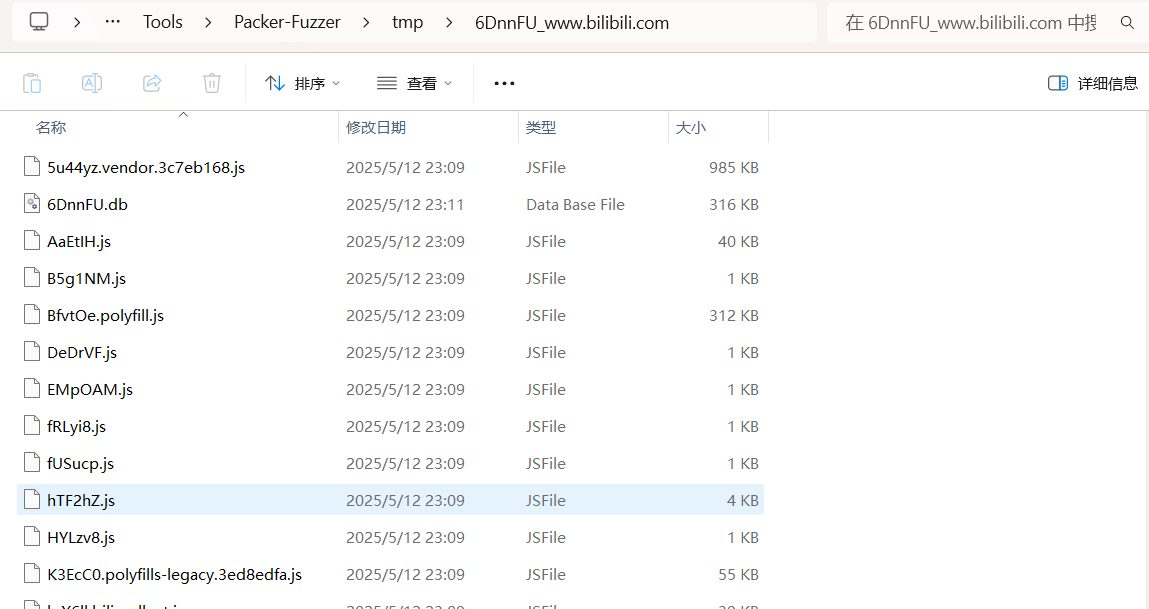
默认下载的js文件保存在tmp目录下,我们接下来要从js文件中提取接口
- 脚本提取
import os
import re
import argparse


def create_directory(directory):
    """创建指定目录"""
    if not os.path.exists(directory):
        os.makedirs(directory)


def extract_paths(directory):
    """从指定目录中的文件提取路径信息"""
    paths = []
    for dirpath, dirnames, filenames in os.walk(directory):
        for file in filenames:
            file_path = os.path.join(dirpath, file)
            try:
                with open(file_path, "r", encoding='gb18030', errors='ignore') as f2:
                    lines = f2.readlines()
                    for line in lines:
                        line = line.strip('\n').strip('\t')
                        p = re.findall(r'''(['"]\/[^][^>< \)\(\{\}]*?['"])''', line)
                        if p:
                            for path in p:
                                path = path.replace(':"', "").replace('"', "")
                                paths.append(file + "---" + path)
            except Exception as e:
                print(f"Error processing file {file_path}: {e}")
    return paths


def save_paths(output_file, paths):
    """将提取的路径信息保存到指定文件"""
    with open(output_file, "w", encoding='gb18030', errors='ignore') as f:
        for path in sorted(set(paths)):
            f.write(path + '\n')


def main():
    # 创建 ArgumentParser 对象
    parser = argparse.ArgumentParser(description="Extract paths from files in a specified directory and save to an output file.")
    parser.add_argument("-d", "--directory", required=True, help="Directory to process")
    parser.add_argument("-o", "--output", required=True, help="Output file name")

    # 解析命令行参数
    args = parser.parse_args()

    # 创建目录
    create_directory(args.directory)

    # 提取路径
    paths = extract_paths(args.directory)

    # 保存路径到文件
    save_paths(args.output, paths)


if __name__ == "__main__":
    main()
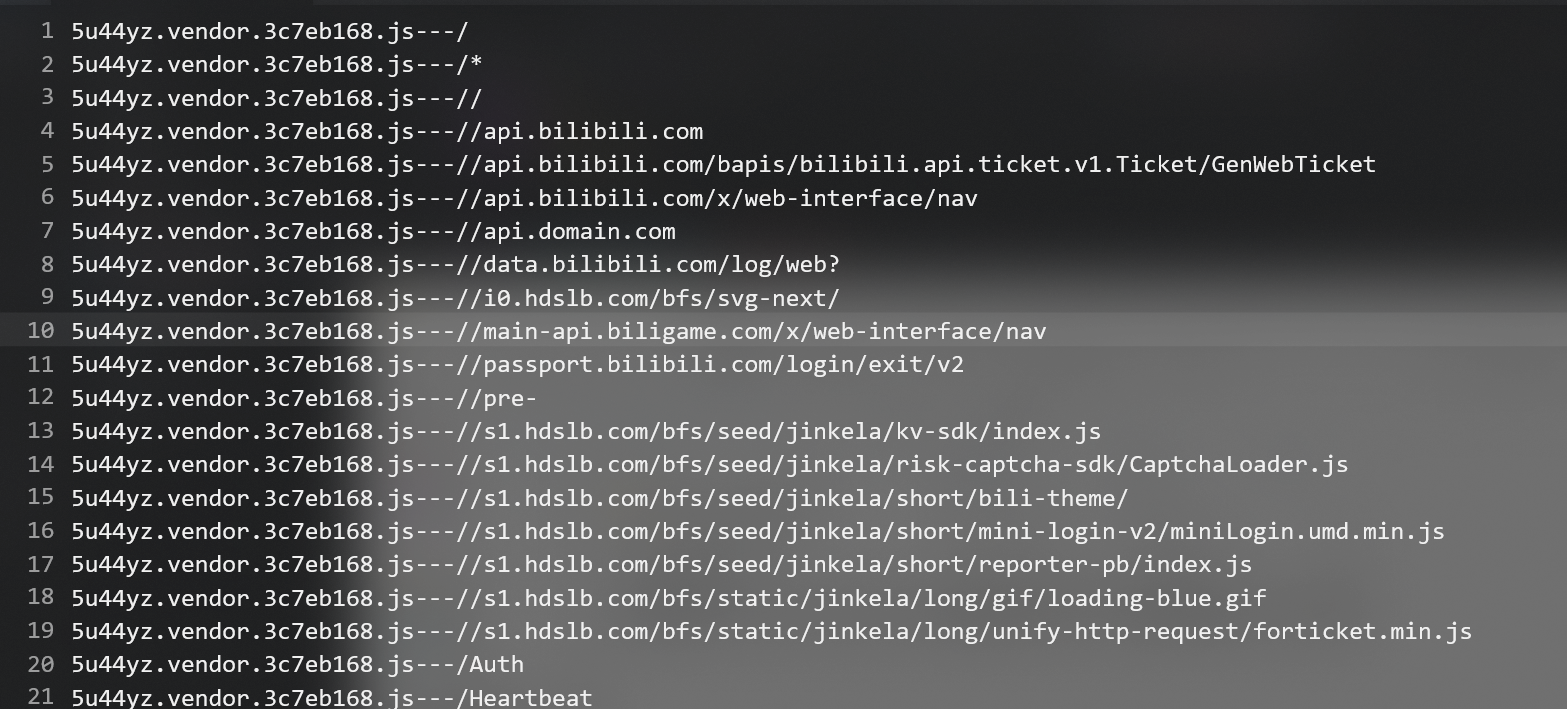
- packerfuzzer
packerfuzzer下载时会自动提取接口,保存在tmp/xxx/xx.db下,我们使用数据库工具sqlite连接该文件
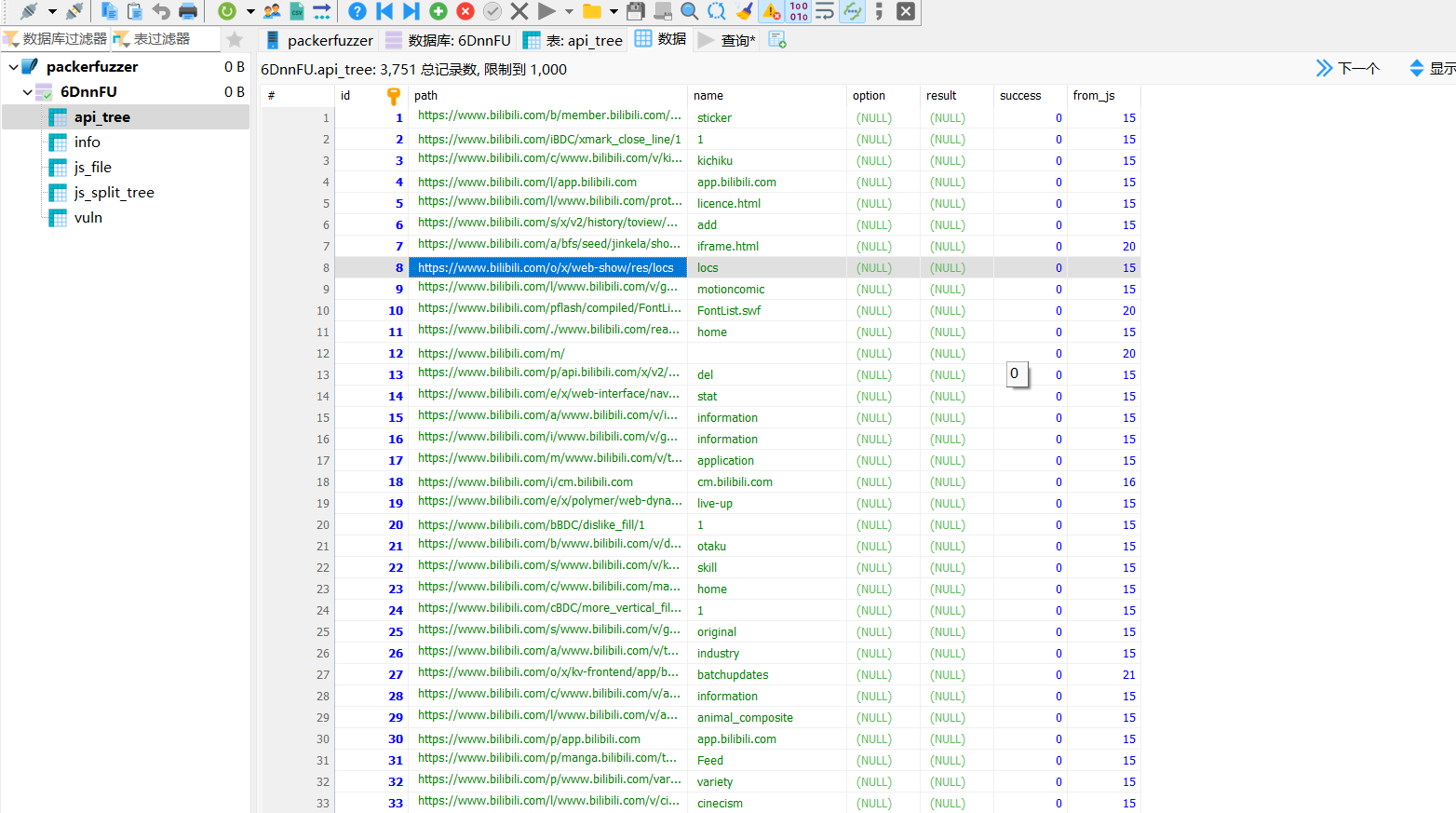
但我们还需要对path字段进行处理,综合处理脚本如下:
import os
import re
import argparse
import sqlite3
from typing import List


def create_directory(directory: str) -> None:
    """
    创建指定目录,如果目录不存在则创建。

    :param directory: 要创建的目录路径
    """
    if not os.path.exists(directory):
        os.makedirs(directory)


def extract_paths_from_files(directory: str) -> List[str]:
    """
    从指定目录中的文件提取路径信息。支持普通文件和 SQLite 数据库文件。

    :param directory: 要处理的目录路径
    :return: 提取的路径信息列表
    """
    paths: List[str] = []
    for dirpath, dirnames, filenames in os.walk(directory):
        for file in filenames:
            file_path = os.path.join(dirpath, file)
            if file.endswith('.db'):
                # 处理 SQLite 数据库文件
                paths.extend(extract_paths_from_db(file, file_path))
            else:
                try:
                    with open(file_path, "r", encoding='gb18030',
                              errors='ignore') as f2:
                        lines = f2.readlines()
                        for line in lines:
                            line = line.strip('\n').strip('\t')
                            p = re.findall(r'''(['"]\/[^][^>< \)\(\{\}]*?['"])''', line)  # noqa
                            if p:
                                for path in p:
                                    path = path.replace(':"', "").replace('"', "")  # noqa
                                    paths.append(f"{file}---{path}")
                except Exception as e:
                    print(f"Error processing file {file_path}: {e}")
    return paths


def extract_paths_from_db(db_file_name: str, db_path: str) -> List[str]:
    """
    从 SQLite 数据库文件中提取路径信息。假设数据库中有一个表 `api_tree`,其中包含 `path` 字段。
    提取 URL 中的路径部分。

    :param db_path: SQLite 数据库文件路径
    :return: 提取的路径信息列表
    """
    paths: List[str] = []
    try:
        conn = sqlite3.connect(db_path)
        cursor = conn.cursor()
        cursor.execute("SELECT path FROM api_tree")
        rows = cursor.fetchall()
        for row in rows:
            path = row[0]
            if path:
                # 提取 URL 中的路径部分
                match = re.match(r'http[s]?://[^/]+(/.*)', path)
                if match:
                    path = match.group(1)
                    paths.append(f"{db_file_name}---{path}")
        conn.close()
    except Exception as e:
        print(f"Error processing SQLite database {db_path}: {e}")
    return paths


def save_paths(output_file: str, paths: List[str]) -> None:
    """
    将提取的路径信息去重并保存到指定文件。

    :param output_file: 保存结果的文件路径
    :param paths: 提取的路径信息列表
    """
    with open(output_file, "w", encoding='gb18030', errors='ignore') as f:
        for path in sorted(set(paths)):
            f.write(path + '\n')


def main() -> None:
    """
    主函数,解析命令行参数并调用相关函数完成路径提取和保存。
    """
    # 创建 ArgumentParser 对象
    parser = argparse.ArgumentParser(description="Extract paths from files in a specified directory and save to an output file.")  # noqa
    parser.add_argument("-d", "--directory", required=True,
                        help="Directory to process")
    parser.add_argument("-o", "--output", required=True,
                        help="Output file name")

    # 解析命令行参数
    args = parser.parse_args()

    # 创建目录
    create_directory(args.directory)

    # 提取路径
    paths = extract_paths_from_files(args.directory)

    # 保存路径到文件
    save_paths(args.output, paths)


if __name__ == "__main__":
    main()
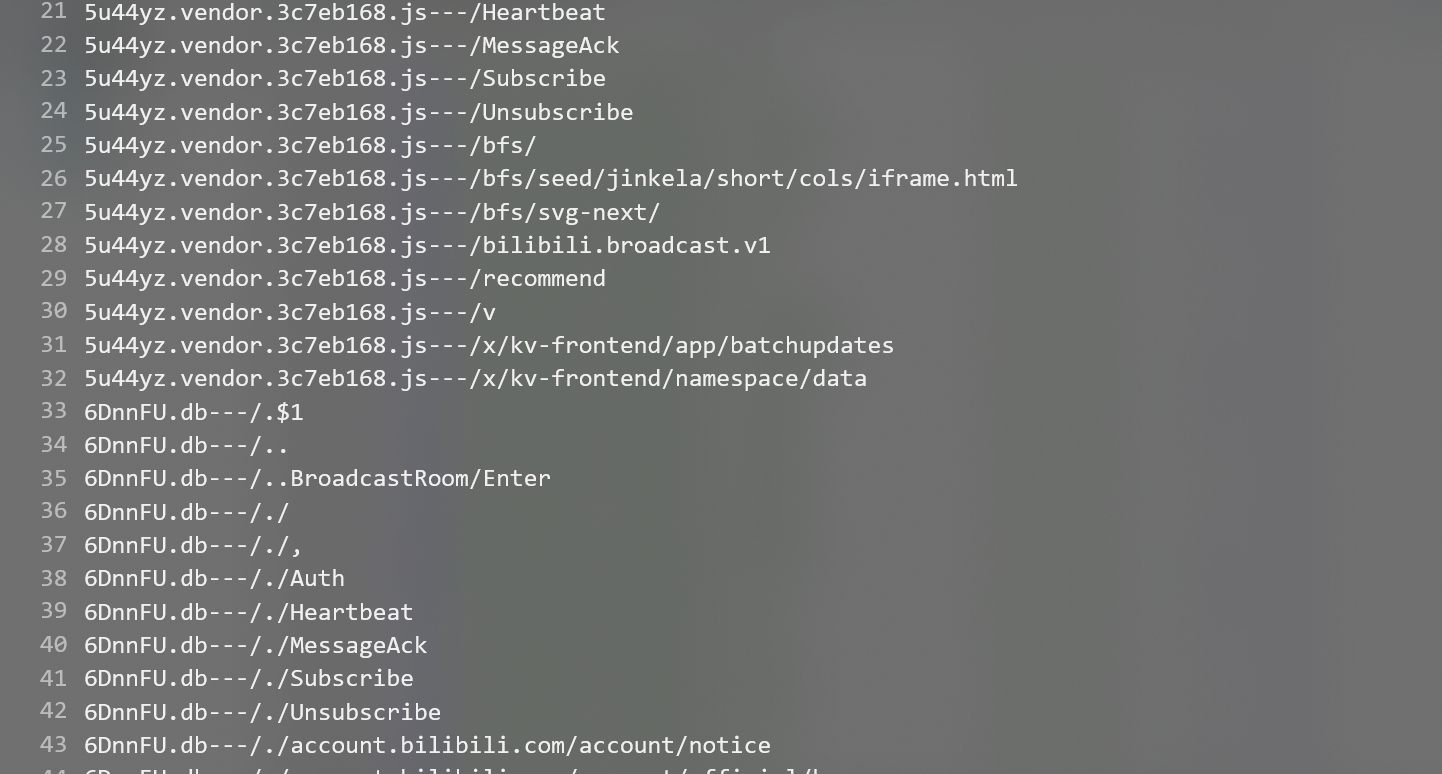
得到如上效果
Note
实战中建议该脚本和findsomething等工具结合使用
如何找到base_url?
在提取js中的接口后,我们需要把这些接口和base_url进行Fuzz测试,那么如何找到base_url?
基于抓包等观察得出base_url
比方说我们调用http://test.com/#/login的登录点

上图就是一个登录点的uri。这里我们引入一个“初级目录”的概念,打引号是因为绝大多数情况下这并不是真正的目录。
什么意思呢?我们以Spring开发为例,对SpringSSM比较熟悉的小伙伴应该知道,我们可以在配置文件里添加一个配置项:
比方说
这样,你的web应用的所有uri前面都要加一层/test1,比方说我给登录的动作配置一个RequestMapping,为@RequestMapping(“/virsical-auth/oauth/token”);
那么如果我想通过WEB访问这个动作,应该访问的uri应该是:/vsk/virsical-auth/oauth/token
(当然这里是简化过的,实际上真正的构成规则我猜测是设置初始路径为/vsk,然后负责登录相关功能的controller设置为/virsical-auth,然后给Controller里的具体方法设置为/oauth/token)
通过上面这个例子你想到了什么?没错,我们上面抓到的那个数据包,有可能是以/vsk作为初始路径。然后我们通过前文的提取接口相关的技术找到的接口uri可能是/virsical-auth/oauth/token,这样我们就知道怎么拼接了,就可以得到/vsk/virsical-auth/oauth/token。
当然实战中绝大部分都是黑盒的情况,你通过现有功能看到这么一个uri,其实也不一定能百分百判断到底哪个是初级uri,比方说上述情况。有可能是/vsk作为初级uri,亦可能是/vsk/virsical-auth/作为初级uri,这个需要靠经验来判断。如果你怕判断有误,最好的办法就是多拼接几次,比如:
http://test.com/vsk/ <---接口依次拼接在这后面
http://test.com/vsk/virsical-auth/ <---接口依次拼接在这后面
http://test.com/vsk/virsical-auth/oauth/ <---接口依次拼接在这后面
以此类推,不过一般比较少出现这种情况。上述是“初级目录”的情况,还有一种情况则是前后端分离。这个也很好理解。比方说你访问的网站是:
然而负责提供服务的后端地址可能是:
这些抓包都很容易看出来,就不赘述了。此外还有一种很有趣的情况,还是以我们上面提取出的接口为例:
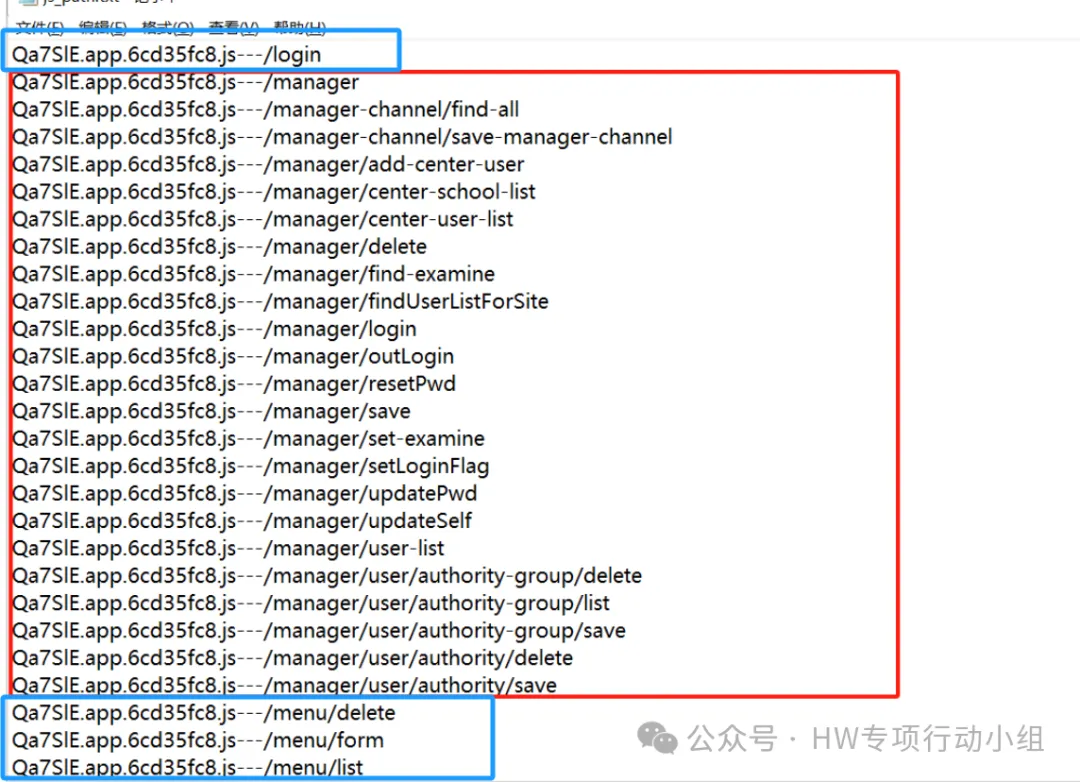
注意看蓝框标注的部分,这些“接口”uri比其它接口uri显著短得多,而且规则也不一样,很多时候你把他们与后端或者“初级路径”做拼接去请求,却发现直接404了,那么这种是什么呢?这些实际上大部分是前端uri,相信师傅们经常能看到
这样的路径,这实际上就是前端的uri,当然不一定每个系统都是这样,也得因地制宜地去观察规则,比方说在上图中,我们尝试访问:
也有可能直接去访问到一些鉴权没做好的页面,去看到一些信息或者调用某些功能。
从Js中提取base_url
我们上述提取接口,实际上就是提取了所有类似/userApi/changePwd这样的uri。我们要找后端也很简单,写个正则专门匹配http://或https://开头的字符串即可:
import os
import re
import argparse
from typing import List


def create_directory(directory: str) -> None:
    """
    创建指定目录,如果目录不存在则创建。

    :param directory: 要创建的目录路径
    """
    if not os.path.exists(directory):
        os.makedirs(directory)


def extract_base_urls_from_files(directory: str) -> List[str]:
    """
    从指定目录中的文件提取 base_url 信息。base_url 是 URL 中的协议和一级目录部分。

    :param directory: 要处理的目录路径
    :return: 提取的 base_url 信息列表
    """
    base_urls: List[str] = []
    for dirpath, dirnames, filenames in os.walk(directory):
        for file in filenames:
            file_path = os.path.join(dirpath, file)
            try:
                with open(file_path, "r", encoding='utf-8',
                          errors='ignore') as f2:
                    lines = f2.readlines()
                    for line in lines:
                        line = line.strip('\n').strip('\t')
                        # 使用正则表达式匹配 URL 并提取 base_url
                        matches = re.findall(r"""(["'])(https?://[^\1]*?)\1""",
                                             line, re.IGNORECASE)
                        if matches:
                            for match in matches:
                                base_urls.append(f"{file}---{match}")
            except Exception as e:
                print(f"Error processing file {file_path}: {e}")
    return base_urls


def save_base_urls(output_file: str, base_urls: List[str]) -> None:
    """
    将提取的 base_url 信息去重并保存到指定文件。

    :param output_file: 保存结果的文件路径
    :param base_urls: 提取的 base_url 信息列表
    """
    with open(output_file, "w", encoding='utf-8', errors='ignore') as f:
        for base_url in sorted(set(base_urls)):
            f.write(base_url + '\n')


def main() -> None:
    """
    主函数,解析命令行参数并调用相关函数完成 base_url 提取和保存。
    """
    # 创建 ArgumentParser 对象
    parser = argparse.ArgumentParser(description="Extract base URLs from files in a specified directory and save to an output file.")  # noqa
    parser.add_argument("-d", "--directory", required=True,
                        help="Directory to process")
    parser.add_argument("-o", "--output", required=True,
                        help="Output file name")

    # 解析命令行参数
    args = parser.parse_args()

    # 创建目录
    create_directory(args.directory)

    # 提取 base_urls
    base_urls = extract_base_urls_from_files(args.directory)

    # 保存 base_urls 到文件
    save_base_urls(args.output, base_urls)


if __name__ == "__main__":
    main()
这个正则也比较简单,效果大概是这样:
Unexpected information和findsomething也可以实现一部分这样的功能,如下图也是来自于某个企业src:
Unexpected information插件就帮我们找到了大量后端地址。
Fuzz
我们获取到所有可能的后端和初级路径之后,我比较喜欢的操作其实是采用笛卡尔积去依此拼接初级路径。简单来说:
后端字典 接口字典
http://api1.test.com/                     /user/getinfo
http://api2.test.com/api/admin/            /user/register
http://api2.test.com/api/                  /manager/changeSetting
按照笛卡尔积拼接处理可以得到:
http://api1.test.com/user/getinfo
http://api1.test.com/user/register
http://api1.test.com/manager/changeSetting
http://api2.test.com/api/admin/user/getinfo
http://api2.test.com/api/admin/user/register
http://api2.test.com/api/admin/manager/changeSetting
http://api2.test.com/api/user/getinfo
http://api2.test.com/api/user/register
http://api2.test.com/api/manager/changeSetting
然后我们把这个最终的列表丢给HTTPX之类的工具跑一遍,测测活,根据响应码和数据包长度去筛选出所有可用接口,管他什么后端、初级路径,一下就能找到了,要的就是笨办法!当然这一步要是乐意也可以用burp的Cluster bomb去搞,反正啥工具用得顺手就用啥工具去测活。
综上我们就简单介绍了怎么去提取后端,然后怎么去拼接测试。然而我们提取出后端或者别的地址后,也不要只盯着接口拼接和测活去搞,眼界开拓点,这些新找到的地址,靠常规的信息搜集手法不一定能找到,属于藏得比较深的资产,所以算是比较重要的攻击面,可以进一步对这些新的地址进行全端口扫描、漏扫或者其他测试手段,说不定就找到啥洞能直接一把梭getshell了。因此获取JS中的后端、地址实际上是两个目的,一个是与接口测试相结合,另一个则是打开新的攻击面。
敏感信息
我们也可以使用正则表达式提取出js中的敏感信息
原代码在windows平台使用时会报错,修复后代码如下:
#!/usr/bin/env python
# SecretFinder - Tool for discover apikeys/accesstokens and sensitive data in js file
# based on LinkFinder - github.com/GerbenJavado
# By m4ll0k (@m4ll0k2) github.com/m4ll0k


import os,sys
if not sys.version_info.major >= 3:
    print("[ + ] Run this tool with python version 3.+")
    sys.exit(0)
os.environ["BROWSER"] = "open"

import re
import glob
import argparse
import jsbeautifier
import webbrowser
import subprocess
import base64
import requests
import string
import random
from html import escape
import urllib3
import xml.etree.ElementTree

# disable warning

urllib3.disable_warnings(urllib3.exceptions.InsecureRequestWarning)

# for read local file with file:// protocol
from requests_file import FileAdapter
from lxml import html
from urllib.parse import urlparse

# regex
_regex = {
    'google_api'     : r'AIza[0-9A-Za-z-_]{35}',
    'firebase'  : r'AAAA[A-Za-z0-9_-]{7}:[A-Za-z0-9_-]{140}',
    'google_captcha' : r'6L[0-9A-Za-z-_]{38}|^6[0-9a-zA-Z_-]{39}$',
    'google_oauth'   : r'ya29\.[0-9A-Za-z\-_]+',
    'amazon_aws_access_key_id' : r'A[SK]IA[0-9A-Z]{16}',
    'amazon_mws_auth_toke' : r'amzn\\.mws\\.[0-9a-f]{8}-[0-9a-f]{4}-[0-9a-f]{4}-[0-9a-f]{4}-[0-9a-f]{12}',
    'amazon_aws_url' : r's3\.amazonaws.com[/]+|[a-zA-Z0-9_-]*\.s3\.amazonaws.com',
    'amazon_aws_url2' : r"(" \
           r"[a-zA-Z0-9-\.\_]+\.s3\.amazonaws\.com" \
           r"|s3://[a-zA-Z0-9-\.\_]+" \
           r"|s3-[a-zA-Z0-9-\.\_\/]+" \
           r"|s3.amazonaws.com/[a-zA-Z0-9-\.\_]+" \
           r"|s3.console.aws.amazon.com/s3/buckets/[a-zA-Z0-9-\.\_]+)",
    'facebook_access_token' : r'EAACEdEose0cBA[0-9A-Za-z]+',
    'authorization_basic' : r'basic [a-zA-Z0-9=:_\+\/-]{5,100}',
    'authorization_bearer' : r'bearer [a-zA-Z0-9_\-\.=:_\+\/]{5,100}',
    'authorization_api' : r'api[key|_key|\s+]+[a-zA-Z0-9_\-]{5,100}',
    'mailgun_api_key' : r'key-[0-9a-zA-Z]{32}',
    'twilio_api_key' : r'SK[0-9a-fA-F]{32}',
    'twilio_account_sid' : r'AC[a-zA-Z0-9_\-]{32}',
    'twilio_app_sid' : r'AP[a-zA-Z0-9_\-]{32}',
    'paypal_braintree_access_token' : r'access_token\$production\$[0-9a-z]{16}\$[0-9a-f]{32}',
    'square_oauth_secret' : r'sq0csp-[ 0-9A-Za-z\-_]{43}|sq0[a-z]{3}-[0-9A-Za-z\-_]{22,43}',
    'square_access_token' : r'sqOatp-[0-9A-Za-z\-_]{22}|EAAA[a-zA-Z0-9]{60}',
    'stripe_standard_api' : r'sk_live_[0-9a-zA-Z]{24}',
    'stripe_restricted_api' : r'rk_live_[0-9a-zA-Z]{24}',
    'github_access_token' : r'[a-zA-Z0-9_-]*:[a-zA-Z0-9_\-]+@github\.com*',
    'rsa_private_key' : r'-----BEGIN RSA PRIVATE KEY-----',
    'ssh_dsa_private_key' : r'-----BEGIN DSA PRIVATE KEY-----',
    'ssh_dc_private_key' : r'-----BEGIN EC PRIVATE KEY-----',
    'pgp_private_block' : r'-----BEGIN PGP PRIVATE KEY BLOCK-----',
    'json_web_token' : r'ey[A-Za-z0-9-_=]+\.[A-Za-z0-9-_=]+\.?[A-Za-z0-9-_.+/=]*$',
    'slack_token' : r"\"api_token\":\"(xox[a-zA-Z]-[a-zA-Z0-9-]+)\"",
    'SSH_privKey' : r"([-]+BEGIN [^\s]+ PRIVATE KEY[-]+[\s]*[^-]*[-]+END [^\s]+ PRIVATE KEY[-]+)",
    'Heroku API KEY' : r'[0-9a-fA-F]{8}-[0-9a-fA-F]{4}-[0-9a-fA-F]{4}-[0-9a-fA-F]{4}-[0-9a-fA-F]{12}',
    'possible_Creds' : r"(?i)(" \
                    r"password\s*[`=:\"]+\s*[^\s]+|" \
                    r"password is\s*[`=:\"]*\s*[^\s]+|" \
                    r"pwd\s*[`=:\"]*\s*[^\s]+|" \
                    r"passwd\s*[`=:\"]+\s*[^\s]+)",
}

_template = '''
<!DOCTYPE html>
<html>
<head>
  <meta charset="UTF-8">
  <style>
       h1 {
          font-family: sans-serif;
       }
       a {
          color: #000;
       }
       .text {
          font-size: 16px;
          font-family: Helvetica, sans-serif;
          color: #323232;
          background-color: white;
       }
       .container {
          background-color: #e9e9e9;
          padding: 10px;
          margin: 10px 0;
          font-family: helvetica;
          font-size: 13px;
          border-width: 1px;
          border-style: solid;
          border-color: #8a8a8a;
          color: #323232;
          margin-bottom: 15px;
       }
       .button {
          padding: 17px 60px;
          margin: 10px 10px 10px 0;
          display: inline-block;
          background-color: #f4f4f4;
          border-radius: .25rem;
          text-decoration: none;
          -webkit-transition: .15s ease-in-out;
          transition: .15s ease-in-out;
          color: #333;
          position: relative;
       }
       .button:hover {
          background-color: #eee;
          text-decoration: none;
       }
       .github-icon {
          line-height: 0;
          position: absolute;
          top: 14px;
          left: 24px;
          opacity: 0.7;
       }
  </style>
  <title>LinkFinder Output</title>
</head>
<body contenteditable="true">
  $$content$$

  <a class='button' contenteditable='false' href='https://github.com/m4ll0k/SecretFinder/issues/new' rel='nofollow noopener noreferrer' target='_blank'><span class='github-icon'><svg height="24" viewbox="0 0 24 24" width="24" xmlns="http://www.w3.org/2000/svg">
  <path d="M9 19c-5 1.5-5-2.5-7-3m14 6v-3.87a3.37 3.37 0 0 0-.94-2.61c3.14-.35 6.44-1.54 6.44-7A5.44 5.44 0 0 0 20 4.77 5.07 5.07 0 0 0 19.91 1S18.73.65 16 2.48a13.38 13.38 0 0 0-7 0C6.27.65 5.09 1 5.09 1A5.07 5.07 0 0 0 5 4.77a5.44 5.44 0 0 0-1.5 3.78c0 5.42 3.3 6.61 6.44 7A3.37 3.37 0 0 0 9 18.13V22" fill="none" stroke="#000" stroke-linecap="round" stroke-linejoin="round" stroke-width="2"></path></svg></span> Report an issue.</a>
</body>
</html>
'''

def parser_error(msg):
    print('Usage: python %s [OPTIONS] use -h for help'%sys.argv[0])
    print('Error: %s'%msg)
    sys.exit(0)

def getContext(matches,content,name,rex='.*?'):
    ''' get context '''
    items = []
    matches2 =  []
    for  i in [x[0] for x in matches]:
        if i not in matches2:
            matches2.append(i)
    for m in matches2:
        context = re.findall('%s%s%s'%(rex,re.escape(m),rex),content,re.IGNORECASE)

        item = {
            'matched'          : m,
            'name'             : name,
            'context'          : context,
            'multi_context'    : True if len(context) > 1 else False
        }
        items.append(item)
    return items


def parser_file(content,mode=1,more_regex=None,no_dup=1):
    ''' parser file '''
    if mode == 1:
        if len(content) > 1000000:
            content = content.replace(";",";\r\n").replace(",",",\r\n")
        else:
            content = jsbeautifier.beautify(content)
    all_items = []
    for regex in _regex.items():
        r = re.compile(regex[1],re.VERBOSE|re.I)
        if mode == 1:
            all_matches = [(m.group(0),m.start(0),m.end(0)) for m in re.finditer(r,content)]
            items = getContext(all_matches,content,regex[0])
            if items != []:
                all_items.append(items)
        else:
            items = [{
                'matched' : m.group(0),
                'context' : [],
                'name'    : regex[0],
                'multi_context' : False
            } for m in re.finditer(r,content)]
        if items != []:
            all_items.append(items)
    if all_items != []:
        k = []
        for i in range(len(all_items)):
            for ii in all_items[i]:
                if ii not in k:
                    k.append(ii)
        if k != []:
            all_items = k

    if no_dup:
        all_matched = set()
        no_dup_items = []
        for item in all_items:
            if item != [] and type(item) is dict:
                if item['matched'] not in all_matched:
                    all_matched.add(item['matched'])
                    no_dup_items.append(item)
        all_items = no_dup_items

    filtered_items = []
    if all_items != []:
        for item in all_items:
            if more_regex:
                if re.search(more_regex,item['matched']):
                    filtered_items.append(item)
            else:
                filtered_items.append(item)
    return filtered_items


def parser_input(input):
    ''' Parser Input '''
    # method 1 - url
    schemes = ('http://','https://','ftp://','file://','ftps://')
    if input.startswith(schemes):
        return [input]
    # method 2 - url inpector firefox/chrome
    if input.startswith('view-source:'):
        return [input[12:]]
    # method 3 - Burp file
    if args.burp:
        jsfiles = []
        items = []

        try:
            items = xml.etree.ElementTree.fromstring(open(args.input,'r').read())
        except Exception as err:
            print(err)
            sys.exit()
        for item in items:
            jsfiles.append(
                {
                    'js': base64.b64decode(item.find('response').text).decode('utf-8','replace'),
                    'url': item.find('url').text
                }
            )
        return jsfiles
    # method 4 - folder with a wildcard
    if '*' in input:
        # 获取输入中的文件扩展名,例如 'js' 或 'txt'
        extension = os.path.splitext(input)[1]  # 获取文件的扩展名,包含点(.)
        # 构建递归搜索路径
        pattern = os.path.join(os.path.abspath(os.path.dirname(input)), '**', f'*{extension}')
        # 递归查找文件
        paths = glob.glob(pattern, recursive=True)
        paths = [path.replace('\\', '/') for path in paths]
        for index, path in enumerate(paths):
            paths[index] = "file:///%s" % path
        return (paths if len(paths)> 0 else parser_error('Input with wildcard does not match any files.'))

    # method 5 - local file
    path = "file:///%s"% os.path.abspath(input).replace('\\', '/')
    return [path if os.path.exists(input.replace('\\', '/')) else parser_error('file could not be found (maybe you forgot to add http/https).')]


def html_save(output):
    ''' html output '''
    hide = os.dup(1)
    os.close(1)
    os.open(os.devnull,os.O_RDWR)
    try:
        text_file = open(args.output,"wb")
        text_file.write(_template.replace('$$content$$',output).encode('utf-8'))
        text_file.close()

        print('URL to access output: file://%s'%os.path.abspath(args.output))
        file = 'file:///%s'%(os.path.abspath(args.output))
        if sys.platform == 'linux' or sys.platform == 'linux2':
            subprocess.call(['xdg-open',file])
        else:
            webbrowser.open(file)
    except Exception as err:
        print('Output can\'t be saved in %s due to exception: %s'%(args.output,err))
    finally:
        os.dup2(hide,1)

def cli_output(matched):
    ''' cli output '''
    for match in matched:
        print(match.get('name')+'\t->\t'+match.get('matched').encode('ascii','ignore').decode('utf-8'))

def urlParser(url):
    ''' urlParser '''
    parse = urlparse(url)
    urlParser.this_root = parse.scheme + '://' + parse.netloc
    urlParser.this_path = parse.scheme + '://' + parse.netloc  + '/' + parse.path

def extractjsurl(content,base_url):
    ''' JS url extract from html page '''
    soup = html.fromstring(content)
    all_src = []
    urlParser(base_url)
    for src in soup.xpath('//script'):
        src = src.xpath('@src')[0] if src.xpath('@src') != [] else []
        if src != []:
            if src.startswith(('http://','https://','ftp://','ftps://')):
                if src not in all_src:
                    all_src.append(src)
            elif src.startswith('//'):
                src = 'http://'+src[2:]
                if src not in all_src:
                    all_src.append(src)
            elif src.startswith('/'):
                src = urlParser.this_root + src
                if src not in all_src:
                    all_src.append(src)
            else:
                src = urlParser.this_path + src
                if src not in all_src:
                    all_src.append(src)
    if args.ignore and all_src != []:
        temp = all_src
        ignore = []
        for i in args.ignore.split(';'):
            for src in all_src:
                if i in src:
                    ignore.append(src)
        if ignore:
            for i in ignore:
                temp.pop(int(temp.index(i)))
        return temp
    if args.only:
        temp = all_src
        only = []
        for i in args.only.split(';'):
            for src in all_src:
                if i in src:
                    only.append(src)
        return only
    return all_src

def send_request(url):
    ''' Send Request '''
    # read local file
    # https://github.com/dashea/requests-file
    if 'file://' in url:
        s = requests.Session()
        s.mount('file://',FileAdapter())
        return s.get(url).content.decode('utf-8','replace')
    # set headers and cookies
    headers = {}
    default_headers = {
        'User-Agent'      : 'Mozilla/5.0 (Windows NT 10.0; Win64; x64) AppleWebKit/537.36 (KHTML, like Gecko) Chrome/58.0.3029.110 Safari/537.36',
        'Accept'          : 'text/html, application/xhtml+xml,application/xml;q=0.9,image/webp,*/*;q=0.8',
        'Accept-Language' : 'en-US,en;q=0.8',
        'Accept-Encoding' : 'gzip'
    }
    if args.headers:
        for i in args.header.split('\\n'):
            # replace space and split
            name,value = i.replace(' ','').split(':')
            headers[name] = value
    # add cookies
    if args.cookie:
        headers['Cookie'] = args.cookie

    headers.update(default_headers)
    # proxy
    proxies = {}
    if args.proxy:
        proxies.update({
            'http'  : args.proxy,
            'https' : args.proxy,
            # ftp
        })
    try:
        resp = requests.get(
            url = url,
            verify = False,
            headers = headers,
            proxies = proxies
        )
        return resp.content.decode('utf-8','replace')
    except Exception as err:
        print(err)
        sys.exit(0)

if __name__ == "__main__":
    parser = argparse.ArgumentParser()
    parser.add_argument("-e","--extract",help="Extract all javascript links located in a page and process it",action="store_true",default=False)
    parser.add_argument("-i","--input",help="Input a: URL, file or folder",required="True",action="store")
    parser.add_argument("-o","--output",help="Where to save the file, including file name. Default: output.html",action="store", default="output.html")
    parser.add_argument("-r","--regex",help="RegEx for filtering purposes against found endpoint (e.g: ^/api/)",action="store")
    parser.add_argument("-b","--burp",help="Support burp exported file",action="store_true")
    parser.add_argument("-c","--cookie",help="Add cookies for authenticated JS files",action="store",default="")
    parser.add_argument("-g","--ignore",help="Ignore js url, if it contain the provided string (string;string2..)",action="store",default="")
    parser.add_argument("-n","--only",help="Process js url, if it contain the provided string (string;string2..)",action="store",default="")
    parser.add_argument("-H","--headers",help="Set headers (\"Name:Value\\nName:Value\")",action="store",default="")
    parser.add_argument("-p","--proxy",help="Set proxy (host:port)",action="store",default="")
    args = parser.parse_args()

    if args.input[-1:] == "/":
        # /aa/ -> /aa
        args.input = args.input[:-1]

    mode = 1
    if args.output == "cli":
        mode = 0
    # add args
    if args.regex:
        # validate regular exp
        try:
            r = re.search(args.regex,''.join(random.choice(string.ascii_uppercase + string.digits) for _ in range(random.randint(10,50))))
        except Exception as e:
            print('your python regex isn\'t valid')
            sys.exit()

        _regex.update({
            'custom_regex' : args.regex
        })

    if args.extract:
        content = send_request(args.input)
        urls = extractjsurl(content,args.input)
    else:
        # convert input to URLs or JS files
        urls = parser_input(args.input)
    # conver URLs to js file
    output = ''
    for url in urls:
        print('[ + ] URL: '+url)
        if not args.burp:
            file = send_request(url)
        else:
            file = url.get('js')
            url = url.get('url')

        matched = parser_file(file,mode)
        if args.output == 'cli':
            cli_output(matched)
        else:
            output += '<h1>File: <a href="%s" target="_blank" rel="nofollow noopener noreferrer">%s</a></h1>'%(escape(url),escape(url))
            for match in matched:
                _matched = match.get('matched')
                _named = match.get('name')
                header = '<div class="text">%s'%(_named.replace('_',' '))
                body = ''
                # find same thing in multiple context
                if match.get('multi_context'):
                    # remove duplicate
                    no_dup = []
                    for context in match.get('context'):
                        if context not in no_dup:
                            body += '</a><div class="container">%s</div></div>'%(context)
                            body = body.replace(
                                context,'<span style="background-color:yellow">%s</span>'%context)
                            no_dup.append(context)
                        # --
                else:
                    body += '</a><div class="container">%s</div></div>'%(match.get('context')[0] if len(match.get('context'))>1 else match.get('context'))
                    body = body.replace(
                        match.get('context')[0] if len(match.get('context')) > 0 else ''.join(match.get('context')),
                        '<span style="background-color:yellow">%s</span>'%(match.get('context') if len(match.get('context'))>1 else match.get('context'))
                    )
                output += header + body
    if args.output != 'cli':
        html_save(output)
下面提取指定文件夹中所有js文件中的敏感信息
可以修改/增加其中自带的正则表达式
# regex
_regex = {
    'google_api'     : r'AIza[0-9A-Za-z-_]{35}',
    'firebase'  : r'AAAA[A-Za-z0-9_-]{7}:[A-Za-z0-9_-]{140}',
    'google_captcha' : r'6L[0-9A-Za-z-_]{38}|^6[0-9a-zA-Z_-]{39}$',
    'google_oauth'   : r'ya29\.[0-9A-Za-z\-_]+',
    'amazon_aws_access_key_id' : r'A[SK]IA[0-9A-Z]{16}',
    'amazon_mws_auth_toke' : r'amzn\\.mws\\.[0-9a-f]{8}-[0-9a-f]{4}-[0-9a-f]{4}-[0-9a-f]{4}-[0-9a-f]{12}',
    'amazon_aws_url' : r's3\.amazonaws.com[/]+|[a-zA-Z0-9_-]*\.s3\.amazonaws.com',
    'amazon_aws_url2' : r"(" \
           r"[a-zA-Z0-9-\.\_]+\.s3\.amazonaws\.com" \
           r"|s3://[a-zA-Z0-9-\.\_]+" \
           r"|s3-[a-zA-Z0-9-\.\_\/]+" \
           r"|s3.amazonaws.com/[a-zA-Z0-9-\.\_]+" \
           r"|s3.console.aws.amazon.com/s3/buckets/[a-zA-Z0-9-\.\_]+)",
    'facebook_access_token' : r'EAACEdEose0cBA[0-9A-Za-z]+',
    'authorization_basic' : r'basic [a-zA-Z0-9=:_\+\/-]{5,100}',
    'authorization_bearer' : r'bearer [a-zA-Z0-9_\-\.=:_\+\/]{5,100}',
    'authorization_api' : r'api[key|_key|\s+]+[a-zA-Z0-9_\-]{5,100}',
    'mailgun_api_key' : r'key-[0-9a-zA-Z]{32}',
    'twilio_api_key' : r'SK[0-9a-fA-F]{32}',
    'twilio_account_sid' : r'AC[a-zA-Z0-9_\-]{32}',
    'twilio_app_sid' : r'AP[a-zA-Z0-9_\-]{32}',
    'paypal_braintree_access_token' : r'access_token\$production\$[0-9a-z]{16}\$[0-9a-f]{32}',
    'square_oauth_secret' : r'sq0csp-[ 0-9A-Za-z\-_]{43}|sq0[a-z]{3}-[0-9A-Za-z\-_]{22,43}',
    'square_access_token' : r'sqOatp-[0-9A-Za-z\-_]{22}|EAAA[a-zA-Z0-9]{60}',
    'stripe_standard_api' : r'sk_live_[0-9a-zA-Z]{24}',
    'stripe_restricted_api' : r'rk_live_[0-9a-zA-Z]{24}',
    'github_access_token' : r'[a-zA-Z0-9_-]*:[a-zA-Z0-9_\-]+@github\.com*',
    'rsa_private_key' : r'-----BEGIN RSA PRIVATE KEY-----',
    'ssh_dsa_private_key' : r'-----BEGIN DSA PRIVATE KEY-----',
    'ssh_dc_private_key' : r'-----BEGIN EC PRIVATE KEY-----',
    'pgp_private_block' : r'-----BEGIN PGP PRIVATE KEY BLOCK-----',
    'json_web_token' : r'ey[A-Za-z0-9-_=]+\.[A-Za-z0-9-_=]+\.?[A-Za-z0-9-_.+/=]*$',
    'slack_token' : r"\"api_token\":\"(xox[a-zA-Z]-[a-zA-Z0-9-]+)\"",
    'SSH_privKey' : r"([-]+BEGIN [^\s]+ PRIVATE KEY[-]+[\s]*[^-]*[-]+END [^\s]+ PRIVATE KEY[-]+)",
    'Heroku API KEY' : r'[0-9a-fA-F]{8}-[0-9a-fA-F]{4}-[0-9a-fA-F]{4}-[0-9a-fA-F]{4}-[0-9a-fA-F]{12}',
    'possible_Creds' : r"(?i)(" \
                    r"password\s*[`=:\"]+\s*[^\s]+|" \
                    r"password is\s*[`=:\"]*\s*[^\s]+|" \
                    r"pwd\s*[`=:\"]*\s*[^\s]+|" \
                    r"passwd\s*[`=:\"]+\s*[^\s]+)",
}
更多的正则表达式如下:
#邮箱匹配
matches = re.findall(r'[A-Za-z0-9._%+-]+@[A-Za-z0-9.-]+\.[A-Za-z]{2,}', line)

#手机号匹配
matches = re.findall(r'(?<!\d)(13\d{9}|14[579]\d{8}|15[^4\D]\d{8}|166\d{8}|17[^49\D]\d{8}|18\d{9}|19[189]\d{8})(?!\d)', line)

#身份证匹配
matches = re.findall(r'\b\d{17}[\dXx]|\b\d{14}\d{1}|\b\d{17}[\dXx]', line)

#ip匹配
matches = re.findall(r'\d+\.\d+\.\d+\.\d+', line)

#常见的云AK匹配
matches = re.findall(r'''(['"]\s*(?:GOOG[\w\W]{10,30}|AZ[A-Za-z0-9]{34,40}|AKID[A-Za-z0-9]{13,20}|AKIA[A-Za-z0-9]{16}|IBM[A-Za-z0-9]{10,40}|OCID[A-Za-z0-9]{10,40}|LTAI[A-Za-z0-9]{12,20}|AK[\w\W]{10,62}|AK[A-Za-z0-9]{10,40}|AK[A-Za-z0-9]{10,40}|UC[A-Za-z0-9]{10,40}|QY[A-Za-z0-9]{10,40}|KS3[A-Za-z0-9]{10,40}|LTC[A-Za-z0-9]{10,60}|YD[A-Za-z0-9]{10,60}|CTC[A-Za-z0-9]{10,60}|YYT[A-Za-z0-9]{10,60}|YY[A-Za-z0-9]{10,40}|CI[A-Za-z0-9]{10,40}|gcore[A-Za-z0-9]{10,30})\s*['"])''', line)

#谷歌云 AccessKey ID匹配
matches = re.findall(r'\bAIza[0-9A-Za-z_\-]{35}\b', line)

#金山云 AccessKey ID匹配
matches = re.findall(r'\bAKLT[a-zA-Z0-9-_]{16,28}\b', line)

#火山引擎 AccessKey ID匹配
matches = re.findall(r'\b(?:AKLT|AKTP)[a-zA-Z0-9]{35,50}\b', line)

#亚马逊 AccessKey ID匹配
matches = re.findall(r'["''](?:A3T[A-Z0-9]|AKIA|AGPA|AIDA|AROA|AIPA|ANPA|ANVA|ASIA)[A-Z0-9]{16}["'']', line)

#京东云 AccessKey ID匹配
matches = re.findall(r'\bJDC_[0-9A-Z]{25,40}\b', line)

#JWT Token匹配
matches = re.findall(r'eyJ[A-Za-z0-9_/+\-]{10,}={0,2}\.[A-Za-z0-9_/+\-\\]{15,}={0,2}\.[A-Za-z0-9_/+\-\\]{10,}={0,2}', line)

#PRIVATE KEY匹配
matches = re.findall(r'-----\s*?BEGIN[ A-Z0-9_-]*?PRIVATE KEY\s*?-----[a-zA-Z0-9\/\n\r=+]*-----\s*?END[ A-Z0-9_-]*? PRIVATE KEY\s*?-----', line)

#Auth Token匹配
matches = re.findall(r'["''\[]*[Aa]uthorization["''\]]*\s*[:=]\s*[''"]?\b(?:[Tt]oken\s+)?[a-zA-Z0-9\-_+/]{20,500}[''"]?', line)

#Basic Token匹配
matches = re.findall(r'\b[Bb]asic\s+[A-Za-z0-9+/]{18,}={0,2}\b', line)

#Bearer Token匹配
matches = re.findall(r'\b[Bb]earer\s+[a-zA-Z0-9\-=._+/\\]{20,500}\b', line)

---------------------钉钉、飞书、企微、微信小程序/公众号之类的key和token---------------------

#slack webhook匹配
matches = re.findall(r'\bhttps://hooks.slack.com/services/[a-zA-Z0-9\-_]{6,12}/[a-zA-Z0-9\-_]{6,12}/[a-zA-Z0-9\-_]{15,24}\b', line)

#飞书 webhook匹配
matches = re.findall(r'\bhttps://open.feishu.cn/open-apis/bot/v2/hook/[a-z0-9\-]{25,50}\b', line)

#钉钉 webhook匹配
matches = re.findall(r'\bhttps://oapi.dingtalk.com/robot/send\?access_token=[a-z0-9]{50,80}\b', line)

#企业微信 webhook匹配
matches = re.findall(r'\bhttps://qyapi.weixin.qq.com/cgi-bin/webhook/send\?key=[a-zA-Z0-9\-]{25,50}\b', line)

#微信公众号匹配
matches = re.findall(r'["''](gh_[a-z0-9]{11,13})["'']', line)

#企业微信 corpid匹配
matches = re.findall(r'["''](ww[a-z0-9]{15,18})["'']', line)

#微信 公众号/小程序 APPID匹配
matches = re.findall(r'["''](wx[a-z0-9]{15,18})["'']', line)

#腾讯云 API网关 APPKEY匹配
matches = re.findall(r'\bAPID[a-zA-Z0-9]{32,42}\b', line)


#grafana service account token匹配1
matches = re.findall(r'\b(?:VUE|APP|REACT)_[A-Z_0-9]{1,15}_(?:KEY|PASS|PASSWORD|TOKEN|APIKEY)[\'"]*[:=]"(?:[A-Za-z0-9_\-]{15,50}|[a-z0-9/+]{50,100}==?)"', line)

#grafana service account token匹配2
matches = re.findall(r'\bglsa_[A-Za-z0-9]{32}_[A-Fa-f0-9]{8}\b', line)

#grafana cloud api token匹配
matches = re.findall(r'\bglc_[A-Za-z0-9\-_+/]{32,200}={0,2}\b', line)

#grafana api key匹配
matches = re.findall(r'\beyJrIjoi[a-zA-Z0-9\-_+/]{50,100}={0,2}\b', line)

#Github Token匹配
matches = re.findall(r'\b((?:ghp|gho|ghu|ghs|ghr|github_pat)_[a-zA-Z0-9_]{36,255})\b', line)

#Gitlab V2 Token匹配
matches = re.findall(r'\b(glpat-[a-zA-Z0-9\-=_]{20,22})\b', line)
注释中的敏感信息
有些时候,开发者可能也会把默认账号密码等敏感信息以注释的形式写在某个文件中,所以提取注释还是有可能找到一些敏感信息。
match = re.search(r'\*/(.*)', line)
matches = re.findall(r'//[^\n]*', line)
match = re.search(r'/\*(.*)', line)
matches = re.findall(r'<!--(?:.|\n)*?-->', line)
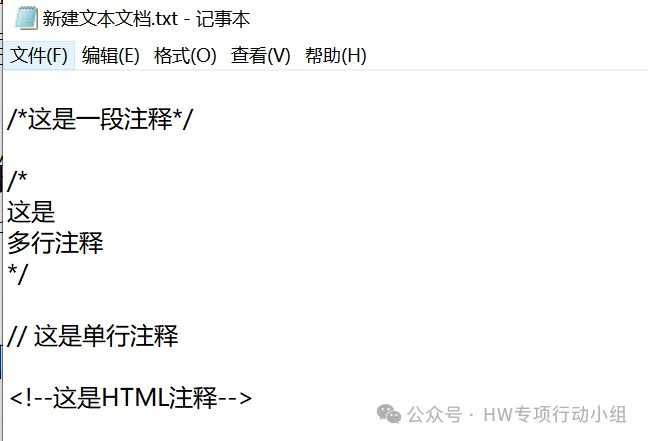
可以有效提取多种风格的注释,以下面这些数据为例:
提取中文中的敏感信息
继续拓展一下,既然一些注释还有可能用得上的敏感信息多以中文的形式存在,那么有没有可能通过匹配所有中文,去找到一些敏感信息呢?还是以我自己的案例为例,我先是从JS中提取出一个测试手机号

然后跟过去看前后文,找到了目标一个内部员工的名字

进一步寻找,还可以找到注册相关服务(未开放给普通用户)要求的密码规则:

(可能为后续密码爆破提供指导)
还找到了目标的一些办公地点相关的信息:
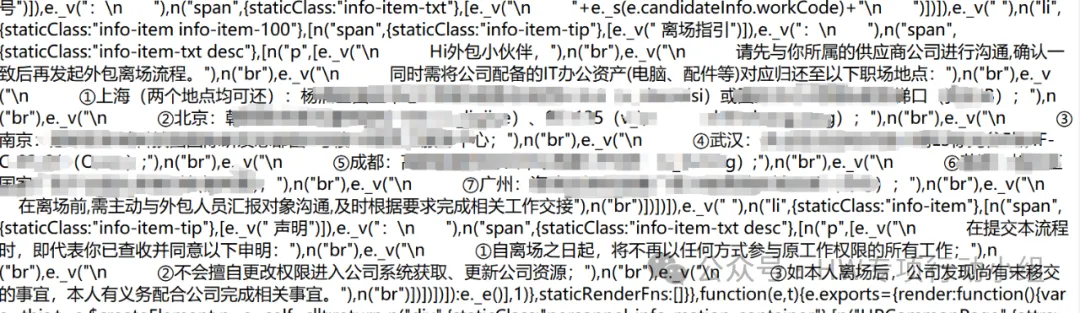
虽然这些都称不上有多敏感,也没法当作漏洞交上去,但是万一呢?很多时候我们的测试就缺了那么一点点的关键信息,就比如说上面的员工名字,万一裤子里正好有这家伙的常用密码,万一他名字的拼音就是账号呢?多关注一点细枝末节还是很有必要的。
相关工具
gh0stkey/HaE: HaE - Highlighter and Extractor, Empower ethical hacker for efficient operations.
Release TsojanScan-v1.4.6 · Tsojan/TsojanScan
API-Security/APIKit: APIKit:Discovery, Scan and Audit APIs Toolkit All In One.