目录遍历/目录穿越漏洞
目录遍历漏洞介绍
路径遍历攻击(也称为目录遍历)是指在访问储存在web根目录文件夹之外的文件和目录。通过操纵带有“点-斜线(..)”序列及其变化的文件或使用绝对文件路径来引用文件的变量,可以访问存储在文件系统上的任意文件和目录,包括应用程序源代码、配置和关键系统文件。
需要注意的是,系统操作访问控制(如在微软windows操作系统上锁定或使用文件)限制了对文件的访问权限。
这种攻击也称为 “点-点斜线”、“目录遍历”、“目录爬升”和“回溯”。
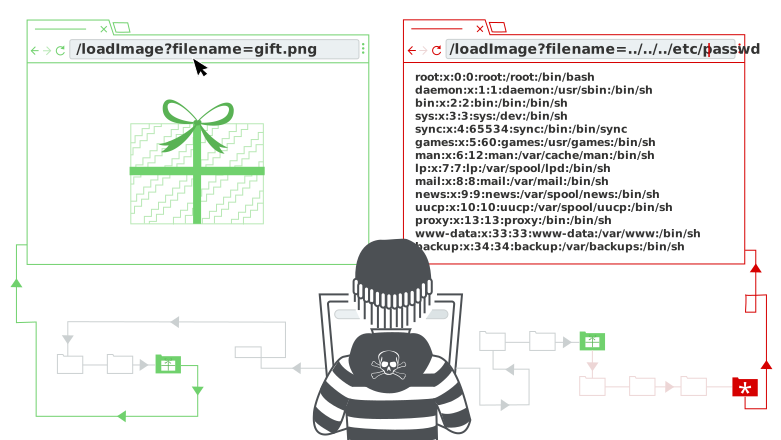
想象一个购物应用,显示待售商品图片。这可能会加载使用以下 HTML 的图片:
loadImage URL 会接收 filename 参数并返回指定文件的内容。映像文件存储在磁盘上的位置为 /var/www/images/ 。为了返回映像,应用程序将请求的文件名附加到该基础目录,并使用文件系统 API 读取文件内容。换句话说,应用程序读取以下文件路径:
假设该应用不实现路径穿越攻击的防御措施。因此,攻击者可以请求以下 URL 以从服务器文件系统中获取 /etc/passwd 文件:
这会导致应用程序从以下文件路径读取:
序列 ../ 在文件路径内有效,意味着在目录结构中提升一级。连续的三个 ../ 序列从 /var/www/images/ 上行到文件系统根节点,因此实际被读取的文件为:
在基于 Unix 的操作系统中,这是一个标准文件,包含服务器上注册用户的详细信息,但攻击者也可以用同样的方法获取其他任意文件。
Windows 上, ../ 和 ..\ 都是有效的目录遍历序列。以下是针对 Windows 服务器的等效攻击示例:
可以本地利用PHP环境搭建一个读取文件的脚本。来测试目录遍历。
Note
需要说明的是,在Windows环境下,无法通过../或..\穿越盘符,也就是说如果网站存在目录穿越漏洞,但根目录在D盘,那么你无法通过该漏洞读取到C盘或其他盘符下的文件
绕过方式
traversal sequences stripped non-recursively
http://example.com/index.php?page=....//....//....//etc/passwd
http://example.com/index.php?page=....\/....\/....\/etc/passwd
http://some.domain.com/static/%5c..%5c..%5c..%5c..%5c..%5c..%5c..%5c/etc/passwd
From existent folder
Maybe the back-end is checking the folder path:
Path Truncation Technique
Path truncation is a method employed to manipulate file paths in web applications. It's often used to access restricted files by bypassing certain security measures that append additional characters to the end of file paths. The goal is to craft a file path that, once altered by the security measure, still points to the desired file.
In PHP, various representations of a file path can be considered equivalent due to the nature of the file system. For instance:
/etc/passwd,/etc//passwd,/etc/./passwd, and/etc/passwd/are all treated as the same path.- When the last 6 characters are
passwd, appending a/(making itpasswd/) doesn't change the targeted file. - Similarly, if
.phpis appended to a file path (likeshellcode.php), adding a/.at the end will not alter the file being accessed.
The provided examples demonstrate how to utilize path truncation to access /etc/passwd, a common target due to its sensitive content (user account information):
http://example.com/index.php?page=a/../../../../../../../../../etc/passwd......[ADD MORE]....
http://example.com/index.php?page=a/../../../../../../../../../etc/passwd/././.[ADD MORE]/././.
http://example.com/index.php?page=a/./.[ADD MORE]/etc/passwd
http://example.com/index.php?page=a/../../../../[ADD MORE]../../../../../etc/passwd
In these scenarios, the number of traversals needed might be around 2027, but this number can vary based on the server's configuration.
- Using Dot Segments and Additional Characters: Traversal sequences (
../) combined with extra dot segments and characters can be used to navigate the file system, effectively ignoring appended strings by the server. - Determining the Required Number of Traversals: Through trial and error, one can find the precise number of
../sequences needed to navigate to the root directory and then to/etc/passwd, ensuring that any appended strings (like.php) are neutralized but the desired path (/etc/passwd) remains intact. - Starting with a Fake Directory: It's a common practice to begin the path with a non-existent directory (like
a/). This technique is used as a precautionary measure or to fulfill the requirements of the server's path parsing logic.
When employing path truncation techniques, it's crucial to understand the server's path parsing behavior and filesystem structure. Each scenario might require a different approach, and testing is often necessary to find the most effective method.
This vulnerability was corrected in PHP 5.3.
加密参数传递的数据
有的网站程序传递参数后会进行base64加密(当然也会有其他加密),导致我们传递的参数无法解析,所以就无法利用目录遍历,而绕过方式也很简单,就是先对参数进行base64加密后再进行传参。如:
编码绕过
进行传参时将参数进行编码,实现绕过,比如URL编码。?page=%6D%30%72%65%2E%74%78%74
目录限定绕过
有些Web应用程序是通过限定目录权限来分离的。可以使用一些特殊的符号~来绕过。比如提交这样的xxx.php?page=~/../boot。就可以直接跳转到硬盘目录下。
绕过文件后缀过滤
一些Web应用程序在读取文件前,会对提交的文件后缀进行检测,攻击者可以在文件名后放一个空字节的编码,来绕过这样的文件类型的检查。
比如:../../../../boot.ini%00.jpg,Web应用程序使用的Api会允许字符串中包含空字符,当实际获取文件名时,则由系统的Api会直接截断,而解析为../../../../boot.ini。
在类Unix的系统中也可以使用Url编码的换行符,例如:../../../etc/passwd%0a.jpg如果文件系统在获取含有换行符的文件名,会截短为文件名。也可以尝试%20,例如: ../../../index.php%20
Note
空字节截断能绕过的本质原因在于**应用层/中间件的逻辑处理**与**底层操作系统 C/C++ API 的字符串处理**之间的差异,例子如下:
假设后端使用 Java 或 PHP 编写。高级语言的字符串(如 Java 的 String)是自带长度属性的,不依赖 \0 结尾。当应用代码进行后缀检查时(例如 if (filename.endsWith(".jpg"))),如果代码逻辑有缺陷,或者在检查前没有过滤掉 \0,它可能会将 \0 视为普通字符,或者因为某些语言特性导致校验被绕过,从而**放行**了这个恶意文件名。
当应用层将放行后的文件名(包含真实的 \0 字节)传递给底层操作系统的文件读取 API 时,底层 C 函数遇到 \0 发生**截断**。最终导致应用层以为在读取 boot.ini\0.jpg,但底层 OS 实际打开的是 boot.ini。
需要特别注意的是,在现代 Web 环境中,这种攻击已经基本失效。
- PHP:在 PHP 5.3.4(2010年发布) 之前,PHP 底层直接调用 C 库,受此漏洞影响。5.3.4 之后,PHP 在底层增加了对
\0的检查,如果文件名包含 Null 字节,会直接抛出 Warning 并拒绝操作。 - Java:在 JDK 1.7.0_40(2013年发布) 之前,Java 的
File类存在此漏洞。之后的版本在传递给 OS API 前会检查\0,如果存在则抛出InvalidFileStoreException异常。 - 现代 OS 与 Web 服务器:现在的 Nginx、Apache、Tomcat 等中间件,在 URL 解析阶段如果检测到
%00,通常会直接返回400 Bad Request,根本不会让请求进入业务代码。
绕过来路验证
Http Referer : HTTP Referer是header的一部分,当浏览器向web服务器发送请求的时候,一般会带上Referer,告诉服务器我是从哪个页面链接过来的
在一些Web应用程序中,会有对提交参数的来路进行判断的方法,而绕过的方法可以尝试通过在网站留言或者交互的地方提交Url再点击或者直接修改Http
Referer即可,这主要是原因Http Referer是由客户端浏览器发送的,服务器是无法控制的,而将此变量当作一个值得信任源是错误的。
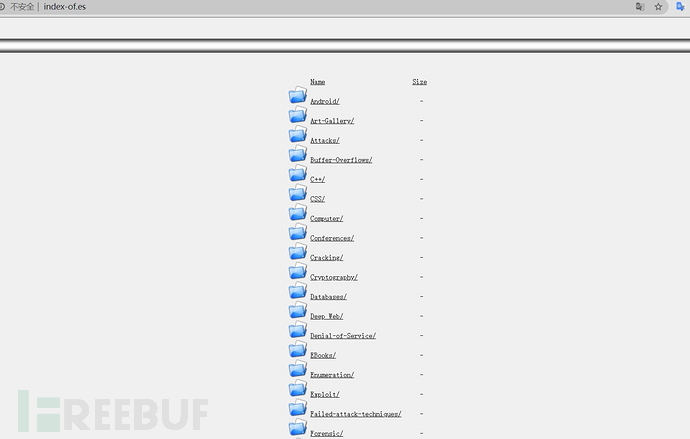
还有就是web服务器配置不当而造成的目录遍历漏洞,可以使用谷歌语法进行查找。
使用 intitle: index of
随便选择一个打开就是了。
Top 25 parameters
Here’s list of top 25 parameters that could be vulnerable to local file inclusion (LFI) vulnerabilities (from link):
?cat={payload}
?dir={payload}
?action={payload}
?board={payload}
?date={payload}
?detail={payload}
?file={payload}
?download={payload}
?path={payload}
?folder={payload}
?prefix={payload}
?include={payload}
?page={payload}
?inc={payload}
?locate={payload}
?show={payload}
?doc={payload}
?site={payload}
?type={payload}
?view={payload}
?content={payload}
?document={payload}
?layout={payload}
?mod={payload}
?conf={payload}
常用字典
https://github.com/carlospolop/Auto_Wordlists/blob/main/wordlists/file_inclusion_linux.txt
如何防御路径穿越
防止路径穿越漏洞的最有效方法是完全避免将用户输入传递给文件系统 API。许多实现此功能的应用函数可以重写,以更安全的方式实现相同行为。
如果你无法避免将用户提供的输入传递给文件系统 API,我们建议采用两层防御措施来防止攻击:
- 在处理用户输入前,先验证其内容。理想情况下,将用户输入与允许值的白名单进行比较。如果无法做到,请确认输入仅包含允许的内容,比如仅字母数字字符。
- 验证输入后,将输入附加到基础目录,并使用平台文件系统 API 规范化路径。验证规范化路径是否从预期的Base目录开始。
以下是一些简单的 Java 代码示例,用于根据用户输入验证文件的规范路径: