Docker risks
容器镜像存在的风险
不安全的第三方组件
例如开发者在代码中引入了存在漏洞版本的 log4j2 组件,然后将其打包成了业务镜像。这样即使代码没有漏洞,但因为引入了不安全的第三方组件也变得有漏洞了。
再比如开发者在 Django 镜像的基础上,编写了自己的 Python 代码,然后将其打包成镜像。这样如果在 Django 镜像里引用了不安全的第三方组件或者 Django 自身存在漏洞,自己打包的镜像也同样会受到影响。
不安全的镜像
在公共镜像仓库比如 Docker Hub 里,会存在一些有漏洞的镜像或者恶意镜像,如果使用了这些镜像那就存在风险了。
敏感信息泄露
如果开发者为了开发、调试方便,可能会将数据库账号密码、云服务密钥之类的敏感数据打包到了镜像里,那别人获取到这个镜像后,就会导致敏感信息泄露了。
活动中的容器存在的风险
不安全的容器应用
在使用容器时,往往会需要进行端口映射,比如把 MySQL 的 3306 端口映射出来,如果 MySQL 被配置了弱密码,那就存在被利用的风险了。
除此之外,如果一个 Web 服务端口被映射出来,同时这个 Web 服务存在漏洞,那么也同样是存在风险的。
不受限制的资源共享
容器运行在宿主机上,容器必然要使用宿主机的各种 CPU、内存等资源,如果没有对容器进行资源使用限制,那么就存在宿主机被资源耗尽的风险。
不安全的配置与挂载
如果为容器设定了不安全的配置,会导致容器本身的隔离机制失效,容器的两大隔离机制如下:
- Linux 命名空间(NameSpace):实现文件系统、网络、进程、主机名等方面的隔离
- Linux 控制组(cgroups):实现 CPU、内存、硬盘等方面的隔离
如果设定了以下配置就会导致相应的隔离机制失效:
- --privileged:使容器内的 root 权限和宿主机上的 root 权限一致,权限隔离被打破
-
--net=host:使容器与宿主机处于同一网络命名空间,网络隔离被打破
-
--pid=host:使容器与宿主机处于同一进程命令空间,进程隔离被打破
- --volume /:/host:宿主机根目录被挂载到容器内部,文件系统隔离被打破
容器管理程序接口的风险
Docker 守护进程主要监听 UNIX socket 和 TCP socket,默认情况下,Docker 只会监听 UNIX socket
UNIX socket
UNIX socket 的风险主要在于 Docker 守护进程默认以宿主机的 root 权限运行,因此就可以借助这点进行提权或者容器逃逸。
这类风险主要有两个利用场景:
- 普通用户被加到 Docker 用户组内
如果普通用户被加入到 Docker 用户组内,那么普通用户也将有权限访问 Docker UNIX socket,如果攻击者获得了这个普通用户权限,就可以借助 Docker 提权到 root 用户权限。
具体的做法可以简单描述为:使用普通用户创建一个 privileged 为 true 的容器,在该容器内挂载宿主机硬盘并写入定时任务,然后将宿主机的 root 权限反弹回来,后期将详细介绍这种方法的使用。
- UNIX socket 挂载到容器内部
有时为了实现容器内部管理容器,可能会将 Docker UNIX socket 挂载到容器内部,那么如果该容器被入侵,RT 就可以借助这个 socket 进行容器逃逸获得宿主机 root 权限。
TCP socket
现在 Docker 守护进程默认不会监听 TCP socket,不过有时可能用户会因为方便开启 TCP socket 的监听,一般默认监听端口是 2375
默认情况下,Docker 守护进程 TCP socket 是无加密无认证的,因此如果发现宿主机 Docker 开放了 TCP socket,就可以直接使用 docker -H 接管目标的容器
其他风险
容器网络风险
虽然默认情况下,容器内部的网络与宿主机是隔离的,但是每个容器之间是彼此互相连通的,理论上在容器之间是存在内网横向的风险的。
宿主机操作系统风险
容器通常与宿主机共享内核,也就是说如果宿主机内核存在漏洞,意味着容器可能也会存在相同的漏洞。
例如如果宿主机存在脏牛漏洞,那么拿到容器权限后,使用脏牛漏洞就可以获得宿主机权限,实现容器逃逸。
软件自身的漏洞
Docker 自身存在的一些漏洞,比如 CVE-2019-14271、CVE-2019-5736 等都可以导致容器逃逸,这些也都是风险点,后面会对这些漏洞进行尝试复现。
参考地址:
《云原生安全-攻防实践与体系构建》
https://docs.docker.com/get-started/overview/
https://www.freebuf.com/articles/web/258398.html
https://cloud.tencent.com/developer/article/1428102
Securing your Docker
Securing Docker installation and usage
- You can use the tool https://github.com/docker/docker-bench-security to inspect your current docker installation.
./docker-bench-security.sh- You can use the tool https://github.com/kost/dockscan to inspect your current docker installation.
dockscan -v unix:///var/run/docker.sock- You can use the tool https://github.com/genuinetools/amicontained the privileges a container will have when run with different security options. This is useful to know the implications of using some security options to run a container:
docker run --rm -it r.j3ss.co/amicontaineddocker run --rm -it --pid host r.j3ss.co/amicontaineddocker run --rm -it --security-opt "apparmor=unconfined" r.j3ss.co/amicontained
Securing Docker Images
- You can use a docker image of https://github.com/quay/clair to make it scan your other docker images and find vulnerabilities.
docker run --rm -v /root/clair_config/:/config -p 6060-6061:6060-6061 -d clair -config="/config/config.yaml"clair-scanner -c http://172.17.0.3:6060 --ip 172.17.0.1 ubuntu-image
Securing Dockerfiles
- You can use the tool https://github.com/buddy-works/dockerfile-linter to inspect your Dockerfile and find all kinds of misconfigurations. Each misconfiguration will be given an ID, you can find here https://github.com/buddy-works/dockerfile-linter/blob/master/Rules.md how to fix each of them.
dockerfilelinter -f Dockerfile

You can use the tool https://github.com/replicatedhq/dockerfilelint to inspect your Dockerfile and find all kinds of misconfigurations.
dockerfilelint Dockerfile
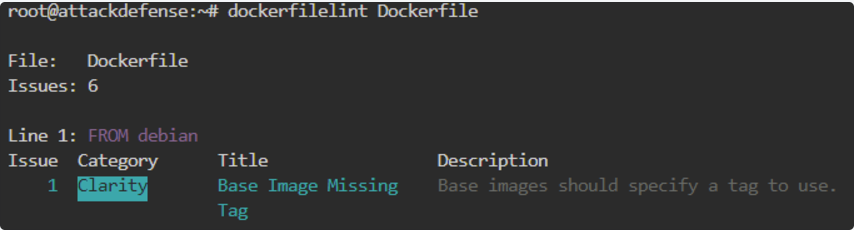
You can use the tool https://github.com/RedCoolBeans/dockerlint to inspect your Dockerfile and find all kinds of misconfigurations.
dockerlint Dockerfile

Logging Suspicious activity
- You can use the tool https://github.com/falcosecurity/falco to detect suspicious behaviour in running containers.
- Note in the following chunk how Falco compiles a kernel module and insert it. After that, it loads the rules and start logging suspicious activities. In this case it has detected 2 privileged containers started, 1 of them with a sensitive mount, and after some seconds it detected how a shell was opened inside one of the containers.
docker run -it --privileged -v /var/run/docker.sock:/host/var/run/docker.sock -v /dev:/host/dev -v /proc:/host/proc:ro -v /boot:/host/boot:ro -v /lib/modules:/host/lib/modules:ro -v /usr:/host/usr:ro falco
* Setting up /usr/src links from host
* Unloading falco-probe, if present
* Running dkms install for falco

Kernel preparation unnecessary for this kernel.  Skipping...

Building module:
cleaning build area......
make -j3 KERNELRELEASE=5.0.0-20-generic -C /lib/modules/5.0.0-20-generic/build M=/var/lib/dkms/falco/0.18.0/build.............
cleaning build area......

DKMS: build completed.

falco-probe.ko:
Running module version sanity check.
modinfo: ERROR: missing module or filename.
 - Original module
   - No original module exists within this kernel
 - Installation
   - Installing to /lib/modules/5.0.0-20-generic/kernel/extra/
mkdir: cannot create directory '/lib/modules/5.0.0-20-generic/kernel/extra': Read-only file system
cp: cannot create regular file '/lib/modules/5.0.0-20-generic/kernel/extra/falco-probe.ko': No such file or directory

depmod...

DKMS: install completed.
* Trying to load a dkms falco-probe, if present
falco-probe found and loaded in dkms
2021-01-04T12:03:20+0000: Falco initialized with configuration file /etc/falco/falco.yaml
2021-01-04T12:03:20+0000: Loading rules from file /etc/falco/falco_rules.yaml:
2021-01-04T12:03:22+0000: Loading rules from file /etc/falco/falco_rules.local.yaml:
2021-01-04T12:03:22+0000: Loading rules from file /etc/falco/k8s_audit_rules.yaml:
2021-01-04T12:03:24+0000: Starting internal webserver, listening on port 8765
2021-01-04T12:03:24.646959000+0000: Notice Privileged container started (user=<NA> command=container:db5dfd1b6a32 laughing_kowalevski (id=db5dfd1b6a32) image=ubuntu:18.04)
2021-01-04T12:03:24.664354000+0000: Notice Container with sensitive mount started (user=<NA> command=container:4822e8378c00 xenodochial_kepler (id=4822e8378c00) image=ubuntu:modified mounts=/:/host::true:rslave)
2021-01-04T12:03:24.664354000+0000: Notice Privileged container started (user=root command=container:4443a8daceb8 focused_brahmagupta (id=4443a8daceb8) image=falco:latest)
2021-01-04T12:04:56.270553320+0000: Notice A shell was spawned in a container with an attached terminal (user=root xenodochial_kepler (id=4822e8378c00) shell=bash parent=runc cmdline=bash terminal=34816 container_id=4822e8378c00 image=ubuntu)
Monitoring Docker
You can use auditd to monitor docker.