OAuth to Account takeover
Whit is OAuth?
OAuth 是一种技术标准,允许你授权一个应用或服务登录到另一个应用或服务,无需泄露密码等私有信息。是否曾经收到过这样的消息,例如"使用 Facebook 登录?” 或“允许此应用程序访问你的帐户?” 你已看到 OAuth 正在运行。
OAuth 是 Open Authorization(开放式授权)的缩写,而不是有时被认为的 authentication。身份验证是一个验证身份的过程。OAuth 确实涉及到你的身份,但目的是授予使用不同应用和服务无缝连接到你的权限,而无需新建账户。OAuth 提供了这种简单的体验,让你可以选择授权两个应用程序共享部分数据,而无需透露凭据。它兼顾了便捷性和安全性。
OAuth 设计用于超文本传输协议 (HTTP)。它使用访问令牌来证明你的身份,并允许它代表你与另一个服务进行交互。如果第二个服务发生数据泄露,你在第一个服务上的凭据仍然安全。OAuth 是一个被广泛采用的开放标准协议,大多数网站和应用程序的开发者都使用此协议。
重要的是,OAuth 不会授予第三方应用或服务无限制访问数据的权限。协议部分内容明确规定允许第三方访问哪些数据,以及可对此数据执行的操作。在很多人都能接触到大量敏感信息和专有信息的商业环境中,设置此类限制和保护身份信息尤为重要。
OAuth 的工作原理是什么?
访问令牌使 OAuth 的使用更加安全。访问令牌是一段数据,其中包含有关适用于令牌的用户和资源信息。令牌还将包括数据共享的具体规则。
例如,你可能希望与照片编辑应用程序共享社交媒体个人资料中的照片,但只希望能访问你的部分照片。它也不需要访问你的直接消息或好友列表。此令牌仅授权访问你批准的数据。此外,还可能有一些规则规定应用程序何时可以使用令牌(可能是单次使用或重复使用)以及令牌的有效期。
OAuth 流程主要是机器与机器之间的交互,用户只需几个接触点。在某些情况下,你可能不需要提供审批,因为软件正在后台以无提示方式处理。这方面的两个 OAuth 例子是:在企业工作场景中,身份平台处理资源之间的连接,以减少大量用户的 IT 摩擦;或者在某些智能设备之间的交互中。
OAuth 1.0 和 OAuth 2.0 之间有什么区别?
最初的 OAuth 1.0 仅针对网站开发。由于 OAuth 2.0 既适用于应用程序也适用于网站,而且实施起来更快、更容易,因此目前并未广泛使用。OAuth 1.0 的扩展性不如 OAuth 2.0,它只有三种可能的授权流,而 OAuth 2.0 有六种。
如果计划使用 OAuth,最好从一开始就使用 2.0 版本。遗憾的是,OAuth 1.0 无法升级到 OAuth 2.0。OAuth 2.0 是对 OAuth 1.0 的全面重新设计,多家大型科技公司对其设计提出了反馈意见。网站可以同时支持 OAuth 1.0 和 OAuth 2.0,但创建者希望 2.0 完全替代 1.0。
OAuth Framework
It's essential to grasp the following components within the OAuth 2.0 framework:
- resource owner: You, as the user/entity, authorize access to your resource, like your social media account posts.
- resource server: The server managing authenticated requests after the application has secured an
access tokenon behalf of theresource owner, e.g., https://socialmedia.com. - client application: The application seeking authorization from the
resource owner, such as https://example.com. - authorization server: The server that issues
access tokensto theclient applicationfollowing the successful authentication of theresource ownerand securing authorization, e.g., https://socialmedia.com. - client_id: A public, unique identifier for the application.
- client_secret: A confidential key, known solely to the application and the authorization server, used for generating
access_tokens. - response_type: A value specifying the type of token requested, like
code. - scope: The level of access the
client applicationis requesting from theresource owner. - redirect_uri: The URL to which the user is redirected after authorization. This typically must align with the pre-registered redirect URL.
- state: A parameter to maintain data across the user's redirection to and from the authorization server. Its uniqueness is critical for serving as a CSRF protection mechanism.
- grant_type: A parameter indicating the grant type and the type of token to be returned.
- code: The authorization code from the
authorization server, used in tandem withclient_idandclient_secretby the client application to acquire anaccess_token. - access_token: The token that the client application uses for API requests on behalf of the
resource owner. - refresh_token: Enables the application to obtain a new
access_tokenwithout re-prompting the user.
OAuth2.0定义了四种授权模式,每种模式适用于不同的应用场景:
| 授权模式 | 安全性 | 适用场景 | 用户体验 | 实现复杂度 |
|---|---|---|---|---|
| 授权码模式 | 高 | Web应用、移动应用 | 优秀 | 中等 |
| 隐式授权模式 | 中 | 纯前端SPA应用 | 良好 | 简单 |
| 密码模式 | 低 | 内部系统、第一方应用 | 优秀 | 简单 |
| 客户端模式 | 中 | 机器对机器通信 | 无 | 简单 |
Note
目前网站最常用的是第一种-授权码模式,所以我们会重点介绍授权码模式
Authorization Code Flow
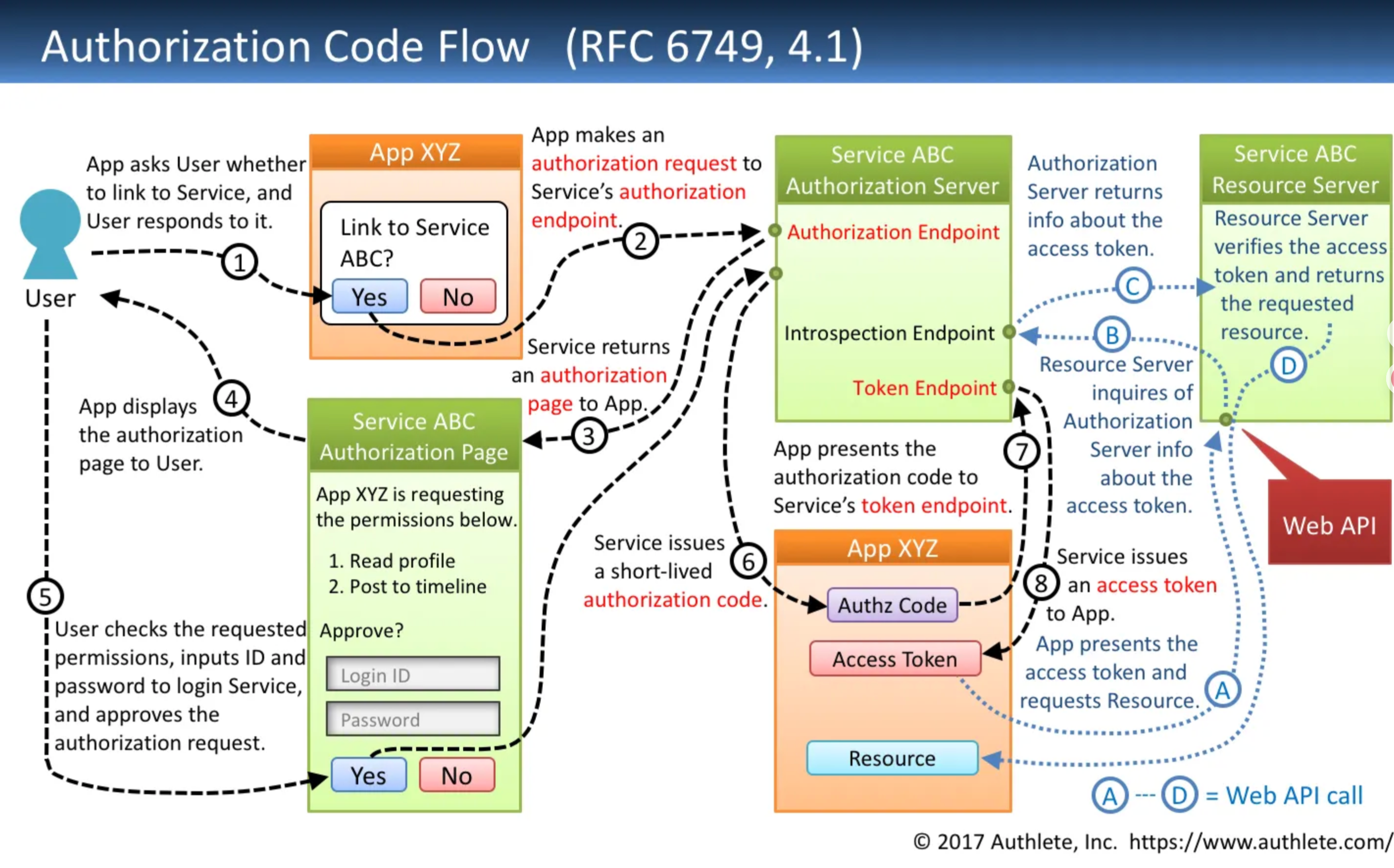
Request To Authorization Endpoint-2️⃣
GET {Authorization Endpoint}
  ?response_type=code             // - Required
  &client_id={Client ID}          // - Required
  &redirect_uri={Redirect URI}    // - Conditionally required
  &scope={Scopes}                 // - Optional
  &state={Arbitrary String}       // - Recommended
  &code_challenge={Challenge}     // - Optional
  &code_challenge_method={Method} // - Optional
  HTTP/1.1
HOST: {Authorization Server}
Response From Authorization Endpoint-6️⃣
HTTP/1.1 302 Found
Location: {Redirect URI}
  ?code={Authorization Code}  // - Always included
  &state={Arbitrary String}   // - Included if the authorization
                              //   request included 'state'.
Request To Token Endpoint-7️⃣
POST {Token Endpoint} HTTP/1.1
Host: {Authorization Server}
Content-Type: application/x-www-form-urlencoded
grant_type=authorization_code  // - Required
&code={Authorization Code}     // - Required
&redirect_uri={Redirect URI}   // - Required if the authorization
                               //   request included 'redirect_uri'.
&code_verifier={Verifier}      // - Required if the authorization
                               //   request included
                               //   'code_challenge'.
Response From Token Endpoint-8️⃣
HTTP/1.1 200 OK
Content-Type: application/json;charset=UTF-8
Cache-Control: no-store
Pragma: no-cache
{
  "access_token": "{Access Token}",    // - Always included
  "token_type": "{Token Type}",        // - Always included
  "expires_in": {Lifetime In Seconds}, // - Optional
  "refresh_token": "{Refresh Token}",  // - Optional
  "scope": "{Scopes}"                  // - Mandatory if the granted
                                       //   scopes differ from the
                                       //   requested ones.
}
The actual OAuth flow proceeds as follows:
- You navigate to https://example.com and select the “Integrate with Social Media” button.
- The site then sends a request to https://socialmedia.com asking for your authorization to let https://example.com’s application access your posts. The request is structured as:
https://socialmedia.com/auth
?response_type=code
&client_id=example_clientId
&redirect_uri=https%3A%2F%2Fexample.com%2Fcallback
&scope=readPosts
&state=randomString123
-
You are then presented with a consent page.
-
Following your approval, Social Media sends a response to the
redirect_uriwith thecodeandstateparameters:
- https://example.com utilizes this
code, together with itsclient_idandclient_secret, to make a server-side request to obtain anaccess_tokenon your behalf, enabling access to the permissions you consented to:
POST /oauth/access_token
Host: socialmedia.com
...{"client_id": "example_clientId", "client_secret": "example_clientSecret", "code": "uniqueCode123", "grant_type": "authorization_code"}
- Finally, the process concludes as https://example.com employs your
access_tokento make an API call to Social Media to access
Implicit Flow
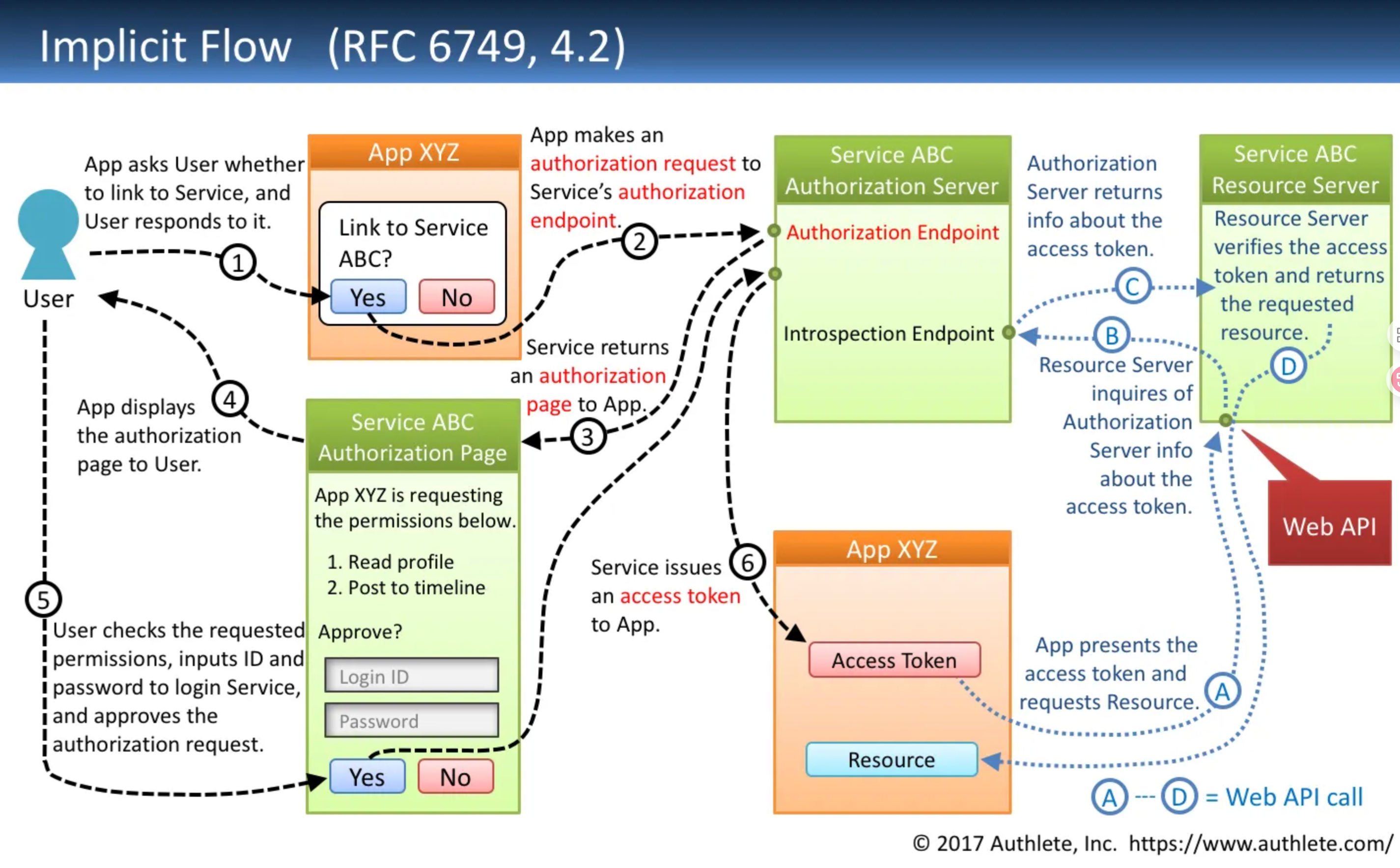
Request To Authorization Endpoint-2️⃣
GET {Authorization Endpoint}
  ?response_type=token          // - Required
  &client_id={Client ID}        // - Required
  &redirect_uri={Redirect URI}  // - Conditionally required
  &scope={Scopes}               // - Optional
  &state={Arbitrary String}     // - Recommended
  HTTP/1.1
HOST: {Authorization Server}
Response From Authorization Endpoint-6️⃣
HTTP/1.1 302 Found
Location: {Redirect URI}
  #access_token={Access Token}       // - Always included
  &token_type={Token Type}           // - Always included
  &expires_in={Lifetime In Seconds}  // - Optional
  &state={Arbitrary String}          // - Included if the request
                                     //   included 'state'.
  &scope={Scopes}                    // - Mandatory if the granted
                                     //   scopes differ from the
                                     //   requested ones.
Resource Owner Password Credentials Flow
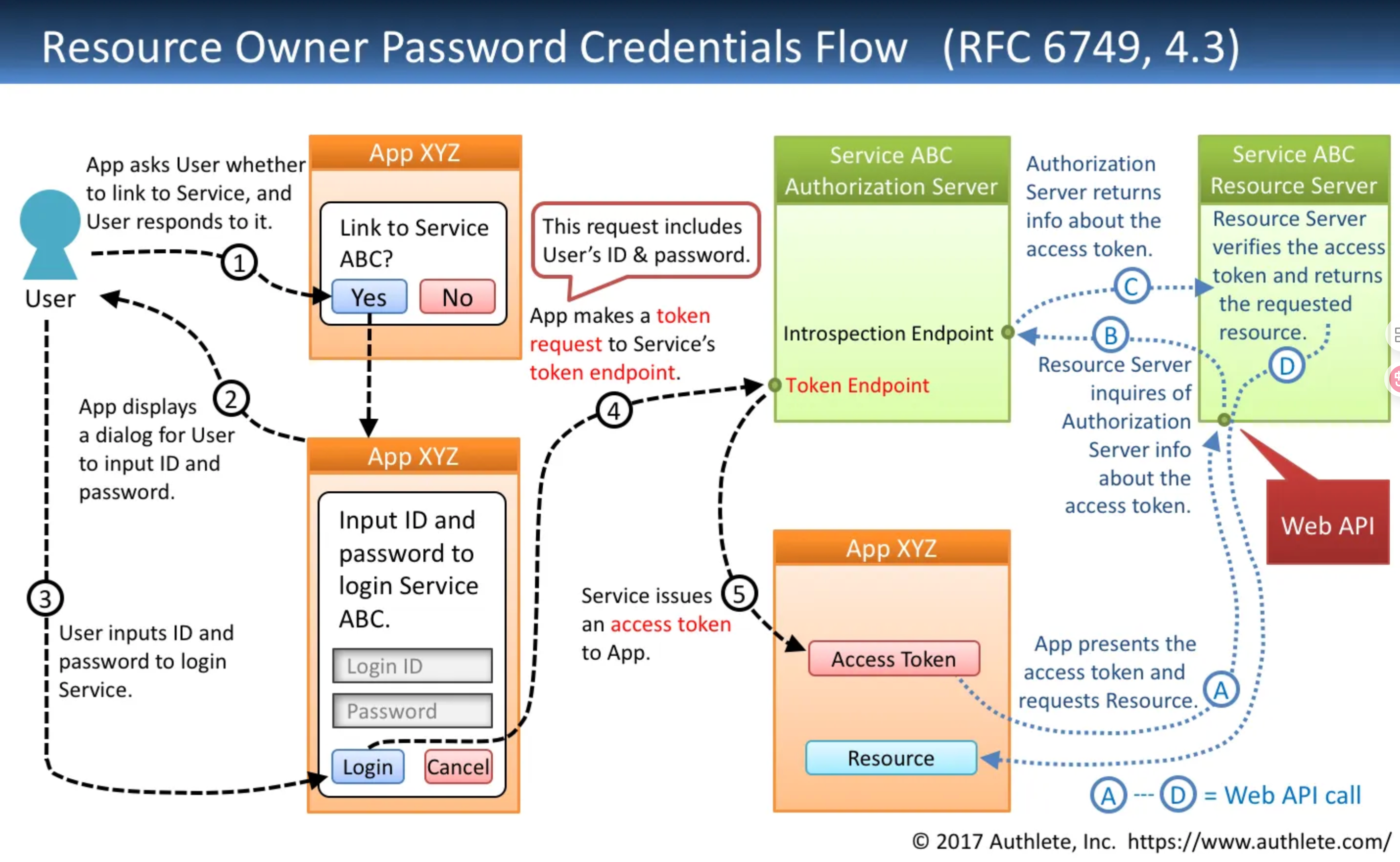
Request To Token Endpoint-4️⃣
POST {Token Endpoint} HTTP/1.1
Host: {Authorization Server}
Content-Type: application/x-www-form-urlecoded
grant_type=password    // - Required
&username={User ID}    // - Required
&password={Password}   // - Required
&scope={Scopes}        // - Optional
Response From Token Endpoint-5️⃣
HTTP/1.1 200 OK
Content-Type: application/json;charset=UTF-8
Cache-Control: no-store
Pragma: no-cache
{
  "access_token": "{Access Token}",    // - Always included
  "token_type": "{Token Type}",        // - Always included
  "expires_in": {Lifetime In Seconds}, // - Optional
  "refresh_token": "{Refresh Token}",  // - Optional
  "scope": "{Scopes}"                  // - Mandatory if the granted
                                       //   scopes differ from the
                                       //   requested ones.
}
Client Credentials Flow
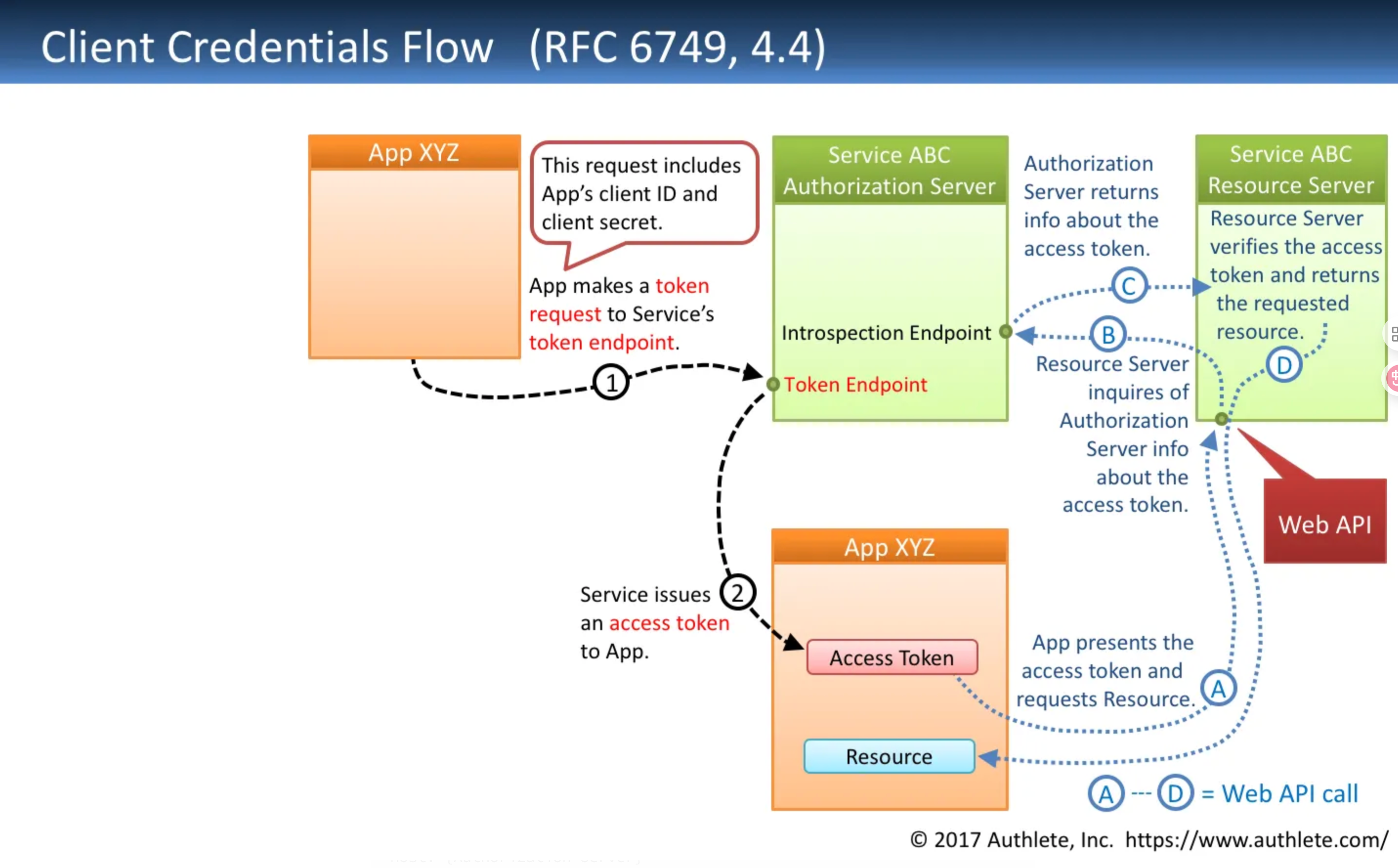
Request To Token Endpoint-1️⃣
POST {Token Endpoint} HTTP/1.1
Host: {Authorization Server}
Authorization: Basic {Client Credentials}
Content-Type: application/x-www-form-urlecoded
grant_type=client_credentials  // - Required
&scope={Scopes}                // - Optional
Response From Token Endpoint-2️⃣
HTTP/1.1 200 OK
Content-Type: application/json;charset=UTF-8
Cache-Control: no-store
Pragma: no-cache
{
  "access_token": "{Access Token}",    // - Always included
  "token_type": "{Token Type}",        // - Always included
  "expires_in": {Lifetime In Seconds}, // - Optional
  "scope": "{Scopes}"                  // - Mandatory if the granted
                                       //   scopes differ from the
                                       //   requested ones.
}
Refresh Token Flow
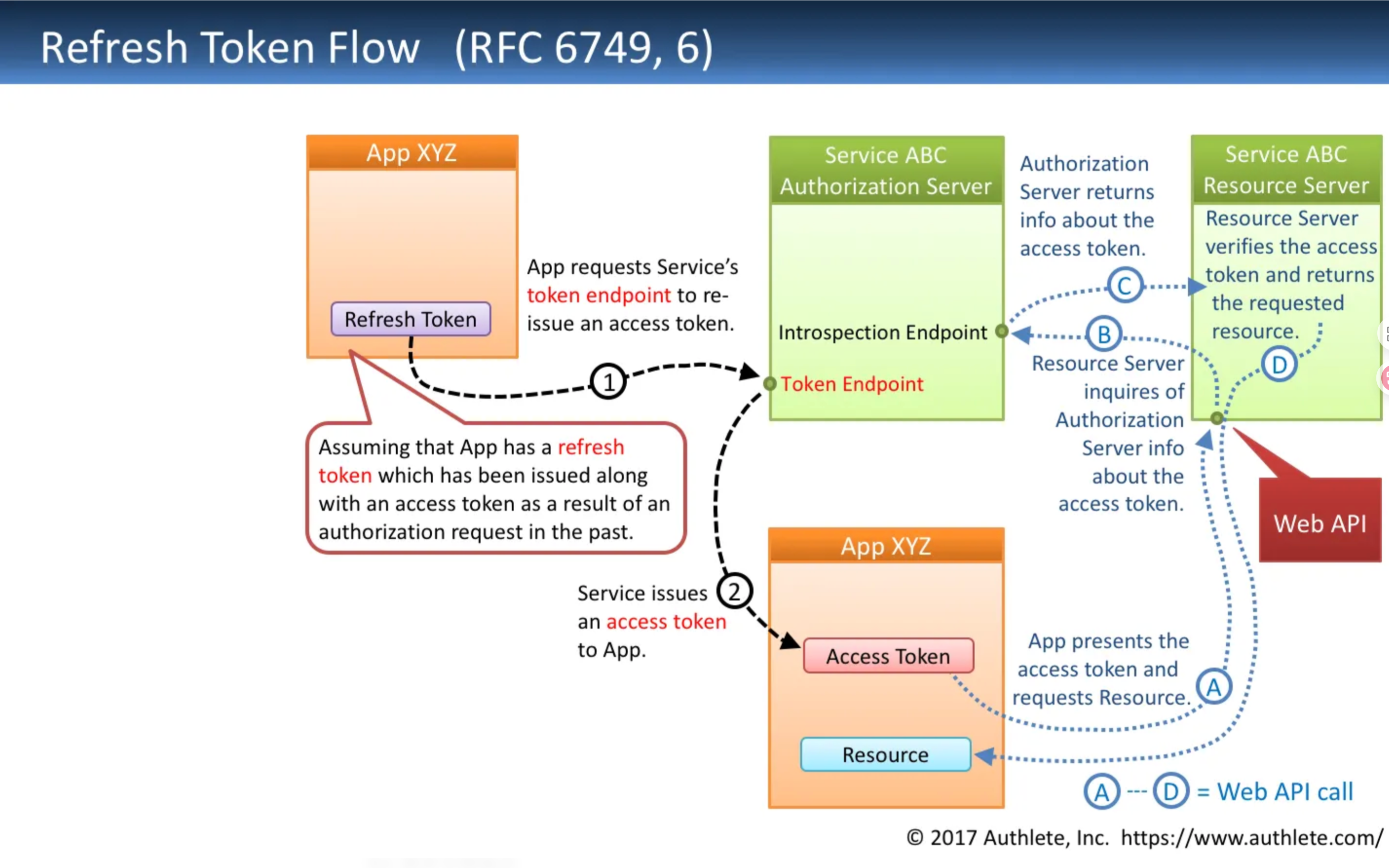
Request To Token Endpoint
POST {Token Endpoint} HTTP/1.1
Host: {Authorization Server}
Content-Type: application/x-www-form-urlecoded
grant_type=refresh_token        // - Required
&refresh_token={Refresh Token}  // - Required
&scope={Scopes}                 // - Optional
Response From Token Endpoint
HTTP/1.1 200 OK
Content-Type: application/json;charset=UTF-8
Cache-Control: no-store
Pragma: no-cache
{
  "access_token": "{Access Token}",    // - Always included
  "token_type": "{Token Type}",        // - Always included
  "expires_in": {Lifetime In Seconds}, // - Optional
  "refresh_token": "{Refresh Token}",  // - Optional
  "scope": "{Scopes}"                  // - Mandatory if the granted
                                       //   scopes differ from the
                                       //   original ones.
}
Vulnerabilities
Open redirect_uri
The redirect_uri is crucial for security in OAuth and OpenID implementations, as it directs where sensitive data, like authorization codes, are sent post-authorization. If misconfigured, it could allow attackers to redirect these requests to malicious servers, enabling account takeover.
Exploitation techniques vary based on the authorization server's validation logic. They can range from strict path matching to accepting any URL within the specified domain or subdirectory. Common exploitation methods include open redirects, path traversal, exploiting weak regexes, and HTML injection for token theft.
Besides redirect_uri, other OAuth and OpenID parameters like client_uri, policy_uri, tos_uri, and initiate_login_uri are also susceptible to redirection attacks. These parameters are optional and their support varies across servers.
For those targeting an OpenID server, the discovery endpoint (.well-known/openid-configuration) often lists valuable configuration details like registration_endpoint, request_uri_parameter_supported, and "require_request_uri_registration. These details can aid in identifying the registration endpoint and other configuration specifics of the server.
XSS in redirect implementation
As mentioned in this bug bounty report https://blog.dixitaditya.com/2021/11/19/account-takeover-chain.html it might be possible that the redirect URL is being reflected in the response of the server after the user authenticates, being vulnerable to XSS. Possible payload to test:
https://app.victim.com/login?redirectUrl=https://app.victim.com/dashboard</script><h1>test</h1>
CSRF - Improper handling of state parameter
In OAuth implementations, the misuse or omission of the state parameter can significantly increase the risk of Cross-Site Request Forgery (CSRF) attacks. This vulnerability arises when the state parameter is either not used, used as a static value, or not properly validated, allowing attackers to bypass CSRF protections.
Attackers can exploit this by intercepting the authorization process to link their account with a victim's account, leading to potential account takeovers. This is especially critical in applications where OAuth is used for authentication purposes.
Real-world examples of this vulnerability have been documented in various CTF challenges and hacking platforms, highlighting its practical implications. The issue also extends to integrations with third-party services like Slack, Stripe, and PayPal, where attackers can redirect notifications or payments to their accounts.
Proper handling and validation of the state parameter are crucial for safeguarding against CSRF and securing the OAuth flow.
Pre Account Takeover
- Without Email Verification on Account Creation: Attackers can preemptively create an account using the victim's email. If the victim later uses a third-party service for login, the application might inadvertently link this third-party account to the attacker's pre-created account, leading to unauthorized access.
- Exploiting Lax OAuth Email Verification: Attackers may exploit OAuth services that don't verify emails by registering with their service and then changing the account email to the victim's. This method similarly risks unauthorized account access, akin to the first scenario but through a different attack vector.
Disclosure of Secrets
Identifying and protecting secret OAuth parameters is crucial. While the client_id can be safely disclosed, revealing the client_secret poses significant risks. If the client_secret is compromised, attackers can exploit the identity and trust of the application to steal user access_tokens and private information.
A common vulnerability arises when applications mistakenly handle the exchange of the authorization code for an access_token on the client-side rather than the server-side. This mistake leads to the exposure of the client_secret, enabling attackers to generate access_tokens under the guise of the application. Moreover, through social engineering, attackers could escalate privileges by adding additional scopes to the OAuth authorization, further exploiting the application's trusted status.
Client Secret Bruteforce
You can try to bruteforce the client_secret of a service provider with the identity provider in order to be try to steal accounts. The request to BF may look similar to:
POST /token HTTP/1.1
content-type: application/x-www-form-urlencoded
host: 10.10.10.10:3000
content-length: 135
Connection: close

code=77515&redirect_uri=http%3A%2F%2F10.10.10.10%3A3000%2Fcallback&grant_type=authorization_code&client_id=public_client_id&client_secret=[bruteforce]
Referer Header leaking Code + State
Once the client has the code and state, if it's reflected inside the Referer header when he browses to a different page, then it's vulnerable.
Access Token Stored in Browser History
Go to the browser history and check if the access token is saved in there.
Everlasting Authorization Code
The authorization code should live just for some time to limit the time window where an attacker can steal and use it.
Authorization/Refresh Token not bound to client
If you can get the authorization code and use it with a different client then you can takeover other accounts.