Access Token
Access Tokens
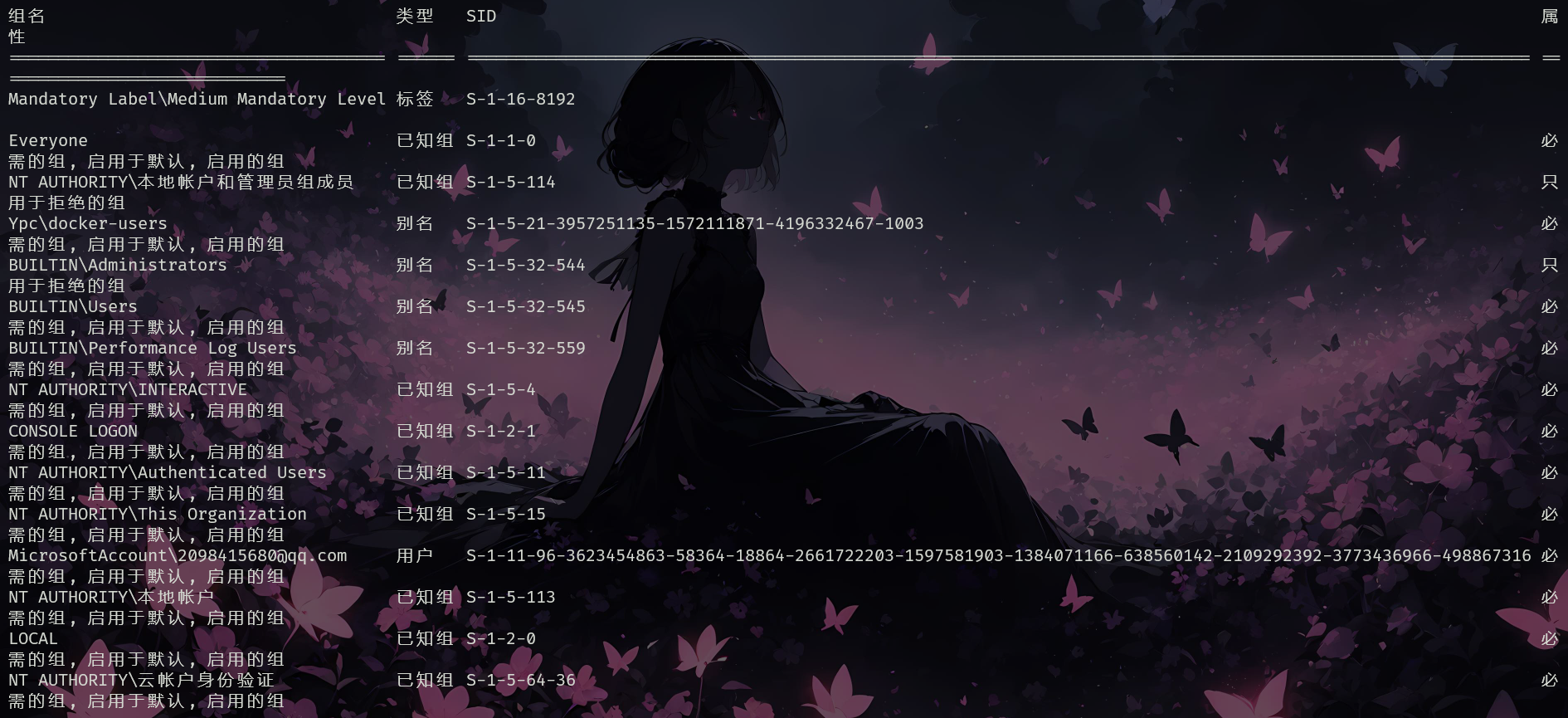
Each user logged onto the system holds an access token with security information for that logon session. The system creates an access token when the user logs on. Every process executed on behalf of the user has a copy of the access token. The token identifies the user, the user's groups, and the user's privileges. A token also contains a logon SID (Security Identifier) that identifies the current logon session.
You can see this information executing whoami /all
Local administrator
When a local administrator logins, two access tokens are created: One with admin rights and other one with normal rights. By default, when this user executes a process the one with regular (non-administrator) rights is used. When this user tries to execute anything as administrator ("Run as Administrator" for example) the UAC will be used to ask for permission. If you want to learn more about the UAC read this page.
Credentials user impersonation
If you have valid credentials of any other user, you can create a new logon session with those credentials :
The access token has also a reference of the logon sessions inside the LSASS, this is useful if the process needs to access some objects of the network. You can launch a process that uses different credentials for accessing network services using:
This is useful if you have useful credentials to access objects in the network but those credentials aren't valid inside the current host as they are only going to be used in the network (in the current host your current user privileges will be used).
微软在Windows 11 版本 24H2中推出了sudo,该命令也可以用来提升权限
但需要注意的是:
- sudo目前只能提升到administrator
- sudo目前只能采用UAC方式验证
Types of tokens
There are two types of tokens available:
- Primary Token: It serves as a representation of a process's security credentials. The creation and association of primary tokens with processes are actions that require elevated privileges, emphasizing the principle of privilege separation. Typically, an authentication service is responsible for token creation, while a logon service handles its association with the user's operating system shell. It is worth noting that processes inherit the primary token of their parent process at creation.
- Impersonation Token: Empowers a server application to adopt the client's identity temporarily for accessing secure objects. This mechanism is stratified into four levels of operation:
- Anonymous: Grants server access akin to that of an unidentified user.
- Identification: Allows the server to verify the client's identity without utilizing it for object access.
- Impersonation: Enables the server to operate under the client's identity.
- Delegation: Similar to Impersonation but includes the ability to extend this identity assumption to remote systems the server interacts with, ensuring credential preservation.
Impersonate Tokens
Using the incognito module of metasploit if you have enough privileges you can easily list and impersonate other tokens. This could be useful to perform actions as if you where the other user. You could also escalate privileges with this technique.
Token Privileges
SeImpersonatePrivilege
This is privilege that is held by any process allows the impersonation (but not creation) of any token, given that a handle to it can be obtained. A privileged token can be acquired from a Windows service (DCOM) by inducing it to perform NTLM authentication against an exploit, subsequently enabling the execution of a process with SYSTEM privileges. This vulnerability can be exploited using various tools, such as juicy-potato, RogueWinRM (which requires winrm to be disabled), SweetPotato, and PrintSpoofer.
SeAssignPrimaryPrivilege
It is very similar to SeImpersonatePrivilege, it will use the same method to get a privileged token. Then, this privilege allows to assign a primary token to a new/suspended process. With the privileged impersonation token you can derivate a primary token (DuplicateTokenEx). With the token, you can create a new process with 'CreateProcessAsUser' or create a process suspended and set the token (in general, you cannot modify the primary token of a running process).
SeTcbPrivilege
If you have enabled this token you can use KERB_S4U_LOGON to get an impersonation token for any other user without knowing the credentials, add an arbitrary group (admins) to the token, set the integrity level of the token to "medium", and assign this token to the current thread (SetThreadToken).
SeBackupPrivilege
The system is caused to grant all read access control to any file (limited to read operations) by this privilege. It is utilized for reading the password hashes of local Administrator accounts from the registry, following which, tools like "psexec" or "wmiexec" can be used with the hash (Pass-the-Hash technique). However, this technique fails under two conditions: when the Local Administrator account is disabled, or when a policy is in place that removes administrative rights from Local Administrators connecting remotely. You can abuse this privilege with:
- https://github.com/Hackplayers/PsCabesha-tools/blob/master/Privesc/Acl-FullControl.ps1
- https://github.com/giuliano108/SeBackupPrivilege/tree/master/SeBackupPrivilegeCmdLets/bin/Debug
- following IppSec in https://www.youtube.com/watch?v=IfCysW0Od8w&t=2610&ab_channel=IppSec
- Or as explained in the escalating privileges with Backup Operators(参考权限组)
SeRestorePrivilege
Permission for write access to any system file, irrespective of the file's Access Control List (ACL), is provided by this privilege. It opens up numerous possibilities for escalation, including the ability to modify services, perform DLL Hijacking, and set debuggers via Image File Execution Options among various other techniques.
SeCreateTokenPrivilege
SeCreateTokenPrivilege is a powerful permission, especially useful when a user possesses the ability to impersonate tokens, but also in the absence of SeImpersonatePrivilege. This capability hinges on the ability to impersonate a token that represents the same user and whose integrity level does not exceed that of the current process.
Key Points:
- Impersonation without SeImpersonatePrivilege: It's possible to leverage SeCreateTokenPrivilege for EoP by impersonating tokens under specific conditions.
- Conditions for Token Impersonation: Successful impersonation requires the target token to belong to the same user and have an integrity level that is less or equal to the integrity level of the process attempting impersonation.
- Creation and Modification of Impersonation Tokens: Users can create an impersonation token and enhance it by adding a privileged group's SID (Security Identifier).
SeLoadDriverPrivilege
This privilege allows to load and unload device drivers with the creation of a registry entry with specific values for ImagePath and Type. Since direct write access to HKLM (HKEY_LOCAL_MACHINE) is restricted, HKCU (HKEY_CURRENT_USER) must be utilized instead. However, to make HKCU recognizable to the kernel for driver configuration, a specific path must be followed.
This path is \Registry\User\<RID>\System\CurrentControlSet\Services\DriverName, where <RID> is the Relative Identifier of the current user. Inside HKCU, this entire path must be created, and two values need to be set:
ImagePath, which is the path to the binary to be executedType, with a value ofSERVICE_KERNEL_DRIVER(0x00000001).
Steps to Follow:
- Access
HKCUinstead ofHKLMdue to restricted write access. - Create the path
\Registry\User\<RID>\System\CurrentControlSet\Services\DriverNamewithinHKCU, where<RID>represents the current user's Relative Identifier. - Set the
ImagePathto the binary's execution path. - Assign the
TypeasSERVICE_KERNEL_DRIVER(0x00000001).
# Example Python code to set the registry values
import winreg as reg

# Define the path and values
path = r'Software\YourPath\System\CurrentControlSet\Services\DriverName' # Adjust 'YourPath' as needed
key = reg.OpenKey(reg.HKEY_CURRENT_USER, path, 0, reg.KEY_WRITE)
reg.SetValueEx(key, "ImagePath", 0, reg.REG_SZ, "path_to_binary")
reg.SetValueEx(key, "Type", 0, reg.REG_DWORD, 0x00000001)
reg.CloseKey(key)
More ways to abuse this privilege in https://www.ired.team/offensive-security-experiments/active-directory-kerberos-abuse/privileged-accounts-and-token-privileges#seloaddriverprivilege
SeTakeOwnershipPrivilege
This is similar to to SeRestorePrivilege. Its primary function allows a process to assume ownership of an object, circumventing the requirement for explicit discretionary access through the provision of WRITE_OWNER access rights. The process involves first securing ownership of the intended registry key for writing purposes, then altering the DACL to enable write operations.
takeown /f 'C:\some\file.txt' #Now the file is owned by you
icacls 'C:\some\file.txt' /grant <your_username>:F #Now you have full access
# Use this with files that might contain credentials such as
%WINDIR%\repair\sam
%WINDIR%\repair\system
%WINDIR%\repair\software
%WINDIR%\repair\security
%WINDIR%\system32\config\security.sav
%WINDIR%\system32\config\software.sav
%WINDIR%\system32\config\system.sav
%WINDIR%\system32\config\SecEvent.Evt
%WINDIR%\system32\config\default.sav
c:\inetpub\wwwwroot\web.config
SeDebugPrivilege
This privilege permits the debug other processes, including to read and write in the memore. Various strategies for memory injection, capable of evading most antivirus and host intrusion prevention solutions, can be employed with this privilege.
Dump memory
You could use ProcDump from the SysInternals Suite to capture the memory of a process. Specifically, this can apply to the Local Security Authority Subsystem Service (LSASS) process, which is responsible for storing user credentials once a user has successfully logged into a system.
You can then load this dump in mimikatz to obtain passwords:
mimikatz.exe
mimikatz # log
mimikatz # sekurlsa::minidump lsass.dmp
mimikatz # sekurlsa::logonpasswords
RCE
If you want to get a NT SYSTEM shell you could use:
# Get the PID of a process running as NT SYSTEM
import-module psgetsys.ps1; [MyProcess]::CreateProcessFromParent(<system_pid>,<command_to_execute>)
Check privileges
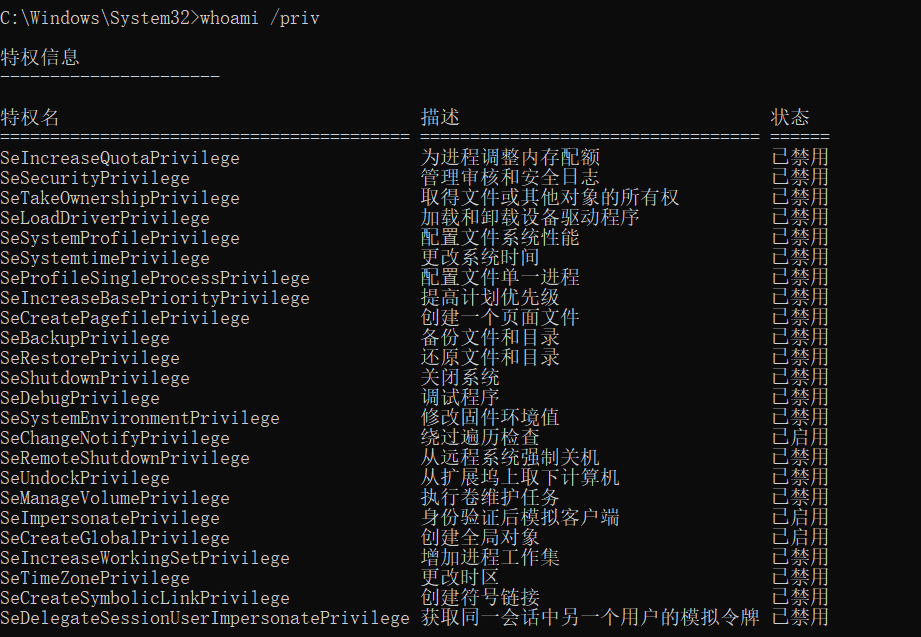
The tokens that appear as Disabled can be enable, you you actually can abuse Enabled and Disabled tokens.
Enable All the tokens
If you have tokens disables, you can use the script EnableAllTokenPrivs.ps1 to enable all the tokens:
Or the script embed in this post.
Table
Full token privileges cheatsheet at https://github.com/gtworek/Priv2Admin, summary below will only list direct ways to exploit the privilege to obtain an admin session or read sensitive files.
| Privilege | Impact | Tool | Execution path | Remarks |
|---|---|---|---|---|
SeAssignPrimaryToken |
Admin | 3rd party tool | "It would allow a user to impersonate tokens and privesc to nt system using tools such as potato.exe, rottenpotato.exe and juicypotato.exe" | Thank you Aurélien Chalot for the update. I will try to re-phrase it to something more recipe-like soon. |
SeAudit |
Threat | 3rd party tool | Write events to the Security event log to fool auditing or to overwrite old events. | Writing own events is possible with Authz Report Security Event API. - see PoC by @daem0nc0re |
SeBackup |
Admin | 3rd party tool | 1. Backup the HKLM\SAM and HKLM\SYSTEM registry hives 2. Extract the local accounts hashes from the SAM database 3. Pass-the-Hash as a member of the local Administrators group Alternatively, can be used to read sensitive files. |
For more information, refer to the SeBackupPrivilege file. - see PoC by @daem0nc0re |
SeChangeNotify |
None | - | - | Privilege held by everyone. Revoking it may make the OS (Windows Server 2019) unbootable. |
SeCreateGlobal |
? | ? | ? | |
SeCreatePagefile |
None | Built-in commands | Create hiberfil.sys, read it offline, look for sensitive data. | Requires offline access, which leads to admin rights anyway. - See PoC by @daem0nc0re |
SeCreatePermanent |
? | ? | ? | |
SeCreateSymbolicLink |
? | ? | ? | |
SeCreateToken |
Admin | 3rd party tool | Create arbitrary token including local admin rights with NtCreateToken. - see PoC by @daem0nc0re |
|
SeDebug |
Admin | PowerShell | Duplicate the lsass.exe token. |
Script to be found at FuzzySecurity. - See PoC by @daem0nc0re |
SeDelegateSession- UserImpersonate |
? | ? | ? | Privilege name broken to make the column narrow. |
SeEnableDelegation |
None | - | - | The privilege is not used in the Windows OS. |
SeImpersonate |
Admin | 3rd party tool | Tools from the Potato family (potato.exe, RottenPotato, RottenPotatoNG, Juicy Potato, SweetPotato, RemotePotato0), RogueWinRM, PrintSpoofer, etc. | Similarly to SeAssignPrimaryToken, allows by design to create a process under the security context of another user (using a handle to a token of said user). Multiple tools and techniques may be used to obtain the required token. |
SeIncreaseBasePriority |
Availability | Built-in commands | start /realtime SomeCpuIntensiveApp.exe |
May be more interesting on servers. |
SeIncreaseQuota |
Availability | 3rd party tool | Change cpu, memory, and cache limits to some values making the OS unbootable. | - Quotas are not checked in the safe mode, which makes repair relatively easy. - The same privilege is used for managing registry quotas. |
SeIncreaseWorkingSet |
None | - | - | Privilege held by everyone. Checked when calling fine-tuning memory management functions. |
SeLoadDriver |
Admin | 3rd party tool | 1. Load buggy kernel driver such as szkg64.sys 2. Exploit the driver vulnerability Alternatively, the privilege may be used to unload security-related drivers with fltMC builtin command. i.e.: fltMC sysmondrv |
1. The szkg64 vulnerability is listed as CVE-2018-15732 2. The szkg64 exploit code was created by Parvez Anwar |
SeLockMemory |
Availability | 3rd party tool | Starve System memory partition by moving pages. | PoC published by Walied Assar (@waleedassar) |
SeMachineAccount |
None | - | - | The privilege is not used in the Windows OS. |
SeManageVolume |
Admin | 3rd party tool | 1. Enable the privilege in the token 2. Create handle to .\C: with SYNCHRONIZE | FILE_TRAVERSE 3. Send the FSCTL_SD_GLOBAL_CHANGE to replace S-1-5-32-544 with S-1-5-32-545 4. Overwrite utilman.exe etc. |
FSCTL_SD_GLOBAL_CHANGE can be made with this piece of code. |
SeProfileSingleProcess |
None | - | - | The privilege is checked before changing (and in very limited set of commands, before querying) parameters of Prefetch, SuperFetch, and ReadyBoost. The impact may be adjusted, as the real effect is not known. |
SeRelabel |
Threat | 3rd party tool | Modification of system files by a legitimate administrator | See: MIC documentation Integrity labels provide additional protection, on top of well-known ACLs. Two main scenarios include: - protection against attacks using exploitable applications such as browsers, PDF readers etc. - protection of OS files. SeRelabel present in the token will allow to use WRITE_OWNER access to a resource, including files and folders. Unfortunately, the token with IL less than High will have SeRelabel privilege disabled, making it useless for anyone not being an admin already. See great blog post by @tiraniddo for details. |
SeRemoteShutdown |
Availability | Built-in commands | shutdown /s /f /m \\server1 /d P:5:19 |
The privilege is verified when shutdown/restart request comes from the network. 127.0.0.1 scenario to be investigated. |
SeReserveProcessor |
None | - | - | It looks like the privilege is no longer used and it appeared only in a couple of versions of winnt.h. You can see it listed i.e. in the source code published by Microsoft here. |
SeRestore |
Admin | PowerShell | 1. Launch PowerShell/ISE with the SeRestore privilege present. 2. Enable the privilege with Enable-SeRestorePrivilege). 3. Rename utilman.exe to utilman.old 4. Rename cmd.exe to utilman.exe 5. Lock the console and press Win+U | Attack may be detected by some AV software. Alternative method relies on replacing service binaries stored in "Program Files" using the same privilege. - see PoC by @daem0nc0re |
SeSecurity |
Threat | Built-in commands | - Clear Security event log: wevtutil cl Security - Shrink the Security log to 20MB to make events flushed soon: wevtutil sl Security /ms:0 - Read Security event log to have knowledge about processes, access and actions of other users within the system. - Knowing what is logged to act under the radar. - Knowing what is logged to generate large number of events effectively purging old ones without leaving obvious evidence of cleaning. - Viewing and changing object SACLs (in practice: auditing settings) |
See PoC by @daem0nc0re |
SeShutdown |
Availability | Built-in commands | shutdown.exe /s /f /t 1 |
Allows to call most of NtPowerInformation() levels. To be investigated. Allows to call NtRaiseHardError() causing immediate BSOD and memory dump, leading potentially to sensitive information disclosure - see PoC by @daem0nc0re |
SeSyncAgent |
None | - | - | The privilege is not used in the Windows OS. |
SeSystemEnvironment |
Unknown | 3rd party tool | The privilege permits to use NtSetSystemEnvironmentValue, NtModifyDriverEntry and some other syscalls to manipulate UEFI variables. |
The privilege is required to run sysprep.exe.Additionally: - Firmware environment variables were commonly used on non-Intel platforms in the past, and now slowly return to UEFI world. - The area is highly undocumented. - The potential may be huge (i.e. breaking Secure Boot) but raising the impact level requires at least PoC. - see PoC by @daem0nc0re |
SeSystemProfile |
? | ? | ? | |
SeSystemtime |
Threat | Built-in commands | cmd.exe /c date 01-01-01 cmd.exe /c time 00:00 |
The privilege allows to change the system time, potentially leading to audit trail integrity issues, as events will be stored with wrong date/time. - Be careful with date/time formats. Use always-safe values if not sure. - Sometimes the name of the privilege uses uppercase "T" and is referred as SeSystemTime. |
SeTakeOwnership |
Admin | Built-in commands | 1. takeown.exe /f "%windir%\system32" 2. icacls.exe "%windir%\system32" /grant "%username%":F 3. Rename cmd.exe to utilman.exe 4. Lock the console and press Win+U |
Attack may be detected by some AV software. Alternative method relies on replacing service binaries stored in "Program Files" using the same privilege. - See PoC by @daem0nc0re |
SeTcb |
Admin | 3rd party tool | Manipulate tokens to have local admin rights included. | Sample code+exe creating arbitrary tokens to be found at PsBits. |
SeTimeZone |
Mess | Built-in commands | Change the timezone. tzutil /s "Chatham Islands Standard Time" |
|
SeTrustedCredManAccess |
Threat | 3rd party tool | Dumping credentials from Credential Manager | Great blog post by @tiraniddo. - see PoC by @daem0nc0re |
SeUndock |
None | - | - | The privilege is enabled when undocking, but never observed it checked to grant/deny access. In practice it means it is actually unused and cannot lead to any escalation. |
SeUnsolicitedInput |
None | - | - | The privilege is not used in the Windows OS. |
Reference
- Take a look to this table defining Windows tokens: https://github.com/gtworek/Priv2Admin
- Take a look to this paper about privesc with tokens.