HTTP参数污染和JSON注入
服务器端参数污染是指网站在服务器端请求中嵌入用户输入,指向内部 API,且没有充分编码。这意味着攻击者可能能够操控或注入参数,从而使他们能够实现以下行为:
- 覆盖现有参数。
- 修改应用行为。
- 访问未经授权的数据。
你可以测试任何用户输入中任何参数的污染。例如,查询参数、表单字段、头部和 URL 路径参数都可能存在漏洞。

查询字符串中服务器端参数污染的测试
为了测试查询字符串中的服务器端参数污染,可以在输入中加入 # 、 & 和 = 这样的查询语法字符,观察应用程序的响应。
考虑一个漏洞应用,允许你根据用户名搜索其他用户。当你搜索用户时,浏览器会发出以下请求:
为了获取用户信息,服务器会通过以下请求查询内部 API:
截断查询字符串
你可以使用带有 URL 编码的 # 字符来尝试截断服务器端请求。为了帮助你理解回复,你也可以在 # 字符后加字符串。
例如,你可以修改查询字符串为以下内容:
前端将尝试访问以下 URL:
Note
务必将字符 # 进行 URL 编码。否则,前端应用程序会将它解释为片段标识符,从而无法将其传递给内部 API。
请检查响应内容,以判断查询是否被截断了。例如,如果响应中返回了用户 peter ,那么可能是服务器端查询被截断了。如果返回了 Invalid name 错误信息,说明应用程序可能将 foo 视为用户名的一部分。这表明服务器端请求可能没有被截断。
如果你能够截断服务器端请求,那么就不必将 publicProfile 字段设置为 true 了。这样你就可以利用这个特性返回非公开的用户资料了。
传入了无效的参数
你可以使用 URL 编码的 & 字符来尝试在服务器端请求中添加第二个参数。
例如,你可以将查询字符串修改为如下形式:
这就会触发以下对内部 API 的服务器端请求:
请检查响应内容,以寻找有关如何解析该额外参数的信息。例如,如果响应内容没有发生变化,那就表明该参数已经成功注入,但被应用程序忽略了。
注入有效的参数
如果你能够修改查询字符串,那么就可以尝试在服务器端请求中添加第二个有效的参数。
例如,如果您已经确定了 email 参数,可以像下面这样将其添加到查询字符串中:
这就会触发以下对内部 API 的服务器端请求:
覆盖现有参数
为了确认该应用程序是否容易受到服务器端参数污染的问题,你可以尝试覆盖原始参数。方法是在代码中注入另一个具有相同名称的参数。
例如,你可以将查询字符串修改为如下形式:
这就会触发以下对内部 API 的服务器端请求:
内部 API 解释了两个 name 参数。这一变化会影响应用程序对第二个参数的处理方式。这种情况会因不同的 Web 技术而有所不同。例如:
- PHP 只会解析最后一个参数。这样一来,用户就会尝试输入形如
carlos这样的格式。 - ASP.NET 同时使用了这两种参数。这样一来,用户可能会搜索
peter,carlos,从而导致出现Invalid username错误消息的情况。 - Node.js/Express 只会解析第一个参数。这样一来,当用户输入
peter时,系统会输出未经修改的结果。
如果你能够覆盖原始参数,那么你可能能够实施一些利用手段。例如,你可以在请求中添加 name=administrator 这样的参数,这样就能以管理员用户的身份进行登录了。
对 REST 路径中的服务器端参数污染进行检测
RESTful API 允许将参数名称和值放在 URL 路径中,而不是查询字符串中。例如,考虑以下路径:
该 URL 路径可以如下分解:
/api是根 API 端点。/users表示一个资源,在本例中为users。/123表示一个参数,在这里是指特定用户的标识符。
考虑一个应用程序,它能够根据用户的用户名来编辑用户的个人资料。请求会被发送到以下端点:
这将导致以下服务器端请求:
攻击者可能能够操纵服务器端的 URL 路径参数,从而利用该 API 进行攻击。为了检测这种漏洞,可以在 URL 中添加路径遍历序列来修改参数,然后观察应用程序的响应情况。
你可以将 URL 编码后的 peter/../admin 作为 name 参数的值来使用:
这可能会导致以下服务器端请求:
如果服务器端的客户端或后端 API 将这条路径进行了规范化处理,那么这条路径可能会被解析为 /api/private/users/admin。
HTTP Parameter Pollution (HPP) Overview
Example of HTTP Parameter Pollution (HPP)
A banking application transaction URL:
- Original URL:
https://www.victim.com/send/?from=accountA&to=accountB&amount=10000
By inserting an additional from parameter:
- Manipulated URL:
https://www.victim.com/send/?from=accountA&to=accountB&amount=10000&from=accountC
The transaction may be incorrectly charged to accountC instead of accountA, showcasing the potential of HPP to manipulate transactions or other functionalities such as password resets, 2FA settings, or API key requests.
Technology-Specific Parameter Parsing
- The way parameters are parsed and prioritized depends on the underlying web technology, affecting how HPP can be exploited.
- Tools like Wappalyzer help identify these technologies and their parsing behaviors.
PHP and HPP Exploitation
OTP Manipulation Case:
- Context: A login mechanism requiring a One-Time Password (OTP) was exploited.
- Method: By intercepting the OTP request using tools like Burp Suite, attackers duplicated the
emailparameter in the HTTP request. - Outcome: The OTP, meant for the initial email, was instead sent to the second email address specified in the manipulated request. This flaw allowed unauthorized access by circumventing the intended security measure.
This scenario highlights a critical oversight in the application's backend, which processed the first email parameter for OTP generation but used the last for delivery.
API Key Manipulation Case:
- Scenario: An application allows users to update their API key through a profile settings page.
- Attack Vector: An attacker discovers that by appending an additional
api_keyparameter to the POST request, they can manipulate the outcome of the API key update function. - Technique: Utilizing a tool like Burp Suite, the attacker crafts a request that includes two
api_keyparameters: one legitimate and one malicious. The server, processing only the last occurrence, updates the API key to the attacker's provided value. - Result: The attacker gains control over the victim's API functionality, potentially accessing or modifying private data unauthorizedly.
This example further underscores the necessity for secure parameter handling, especially in features as critical as API key management.
Parameter Parsing: Flask vs. PHP
The way web technologies handle duplicate HTTP parameters varies, affecting their susceptibility to HPP attacks:
- Flask: Adopts the first parameter value encountered, such as
a=1in a query stringa=1&a=2, prioritizing the initial instance over subsequent duplicates. - PHP (on Apache HTTP Server): Contrarily, prioritizes the last parameter value, opting for
a=2in the given example. This behavior can inadvertently facilitate HPP exploits by honoring the attacker's manipulated parameter over the original.
Parameter pollution by technology
There results were taken from https://medium.com/@0xAwali/http-parameter-pollution-in-2024-32ec1b810f89
PHP 8.3.11 AND Apache 2.4.62
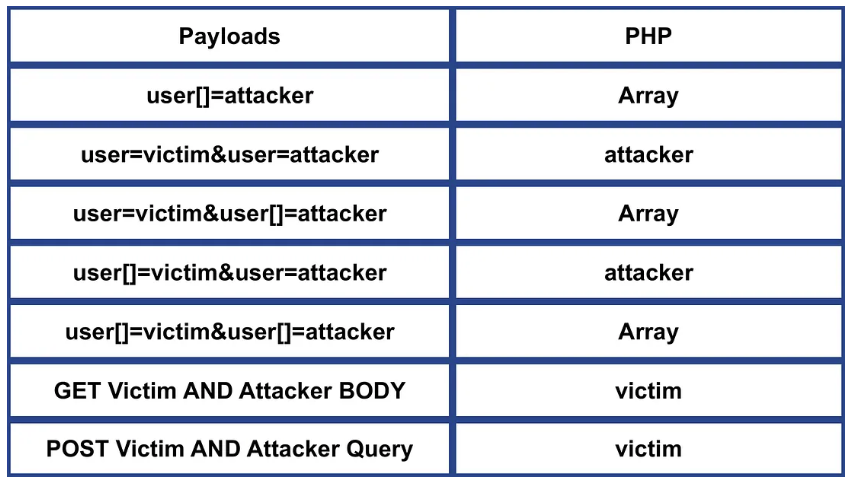
- Ignore anything after %00 in the parameter name .
- Handle name[] as array .
- _GET not meaning GET Method .
- Prefer the last parameter .
Ruby 3.3.5 and WEBrick 1.8.2
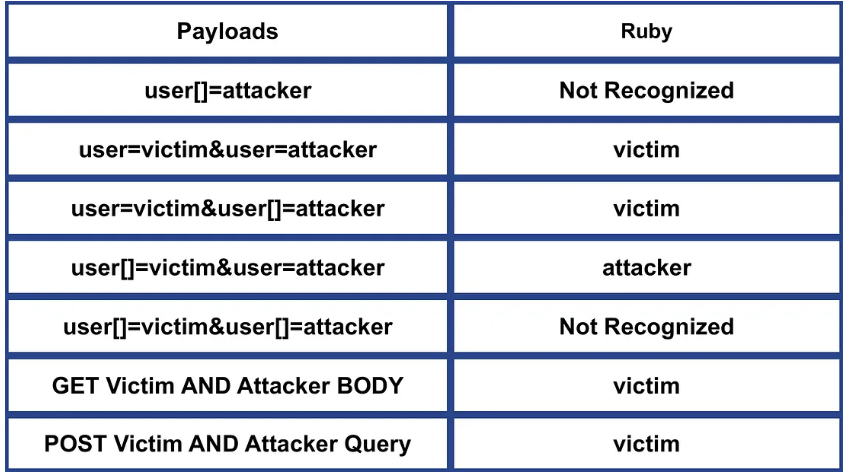
- Uses the & and ; delimiters to split parameters .
- Not Recognized name[] .
- Prefer the first parameter .
Spring MVC 6.0.23 AND Apache Tomcat 10.1.30
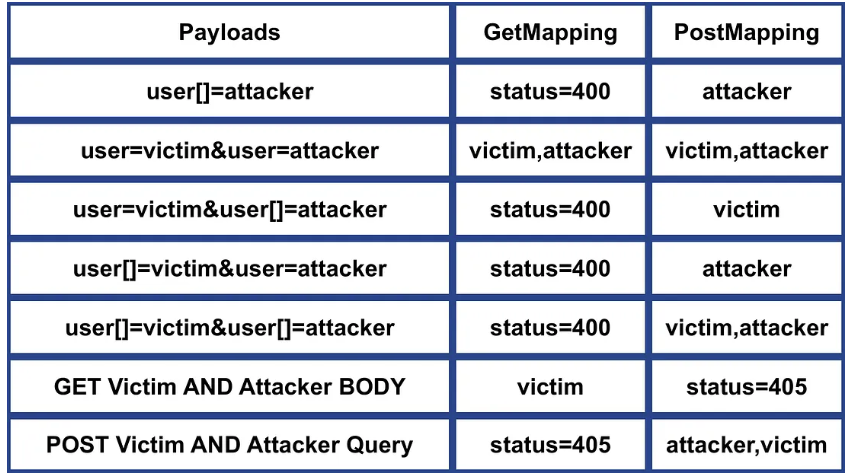
- POST RequestMapping == PostMapping & GET RequestMapping == GetMapping .
- POST RequestMapping & PostMapping Recognized name[] .
- Prefer name if name AND name[] existing .
- Concatenate parameters e.g. first,last .
- POST RequestMapping & PostMapping Recognized query parameter with Content-Type .
NodeJS 20.17.0 AND Express 4.21.0
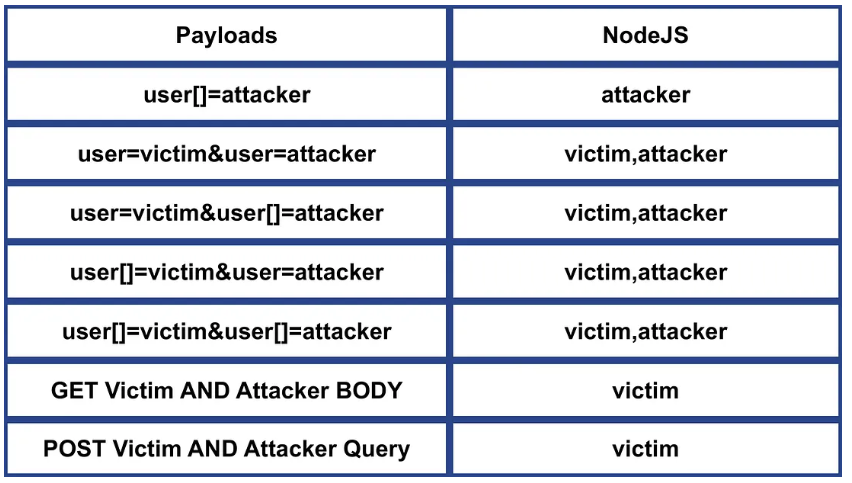
- Recognized name[] .
- Concatenate parameters e.g. first,last .
GO 1.22.7
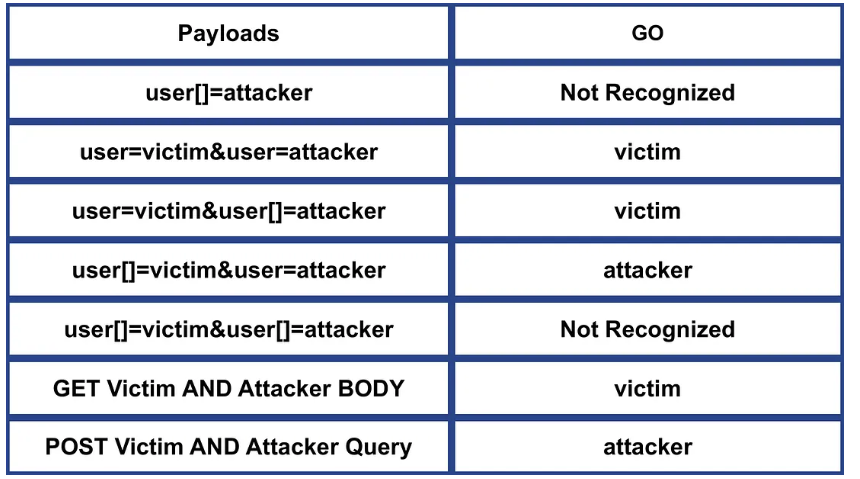
- NOT Recognized name[] .
- Prefer the first parameter .
Python 3.12.6 AND Werkzeug 3.0.4 AND Flask 3.0.3
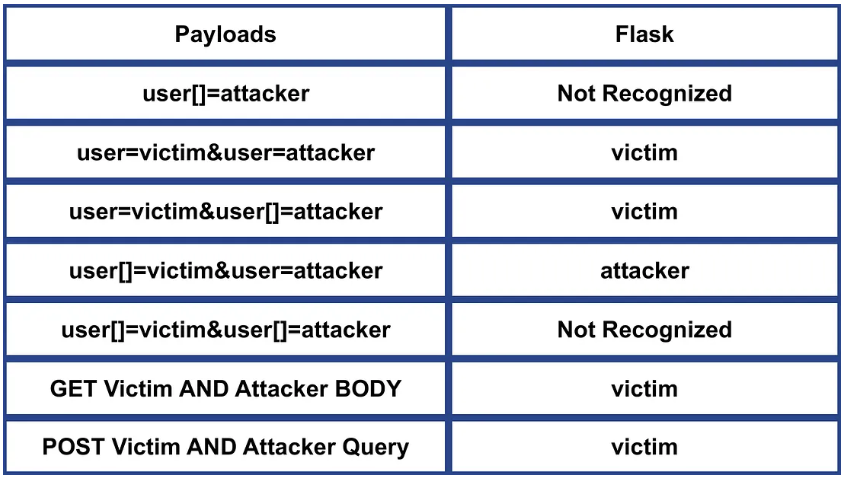
- NOT Recognized name[] .
- Prefer the first parameter .
Python 3.12.6 AND Django 4.2.15
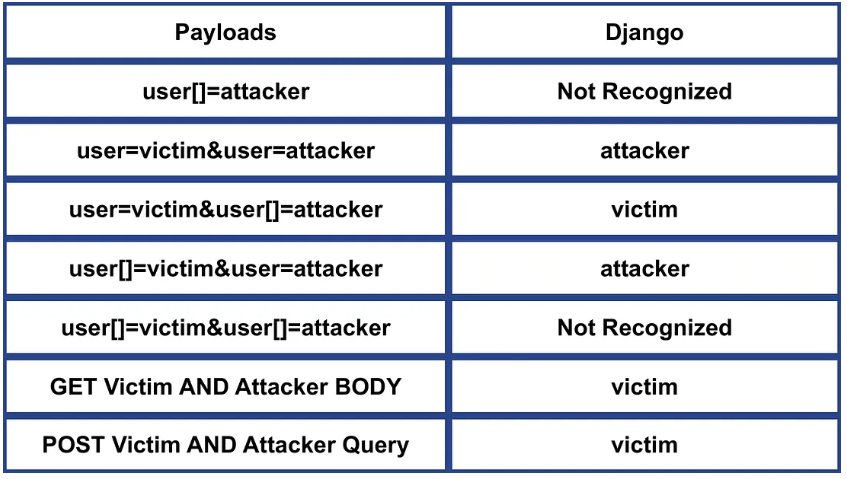
- NOT Recognized name[] .
- Prefer the last parameter .
Python 3.12.6 AND Tornado 6.4.1
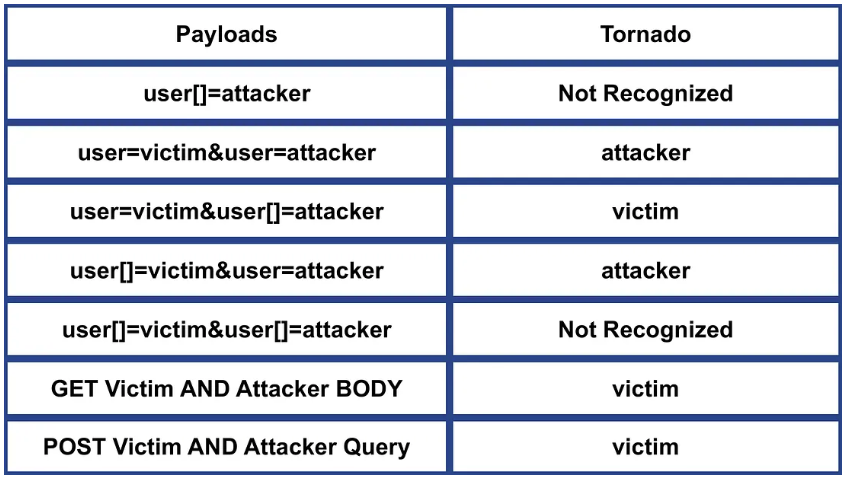
- NOT Recognized name[] .
- Prefer the last parameter .
JSON Injection
Duplicate keys
The front-end might believe the first ocurrence while the backend uses the second ocurrence of the key.
Key Collision: Character Truncation and Comments
Certain characters aren't going to be correctly interpreted by the frontend but the backend will interpret them and use those keys, this could be useful to bypass certain restrictions:
{"test": 1, "test\[raw \x0d byte]": 2}
{"test": 1, "test\ud800": 2}
{"test": 1, "test"": 2}
{"test": 1, "te\st": 2}
Note how in these cases the front end might think that test == 1 and the backend will think that test == 2.
This can also by used to bypass value restrictions like:
{"role": "administrator\[raw \x0d byte]"}
{"role":"administrator\ud800"}
{"role": "administrator""}
{"role": "admini\strator"}
Using Comment Truncation
obj = {"description": "Duplicate with comments", "test": 2, "extra": /*, "test": 1, "extra2": */}
Here we will use the serializer from each parser to view its respective output.
Serializer 1 (e.g., GoLang's GoJay library) will produce:
description = "Duplicate with comments"test = 2extra = ""
Serializer 2 (e.g., Java's JSON-iterator library) will produce:
description = "Duplicate with comments"extra = "/*"extra2 = "*/"test = 1
Alternatively, straightforward use of comments can also be effective:
Java’s GSON library:
Ruby’s simdjson library:
Inconsistent Precedence: Deserialization vs. Serialization
Float and Integer
The number
999999999999999999999999999999999999999999999999999999999999999999999999999999999999999999999999
can be decoded to multiple representations, including:
999999999999999999999999999999999999999999999999999999999999999999999999999999999999999999999999
9.999999999999999e95
1E+96
0
9223372036854775807
Which might create inconsistences